变更模块中自定义触发器的示例场景
场景:工资单查看网站宕机,需要快速安装新服务器。
对于上述影响为“高”的紧急情况,所需的“操作”可通过脚本/类文件触发。
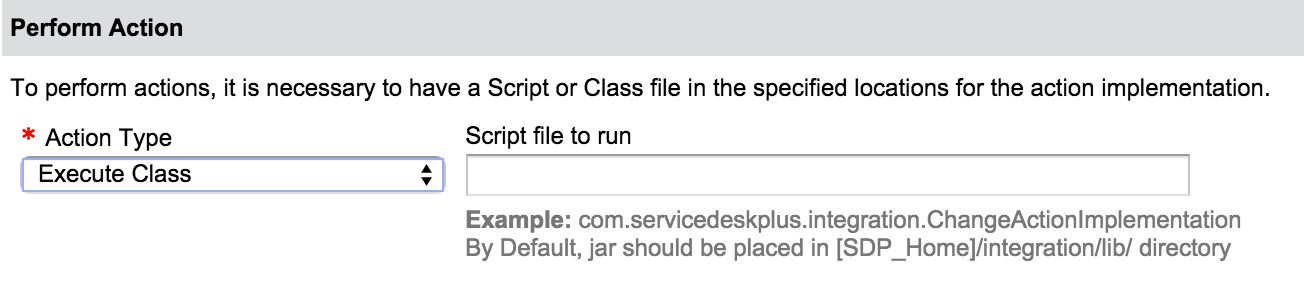
对于此类紧急情况,可以提前妥善配置 E-CAB 成员,并执行相应的类/脚本文件。要执行操作,必须将用于实现该操作的类文件放置在指定位置。
如果是“class”文件:
*默认情况下,jar 应放置在 [SDP_Home]/integration/lib/ 目录中
*示例:com.servicedeskplus.integration.ChangeActionImplementation
注意:必须先将类文件转换为 jar 文件,才能实现该操作。
让我们考虑这样一种情况:需要更新 E-CAB 成员所执行的角色。要触发所需操作,必须遵循以下 JSON 格式。
UPDATE_ROLES(脚本/类)
{
"message": "通过自定义触发器添加紧急 CAB 成员",
"operations": [
{
"operation_name": "UPDATE_ROLES",
"input_data": {
"change": {
"roles": [
{
"id": 5,
"name": "直属经理",
"users": [
{
"email": "Aaron@xyz.com",
"name": "Aaron"
},
{
"email": "Abby@xyz.com",
"name": "Shawn Adams"
}
]
}
]
}
}
}
]
}
以下是“变更”操作的示例实现:
package com.servicedeskplus.integration;
import com.manageengine.servicedesk.actionplugin.executor.ActionInterface
import com.manageengine.servicedesk.actionplugin.executor.ExecutorData
/**
*触发器实现必须在此类中完成
*@executorData,包含 DataJSON、diffJSON
*/
public class ChangeActionImplementation extends DefaultActionInterface {
public JSONObject execute(ExecutorData executorData) throws Exception {
//以 API 格式获取变更数据
JSONObject changeData = executorData.getDataJSON();
//获取 impact 字段
JSONObject impact = changeData.get("impact");
//获取与 impact 关联的值
String impactName = impact.get("name");
JSONObject returnJSON = new JSONObject();
//要在触发器中执行的操作数组,目前变更中仅提供 UPDATE_ROLES 选项
JSONArray operations = new JSONArray();
//特定操作的 JSON
JSONObject operation = new JSONObject();
//用于提供操作详细信息的 JSON
JSONObject input_data = new JSONObject();
//实体 change 的 JSON
JSONObject change = new JSONObject();
//要配置的角色数组
JSONArray roles = new JSONArray();
//角色详细信息的 JSONObject
JSONObject roleObject = new JSONObject();
//要配置的用户数组
JSAONArray users = new JSONArray();
//用户详细信息的 JSONObject
JSONObject user1 = new JSONObject();
JSONObject user2 = new JSONObject();
if (impactName.equalsIgnoreCase("High") {
returnJSON.put("message", "通过触发器添加紧急 CAB 成员");
operation.put("operation_name", "UPDATE_ROLES");
roleObject.put('id': CAB 的 ROLEID);
roleObject.put("name": "角色名称,此处为 CAB");
user1.put("email": "用户的电子邮件 ID");
user1.put("name": "用户名");
user2.put("id": 用户 ID);
// 输入用户名称。
user2.put("name": "用户名");
users.put(user1);
users.put(user2);
roleObject.put("users", users);
roles.put(roleObject);
change.put("roles", roles);
input_data.put("change", change);
operation.put("input_data", input_data);
operations.put(operation);
returnJSON.put("operations", operation);
} else {
returnJSON.put("message", "通过触发器添加 CAB 成员");
operation.put("operation_name", "UPDATE_ROLES");
roleObject.put("id ": CAB 的 ROLEID);
roleObject.put("name": "角色名称,此处为 CAB ");
user1.put("email": "用户的电子邮件 ID");
user1.put("name": "用户名");
user2.put("id": 用户 ID);
user2.put("name": "用户名");
users.put(user1);
users.put(user2);
roleObject.put("users", users);
roles.put(roleObject);
change.put("roles", roles);
input_data.put("change", change);
operation.put("input_data", input_data);
operations.put(operation);
returnJSON.put("operations", operation);
}
return returnJSON;
}
以下是在类实现中使用的方法:
*getDataJSON()- 获取 API 格式的输入,其中提供有关“变更”的完整信息。
*getDiffJSON()- 返回变更中最近被修改的字段详情,用于获取“变更”中最近修改字段的信息。
单击此处查看 getDataJSON() 和 getDiffJSON() 返回的值
了解 JSON 格式后,可以通过类文件或脚本文件执行该操作。要执行操作,必须将用于实现该操作的脚本文件放置在指定位置。
如果是“script”文件:
*默认情况下,脚本应放置在 [SDP_Home]/integration/custom_scripts/ 目录中
*示例:py addApprovers.py

单击此处查看“变更”操作的示例脚本文件: