使用 ADManager Plus 创建自定义报告的必备指南
介绍
预构建报告不提供管理员自定义报告以满足组织不断变化需求的选项。ADManager Plus 帮助管理员克服这一挑战。自定义报告功能允许管理员:
- 根据精确需求筛选数据以缩小结果范围。
- 创建包含 AD 中自定义属性的报告。
- 基于 LDAP 查询生成报告。
- 从自定义报告执行管理操作。
- 以及更多!
筛选报告数据以满足特定需求
在生成 AD 报告时,许多管理员主要担心预构建报告包含过多无关信息。即使某些报告允许自定义显示字段,找到所需信息仍然困难。为了让报告仅显示相关信息,管理员通常需要将报告导出到电子表格并手动筛选。使用 ADManager Plus 可以提高此过程的效率,管理员可以使用命名属性、员工编号、代理地址等过滤器,在报告中获取精确需求。可从头创建关于用户账户过期、用户密码、组成员及其他重要信息的自定义报告,并像使用其他报告一样使用它们。
用例: 一个组织希望生成一份报告,列出其市场团队中加入超过一个月且过去 30 天内未重置密码的成员。具体来说,他们只想获取负责五个不同产品(A、B、C、D 和 E)的市场人员信息。由于此需求非常具体,该组织的管理员必须先生成报告,然后在电子表格中处理以获取所需信息。
如何使用 ADManager Plus 筛选报告数据
- 选择 Reports 选项卡。
- 从左侧导航窗格选择 Custom Reports。
- 点击 New custom report。
- Specify a Report Name and add details about the report under Description. For example:
- 报告名称:市场团队密码重置报告
- 描述:生成一份报告,列出五个不同产品(A、B、C、D 和 E)市场团队中加入超过一个月且过去 30 天内未重置密码的成员名单。
- 在 Add report 到部分,选择 User Reports。
- Choose the appropriate domain from the 选择域 list. Select the OUs for these five products.


- 在 Conditions 部分,从下拉列表中选择 Users 对象类型。
- In the Filters section,
- Click LDAP 过滤器 to create a customized LDAP search query for an object. You can add the conditions to the filter. Select
- When Created 属性 -> 早于 N 天 -> 30
- AND Password Last Set -> 早于 N 天 -> 30
- AND Department 是 marketing
- 点击 Advanced Filter,根据 Filter from Report 选项中选择的预定义报告自动更新 LDAP 查询。
- 选择 Refine results 选项并点击 Add Conditions,在数据库级别细化筛选条件。
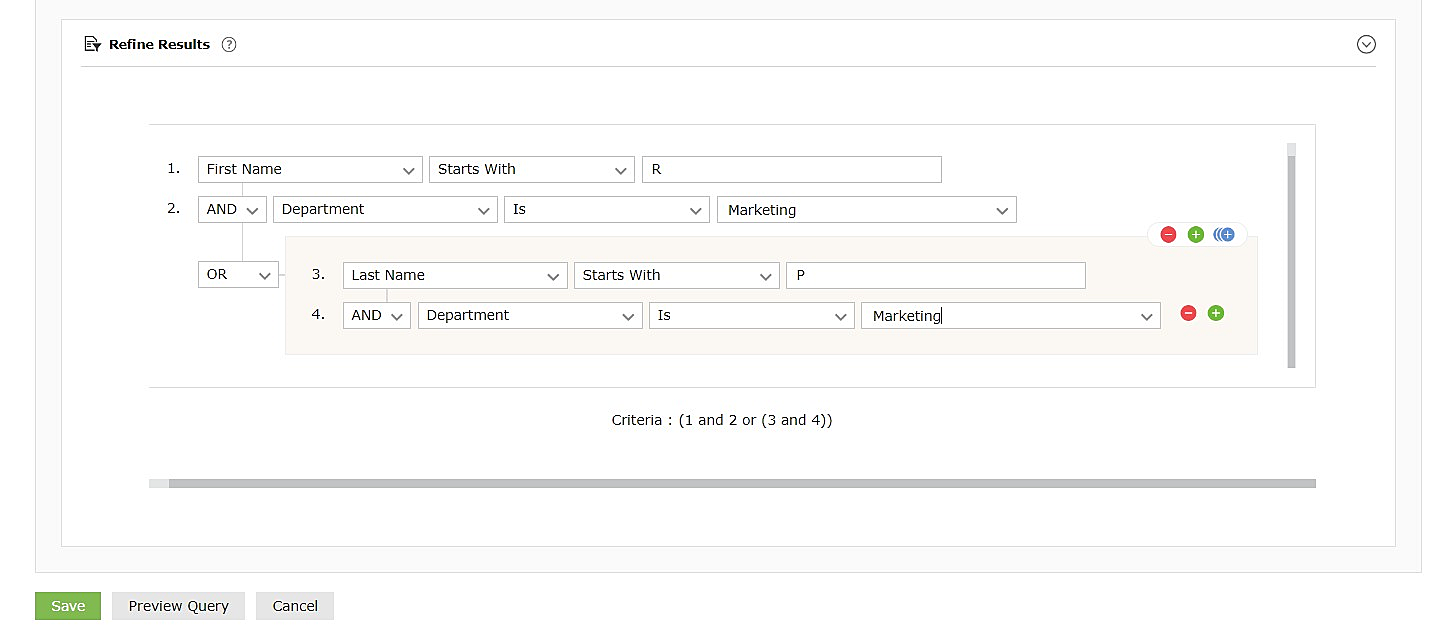
- Click LDAP 过滤器 to create a customized LDAP search query for an object. You can add the conditions to the filter. Select
- Click
 symbol to add grouped conditions which is applicable to both LDAP 过滤器 as well as 细化结果.
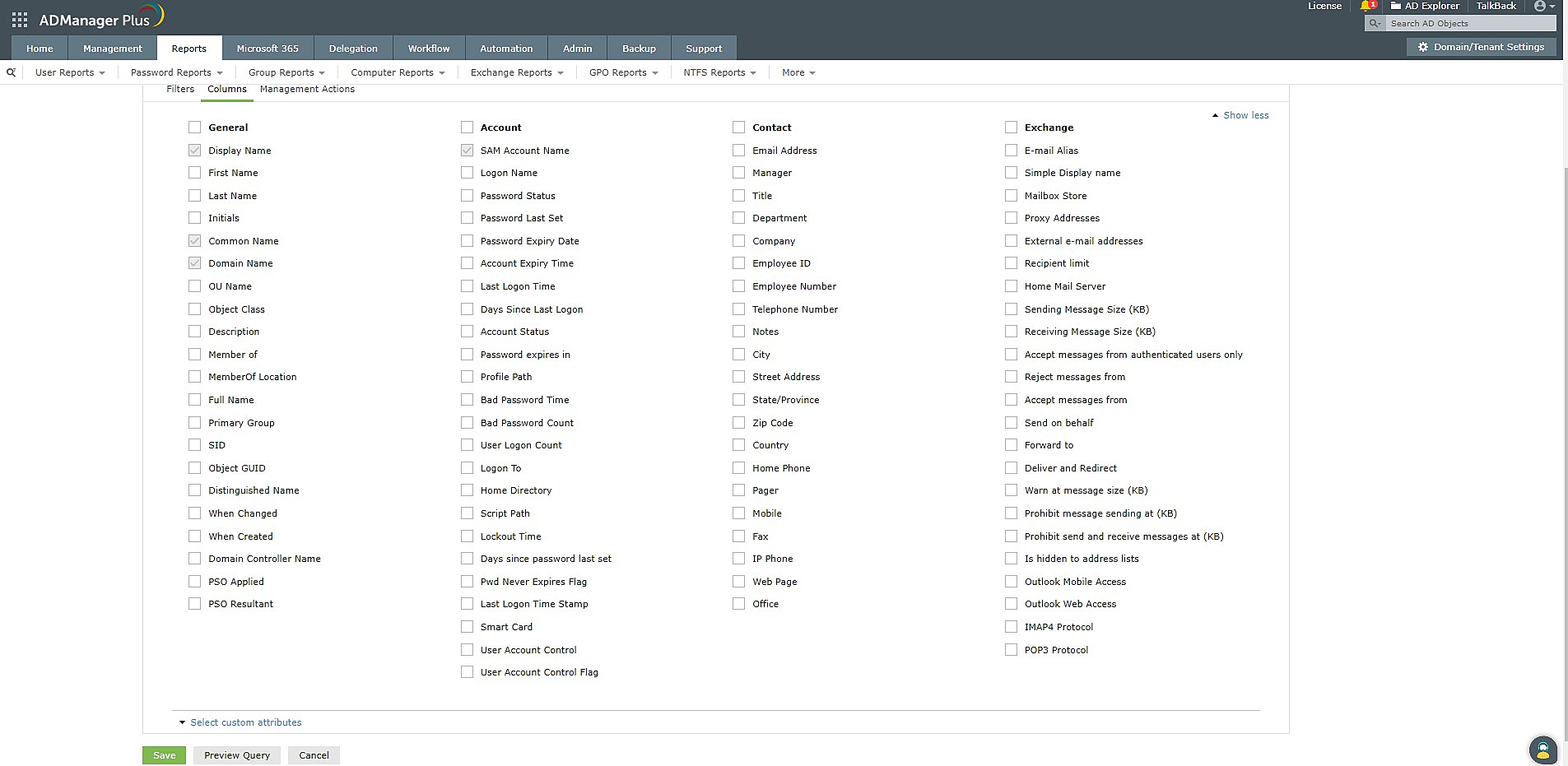
- 选择 Column 选项以指定结果报告中必须显示的列。选择可以直接从自定义报告执行的管理操作。
- 点击 保存。
- 现在您已创建报告,可以使用 Export as 选项将其导出为 PDF、XLS、CSV、CSVDE 或 HTML 格式。
基于自定义 AD 属性创建报告
组织经常需要使用本地 AD 中不可用的属性存储某些信息。当有此需求时,可以扩展 AD 架构以包含可存储这些信息的附加属性。例如,组织可能扩展用户类以存储社会保障号码、护照详情、性别、生日等附加信息,或修改计算机类以存储资产 ID、位置等。
在这种情况下,可以从头生成一个使用自定义属性设置筛选条件的自定义报告,或在选定对象(如用户、组、计算机和联系人)的最终报告中添加自定义属性。自定义属性可添加到筛选条件中,以从原始报告获取更新的报告。
用例: 一个组织希望基于特定架构属性的值生成一系列报告,包括他们创建的自定义属性和 technicalteam 属性,用于定义特定用户账户功能。他们希望基于该自定义属性创建包含最后登录时间、密码过期等详细信息的报告;报告需要针对 technicalteamAttribute 的不同值(如 networking、server 等)生成。他们可以创建包含上述属性的新自定义报告,或将自定义属性包含在筛选条件中以即时获取更新报告。这使组织能够轻松监控每个技术团队,并在团队成员之间共享特定团队的报告。
如何使用 ADManager Plus 创建基于自定义属性的报告
- 选择 AD Reports 选项卡。
- 从左侧导航窗格选择 Custom Reports。
- 点击 New custom report。
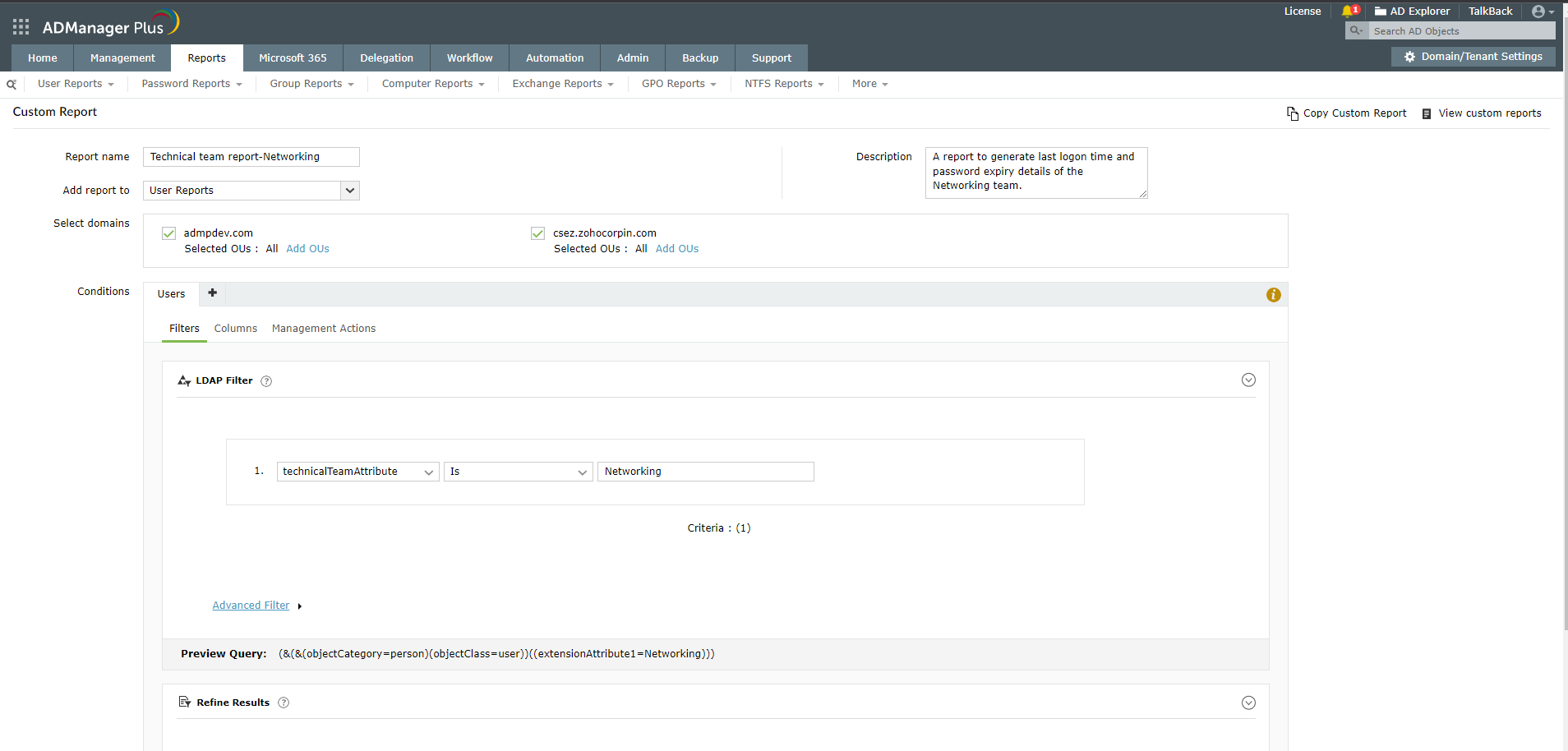
- Specify a Report Name and add details about the report under Description. For example:
- 报告名称:Technical team report - Networking
- 描述:生成网络团队的最后登录时间和密码过期详情的报告。
- 在 Add report to 部分,选择 User Reports 类别。
- Choose the appropriate domain from the Select Domain list.
- 在 Conditions 部分,从下拉列表中选择 Users 对象类型。
- In the Filters section, select Click to Add. From this list, select technicalteamAttribute
listed under Configured Custom Attribute.
- In the next section, you can select the details about the users in the networking team
which have to appear in the report. Here, select details such as First Name, Last Name,
Email Address, Last Logon Time, Password expires in, and so on
您将被重定向到 Admin 选项卡以创建自定义属性,您可以根据需要创建属性。创建后,它将显示在“Configured Custom Attribute”下。
- 点击 Save
- 现在您已创建报告,可以使用 Export as 选项将其导出为 PDF、XLS、CSV 或 HTML 格式。
基于 LDAP 查询创建报告
如果管理员无法使用预构建报告满足其报告需求,可以使用 LDAP 查询生成所需报告。有时技术人员可能更愿意使用已有的 LDAP 查询,而不是设置自定义报告中提供的过滤器。
用例: 组织希望生成一份报告,查找所有启用账户但过去 30 天未登录的用户。
使用 ADManager Plus 创建基于 LDAP 查询的报告的方法:
- 选择 AD Reports 选项卡。
- 从左侧导航窗格选择 Custom Reports。
- 点击 New custom report。
- Specify a Report Name and add details about the report in Description. For example:
- 报告名称:Account enabled but inactive users
- 描述:查找所有启用账户但过去 30 天未登录用户的报告。
- 在 Add report to 部分,选择 User Reports 类别。
- Choose the appropriate Domain from the Select Domain list.
- 在 Conditions 部分,从下拉列表中选择 Custom query。
- Enter the query below in the space provided:
- (&(objectCategory=person)(objectClass=user)(&(!(userAccountControl:1.2.840.113556 1.4.803:=2))(lastLogon<=131556638360000000)))
- Select the necessary details to be displayed for this report, such as SAM Account Name,
Email Address, Employee ID, Department, Manager, and so on.
- 点击 LDAP Filters,并根据所需报告添加条件。如果要添加嵌套条件,如 (1 AND 2 OR (3 AND 4)),请点击 符号。您可以根据需要构建这些条件。
- 点击 Save
- 现在您已生成报告,可以使用 Export as 选项将其导出为 PDF、XLS、CSV 或 HTML 格式。
摘要
每个组织都有独特的报告需求,预构建报告无法完全满足。ADManager Plus 的 Custom Reports 功能通过以下方式帮助解决此挑战:
- 报告过滤器。
- 基于自定义属性的报告。
- 基于 LDAP 查询的报告。
管理员无需再浪费宝贵时间下载和处理每个报告,而是可以使用 ADManager Plus 构建符合其精确需求的报告。