Partial masking of user details during password reset and account unlock
With cybercrime and data theft on the rise, it's essential to secure sensitive data from prying eyes. This includes passwords, email addresses, mobile numbers, etc. Partial masking hides parts of personal information so that only a few characters are visible to the public.
This might lead you to ask another question: why partial masking?
Partial masking can:
- Help users confirm that it's their own account they are resetting password for and not someone else's.
- Prevent unauthorized users from viewing personal data.
- Block spam bots from gaining access to information.
Password masking
Password masking is the process of replacing a user's password with characters like bullet points or asterisks. It is a common practice that protects passwords from public access. By masking passwords, you can prevent over-the-shoulder-snoopers from catching a particular user's password.
Enable partial masking of user details with ADSelfService Plus
ManageEngine ADSelfService Plus understands the importance of integrity for your business and provides a reliable solution to your security issues.
It not only masks passwords by default, but also lets admins partially hide their users' personal details!
So, how do you enable partial masking of user details in ADSelfService Plus?
Simply follow these steps:
- Log in to the ADSelfService Plus admin console with your credentials.
- Navigate to Configuration > Multi-factor Authentication.
- Click on Advanced settings in the top right corner, and navigate to the Verification Code tab.
- Scroll down, and check the box next to Partially hide Email ID/Mobile No. on Verification Code and TFA pages.
- Click Save.
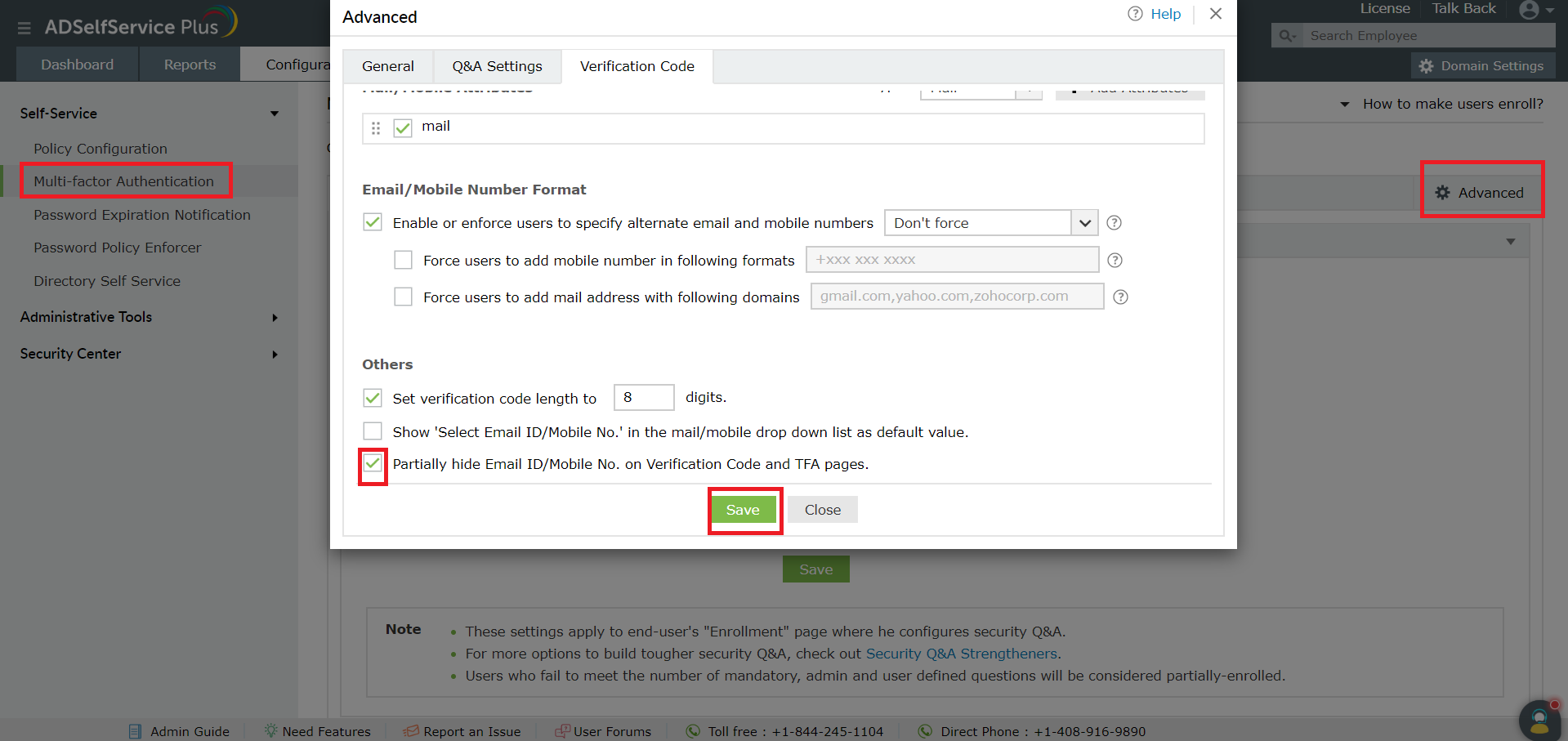
That's it! You've now set up partial masking for your users' sensitive information!
Enable partial masking of user details during password reset and account unlock.
Download a free trial now!Request demoPassword self-service
Free Active Directory users from attending lengthy help desk calls by allowing them to self-service their password resets/ account unlock tasks. Hassle-free password change for Active Directory users with ADSelfService Plus ‘Change Password’ console.
One identity with Single sign-on
Get seamless one-click access to 100+ cloud applications. With enterprise single sign-on, users can access all their cloud applications with their Active Directory credentials. Thanks to ADSelfService Plus!
Password/Account Expiry Notification
Intimate Active Directory users of their impending password/account expiry by mailing them these password/account expiry notifications.
Password Synchronizer
Synchronize Windows Active Directory user password/account changes across multiple systems, automatically, including Office 365, G Suite, IBM iSeries and more.
Password Policy Enforcer
Ensure strong user passwords that resist various hacking threats with ADSelfService Plus by enforcing Active Directory users to adhere to compliant passwords via displaying password complexity requirements.
Directory Self-Update & Corporate Search
Portal that lets Active Directory users update their latest information and a quick search facility to scout for information about peers by using search keys, like contact number, of the personality being searched.

