Quick Configuration Guide : Exchange Reporter Plus
Contents
- Exchange Reporter Plus — Overview
- System Requirements
- Configuring the Credentials
- Getting Started with Exchange Reporter Plus
Exchange Reporter Plus - Overview
ManageEngine Exchange Reporter Plus is a web-based analysis and reporting solution for Microsoft Exchange Server that provides profound insights on your organization's Exchange infrastructure.
Not just plain reporting for vigilance, but this solution offers mail traffic statistics & analysis, mailbox sizes, growth rates, server usage pattern and similar other data using which an administrator can take informed decisions to optimize the efficiency of the organization's Exchange setup. Just one look at these reports and an administrator comes to know what is to be done next.
In other terms, Exchange Reporter Plus is an encapsulation of the "analysis and supervision" required on behalf of an Exchange administrator to manage email communication infrastructure efficiently.
Exchange Reports are grouped under the following categories:
- Mailboxes
Reports under this category provide insights on all aspects of a Mailbox like size, growth, status and permissions. - Outlook Web Access
It’s an exclusive category of reports that audits mailbox logins using Outlook Web Access. - Email Traffic
This section of reports shed light on the amount of mailbox traffic, server traffic, traffic within the Exchange organization, traffic generated towards the internet and custom recipient traffic. - Storage
An overview of the Exchange Information store with details of its current size, growth and quota limits are provided under this category of reports. - Distribution Lists
This category lists the distribution lists along with its members, the inactive ones and the distribution list traffic insights. - Public Folders
This section of reports deals with the public folders, their replicas, size and content. - Organization
An overview of the vital Exchange components like servers, stores, routers, database availability groups and so on. - Audit Reports
The Auditing feature in Exchange Reporter Plus enables vigilant surveillance over modifications and activities in the Exchange Stores and Mailboxes, ensuring a healthy and glitch-free Exchange Environment.
System Requirements
This section briefs on how to get started with Exchange Reporter Plus.
Hardware Requirements
- CPU: P4, 1.0 GHz
- RAM: 1 GB
- Disk Space: 10 to 20 GB (The storage space requirements might vary depending upon your organization size, mailbox size, traffic frequency and outlook web access logins.)
Software Requirements
- Windows Management Framework for Exchange 2010 & 2013 (Windows PowerShell, Windows Remote Management)
- .NET Framework 3.5 Service Pack 1.
- Messaging Application Programming Interface for Exchange Server 2010 and earlier for generating Content Reports. (The Messaging API is a COM-like API that provides access to the contents of messaging stores and also known as Exchange MAPI).
To DOWNLOAD MAPI now, Click on the link below:
https://www.microsoft.com/en-us/download/details.aspx?id=39045
- Exchange System Manager 32 bit and Exchange Management Shell is required for Mailbox Permission Reports
| Exchange Server Version | Software requirement |
| Exchange Server 2003 | Exchange System Manager (ESM) is required. ESM is compatible only with 32 bit machines. Install the product on a 32 bit system where ESM is installed. |
| Exchange Server 2007 | Exchange Management Shell is needed. Install Exchange Management Shell in the same system where Exchange Reporter Plus is installed. |
Supported Exchange Servers
- Exchange Server 2000
- Exchange Server 2003
- Exchange Server 2007
- Exchange Server 2010
- Exchange Server 2013
Supported Platforms
- Windows XP SP3
- Windows 2003 & 2003 R2
- Windows Vista
- Windows 7
- Windows 2008 & 2008 R2
- Windows 8
- Windows 2012 & 2012 R2
Supported Browsers
- Internet Explorer 6.0 and above
- Firefox 2.0 and above
- Google Chrome
Configuring the credentials
Exchange Reporter Plus requires an account to access resources like Active Directory, Exchange Servers, Mailboxes and Public Folders. The account shall have administrative rights on the product and can be referred to as ‘ERP Admin Account’. The user credential provided should satisfy the following criteria.
Group Membership
The ERP Admin Account must be a member of the following group.
- For Exchange 2010 and 2013: Organization Management group
- For Exchange 2007 and 2003: Exchange View only Administrator group
Message Tracking Logs (E-Mail traffic reports)
The ERP Admin Account must at least grant read-only permission on the following directories:
- Exchange 2013: \\\C$Program Files\Microsoft\ExchangeServer\V15\TransportRoles\Logs\MessageTracking
- Exchange 2010: \\\C$Program Files\Microsoft\ExchangeServer\V14\TransportRoles\Logs\MessageTracking
- Exchange 2007: \\\C$\Program Files\Microsoft\ExchangeServer\TransportRoles\Logs\MessageTracking.
IIS Logs (Outlook Web-Access reports & Active Sync Reports)
The ERP Admin Account must at least grant read-only premission on the following directories:
- IIS 6.0: \\\C$\WINDOWS\system32\LogFiles\W3SVC1\
- IIS 7.0/8.0: \\\C$\inetpub\logs\LogFiles\W3SVC1\
MAPI Profile: (Only for Mailbox Content & Public Folder Content Reports)
- The ERP Admin Account should have a valid mailbox which should not be hidden from the GAL (Global Address List).
- The ERP Admin Account should have logged-on to their designated mailbox at least once.
- The ERP Admin Account should be a member of any of the following Administrative Groups:
- For exchange 2010 and 2013: Organization Management group.
- For exchange 2007 and 2003: Exchange View only Administrator group.
Getting Started with Exchange Reporter Plus
Installing
To install ManageEngine Exchange Reporter Plus,

- Download the executable file from the website https://www.exchangereporterplus.com
- Click on the Downloaded file "ManageEngine_ExchangeReporterPlus.exe”
- Follow the install shield wizard to complete the installation of Exchange Reporter Plus.
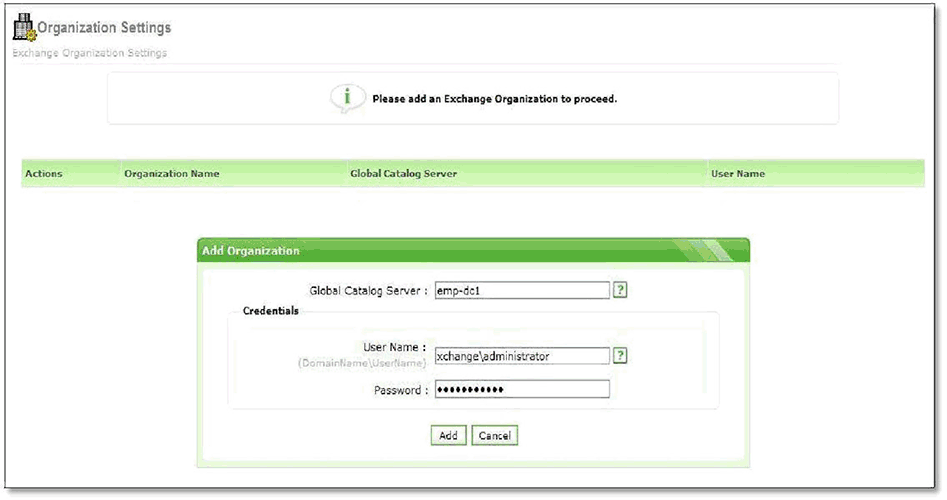
Once Exchange Reporter Plus is installed, an Exchange organization should be added to proceed with the working. The credentials provided here will be used for all data gathering tasks by default.
Starting
To start Exchange Reporter Plus in console mode, click the Desktop Icon of Exchange Reporter Plus from the machine where it is installed.
It can also be started from:
- Start -->> Programs -->>Exchange Reporter Plus -->> Start Exchange Reporter Plus
Running Exchange Reporter Plus as a Service:
- For Exchange Reporter Plus to be started as a service, install the "Exchange Reporter Plus Service".
Installing "Exchange Reporter Plus Service":
- Start -->>Programs -->> Exchange Reporter Plus -->> Service -->> Install "Exchange Reporter Plus Service”.
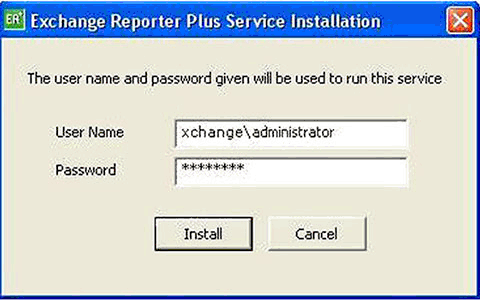
When you install "Exchange Reporter Plus Service" it will invoke the following User Interface. Please provide the credentials of a user who has the administrative privileges on the local machine where the product is installed.
Once the "Exchange Reporter Plus Service" is installed you can start the product as "Windows service". When Exchange Reporter Plus is started in Windows XP / Windows 2003 machines with firewall enabled, Windows may pop up security alerts asking whether to block or unblock the following program as shown in the images below:
Fig. Java Alert
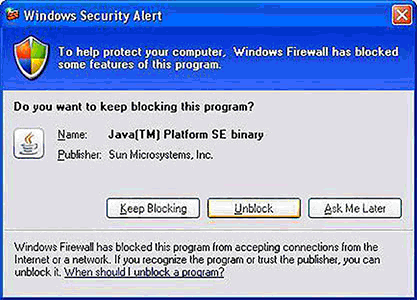
- Java(TM) 2 Platform Standard Edition binary - Java.
Unblock this program to start Exchange Reporter Plus.
Accessing
To access the product, open a Web browser and type “https://<hostname>:<port number>“ in the address bar.
Here the "hostname" refers to the DNS name of the machine where Exchange Reporter Plus is running and the "port number" is the port at which Exchange Reporter Plus is running. The default port number is"8181" which can be changed during installation or from the Connection settings of the product.
Note: If the product runs in a console mode you can invoke the product client from system tray icon as well.
Stopping
Start -->> Programs -->> Exchange Reporter Plus -->>Stop Exchange Reporter Plus.
Note: If the product runs in a console mode you can stop the product from system tray icon as well.


