- 免费版
- 有什么新内容?
- 主要亮点
- 推荐阅读
- 所有功能
- 日志管理
- 应用程序日志管理
- IT 合规性审计
- 安全监控
- 网络设备监控
- 网络设备监控
- 路由器日志审计
- 交换机日志监控
- 防火墙日志分析器
- Cisco 日志分析器
- VPN 日志分析器
- IDS/IPS 日志监控
- Solaris设备审计
- 路由器中的用户活动监控
- 路由器流量监控
- Arista交换机日志监控
- 防火墙流量监控
- Windows防火墙审计
- SonicWall日志分析器
- H3C防火墙审计
- Barracuda设备审计
- Palo Alto Networks防火墙审计
- Juniper设备审计
- Fortinet设备审计
- pfSense防火墙日志分析器
- NetScreen日志分析
- WatchGuard流量监控
- Check Point设备审计
- Sophos日志监控
- Huawei设备监控
- HP日志分析
- F5日志监控
- Fortinet 日志分析器
- 终端日志管理
- 系统和用户监控报告
- 产品资源
- 相关产品
- Log360 (本地部署 | 云端) 全面的 SIEM 和 UEBA
- ADManager PlusActive Directory 管理与报告
- ADAudit Plus实时 Active Directory 审计与 UBA
- ADSelfService Plus通过 MFA、SSO 和 SSPR 实现身份安全
- DataSecurity Plus文件服务器审计与数据发现
- Exchange Reporter PlusExchange Server 审计与报告
- M365 Manager PlusMicrosoft 365 管理与报告工具
- RecoveryManager Plus企业备份与恢复工具
- SharePoint Manager PlusSharePoint 报告与审计
- AD360集成身份与访问管理
- AD 免费工具Active Directory 免费工具
如果您想防止潜在的网络威胁演变成全面攻击,您需要定期监控日志。然而,每天手动筛选数百条日志以查找感兴趣的安全事件并非易事。我们全面的 日志管理解决方案,EventLog Analyzer,可以简化整个过程。
EventLog Analyzer 可以收集 Fortinet 的 FortiGate 防火墙日志,进行分析,并生成图形报告,帮助您监控网络中发生的关键安全事件。
使用 EventLog Analyzer 监控 FortiGate 防火墙日志
使用 FortiGate 日志报告分析网络威胁
EventLog Analyzer 包含 预定义的图形报告,日志收集后即时生成。这些报告可以帮助您分析网络中的潜在安全威胁,并满足各种 合规法规,如 PCI DSS、HIPAA 和 GDPR。一旦发生合规违规,将立即生成警报。您还可以安排定期生成这些报告,并导出为 PDF 或 CSV 格式。

以下是 EventLog Analyzer 为 Fortinet 设备生成的一些报告:
- Fortinet 事件: The reports in this category provide information regarding all events taking place on Fortinet devices, along with their severity levels.
可用报告: 所有事件 | 重要事件
- 防火墙允许流量 | 防火墙拒绝流量: The reports in these two categories provide information regarding traffic that has been allowed or denied entry into the network. The traffic is categorized by source, destination, protocol, and port. Information about traffic trends is also included.
可用报告: 允许流量 | 基于源的流量排行 | 基于协议的流量排行 | 基于端口的流量排行 | 允许流量趋势 | 拒绝连接 | 以及更多
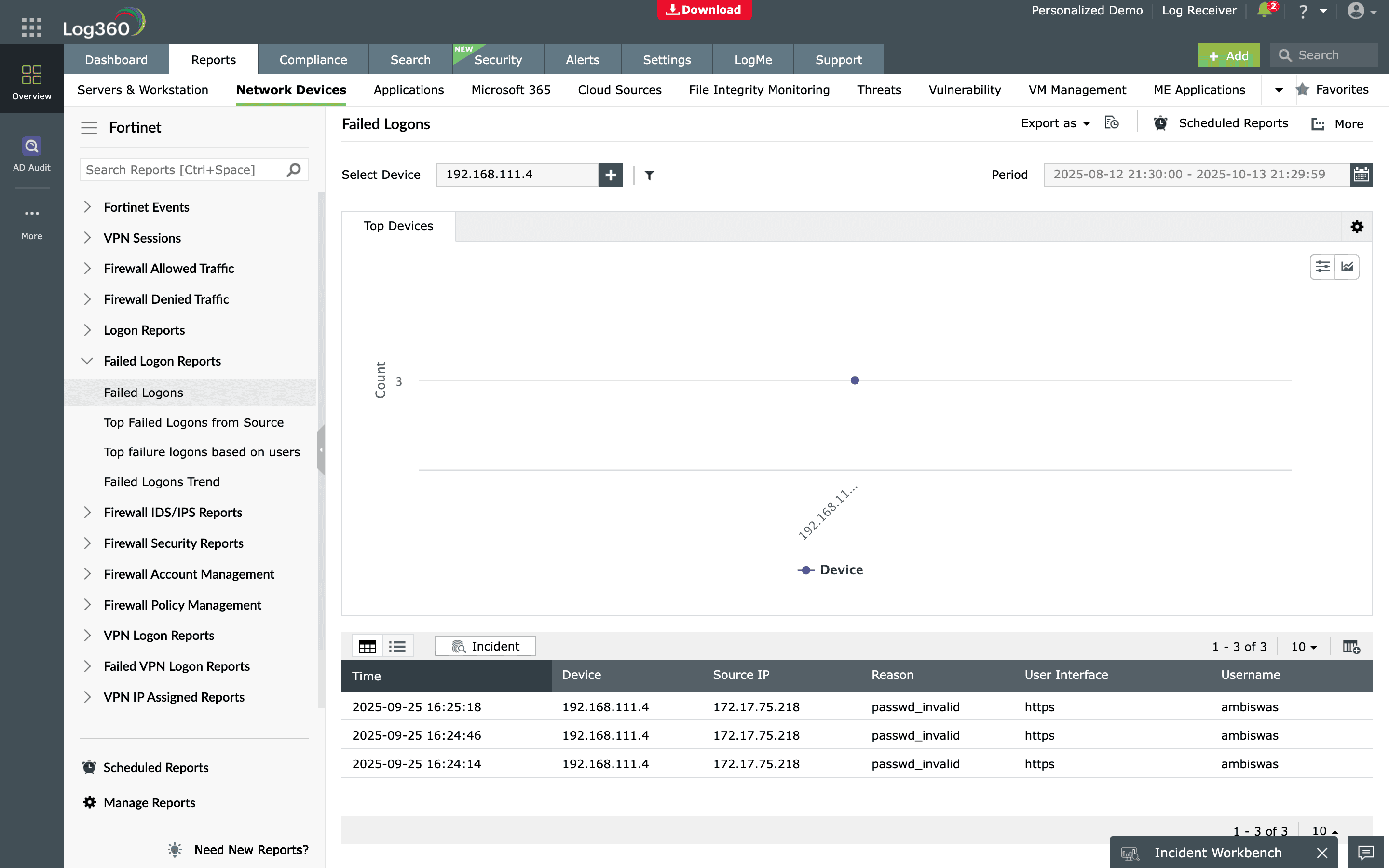
- 登录报告 | 登录失败报告: These two categories include reports regarding successful and failed logons, which are categorized by source IP address and username. The reports also include information on logon trends.
可用报告: 登录 | 基于源的成功登录排行 | 基于用户的登录排行 | 登录趋势 | 登录失败 | 基于源的失败登录排行 | 基于用户的失败登录排行 | 登录失败趋势
- VPN 登录报告 | VPN 登录失败报告: These two categories include reports regarding successful and failed VPN logons, which are categorized by remote device IP address and username. The reports also include information on VPN logon trends.
可用报告: VPN 登出 | VPN 登录 | 基于远程设备的 VPN 登录排行 | 基于用户的 VPN 登录排行 | VPN 登录失败 | 基于用户的 VPN 登录失败排行 | 以及更多
- 防火墙 IDS/IPS 报告: The reports in this category provide information regarding possible and critical attacks, which are classified by source IP address and destination IP address. The reports also include information on attack trends.
可用报告: 可能攻击 | 严重攻击 | 攻击排行 | 基于源的攻击排行 | 基于目标的攻击排行 | 攻击趋势
- 防火墙策略管理: These reports provide information regarding firewall policies that have been added, modified, or deleted.
可用报告: 策略添加 | 策略修改 | 策略删除
- 设备严重性报告: This category includes reports of various events based on their severity.
可用报告: 紧急事件 | 警报事件 | 严重事件 | 错误事件 | 警告事件 | 通知事件 | 信息事件 | 调试事件

EventLog Analyzer 还允许您根据需求创建自定义报告。点击 这里 了解更多。
当可疑事件发生时,实时接收通知
利用 EventLog Analyzer 的 实时警报系统,最大限度减少检测和响应攻击所花费的时间。网络中出现任何威胁迹象时,警报将被触发,EventLog Analyzer 会立即通过电子邮件或短信通知您。
警报分为三个严重级别:注意、问题和严重。严重级别帮助您优先处理警报,以便立即修复最关键的问题。

使用 EventLog Analyzer,您可以设置警报来监控 Fortinet 设备上的特定事件,如拒绝连接、登录失败、系统关机、策略修改和 VPN 登出。