使用汇总服务器进行闭网(DMZ)补丁管理
当 Endpoint Central 服务器安装在无互联网访问权限的闭合网络中(例如 DMZ)时,核心补丁功能诸如漏洞数据库同步和缺失补丁下载无法直接执行。本文档说明了更新漏洞数据库和部署缺失补丁的前提条件及手动流程。
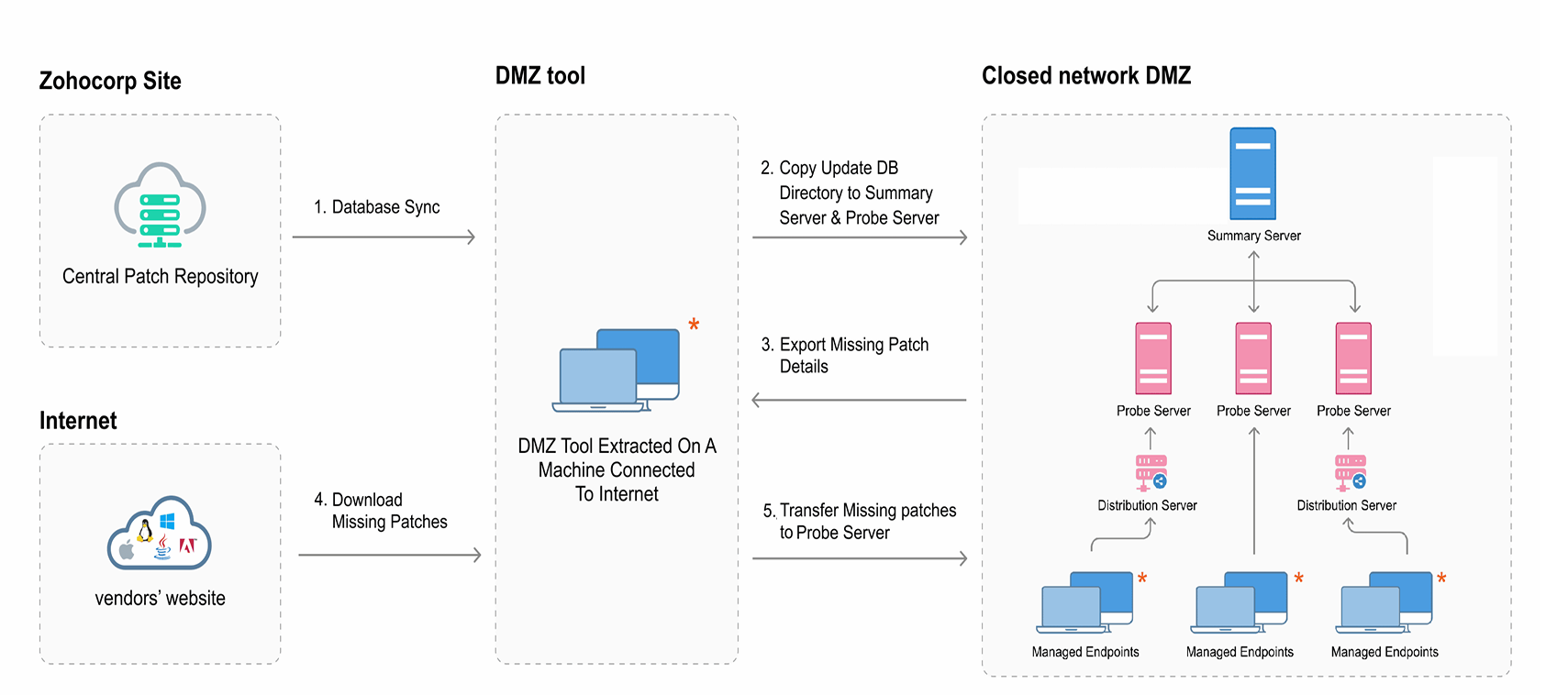
图:使用汇总服务器进行闭网(DMZ)补丁管理
A) 前提条件
1) 配置代理设置
注意: 请在 汇总 和 探针 服务器上分别执行以下步骤。
按照以下步骤配置代理设置:
- 打开 Endpoint Central 控制台并导航至 管理 → 代理服务器 (位于 服务器设置).
- 下) 点击 编辑 在 代理服务器
- 图标下。 选择.
- 下) 不连接互联网 点击
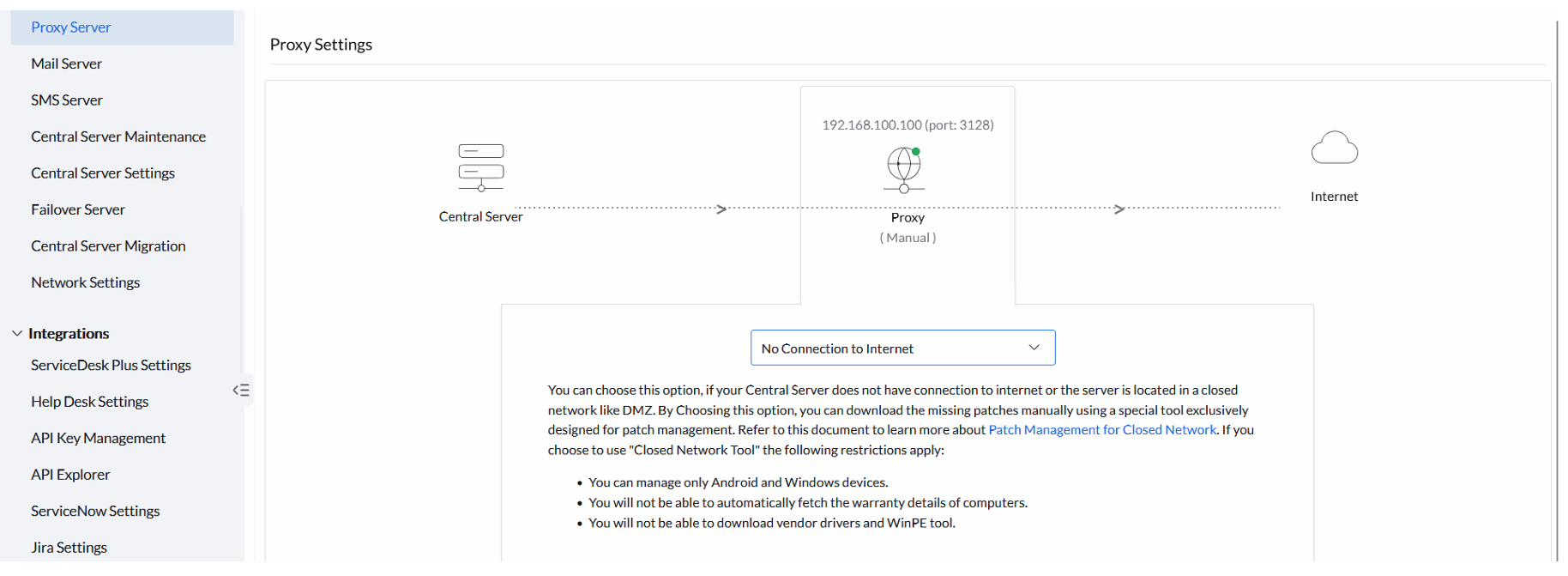
确定
保存更改。
- 打开 汇总服务器 2) 配置补丁数据库设置 按照以下步骤配置补丁数据库设置: (位于 打开 web 控制台并导航至).
- 管理 → 补丁数据库设置 补丁设置在 安排漏洞数据库更新.
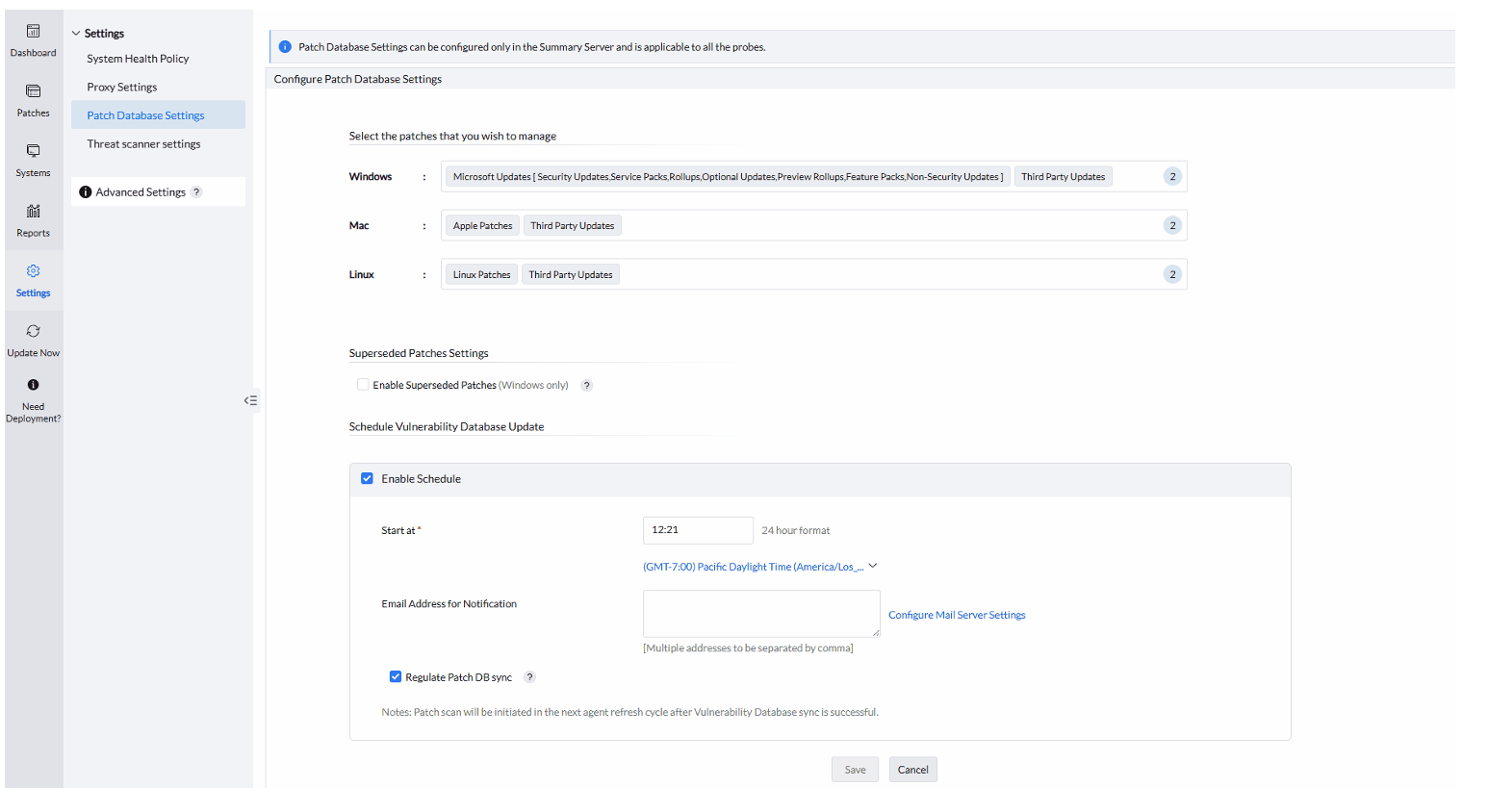
下,禁用 This prevents DB sync from being initiated without the necessary data in <Installation Directory>/conf/CRSData, because the updatedb folder in this directory is erased after a successful sync. If a subsequent sync starts without the required folder, the DB update will fail.
安排
说明该操作的必要性:
- 3) 下载并设置 DMZ 工具 按照以下步骤下载并设置 DMZ 工具: 下载
- 工具 ZIP
并在可访问互联网的计算机上解压。 解压后,工具即已配置完成,准备就绪。 和 配置代理和设置工具是一次性操作,但 更新漏洞数据库
注意: If the computer does not have direct internet connection, open the downloadMgr.prop file within the extracted location and provide the proxy server, port, and authentication details.
下载所需补丁
必须在每次扫描漏洞和部署最新缺失补丁时执行。
- Go to the machine where you extracted
downloadMgr.prop. - B) 手动打补丁和更新应用的步骤
1) 更新漏洞数据库的步骤
打开命令提示符,导航至解压目录。
patchsync.bat -c updatedb -i linux -b <BUILD_NUMBER>- 根据所管理的操作系统执行以下命令: Endpoint Central server and is in the correct format (for example,
11.3.2500.1or113250001).
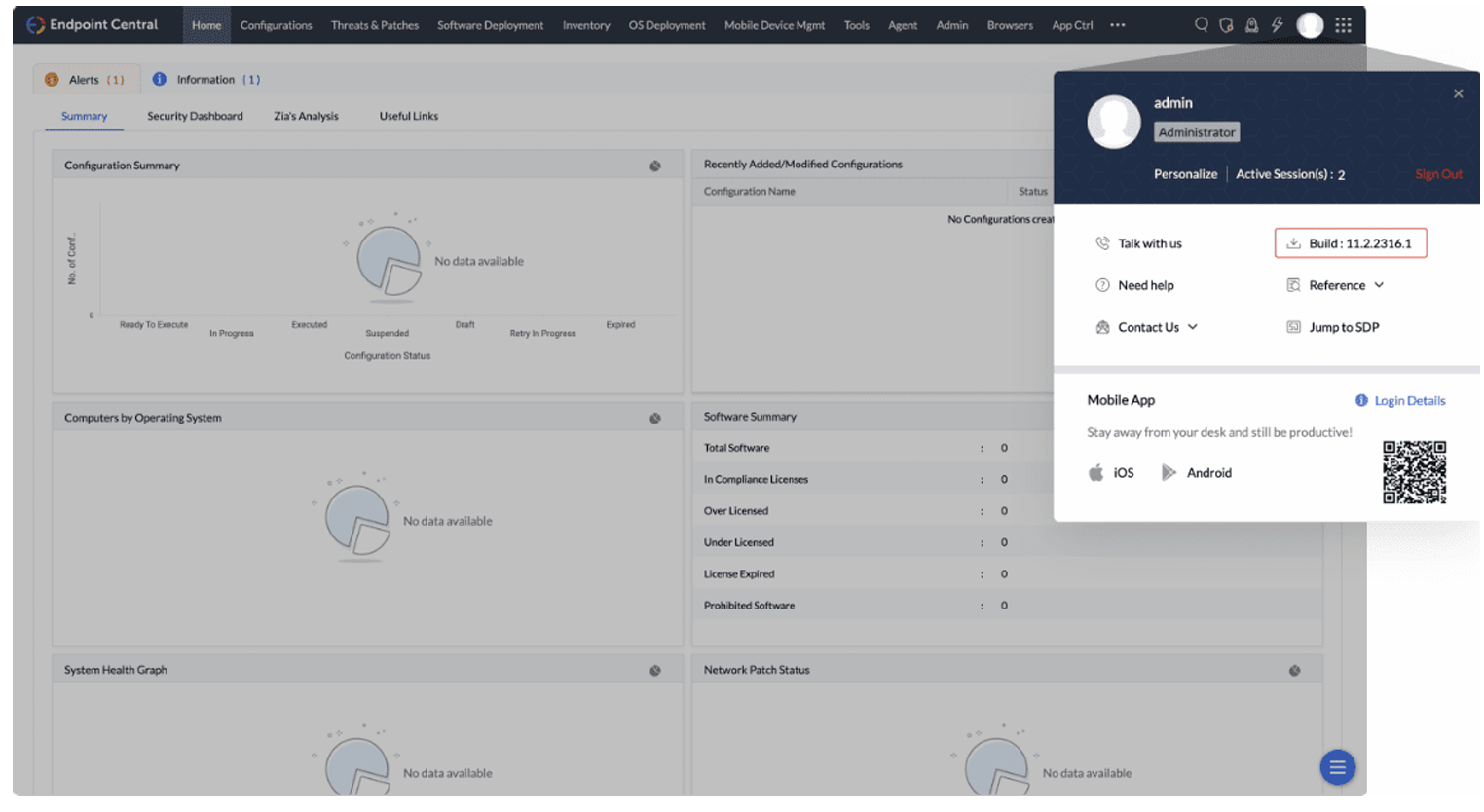
注意: 如果您管理 Windows、Mac 和 Linux: Endpoint Central 确认构建号与您安装的
This command downloads the latest vulnerability information from the Central Vulnerability Database to the local computer. After completion, the required information is updated in the updatedb directory.
相匹配。
Copy the
updatedbdirectory to the 汇总服务器 您可通过点击控制台右上角的个人资料图标来查看构建号。 2) 更新目录至汇总服务器 及<Installation Directory>/conf/CRSData探针服务器 汇总服务器 ,路径如下:
Threats & Patches → Update Now从 web 控制台,导航至: 并点击 立即更新.
This copies the necessary information from the updatedb directory into the local server database, enabling the server to use the latest patch information in a closed network.
位于
- 更新漏洞数据库
- 下。
注意: 3) 扫描受管理终端
扫描网络内的计算机以识别缺失补丁。
扫描结果可用后,从能访问互联网的计算机下载缺失补丁并传输回本地。 在所有计算机扫描完成前,您无法查看所有缺失补丁。请确保所有终端均已扫描后再手动下载缺失补丁。4) 下载所需补丁
您可以下载所需补丁并通过
- 上传补丁 上传至控制台。要批量下载缺失补丁: 获取缺失补丁详情: 进入.
- 探针服务器
- 下) 的.
This exports the missing patch details (including dependent patches) as
downloadUrlJson.txt.
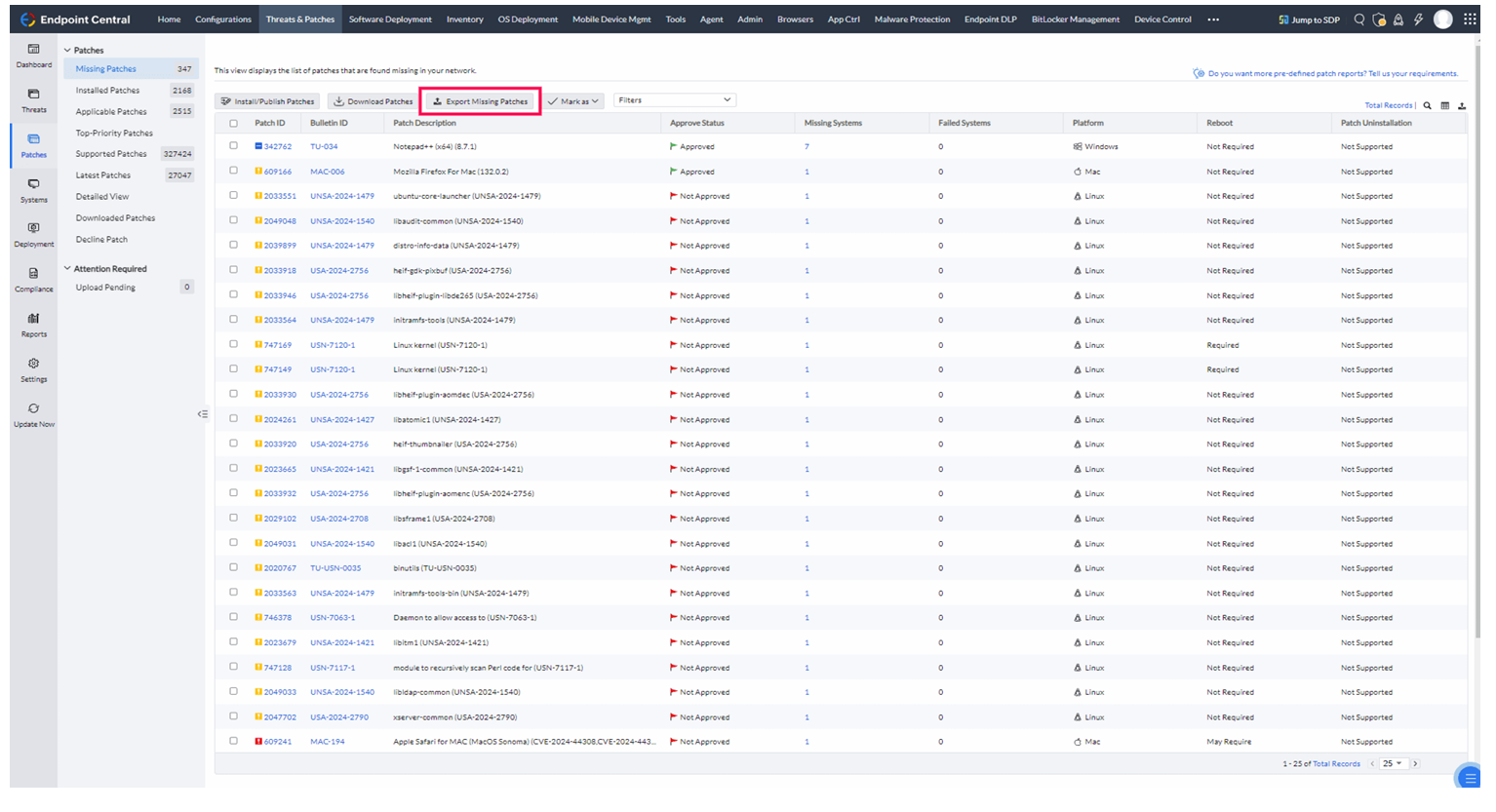
- Copy
downloadUrlJson.txtto the directory where you extracted the DMZ tool ZIP (for example,UpdateManager.zip). 缺失补丁
patchsync.bat -c dwnpatch -f downloadUrlJson.txtThis downloads all missing patches into the
storedirectory.
视图。
Copy the contents of the
storedirectory to the 进入 选择要导出的补丁。<Installation_Dir>/webapps/DesktopCentral/store注意: 导出缺失补丁
- 打开命令提示符并执行: 5) 将所需补丁传输至探针服务器:
- 位置: 5) 将所需补丁传输至探针服务器 复制前请确认在您环境中的路径。
- 下) 更新服务器数据库以使补丁出现在.
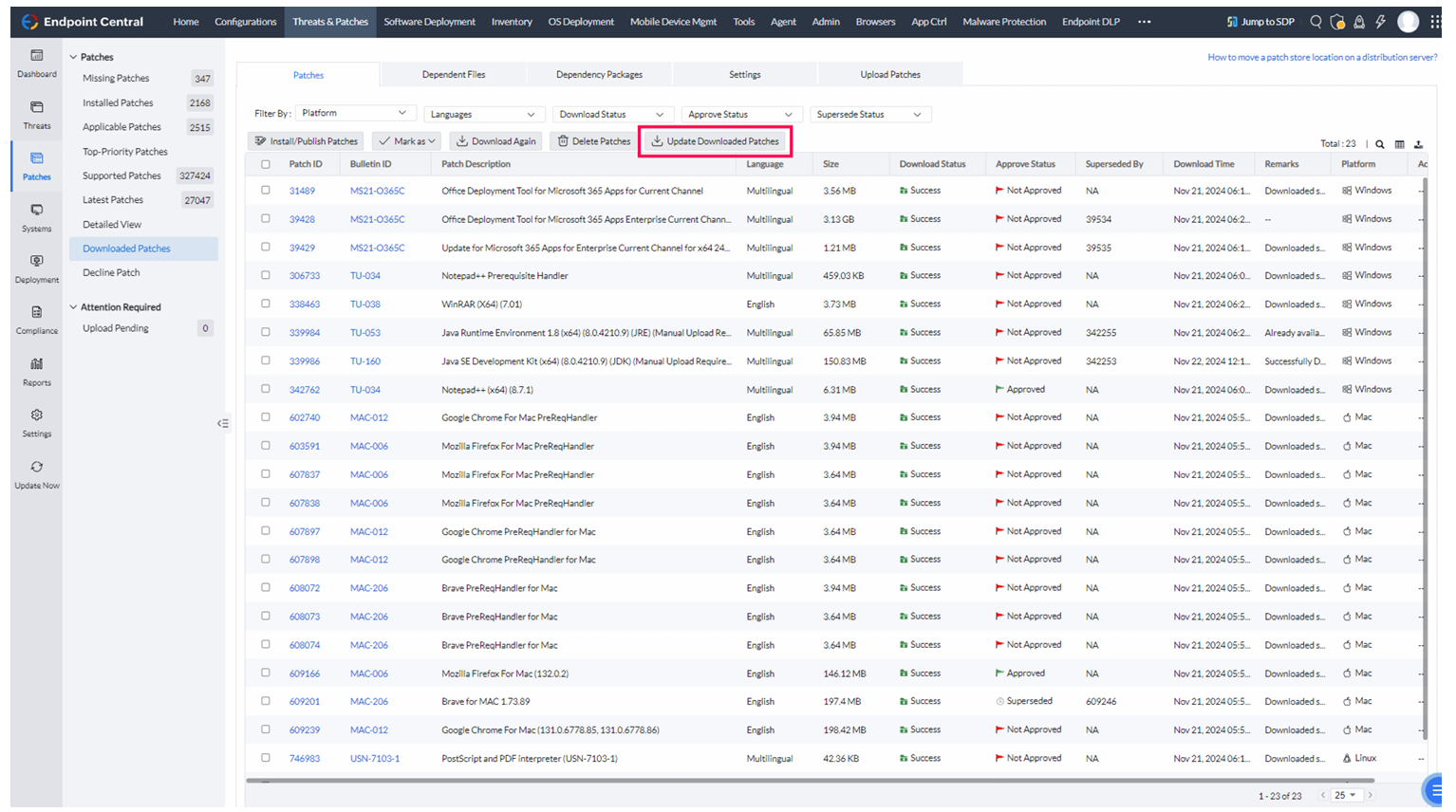
下载补丁 5) 将所需补丁传输至探针服务器视图中。




