如何在无需存储帐户的情况下部署Microsoft Intune服务
本文档提供了无需使用存储帐户部署Microsoft Intune服务的逐步指南,涵盖了下载所需代理、创建安装包及在Microsoft Intune中配置部署。
目录
前提条件
- 有效的Microsoft Intune订阅。
第1步:下载代理
- 访问控制台:
- 登录到Web界面。
- 下载代理:
- 导航至 代理 > 计算机 > 下载代理.
- Rename the downloaded file to
agent.exe.
- 设置目录:
- Create a new folder and place
agent.exeinside it. - 注意: Ensure that this folder contains only the
agent.exefile.
- Create a new folder and place
- 目录路径参考:
- Use the path of the folder containing
agent.exeas<directory_of_agent_exe>. - Specify your preferred output path as
<output_directory>in the upcoming steps.
- Use the path of the folder containing
第2步:创建IntuneWin安装包
- 下载IntuneWinAppUtil:
- 从提供的 链接.
- Extract
IntuneWinAppUtil.exefrom the zip.
- 下载zip文件
- Double-click
IntuneWinAppUtil.exeand provide the following inputs:- 生成IntuneWin安装包:
<directory_of_agent_exe> - 源文件夹:
agent.exe - 安装文件:
<output_directory> - 输出文件夹: When prompted, select
N.
- 生成IntuneWin安装包:
- Double-click
- 目录文件夹:
- An
agent.intunewinfile will be created in the specified output folder.
- An

输出确认:
- 第3步:在Microsoft Intune中配置应用程序
- 登录Intune:
- 访问Microsoft Intune管理中心。
- 添加新应用: 转到 > 应用 > 所有应用.

添加
- 选择应用类型: 选择
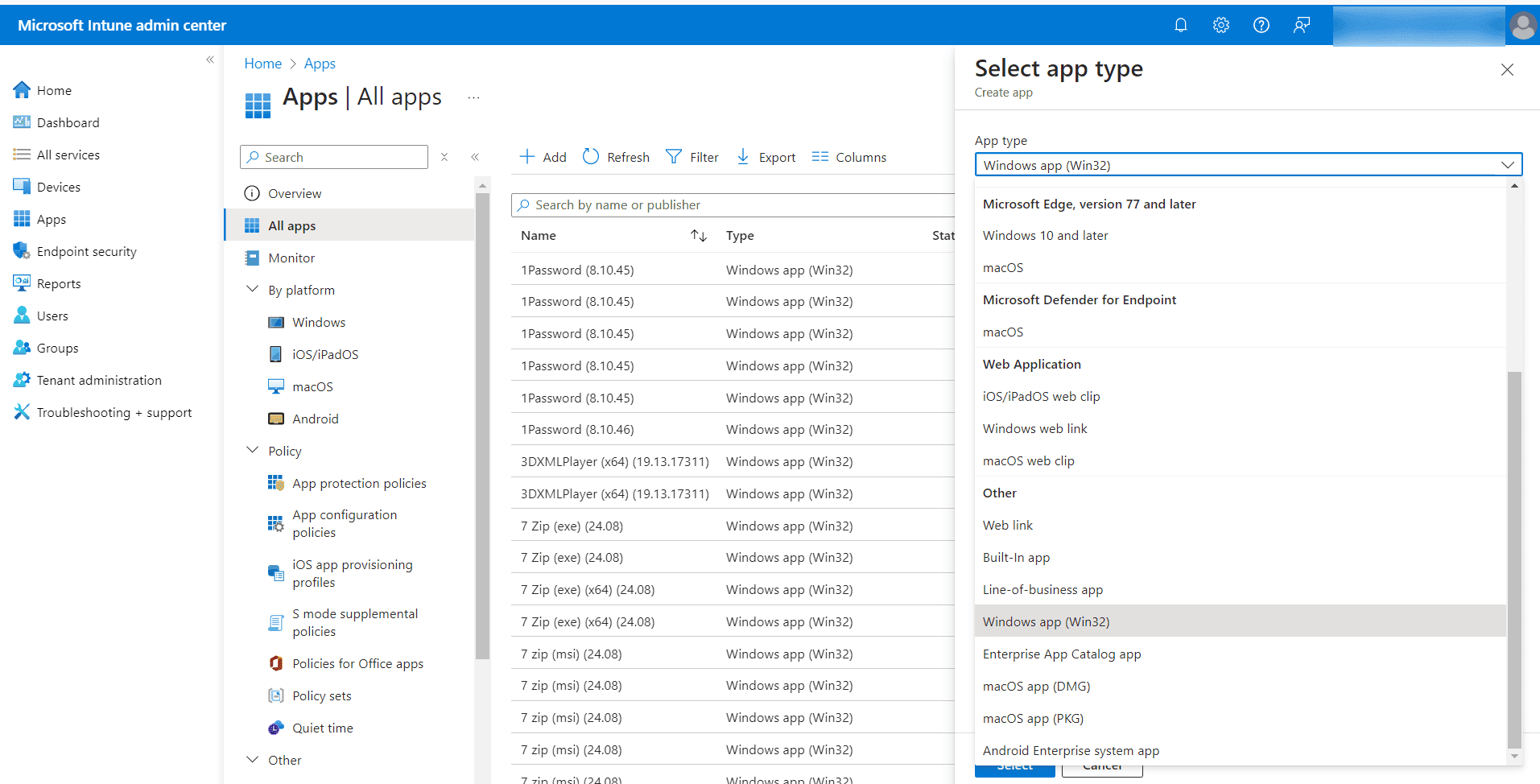
- Windows应用(Win32)
- Choose the package file and navigate to
agent.intunewin.
- Choose the package file and navigate to


- 上传安装包:
- 输入应用详细信息: 提供应用名称和发布者信息,然后点击.

下一步
- 第4步:设置安装和卸载命令
- 程序配置:
Agent.exe /silent - 安装命令:
msiexec.exe /x{6AD2231F-FF48-4D59-AC26-405AFAE23DB7}
- 程序配置:

卸载命令:
- 第5步:定义系统要求
- 要求标签: 操作系统架构: 选择 32位 或.
- 64位 最低操作系统: 设置为.

Windows 10
- 第6步:建立检测规则
- 选择应用类型: 配置检测规则:.
- 手动配置检测规则 点击 + 添加
- 图标。
- MSI检测规则: 规则类型:
- MSI
{6AD2231F-FF48-4D59-AC26-405AFAE23DB7} - MSI产品代码: MSI产品版本检查:

- 否
- 注册表检测规则: 所有应用 再次点击
- MSI检测规则: 注册表
- 键路径:
HKEY_LOCAL_MACHINE\SOFTWARE\AdventNet\DesktopCentral\DCAgent - 值名称:
DCAgentVersion - 检测方法: 值存在
- 与64位客户端上的32位应用相关: 是

第7步:分配应用程序
根据部署需求将应用程序分配给选定的试点用户或所有用户。

结论
本指南为无需存储帐户部署Microsoft Intune服务提供了清晰的说明。请按照这些步骤进行高效的设置和部署。




