复制 Agent 二进制文件到终端机器共享时访问被拒
概述
本指南帮助识别和解决在客户端机器安装 agent 时遇到的问题。错误显示在 agent 备注中为“复制 Agent 二进制文件到终端机器共享时访问被拒”,提供逐步排查说明以帮助诊断和解决问题。

可能原因
该错误可能由以下一个或多个原因引起:
- 权限不足: 用于安装 agent 的账户可能权限不足。请确保该账户具有必要权限,可通过手动登录机器并尝试安装 agent 来确认。
- Admin$/temp 访问权限 确认 Admin$/temp 访问权限:
- 使用正在使用的域账户登录安装了 Endpoint Central 服务器的机器。
- 打开“运行”窗口。
- 输入“远程机器共享”。例如,\\computer-name\Admin$\temp
- “作为批处理作业登录”未启用: 用于安装的用户账户可能未启用“作为批处理作业登录”的策略。
逐步排查
第一步:确保客户端计算机可访问
- 检查客户端机器状态: 确认客户端计算机已开机并连接到网络。这对补丁扫描、远程控制或资产扫描等操作至关重要。
- 验证计算机名称: 确保安装过程中指定了正确的计算机名称。
- 测试可访问性: 导航至 开始 > 运行 > Type
\\computer_nameand press Enter. If the path is not accessible, refer to the documentation for enabling network access. - 分发服务器机器: 如果 agent 是在分发服务器下管理,请确保可以从相应的分发服务器机器访问。
注意: 如果 agent 在分发服务器下管理且用于云服务器访问,请验证从相应的分发服务器安装的机器访问性。若路径不可访问,请参考以下文档进行启用: 启用网络路径.
Step 2: Verify Network Access Using the Net Use Command
- 打开命令提示符: 以管理员身份在服务器机器(或适用时的分发服务器机器)上打开命令提示符。
运行命令:运行以下命令以连接到网络共享:
net use \\computer_name\admin$ /user:domainname\user password
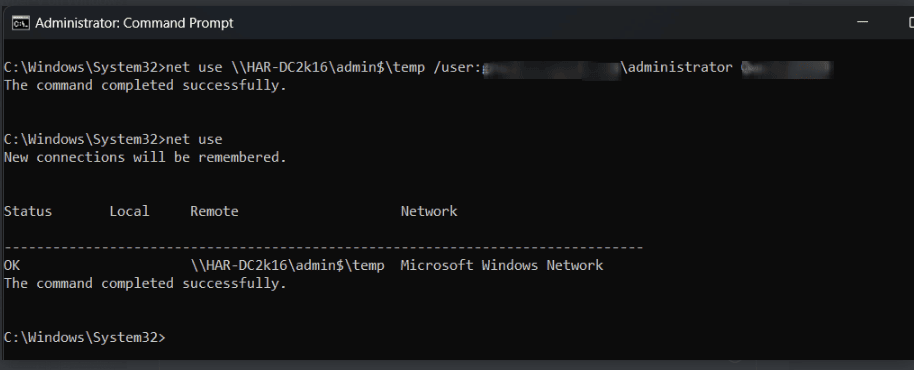

第三步:启用“Microsoft 网络的文件和打印机共享”
确保 文件和打印机共享 在客户端机器上已启用。安装过程中网络通信正常所必需。
第四步:启用客户端机器上的管理共享(Admin$)
- Admin$ 共享: Endpoint Central copies the Agent/Distribution Server binaries to the
Admin$share of the client machine before initiating installation. - 检查 Admin$ 可用性: Ensure that the
Admin$share is enabled on client machines. - 通过注册表启用: If necessary, modify the Windows registry to enable the
Admin$share on the client machine. Refer to the documentation for specific registry key configurations.
第五步:检查防火墙或代理限制
确保没有防火墙或代理限制阻止安装过程。如有需要,为 agent 安装所需的特定文件扩展名和 URL 配置必要的排除项。
其他说明
- 权限: 始终确保用于安装 agent 的账户在客户端机器上具有管理员权限。
- 网络配置: 如果排查以上问题后安装仍失败,请仔细检查网络配置。




