APM Insight .NET Agent 配置选项
本页旨在帮助您调整 APM Insight .NET agent 配置文件的配置。.NET agent 配置文件允许您为关键参数和网络事务设置阈值。这些设置可以在 apminsight.conf 文件中配置,也可以通过 web 客户端进行。请确保此文件存在于您部署 APM Insight agent 的文件夹中。
编辑配置设置
这些设置可以通过 web 客户端中提供的编辑选项进行配置。
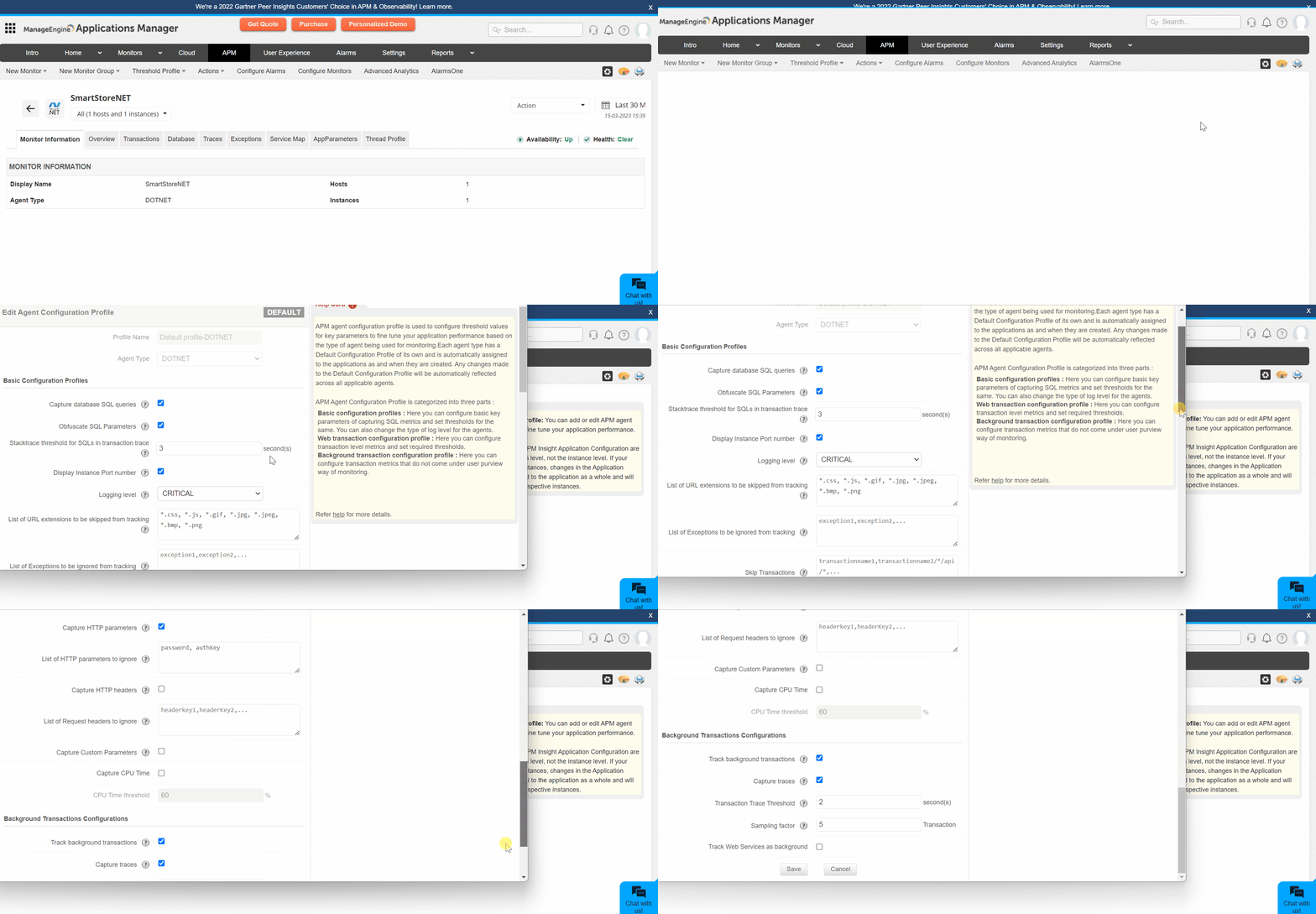
浏览以下主题以查看相应类别 .NET 的 agent 配置文件:
DOTNET 配置文件
.NET agent 配置文件分为三部分:
注意: '*' 表示高亮显示的默认值适用于 Applications Manager v16470 以上版本。
基本配置文件
| 名称 | 键 | 描述 | 默认值 |
|---|---|---|---|
捕获数据库 SQL 查询 |
sql.capture.enabled |
|
True |
混淆 SQL 参数 |
transaction.trace.sql.parametrize |
|
True |
事务跟踪 SQL 堆栈跟踪阈值 |
transaction.trace.sql.stacktrace.threshold |
|
3(秒) |
显示实例端口号 |
show.instance.port.number |
|
True |
日志级别 |
apminsight.log.level |
|
CRITICAL |
需跳过跟踪的 URL 扩展名列表 |
transaction.skip.listening |
|
*.css, *.js, *.gif, *.jpg, *.jpeg, *.bmp, *.png, *.ico |
需跳过跟踪的异常列表 |
exceptions.ignore |
|
无 |
跳过事务 |
transaction.skip.patterns |
|
无 |
| 规范化数据库操作名称 |
|
False |
网络事务配置
| 名称 | 键 | 描述 | 默认值 |
|---|---|---|---|
Apdex 阈值 |
apdex.threshold |
|
0.5(秒) |
采样因子 |
transaction.tracking.request.interval |
|
5(请求)或 10(请求)* |
启用事务跟踪 |
transaction.trace.enabled |
|
True |
事务跟踪阈值 |
transaction.trace.threshold |
|
2(秒)或 5(秒)* |
外部调用超过阈值时捕获跟踪 |
component.trace.threshold |
|
30(计数) |
捕获 HTTP 参数? |
webtransaction.trace.input.params.record |
|
False |
需忽略的 HTTP 参数列表 |
webtransaction.trace.input.params.ignore |
|
password, authKey |
| 捕获 HTTP 头? | webtransaction.trace.request.headers.record |
|
False |
| 需忽略的请求头列表 | webtransaction.trace.request.headers.ignore |
|
无 |
| 捕获自定义参数? | custom.parameters.record |
|
False |
| 捕获 CPU 时间? | cputime.capture.enabled |
|
False |
| CPU 时间阈值 | cputime.threshold |
|
60% |
后台事务配置
| 名称 | 键 | 描述 | 默认值 |
|---|---|---|---|
跟踪后台事务 |
bgtransaction.tracking.enabled |
|
True |
捕获跟踪 |
bgtransaction.trace.enabled |
|
True |
事务跟踪阈值 |
bgtransaction.trace.threshold |
|
2(秒) |
采样因子 |
bgtransaction.tracking.request.interval |
|
5(请求) |
| 将 Web 服务作为后台事务跟踪 | bgtransaction.enable.web.services |
|
False |
DOTNET SERVICE 配置文件
基本配置文件
| 名称 | 键 | 描述 | 默认值 |
|---|---|---|---|
捕获数据库 SQL 查询 |
sql.capture.enabled |
|
True |
混淆 SQL 参数 |
transaction.trace.sql.parametrize |
|
True |
事务跟踪 SQL 堆栈跟踪阈值 |
transaction.trace.sql.stacktrace.threshold |
|
3(秒) |
显示实例端口号 |
show.instance.port.number |
|
True |
日志级别 |
apminsight.log.level |
|
CRITICAL |
需跳过跟踪的异常列表 |
exceptions.ignore |
|
无 |
跳过事务 |
transaction.skip.patterns |
|
无 |
| 采样因子 | transaction.tracking.request.interval |
|
5(请求)或 10(请求)* |
| 启用事务跟踪 | transaction.trace.enabled |
|
True |
| 事务跟踪阈值 | transaction.trace.threshold |
|
2(秒)或 5(秒)* |
| 外部调用超过阈值时捕获跟踪 | component.trace.threshold |
|
30 |
| 捕获 CPU 时间? | cputime.capture.enabled |
|
False |
| CPU 时间阈值 | cputime.threshold |
|
60% |
DOTNET DESKTOP 配置文件
基本配置文件
| 名称 | 键 | 描述 | 默认值 |
|---|---|---|---|
捕获数据库 SQL 查询 |
sql.capture.enabled |
|
True |
混淆 SQL 参数 |
transaction.trace.sql.parametrize |
|
True |
事务跟踪 SQL 堆栈跟踪阈值 |
transaction.trace.sql.stacktrace.threshold |
|
3(秒) |
显示实例端口号 |
show.instance.port.number |
|
True |
日志级别 |
apminsight.log.level |
|
CRITICAL |
需跳过跟踪的异常列表 |
exceptions.ignore |
|
无 |
跳过事务 |
transaction.skip.patterns |
|
无 |
| 采样因子 | transaction.tracking.request.interval |
|
5(请求)或 10(请求)* |
| 启用事务跟踪 | transaction.trace.enabled |
|
True |
| 事务跟踪阈值 | transaction.trace.threshold |
|
2(秒)或 5(秒)* |
| 外部调用超过阈值时捕获跟踪 | component.trace.threshold |
|
30 |
| 捕获 CPU 时间? | cputime.capture.enabled |
|
False |
| CPU 时间阈值 | cputime.threshold |
|
60% |
仅在 apminsight.conf 文件中可用的配置
某些配置文件无法通过客户端修改。这些设置可以在 apminsight.conf 文件中配置。
| 名称 | 键 | 描述 | 默认值 |
|---|---|---|---|
应用名称 |
application.name |
|
True |
捕获跟踪 |
license.key |
|
none |
配置代理 |
behind.proxy |
|
False |

