删除 Active Directory (AD) 用户账户是一个关键的管理任务,关系到安全性和 AD 清理。此操作是永久性的,且如果没有适当的 AD 备份,将无法恢复。删除 AD 用户的方法不止一种,本文将介绍三种主要方法:使用 Active Directory Users and Computers (ADUC)、PowerShell 以及简单且安全的替代方案 ADManager Plus。
使用 PowerShell 的 Remove-ADUser cmdlet 是删除 AD 用户最灵活的方法。操作前,请确保已使用此脚本安装了 PowerShell 的 Active Directory 模块。
                    # Import the Active Directory module

                    Import-Module ActiveDirectory
您可以通过 sAMAccountName、Distinguished Name (DN) 或 User Principal Name (UPN) 来识别用户。
                    # This command will prompt for confirmation

                    Remove-ADUser -Identity "jdoe"

                      # To skip the confirmation prompt in a script, use -Confirm:$false

                    Remove-ADUser -Identity "jdoe" -Confirm:$false
以下是一些使用 PowerShell 中 Remove-ADUser cmdlet 可完成的示例脚本和使用案例。
这是管理员使用 PowerShell 删除 AD 用户时最常用的脚本。创建一个包含待删除用户列表的 CSV 文件,然后运行以下脚本。
                    # Import the list of users from the CSV

                    $users = Import-Csv -Path "C:\temp\users-to-delete.csv"

                      # Loop through each user in the list and remove them

                    foreach ($user in $users) {

                    $sam = $user.samaccountname

                    Write-Host "Attempting to delete user: $sam"

                      # Use -ErrorAction SilentlyContinue so one bad name doesn't stop the script

                    Remove-ADUser -Identity $sam -Confirm:$false -ErrorAction SilentlyContinue

                    }
一个关键的清理任务是删除在设定时间内未登录的 AD 用户。
                    # Set the time for inactivity

                    $inactiveDays = 90

                    $cutoffDate = (Get-Date).AddDays(-$inactiveDays)

                      # Find inactive users

                    $inactiveUsers = Get-ADUser -Filter { LastLogonDate -lt $cutoffDate } -Properties LastLogonDate

                      # Loop through and delete each inactive user

                    foreach ($user in $inactiveUsers) {

                    $name = $user.SamAccountName

                    Write-Host "Deleting inactive user: $name (Last Logon: $($user.LastLogonDate))"

                      # Use -WhatIf first to test! Remove -WhatIf to perform the actual deletion.

                    Remove-ADUser -Identity $name -WhatIf

                    }
使用 ADUC 控制台是删除单个用户的最直接方法。
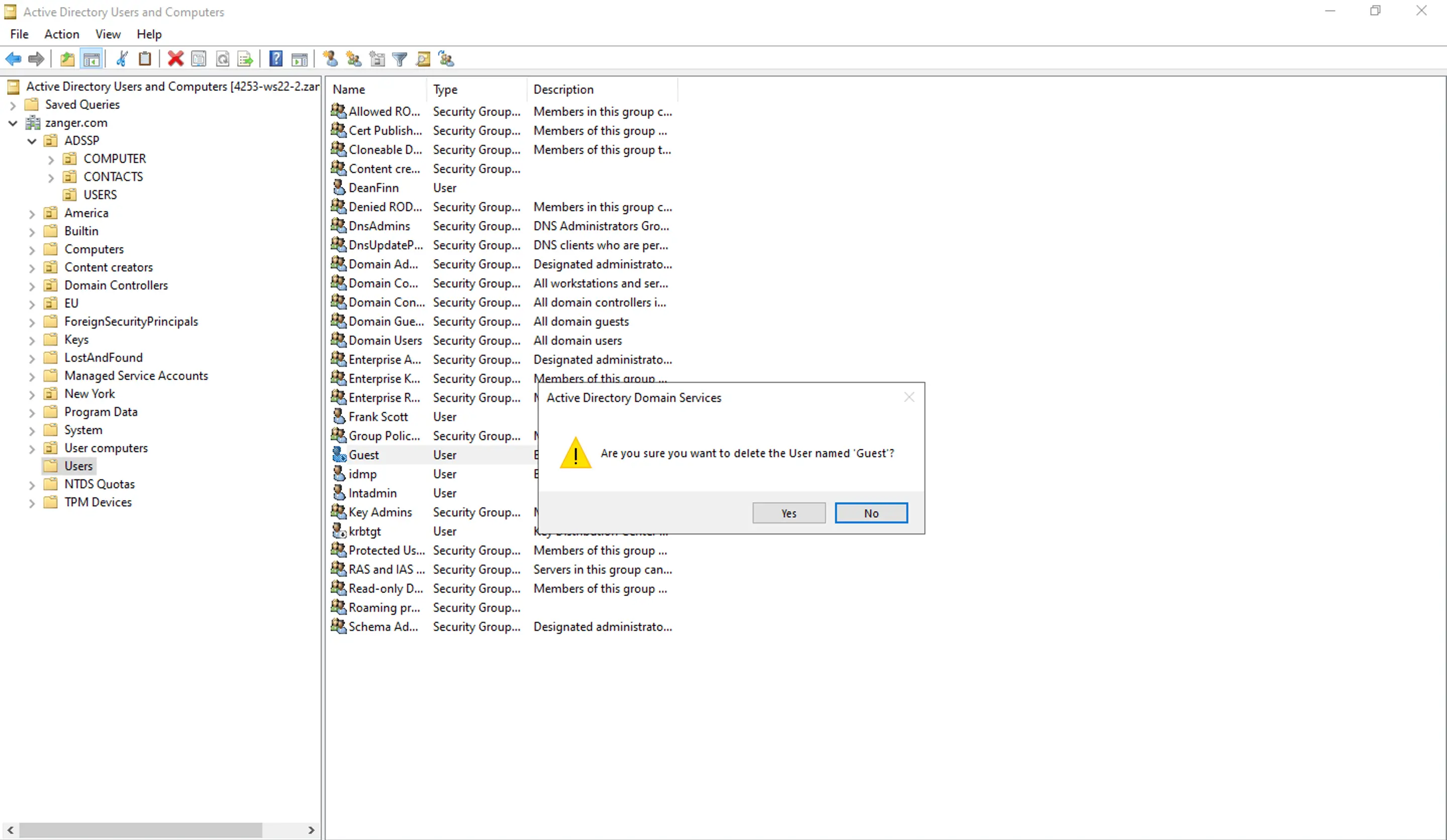
虽然原生工具可用,但存在严重缺陷。ADUC 对于批量任务过于手动,PowerShell 脚本中的一个错误可能导致错误地永久删除整个 OU。
ADManager Plus 是一款 AD 管理 工具,提供安全且直观的界面,将复杂脚本简化为几次简单点击,允许您安全地将任务委派给帮助台人员,而无需授予他们高权限的域权限。
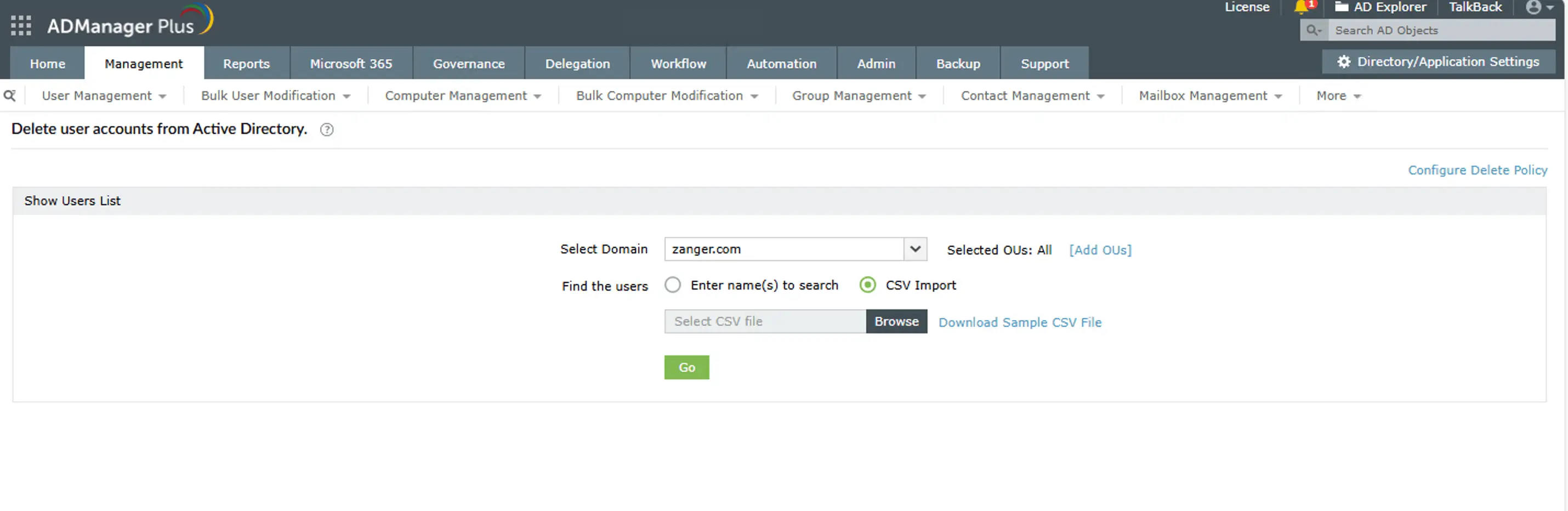
ADManager Plus 简化了整个过程,消除了错误,并为所有 AD 用户管理操作提供了简单的解决方案。
虽然功能齐全,但内置工具存在显著缺陷:
ADManager Plus 旨在克服原生工具的所有限制,提供安全高效的解决方案。
可以,如果您启用了 Active Directory 回收站,则可以恢复已删除的 AD 用户。必须在用户被删除之前启用该功能。如果未启用,则必须从 AD 备份执行复杂的权威还原。
用户的 SID 会随用户对象永久删除。如果您创建一个同名的新用户,他们将获得一个新的 SID。该新用户无法访问之前可访问的任何文件、文件夹或资源。
不会。删除用户对象仅从 AD 中移除该对象,不会自动删除用户的 Microsoft 365 或 Exchange 邮箱或其个人文件共享。这些必须单独注销。不过,ADManager Plus 可以帮助您自动化整个工作流程,简化 AD 注销。

