升级 Windows 10 生命周期结束(EOL)版本
由于其用户友好性以及大量预装的生产力应用,Microsoft 的 Windows 10 一直是全球用户的首选。然而,随着多达二十个 Windows 10 生命周期结束版本,用户需要谨慎并积极升级到最新的 Windows 10 版本,以确保系统的安全性和最新功能。
本文讨论内容:
Windows 10 生命周期结束版本
以下是已达到或即将达到生命周期结束的 Windows 10 版本列表:
| Windows 10 版本 | 发布日期 | 主动支持结束日期 | 安全支持结束日期 |
|---|---|---|---|
| Windows 10,版本 22H2 (E) | 2022年10月18日 | 2025年5月13日 | 2025年5月13日 |
| Windows 10,版本 22H2 (W) | 2022年10月18日 | 2024年5月14日 | 2024年5月14日 |
| Windows 10,版本 21H2 IoT (LTS) | 2021年11月16日 | 2027年1月12日 | 2032年1月13日 |
| Windows 10,版本 21H2 (LTS) | 2021年11月16日 | 2027年1月12日 | 2027年1月12日 |
| Windows 10,版本 21H2 (E) | 2021年11月16日 | 2024年6月11日 | 2024年6月11日 |
| Windows 10,版本 21H2 (W) | 2021年11月16日 | 2023年6月13日 | 2023年6月13日 |
| Windows 10,版本 21H1 (E)(W) | 2021年5月18日 | 2022年12月13日 | 2022年12月13日 |
| Windows 10,版本 20H2 (E) | 2020年10月20日 | 2023年5月9日 | 2023年5月9日 |
| Windows 10,版本 20H2 (W) | 2020年10月20日 | 2022年5月10日 | 2022年5月10日 |
| Windows 10,版本 2004 (E)(W) | 2020年5月27日 | 2021年12月14日 | 2021年12月14日 |
| Windows 10,版本 1909 (E) | 2019年11月12日 | 2022年5月10日 | 2022年5月10日 |
| Windows 10,版本 1909 (W) | 2019年11月12日 | 2021年5月11日 | 2021年5月11日 |
| Windows 10,版本 1903 (E)(W) | 2019年8月29日 | 2020年12月8日 | 2020年12月8日 |
| Windows 10,版本 1809 (LTS) | 2018年11月13日 | 2024年1月9日 | 2024年1月9日 |
| Windows 10,版本 1809 (E) | 2018年11月13日 | 2021年5月11日 | 2021年5月11日 |
| Windows 10,版本 1809 (W) | 2018年11月13日 | 2020年11月10日 | 2020年11月10日 |
| Windows 10,版本 1803 (E) | 2018年4月30日 | 2020年5月11日 | 2021年5月11日 |
| Windows 10,版本 1803 (W) | 2018年4月30日 | 2019年11月12日 | 2019年11月12日 |
| Windows 10,版本 1709 (E) | 2017年10月17日 | 2020年10月13日 | 2020年10月13日 |
| Windows 10,版本 1709 (W) | 2017年10月17日 | 2019年4月9日 | 2019年4月9日 |
| Windows 10,版本 1703 (E) | 2017年4月11日 | 2019年10月8日 | 2019年10月8日 |
| Windows 10,版本 1703 (W) | 2017年4月11日 | 2018年10月9日 | 2018年10月9日 |
| Windows 10,版本 1607 (LTS) | 2016年8月2日 | 2021年10月12日 | 2026年10月13日 |
| Windows 10,版本 1607 (E) | 2016年8月2日 | 2019年4月9日 | 2019年4月9日 |
| Windows 10,版本 1607 (W) | 2016年8月2日 | 2018年4月10日 | 2018年4月10日 |
| Windows 10,版本 1511 (E)(W) | 2015年11月10日 | 2017年10月10日 | 2017年10月10日 |
| Windows 10,版本 1507 (LTS) | 2015年7月29日 | 2020年10月13日 | 2025年10月14日 |
| Windows 10,版本 1507 (E)(W) | 2015年7月29日 | 2017年5月9日 | 2017年5月9日 |
如何将 Windows 10 EOL 版本升级到最新?
您可以通过以下两种方法之一将 Windows 10 生命周期结束版本升级到最新功能包:
如何通过 Windows 更新手动升级 Windows 10 EOL?
通过 Windows 更新更新您的 Windows 10 生命周期结束版本:
- 输入 windows update 在搜索框中
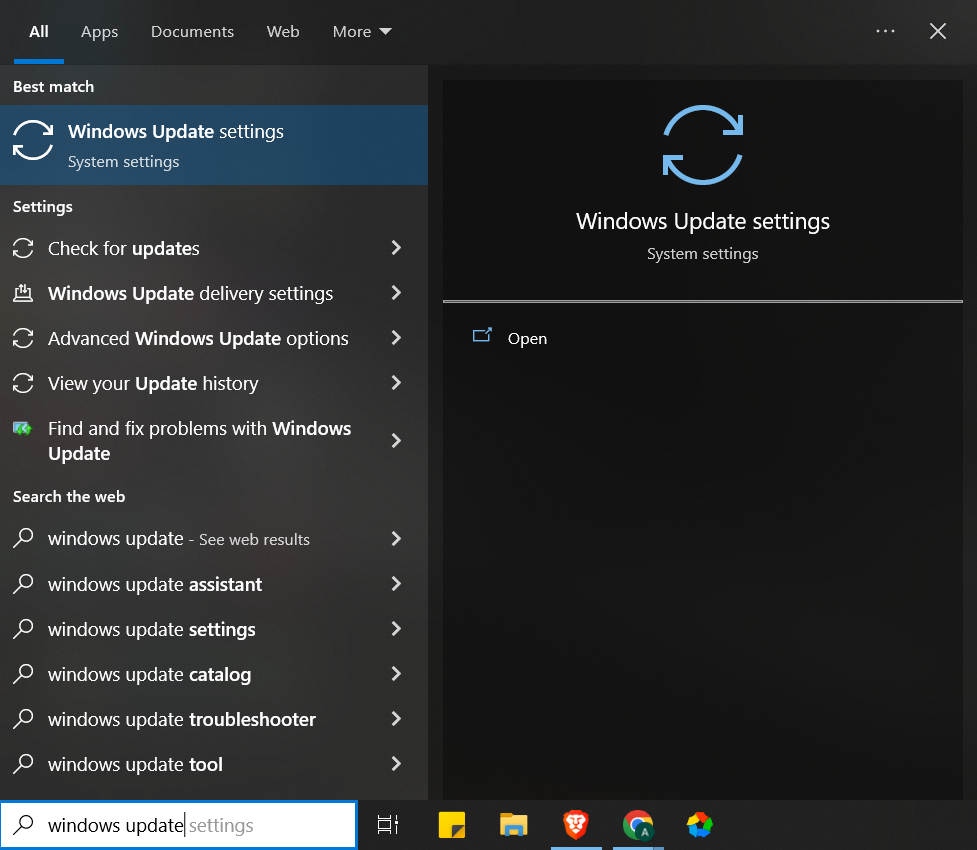
- 点击 Windows Update 设置 > 检查更新
- 系统将检查可用更新。完成后,将列出最新可用的功能包。
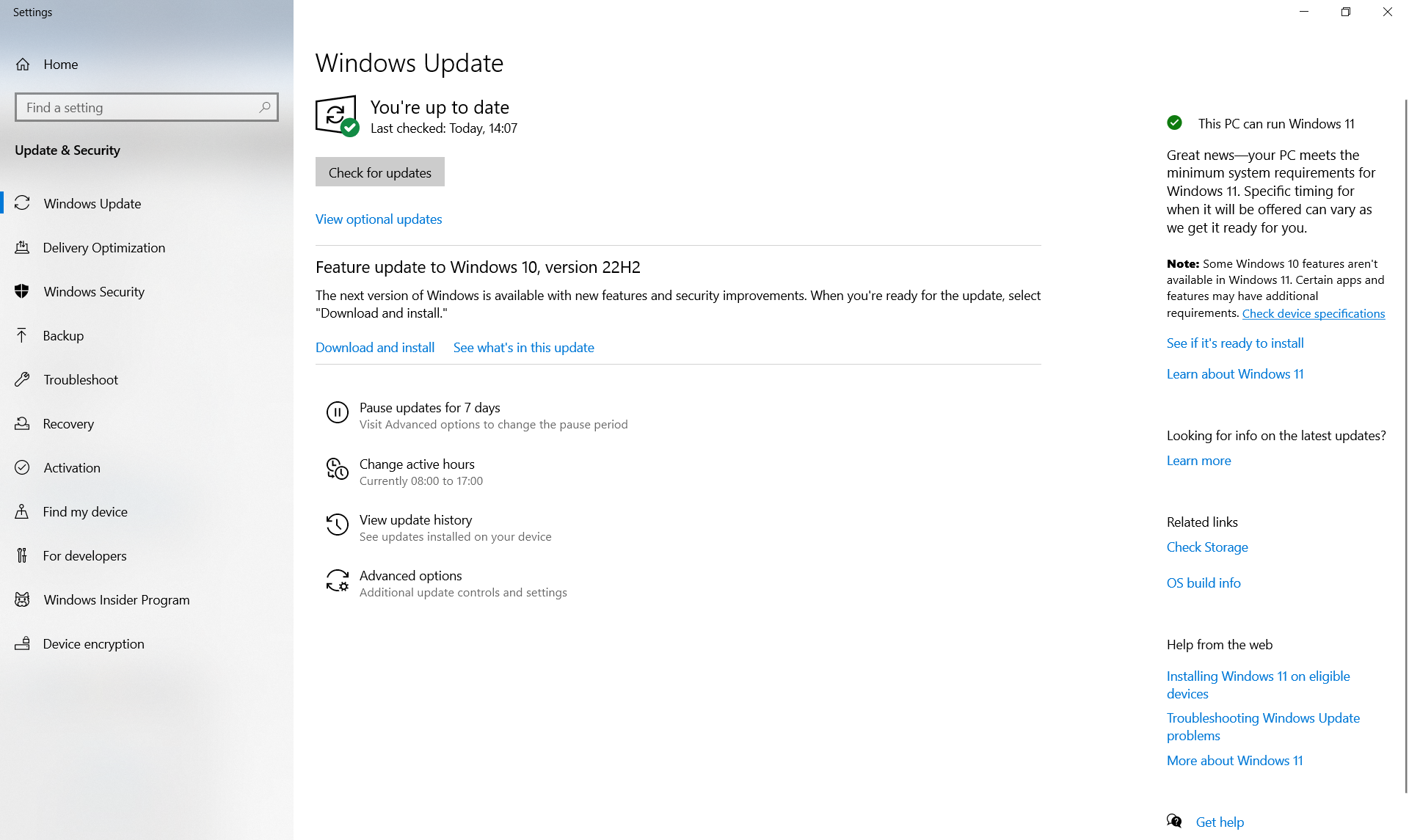
- 点击 下载并安装
- 下载完成并且最新功能包准备安装后,系统会通知用户,以便用户选择方便的安装时间。
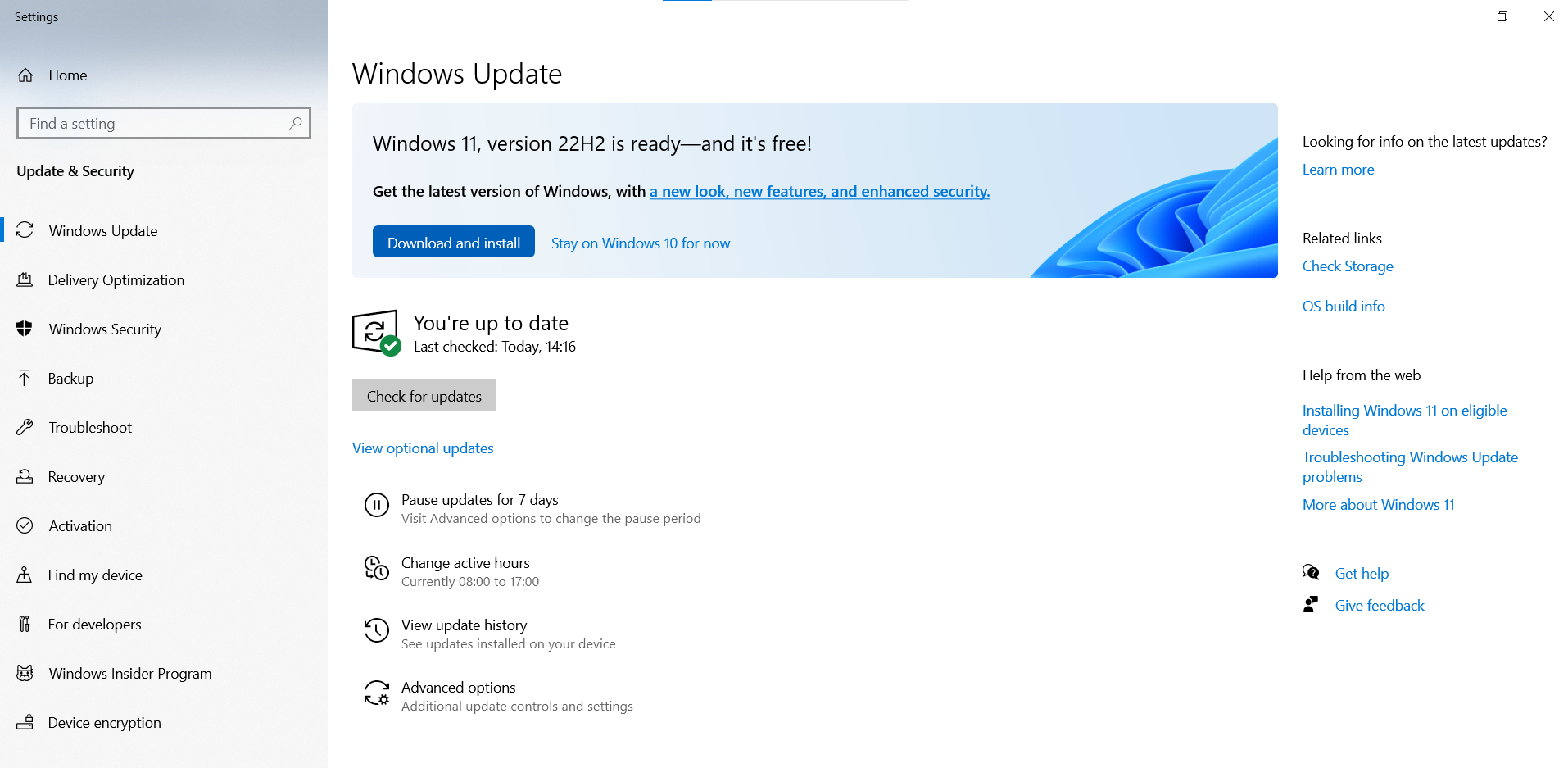
注意: 对于有资格升级到 Windows 11 的系统,将显示以下消息:
如何自动更新 Windows 10 EOL 版本?
您可以使用 ManageEngine Patch Manager Plus 无缝自动化将 Windows 10 生命周期结束系统更新到最新版本的整个过程。
- 在 Patch Manager Plus 控制台中,导航到 系统
- 点击 Windows 10 EOL 系统。在此视图下,将列出带有服务包详情的 EOL 版本系统列表。
- 选择 您想要更新的系统。
- 点击 安装/发布补丁
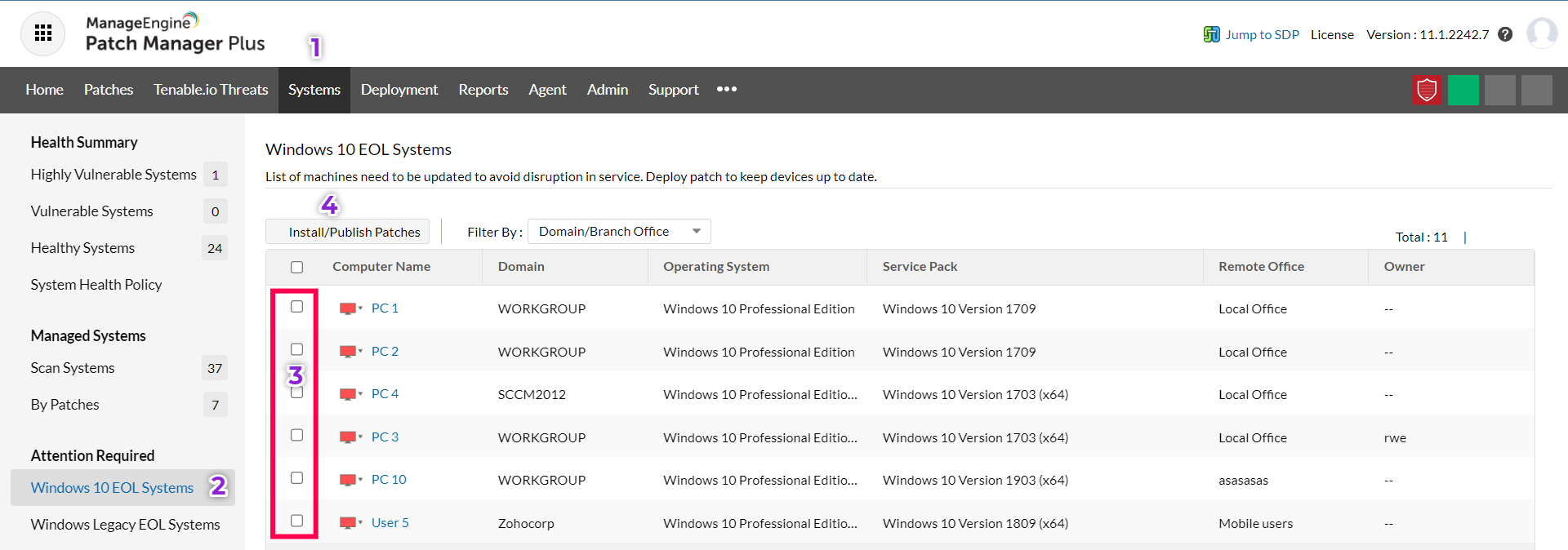
- 选择您想要更新到的 Windows 10 版本,然后点击 部署补丁
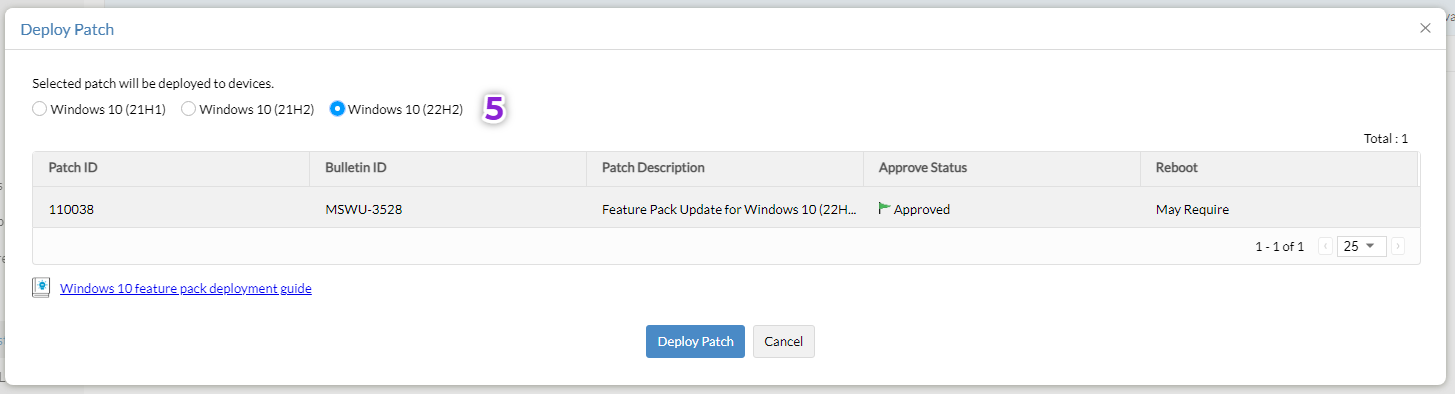
- 配置手动部署任务 并点击 部署 或 立即部署
相关文章
常见问题解答
1) Windows 10 的 EOL 是什么?
Microsoft 已声明他们将至少支持一个 Windows 10 版本至 2025年10月14日。
2) 哪个 Windows 10 版本已到生命周期结束?
企业版、教育版和 IoT 企业版的 Windows 10 版本 20H2 将于 2023年5月9日
达到服务结束。
3) Windows 11 是免费升级吗?

是的,Windows 11 升级是免费的。要检查可用更新,请导航到 Windows Update 设置 > 检查更新。如果您的系统支持 Windows 11,将显示以下消息:
4) Windows 10 21H2 的支持期限有多长?
| Windows 10 21H2 的 EOL 日期如下: | 发布日期 | 主动支持结束日期 | 安全支持结束日期 |
|---|---|---|---|
| Windows 10,版本 21H2 IoT (LTS) | 2021年11月16日 | 2027年1月12日 | 2032年1月13日 |
| Windows 10,版本 21H2 (LTS) | 2021年11月16日 | 2027年1月12日 | 2027年1月12日 |
| Windows 10,版本 21H2 (E) | 2021年11月16日 | 2024年6月11日 | 2024年6月11日 |
| Windows 10,版本 21H2 (W) | 2021年11月16日 | 2023年6月13日 | 2023年6月13日 |
Windows 版本
5) Windows 11 的 EOL 是什么?
| Windows 10 21H2 的 EOL 日期如下: | 发布日期 | 主动支持结束日期 | 安全支持结束日期 |
|---|---|---|---|
| Windows 11 的 EOL 日期如下: | Windows 11,版本 22H2 (E) | 2025年10月14日 | 2025年10月14日 |
| 2022年9月20日 | Windows 11,版本 22H2 (E) | Windows 11,版本 22H2 (W) | Windows 11,版本 22H2 (W) |
| 2024年10月14日 | Windows 11,版本 21H2 (E) | 2021年10月4日 | 2021年10月4日 |
| 2024年10月8日 | Windows 11,版本 21H2 (E) | Windows 11,版本 21H2 (W) | Windows 11,版本 21H2 (W) |