
使用 Endpoint Central MSP

启动 Endpoint Central MSP

启动 Endpoint Central 的方法如下 -

  • 选择 启动 -> 程序 -> ManageEngine Endpoint Central MSP -> 启动 Endpoint Central MSP
  • 任务栏的通知区域 -> 右键单击 -> ManageEngine Endpoint Central MSP 图标 -> 启动服务
  • 运行 services.msc -> 右键单击 -> ManageEngine Endpoint Central MSP 服务器 -> 启动

启动 Endpoint Central MSP时,客户端会在默认浏览器中自动启动。

以下进程会随 Endpoint Central MSP:

  1. 一同启动: Endpoint Central MSP 服务器
  2. java.exe -
  3. postgres.exe - 数据库服务器
  4. wrapper.exe - 用于系统托盘操作

MEDCCPUMonitor.exe - 用于故障排除 Endpoint Central MSP

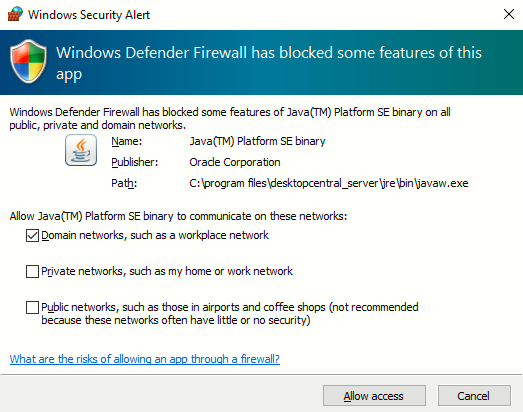
  1. 在启用防火墙的 Windows XP / Windows 2003 机器上启动时,Windows 会弹出安全警报,询问是否阻止或解除阻止以下程序,如下图所示:

Java(TM) 2 Platform Standard Edition binary - Java。 你应 解除阻止 Endpoint Central MSP.
 

桌面与移动设备管理 - ManageEngine Endpoint Central MSP


这些程序以启动


图:Java 警报 Endpoint Central MSP 启动

客户端 Endpoint Central MSP 要启动

  1. 客户端, Endpoint Central MSP 打开网页浏览器,在地址栏输入 http://hostname:8040。这里的 hostname 指运行

  2. 的机器的 DNS 名称。 在相应字段中输入用户名和密码,用户名为 admin ,然后点击.

登录

初次登录后执行的步骤 Endpoint Central MSP 当你第一次登录

  1. 时,请执行以下步骤: 定义 管理范围

  2. - 范围可以限于一小部分计算机或整个域。 定义

  3. 并应用配置

  4. 至用户或计算机。应用的配置将在用户登录时生效(用户配置),在计算机重启时生效(计算机配置)。

  5. 设置补丁管理模块

停止 设置软件部署模块

设置库存管理 设置软件部署模块Endpoint Central 要停止 Endpoint Central MSP ,选择 Endpoint Central MSP