
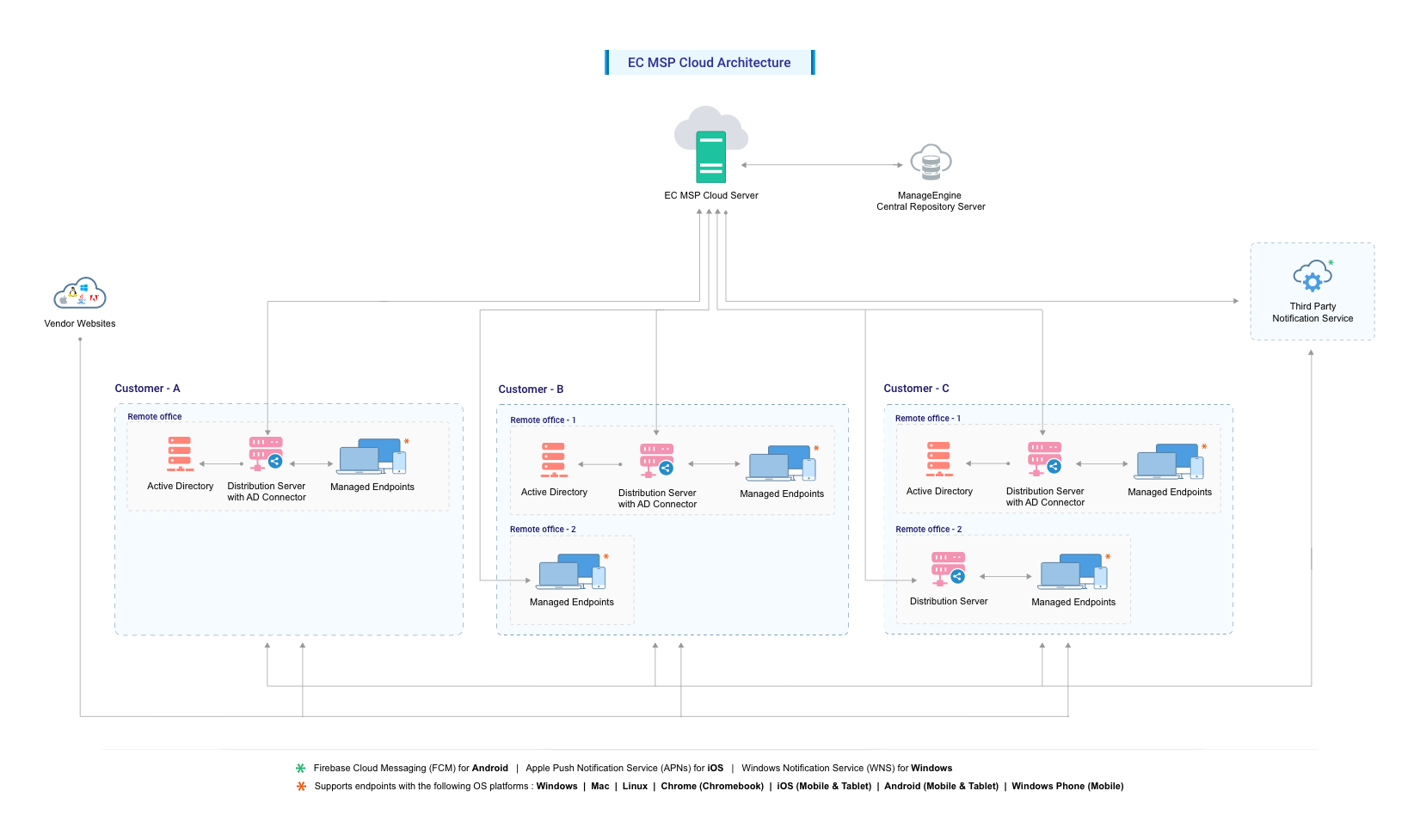
Endpoint Central MSP Cloud Architecture

Architecture of Endpoint Central MSP on Cloud

Endpoint Central MSP Cloud Server

Endpoint Central MSP Server resides in one of Zoho Corporation's data centers and has to be configured as an EDGE device. This means that the designated ports should be accessible through the Internet. It is advised to keep the connection with Endpoint Central MSP server always running to carry out the day-to-day endpoint management activities.

Endpoint Central MSP Agents

Endpoint Central MSP Agent is light-weight software that is installed in the client systems that are being managed using Endpoint Central MSP. It acts as a worker to carry out the operations as instructed by the Central Server. The agent can either be installed manually or through the Distribution Server in all the customer computers that are being managed using Endpoint Central MSP Cloud. For computers in customer branch offices, the agent will contact the Distribution Server to pull the configurations available for them, deploys them and updates the status back to the Server.

Web Console

The Web console of the product provides a central point from where an administrator can manage all the tasks that are related to desktop management. This console can be accessed from anyplace. Separate client installations are not required to access the Web console.

ManageEngine Repository

The ManageEngine repository or the patch database is a portal on the ManageEngine website that hosts the latest vulnerability database. The Endpoint Central MSP Cloud server periodically synchronizes with the patch database’s information on available patches and scans the computers in the network to determine which patches are missing. The results of that scan are stored in the server and can be viewed from the web console.

AD Connector

The AD Connector acts as a communicator between the Endpoint Central MSP Cloud server and the Domain Controller of an organization. It is mandatory for the AD connector to be one of the Distribution Servers (DS) within the organization. When a customer with multiple remote offices is managed by Endpoint Central MSP Cloud, one of the Distribution Server is configured as the AD connector.

Distribution Server

Endpoint Central MSP Cloud Distribution Server is installed in one of the computers in the branch offices. This agent will communicate with the Endpoint Central MSP Cloud Server to pull the information for all the computers in that customer's branch office. The agents that reside in the branch office computers will contact the Distribution Server to get the information available to them and process the requests. This results in low bandwidth utilization as only one agent will contact the Server periodically.


Hardware requirements for Distribution Server (AD Connector)

Number of devices under distribution serverProcessor InformationRAMHard disk space
1 to 500Intel Core i3
(2 core/4 thread) 2.0GHz 3MB cache
4GB6GB*
501 to 1,000Intel Core i3
(2 core/4 thread) 2.9GHz 3MB cache
4GB12GB*
1,001 to 3,000Intel Core i5
(4 core/8 thread) 2.3GHz
8GB16GB*
3,001 to 5,000Intel Core i7
(6 core/12 thread) 3.2GHz
8GB20GB*

*- This symbol indicates that the disk space required might vary based on the patches/software deployed to the devices through distribution server.

Software Requirements for Distribution Servers (AD Connector)

Supported Operating Systems:

  • Windows 11
  • Windows 10
  • Windows 8.1
  • Windows 8
  • Windows Server 2022*
  • Windows Server 2019*
  • Windows Server 2016*
  • Windows Server 2012*
  • Windows Server 2012 R2*

*- Recommended for managing 5000+ devices.

Hardware requirements for Endpoint Central MSP Agents

Hardware RequirementValue
ProcessorsIntel Pentium
Processor Speed1.0GHz
RAM Size512MB
Hard Disk Space3GB*

*- This symbol indicates that the disk space required might vary based on the patches/software deployed to the devices through distribution server.

Software requirements for Endpoint Central Agents

Supported Operating Systems

Windows OSWindows Server OSMac OSLinux OS*
Windows 11Windows Server 2022macOS 13 VenturaUbuntu 10.04 and above
Windows 10Windows Server 2019macOS 12 MontereyDebian 7 and above
Windows 8.1Windows Server 2016macOS 11 Big SurRed Hat Enterprise
Windows 8Windows Server 201210.15 CatalinaLinux 6 and above
Windows 7Windows Server 2012 R210.14 MojaveCentOS 5 and above
 Windows Server 2008 R210.13 High SierraFedora 19 and above
  10.12 SierraMandriva 2010 and above
   Linux Mint 13 and above
   OpenSuSE 11 and above
   SuSE Enterprise Linux 11 and above
   Pardus 17 and 19
   *-Conditional support
   *We support kernel versions above 2.6.33

FOR MANAGING MOBILE DEVICES

  • ANDROID - Android devices running on version 4.0 and above
  • iOS (inclusive of iPhone, iPad, and iPod) - iOS devices running on version 4.0 and above
  • Windowssmartphone - Windows Phone 8.1 and above
  • Windowslaptops (including Surface Hubs and Surface Pros): Devices running on Windows 10 & Windows 11
  • ChromeOS: Devices running on version 57.0 and above
  • tvOS: Devices running on version 7.0 and above
  • macOS: Devices running on version 10.7 and above

Note: A TLS version of 1.2 and above is required for the legacy devices to be managed using Endpoint Central MSP Cloud.

SUPPORTEDBROWSERS

  • Google Chrome 47 and later versions
  • Mozilla Firefox 44 and later versions
  • Microsoft Internet Explorer 10 and later versions

Note: The screen resolution should be 1280 x 1024 pixels or higher.

我们的客户