如何在 Endpoint Central 中配置 PostgreSQL 的 SSL 连接(含与不含 DB HA)
本文档说明如何在 Endpoint Central 与 PostgreSQL(Percona)数据库之间建立安全的 SSL 连接,包括有数据库高可用性(DB HA)和无数据库高可用性两种情况。
SSL 确保应用程序与数据库之间的通信加密,保护敏感数据免受拦截,并确保符合安全最佳实践。
指令已在 PostgreSQL 11.17 和 15.2 版本上测试。SSL 配置可能因 PostgreSQL 版本不同而有所差异。请参阅官方
获取版本特定的详细信息。
- 本文使用自签名证书进行测试。在生产环境中,建议使用证书颁发机构(CA)签发的证书。
- 过程开销: 配置数据库连接 SSL 会引入额外的加密和解密过程,可能导致计算开销增加。实施 SSL 前,请评估服务器硬件能力,确保其能有效处理增加的负载而不影响性能。
如何在无 DB HA 的 Percona PGSQL 中配置 SSL
请在单个 PostgreSQL 服务器节点上按照以下步骤启用 Endpoint Central 与数据库之间的 SSL 连接。
证书生成
有关 PostgreSQL 的 SSL 配置,请参阅官方
获取版本特定的详细信息。
sslmode through which you wish to connect. This allows you to control the desired level of security and protection. Make use of the below chart for selecting appropriate mode suitable for you.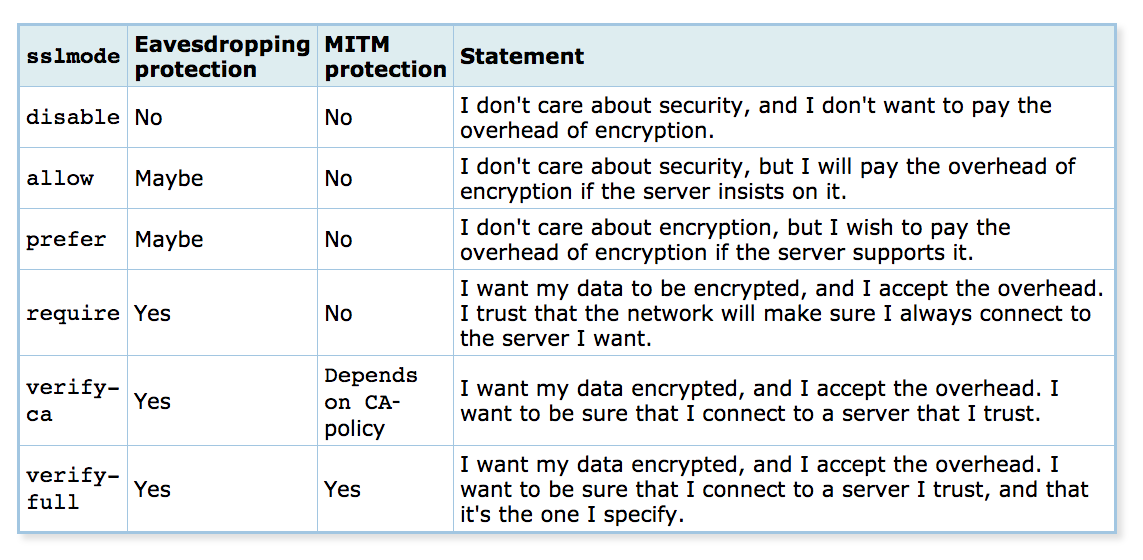
本文将配置 SSL 的 verify-full 模式,该模式是连接 SSL 最安全的方式。对于应用程序和数据库位于同一服务器,只允许本地连接的情况,不需要这种高安全级别的模式 — 这时 require 模式更合适。
To create a server certificate whose identity can be validated by clients, first create a certificate signing request (CSR) and a public/private key file. Replace <hostname.domain.com> with your respective server host name. Generate a certificate from the machine where PostgreSQL server is hosted.
创建服务器证书
最后,创建由新根证书颁发机构签发的服务器证书:
步骤 1:生成服务器证书请求和密钥
openssl req -new -nodes -text -out server.csr -keyout server.key -subj "/CN=<hostname.domain.com>"步骤 2:限制服务器密钥文件权限
chmod og-rwx server.key步骤 3:用根 CA 签署服务器证书
openssl x509 -req -in server.csr -text -days 365 -CA root.crt -CAkey root.key -CAcreateserial -out server.crtserver.crt and server.key should be stored on the PostgreSQL server machine and root.crt should be stored on the client machine in which our application ServiceDeskPlus is installed.配置 PostgreSQL 服务器的 SSL
This section consist of configuring file located at <postgres_installation_location>\data\ directory, as mentioned below. Before that, copy the server.key & server.crt generated to a directory in which the user has permission to read and write. Enter the absolute path of the files in the below configuration file.
A. postgresql.conf
To enable SSL configuration in Postgresql server, paste the following lines in the postgresql.conf file situated in the above directory.
postgresql.conf — SSL 设置
ssl = on
ssl_key_file = 'server.key'
ssl_cert_file = 'server.crt'<product_installation_location>\pgsql directory. Before migrating the product, backup the postgresql.conf file since the configurations in this file will not be retained in our application migration.B. pg_hba.conf
Change the connection type to hostssl mode and restrict the unencrypted connection requests. Change the 类型 of all the connections to hostssl mode as shown in the below example.
# TYPE DATABASE USER ADDRESS METHOD hostssl all all 127.0.0.1/32 md5 注意
进行
# TYPE DATABASE USER ADDRESS METHOD host all all 127.0.0.1/32 md5md5 authentication for postgres user authentication, since we have employed that algorithm.您可以使用以下查询检查 ssl 设置及其他详细信息:
检查 SSL 设置
SELECT * FROM pg_settings WHERE name = 'ssl';配置应用程序以使用 SSL 连接
- 停止应用服务器。
- Place
root.crtin<server_home>/pgsql. If the chosen SSL mode is
verify-ca, add required SSL params at the end of the line url in<server_home>/conf/database_params.conf:追加的 SSL 参数
&sslmode=verify-ca&ssl=required示例url=jdbc:postgresql://128.23.2.1:5000/desktopcentral?charSet=UTF-8&sslmode=verify-ca&ssl=on&sslmode=required- 启动应用服务器。
如何在有 DB HA 的 Percona PGSQL 中配置 SSL
对于 DB HA 设置,请在 每个 HA 节点上分别执行所有证书生成和 SSL 配置步骤,然后配置 HAProxy 以实现 SSL 透传。
证书生成(每个 HA 节点)
在每个 HA 节点重复证书生成流程。有关 PostgreSQL 的 SSL 配置,请参阅官方 PostgreSQL 文档 获取版本特定的详细信息。
sslmode through which you wish to connect. This allows you to control the desired level of security and protection. Make use of the below chart for selecting appropriate mode suitable for you.本文将配置 SSL 的 verify-full 模式,该模式是连接 SSL 最安全的方式。对于应用程序和数据库位于同一服务器,只允许本地连接的情况,不需要这种高安全级别的模式 — 这时 require 模式更合适。
Replace <hostname.domain.com> with the respective host name of each HA node. Run the following commands on each HA node machine where PostgreSQL server is hosted.
创建服务器证书(每个 HA 节点)
在每个 HA 节点创建由新根证书颁发机构签发的服务器证书:
步骤 1:生成服务器证书请求和密钥
openssl req -new -nodes -text -out server.csr -keyout server.key -subj "/CN=<hostname.domain.com>"步骤 2:限制服务器密钥文件权限
chmod og-rwx server.key步骤 3:用根 CA 签署服务器证书
openssl x509 -req -in server.csr -text -days 365 -CA root.crt -CAkey root.key -CAcreateserial -out server.crtserver.crt and server.key should be stored on the PostgreSQL server machine and root.crt should be stored on the client machine in which our application ServiceDeskPlus is installed.配置 PostgreSQL 服务器的 SSL(每个 HA 节点)
Perform the following PostgreSQL configuration on each HA node. This section consists of configuring files located at <postgres_installation_location>\data\ directory. Before that, copy the server.key & server.crt generated to a directory in which the user has permission to read and write. Enter the absolute path of the files in the below configuration file.
A. postgresql.conf
To enable SSL configuration in Postgresql server, paste the following lines in the postgresql.conf file situated in the above directory.
postgresql.conf — SSL 设置
ssl = on
ssl_key_file = 'server.key'
ssl_cert_file = 'server.crt'<product_installation_location>\pgsql directory. Before migrating the product, backup the postgresql.conf file since the configurations in this file will not be retained in our application migration.B. pg_hba.conf
Change the connection type to hostssl mode and restrict the unencrypted connection requests. Change the 类型 of all the connections to hostssl mode as shown in the below example.
pg_hba.conf
# TYPE DATABASE USER ADDRESS METHOD hostssl all all 127.0.0.1/32 md5进行
# TYPE DATABASE USER ADDRESS METHOD hostssl all all 127.0.0.1/32 md5md5 authentication for postgres user authentication, since we have employed that algorithm.您可以使用以下查询检查 ssl 设置及其他详细信息:
检查 SSL 设置
SELECT * FROM pg_settings WHERE name = 'ssl';配置应用程序以使用 SSL 连接
- 以下步骤适用于有无 DB HA 环境。
- 对于 FOS/DCDR,仅需在当前活动数据库节点执行这些步骤 — 配置将自动同步到其他节点。
- 停止应用服务器。
- Place
root.crtin<server_home>/pgsql. If the chosen SSL mode is
verify-ca, add required SSL params at the end of the line url in<server_home>/conf/database_params.conf:追加的 SSL 参数
&sslmode=verify-ca&ssl=required示例url=jdbc:postgresql://128.23.2.1:5000/desktopcentral?charSet=UTF-8&sslmode=verify-ca&ssl=on&sslmode=required- 启动应用服务器。
is verify-ca, add required SSL params at the end of the line url in <server_home>/conf/database_params.conf:
追加的 SSL 参数
&sslmode=verify-ca&ssl=requiredurl=jdbc:postgresql://128.23.2.1:5000/desktopcentral?charSet=UTF-8&sslmode=verify-ca&ssl=on&sslmode=required- 启动应用服务器。
HAProxy 的 SSL 透传配置
如果 DB HA 架构中使用 HAProxy,推荐采用 SSL 透传。SSL 透传允许 HAProxy 将加密流量直接转发到 PostgreSQL 而不进行解密。
此方式实现端到端加密,代理层不暴露敏感数据,满足严格的安全策略。HAProxy 在此模式下不检查或解密 SSL 流量。
步骤 1:编辑 HAProxy 配置文件
打开 HAProxy 配置文件:
HAProxy 配置文件路径
/etc/haproxy/haproxy.cfg步骤 2:启用 TCP 模式
确保前端和后端配置中包含以下行:
TCP 模式指令
mode tcp



