
Open API 规范 (OAS)
API 集合
OAuth
身份验证
补丁管理
补丁详情
补丁配置
自动补丁部署
拒绝补丁
漏洞管理
威胁详情
设备控制报告
自定义字段
资产清单
SoM
报告
查询报告
自定义报告
BitLocker
数据丢失防护报告
常用
DEX
介绍
ManageEngine Endpoint Central API 提供了一个全面的接口,便于与第三方工具实现无缝集成。通过利用这些API,您可以自动化IT生态系统中经常需要跨多个工具协作的端点管理任务。
这些API允许您获取和修改各种Endpoint Central模块中的数据,包括Inventory、Patch Management等。
所有API遵循标准的HTTP方法和错误代码,并支持常用的数据格式,如JSON。
支持提供API的模块列表可在左侧栏中找到。如需额外的API,请联系我们并告知您的需求。
© 2025,Zoho Corporation Pvt. Ltd. 保留所有权利。
API指南索引
目录
- 补丁管理
- 补丁配置
- 补丁详情
- 自动补丁部署
- 拒绝补丁
- 资产清单
- 漏洞管理
- 威胁详情
- 设备控制报告
- 自定义字段
- SoM
- 报告
- 查询报告
- 自定义报告
- BitLocker
- 数据丢失防护报告
- 常用
- DEX
补丁管理
补丁配置
| 方法名称 | 方法类型 | URL | OAuth 范围 | 操作 |
|---|---|---|---|---|
| 在特定系统中安装所有缺失的补丁 | POST | /api/1.4/patch/installpatch | DesktopCentralCloud.PatchMgmt | 更新 |
| 在特定系统中安装特定补丁 | POST | /api/1.4/patch/installpatch | DesktopCentralCloud.PatchMgmt | 更新 |
| 在所有系统中安装特定补丁 | POST | /api/1.4/patch/installpatch | DesktopCentralCloud.PatchMgmt | 更新 |
| 卸载所有系统中特定的补丁 | POST | /api/1.4/patch/uninstallpatch | DesktopCentralCloud.PatchMgmt | 更新 |
此搜索未找到API。
补丁详情
| 方法名称 | 方法类型 | URL | OAuth 范围 | 操作 |
|---|---|---|---|---|
| 获取系统健康策略 | GET | /api/1.4/patch/healthpolicy | DesktopCentralCloud.PatchMgmt | 读取 |
| 列出补丁部署策略 | GET | /api/1.4/patch/deploymentpolicies | DesktopCentralCloud.PatchMgmt | 读取 |
| 检索所有已下载补丁的详细信息 | GET | /api/1.4/patch/downloadedpatches | DesktopCentralCloud.PatchMgmt | 读取 |
| 获取补丁扫描系统列表 | GET | /api/1.4/patch/scandetails | DesktopCentralCloud.PatchMgmt | 读取 |
| 发起拒绝补丁操作 | POST | /api/1.4/patch/declinepatch | DesktopCentralCloud.PatchMgmt | 更新 |
| 列出所有补丁 | GET | /api/1.4/patch/allpatches | DesktopCentralCloud.PatchMgmt | 读取 |
| 发起对所有计算机的补丁扫描 | POST | /api/1.4/patch/computers/scanall | DesktopCentralCloud.PatchMgmt | 更新 |
| 补丁总结 | GET | /api/1.4/patch/summary | DesktopCentralCloud.PatchMgmt | 读取 |
| 检索系统和补丁详情 | GET | /dcapi/threats/systemreport/patches | DesktopCentralCloud.PatchMgmt | 读取 |
| 列出所有带有补丁状态的系统 | GET | /api/1.4/patch/allsystems | DesktopCentralCloud.PatchMgmt | 读取 |
| 检索所有补丁 | GET | /dcapi/threats/patches | DesktopCentralCloud.PatchMgmt | 读取 |
| 获取系统的补丁报告 | GET | /api/1.4/patch/systemreport | DesktopCentralCloud.PatchMgmt | 读取 |
| 列出各计算机的补丁状态 | GET | /api/1.4/patch/allpatchdetails | DesktopCentralCloud.PatchMgmt | 读取 |
| 发起针对选定或所有计算机的补丁扫描 | POST | /api/1.4/patch/computers/scan | DesktopCentralCloud.PatchMgmt | 更新 |
| 发起取消批准补丁操作 | POST | /api/1.4/patch/unapprovepatch | DesktopCentralCloud.PatchMgmt | 更新 |
| 补丁数据库更新状态 | GET | /api/1.4/patch/dbupdatestatus | DesktopCentralCloud.PatchMgmt | 读取 |
| 发起批准补丁操作 | POST | /api/1.4/patch/approvepatch | DesktopCentralCloud.PatchMgmt | 更新 |
| 检索补丁部署配置 | GET | /api/1.4/patch/viewconfig | DesktopCentralCloud.PatchMgmt | 读取 |
| 补丁批准设置 | GET | /api/1.4/patch/approvalsettings | DesktopCentralCloud.PatchMgmt | 读取 |
| 获取支持的补丁 | GET | /api/1.4/patch/supportedpatches | DesktopCentralCloud.PatchMgmt | 读取 |
此搜索未找到API。
自动补丁部署
| 方法名称 | 方法类型 | URL | OAuth 范围 | 操作 |
|---|---|---|---|---|
| 删除 APD 任务。 | POST | /api/1.4/patch/deleteAPDTask | DesktopCentralCloud.PatchMgmt | 更新 |
| 暂停 APD 任务。 | POST | /api/1.4/patch/suspendAPDTask | DesktopCentralCloud.PatchMgmt | 更新 |
| 创建 APD 任务。 | POST | /api/1.4/patch/createAPDTask | DesktopCentralCloud.PatchMgmt | 更新 |
| 修改 APD 任务。 | POST | /api/1.4/patch/modifyAPDTask | DesktopCentralCloud.PatchMgmt | 更新 |
| 恢复 APD 任务。 | POST | /api/1.4/patch/resumeAPDTask | DesktopCentralCloud.PatchMgmt | 更新 |
此搜索未找到API。
拒绝补丁
| 方法名称 | 方法类型 | URL | OAuth 范围 | 操作 |
|---|---|---|---|---|
| 拒绝补丁 | PUT | /dcapi/patch/settings/declinePatch/declinePatches | DesktopCentralCloud.PatchMgmt | 更新 |
| 即将弃用 发起拒绝补丁操作 | POST | /api/{apiversion}/patch/declinepatch | DesktopCentralCloud.PatchMgmt | 更新 |
此搜索未找到API。
资产清单
| 方法名称 | 方法类型 | URL | OAuth 范围 | 操作 |
|---|---|---|---|---|
| 硬件计算机 | GET | /api/1.4/inventory/computers | DesktopCentralCloud.Inventory | 读取 |
| 软件计算机 | GET | /api/1.4/inventory/computers | DesktopCentralCloud.Inventory | 读取 |
| 授权软件计算机 | GET | /api/1.4/inventory/computers | DesktopCentralCloud.Inventory | 读取 |
| 软件计量列表 | GET | /api/1.4/inventory/computers | DesktopCentralCloud.Inventory | 读取 |
| 禁止软件计算机 | GET | /api/1.4/inventory/computers | DesktopCentralCloud.Inventory | 读取 |
| 许可计算机 | GET | /api/1.4/inventory/computers | DesktopCentralCloud.Inventory | 读取 |
| 获取禁止软件列表 | GET | /api/1.4/inventory/prohibitedsw | DesktopCentralCloud.Inventory | 读取 |
| 资产清单过滤参数 | GET | /api/1.4/inventory/filterParams | DesktopCentralCloud.Inventory | 读取 |
| 获取资产计算机和扫描详情 | GET | /api/1.4/inventory/scancomputers | DesktopCentralCloud.Inventory | 读取 |
| 获取计算机概要详情 | GET | /api/1.4/inventory/compdetailssummary | DesktopCentralCloud.Inventory | 读取 |
| 按软件获取软件许可证详情 | GET | /api/1.4/inventory/licenses | DesktopCentralCloud.Inventory | 读取 |
| 获取资产软件列表 | GET | /api/1.4/inventory/software | DesktopCentralCloud.Inventory | 读取 |
| 获取软件计量总结 | GET | /api/1.4/inventory/swmeteringsummary | DesktopCentralCloud.Inventory | 读取 |
| 获取硬件资产清单列表 | GET | /api/1.4/inventory/hardware | DesktopCentralCloud.Inventory | 读取 |
| 获取计算机已安装软件详情 | GET | /api/1.4/inventory/installedsoftware | DesktopCentralCloud.Inventory | 读取 |
| 获取资产模块总结 | GET | /api/1.4/inventory/allsummary | DesktopCentralCloud.Inventory | 读取 |
| 获取软件的所有许可证 | GET | /api/1.4/inventory/licensesoftware | DesktopCentralCloud.Inventory | 读取 |
此搜索未找到API。
漏洞管理
威胁详情
| 方法名称 | 方法类型 | URL | OAuth 范围 | 操作 |
|---|---|---|---|---|
| 检索漏洞列表 | GET | /dcapi/threats/vulnerabilities | DesktopCentralCloud.VulnerabilityMgmt | 读取 |
| 检索存在服务器配置错误的计算机 | GET | /dcapi/threats/servermisconfigurations | DesktopCentralCloud.VulnerabilityMgmt | 读取 |
| 检索易受攻击的计算机 | GET | /dcapi/threats/systemreport/vulnerabilities | DesktopCentralCloud.VulnerabilityMgmt | 读取 |
| 检索所有计算机的威胁和补丁汇总 | GET | /dcapi/threats/systemreport | DesktopCentralCloud.VulnerabilityMgmt | 读取 |
| 获取漏洞-计算机详情 | GET | /dcapi/threats/detailedinfo/vulnerabilities | DesktopCentralCloud.VulnerabilityMgmt | 读取 |
| 检索服务器配置错误 | GET | /dcapi/threats/systemreport/servermisconfigurations | DesktopCentralCloud.VulnerabilityMgmt | 读取 |
| 检索系统配置错误 | GET | /dcapi/threats/systemreport/systemmisconfigurations | DesktopCentralCloud.VulnerabilityMgmt | 读取 |
| 系统配置错误 | GET | /dcapi/threats/systemmisconfigurations | DesktopCentralCloud.VulnerabilityMgmt | 读取 |
此搜索未找到API。
设备控制报告
| 方法名称 | 方法类型 | URL | OAuth 范围 | 操作 |
|---|---|---|---|---|
| 文件活动追踪 | GET | /api/1.4/reports/dcm/filetrace | DesktopCentralCloud.DeviceControl | 读取 |
| 设备活动审计 | GET | /api/1.4/reports/dcm/deviceaudit | DesktopCentralCloud.DeviceControl | 读取 |
| 文件影子操作 | GET | /api/1.4/reports/dcm/fileshadow | DesktopCentralCloud.DeviceControl | 读取 |
| 设备总结 | GET | /api/1.4/reports/dcm/devicesummary | DesktopCentralCloud.DeviceControl | 读取 |
| 被阻止设备审计 | GET | /api/1.4/reports/dcm/blockdeviceaudit | DesktopCentralCloud.DeviceControl | 读取 |
| 按 Mac 的设备状态 | GET | /api/1.4/reports/dcm/maccomputerdevstatus | DesktopCentralCloud.DeviceControl | 读取 |
| 按计算机的设备状态 | GET | /api/1.4/reports/dcm/computerdevstatus | DesktopCentralCloud.DeviceControl | 读取 |
| 临时设备豁免 | GET | /api/1.4/reports/dcm/deviceexemption | DesktopCentralCloud.DeviceControl | 读取 |
| 设备类型豁免 | GET | /api/1.4/reports/dcm/devicetypeexemption | DesktopCentralCloud.DeviceControl | 读取 |
此搜索未找到API。
自定义字段
| 方法名称 | 方法类型 | URL | OAuth 范围 | 操作 |
|---|---|---|---|---|
| 获取用户数据类型长度 | GET | /dcapi/customColumn/udtLength | DesktopCentralCloud.CustomField | 读取 |
| 获取自定义数据类型 | GET | /dcapi/customColumn/customColumnPage | DesktopCentralCloud.CustomField | 读取 |
| 更新自定义字段 | PUT | /dcapi/customColumn/modifyCustomColumn | DesktopCentralCloud.CustomField | 更新 |
| 更新自定义列值 | PUT | /dcapi/customColumn/modifyCustomColumnValue | DesktopCentralCloud.CustomField | 创建 |
| 添加自定义字段 | POST | /dcapi/customColumn/addCustomColumn | DesktopCentralCloud.CustomField | 创建 |
| 上传文件到自定义字段 | PUT | /dcapi/customFields/values/file | DesktopCentralCloud.CustomField | 创建 |
| 删除自定义字段 | 删除 | /dcapi/customColumn/removeCustomColumn | DesktopCentralCloud.CustomField | 删除 |
| 创建自定义数据类型 | POST | /dcapi/customColumn/customDataType | DesktopCentralCloud.CustomField | 创建 |
| 导入自定义数据 | POST | /dcapi/customFields/computers/values/import | DesktopCentralCloud.SOM | 更新 |
| 检查 UDT 名称是否存在 | GET | /dcapi/customColumn/udtNameExists | DesktopCentralCloud.CustomField | 读取 |
| 更新计算机中的自定义字段值 | POST | /dcapi/customFields/computers/{ID}/update | DesktopCentralCloud.CustomField | 创建 |
| 在计算机中上传文件到自定义字段 | PUT | /dcapi/customFields/computers/{ID}/file | DesktopCentralCloud.CustomField | 创建 |
| 获取自定义字段 | GET | /dcapi/customColumn/{ID}/customFields | DesktopCentralCloud.CustomField | 读取 |
| 获取自定义字段元数据 | GET | /dcapi/customFields/computers/{ID} | DesktopCentralCloud.CustomField | 读取 |
此搜索未找到API。
SoM
| 方法名称 | 方法类型 | URL | OAuth 范围 | 操作 |
|---|---|---|---|---|
| 计算机摘要 | GET | /api/1.4/som/summary | DesktopCentralCloud.Common | 读取 |
| 安装代理 | POST | /api/1.4/som/computers/installagent | DesktopCentralCloud.SOM | 更新 |
| 获取计算机 | GET | /api/1.4/som/computers | DesktopCentralCloud.Common | 读取 |
| 远程办公室 | GET | /api/1.4/som/remoteoffice | DesktopCentralCloud.SOM | 读取 |
| 移除计算机 | POST | /api/1.4/som/computers/removecomputer | DesktopCentralCloud.SOM | 更新 |
| 卸载代理 | POST | /api/1.4/som/computers/uninstallagent | DesktopCentralCloud.SOM | 更新 |
此搜索未找到API。
报告
查询报告
| 方法名称 | 方法类型 | URL | OAuth 范围 | 操作 |
|---|---|---|---|---|
| 列出所有查询报告 | GET | /dcapi/reports/queryReports | DesktopCentralCloud.QueryReport | 读取 |
| 获取查询报告数据 | GET | /dcapi/reports/queryReports/{dc_longvalue_pathparam}/data | DesktopCentralCloud.QueryReport | 读取 |
此搜索未找到API。
自定义报告
| 方法名称 | 方法类型 | URL | OAuth 范围 | 操作 |
|---|---|---|---|---|
| 获取所有自定义报告 | GET | /dcapi/reports/customReports | DesktopCentralCloud.CustomReport | 读取 |
| 获取自定义报告数据 | POST | /{crview}.ec | DesktopCentralCloud.CustomReport | 读取 |
此搜索未找到API。
BitLocker
| 方法名称 | 方法类型 | URL | OAuth 范围 | 操作 |
|---|---|---|---|---|
| TPM 报告 | GET | /api/1.4/bitlocker/tpmreport | DesktopCentralCloud.DataEncryption | 读取 |
| 检索 BitLocker 驱动器报告 | GET | /api/1.4/bitlocker/bitlockerreports | DesktopCentralCloud.DataEncryption | 读取 |
| 恢复密钥详情 | GET | /api/1.4/bitlocker/recoverykeydetails | DesktopCentralCloud.DataEncryption | 读取 |
此搜索未找到API。
数据丢失防护报告
| 方法名称 | 方法类型 | URL | OAuth 范围 | 操作 |
|---|---|---|---|---|
| 部署的 USB 打印机 | GET | /api/1.4/reports/dlp/networkusbprinterreport | DesktopCentralCloud.EndpointDLP | 读取 |
| 部署的网络打印机 | GET | /api/1.4/reports/dlp/networkprinterreport | DesktopCentralCloud.EndpointDLP | 读取 |
| 企业误报报告 | GET | /api/1.4/reports/dlp/networkcbfpreport | DesktopCentralCloud.EndpointDLP | 读取 |
| 终端活动报告 | GET | /api/1.4/reports/dlp/endpointactivityreport | DesktopCentralCloud.EndpointDLP | 读取 |
| 理由总结 | GET | /api/1.4/reports/dlp/justificationreport | DesktopCentralCloud.EndpointDLP | 读取 |
| 已部署规则 | GET | /api/1.4/reports/dlp/networkrulesreport | DesktopCentralCloud.EndpointDLP | 读取 |
| 已部署电子邮件域 | GET | /api/1.4/reports/dlp/networkemailreport | DesktopCentralCloud.EndpointDLP | 读取 |
| 已部署网页域 | GET | /api/1.4/reports/dlp/networkwebdomainreport | DesktopCentralCloud.EndpointDLP | 读取 |
| 已部署设备 | GET | /api/1.4/reports/dlp/networkdevicereport | DesktopCentralCloud.EndpointDLP | 读取 |
| 已部署的应用程序 | GET | /api/1.4/reports/dlp/networkproductreport | DesktopCentralCloud.EndpointDLP | 读取 |
| 数据规则误报报告 | GET | /api/1.4/reports/dlp/networkdcfpreport | DesktopCentralCloud.EndpointDLP | 读取 |
此搜索未找到API。
常用
| 方法名称 | 方法类型 | URL | OAuth 范围 | 操作 |
|---|---|---|---|---|
| 获取所有自定义组 | GET | /api/1.4/customgroup/getCGList | DesktopCentralCloud.Common | 读取 |
| 服务器属性 | GET | /api/1.4/desktop/serverproperties | DesktopCentralCloud.Common | 读取 |
此搜索未找到API。
DEX
| 方法名称 | 方法类型 | URL | OAuth 范围 | 操作 |
|---|---|---|---|---|
| 获取设备体验详情 | GET | /intelligence/api/score/device/profile/{scoreProfileId}/{agentResourceId} | DesktopCentralCloud.DEX | 读取 |
| 获取插件状态 | GET | /intelligence/api/addon | DesktopCentralCloud.DEX | 读取 |
| 获取最新体验分数 | GET | /intelligence/api/score/{scoreProfileId}/latestExperience | DesktopCentralCloud.DEX | 读取 |
| 获取上次分数摘要生成时间 | GET | /intelligence/api/score/lastUpdatedTime | DesktopCentralCloud.DEX | 读取 |
| 获取DEX元数据 | GET | /intelligence/api/common/meta | DesktopCentralCloud.DEX | 读取 |
| 获取下次分数摘要生成时间 | GET | /intelligence/api/score/nextDataProcessTime | DesktopCentralCloud.DEX | 读取 |
| 获取设备体验指标 | GET | /intelligence/api/score/device/profile/{scoreProfileId}/{agentResourceId}/nodes | DesktopCentralCloud.DEX | 读取 |
此搜索未找到API。
© 2025,Zoho Corporation Pvt. Ltd. 保留所有权利。
选择 API 范围
API 范围
已复制!
DEX
SOM
PatchMgmt
DataEncryption
CustomReport
常用
CustomField
VulnerabilityMgmt
QueryReport
DeviceControl
资产清单
EndpointDLP
| 操作类型 | 描述 |
|---|---|
| 全部 | 对资源的完全访问权限 |
| 读取 | 允许访问以读取资源中的数据 |
| 创建 | 允许访问以在资源中创建数据 |
| 更新 | 允许访问以更新资源中现有数据 |
| 写入 | 允许访问以编辑资源中的数据(CREATE、UPDATE 和 DELETE 的别名) |
| 删除 | 允许访问以删除资源中的数据 |
| 自定义 | 自定义操作类型 |
© 2025,Zoho Corporation Pvt. Ltd. 保留所有权利。
OAuth 2.0 for APIs - 概述
EndpointCentralCloud API 使用 OAuth 2.0 协议进行身份验证。 OAuth 2.0 是一种行业标准的协议规范,使第三方应用程序(客户端)能够通过 API 获得对 Zoho 中受保护资源的委托访问权限。
为什么要使用 OAuth 2.0?
- 客户端无需支持密码认证或存储用户凭据。
- 客户端获得委托访问权限,即仅访问用户认证的资源。
- 用户可随时撤销客户端的委托访问权限。
- OAuth 2.0 访问令牌在设定时间后失效。如果客户端遭受安全漏洞,用户数据只在访问令牌有效期间内受到影响。
OAuth 2.0 如何工作?
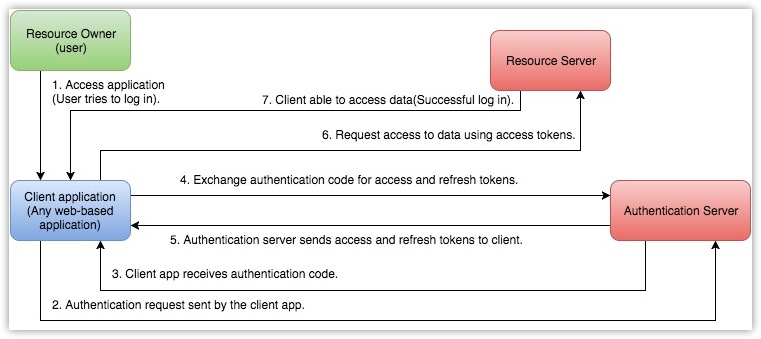
OAuth 2.0 关键术语
开始使用 EndpointCentralCloud APIs 前,您需要了解以下术语。
资源所有者
您账户的任意终端用户,能够授予对受保护资源的访问权限。
客户端
代表终端用户向资源服务器发送请求以访问受保护资源的应用程序。
客户端 ID
从连接的应用程序生成的消费者密钥。
客户端密钥
从连接的应用程序生成的消费者密钥秘密。
认证服务器
授权服务器向客户端提供必要的凭证(如访问令牌和刷新令牌)。
认证代码
授权服务器创建临时令牌并通过浏览器发送给客户端。客户端将使用此代码向授权服务器获取访问和刷新令牌。
令牌
访问令牌
发送至资源服务器以访问用户受保护资源的令牌。访问令牌为受保护资源提供安全且临时的访问权限,供应用程序向连接的应用发起请求。每个访问令牌仅有效一小时,且仅用于范围内描述的操作集。
刷新令牌
可用于获取新访问令牌的令牌。此令牌有效期无限,直到被终端用户撤销。
重要
用户访问令牌必须保密,因为它提供对受保护资源的访问。切勿在公共论坛、公共仓库或网站客户端代码(如 HTML 或 JavaScript)中暴露访问令牌。泄露可能导致数据被盗、丢失或损坏。
© 2025,Zoho Corporation Pvt. Ltd. 保留所有权利。
范围
范围限制客户端对受保护资源的访问级别。允许用户向客户端提供委托访问权限。EndpointCentralCloud APIs 使用选定的范围来控制客户端应用程序可访问的资源类型。
令牌通常携带不同范围以保障更高安全性。例如,可以生成创建或查看潜在客户、查看元数据的范围等。范围包含三个参数——服务名称、范围名称和操作类型。定义范围的格式是
scope=service_name.scope_name.operation_type 例如 DesktopCentralCloud.SOM.READ
这里,
DesktopCentralCloud 是 EndpointCentral 的服务 API 名称, 是范围名称, SOM 是操作类型。 读取 服务 API 名称是客户端发起 API 调用的服务名称。
- 范围名称是客户端需要访问的服务中的模块名称。
- 操作类型是客户端被允许执行的操作类型。可以是 CREATE、READ、UPDATE、DELETE。
- 独立范围
独立范围用于仅访问特定模块中的数据,而不访问其他模块。
https://accounts.zoho.com/oauth/v2/auth?scope=DesktopCentralCloud.SOM.UPDATE,DesktopCentralCloud.SOM.READ&client_id={client_id}&response_type=code&access_type={"offline"or"online"}&redirect_uri={redirect_uri}
上述范围仅允许用户从客户端 EndpointCentralCloud 账户访问 SOM 模块。
另外,您可以为每个模块设置具体权限,如读取、创建、更新或删除。例如:
scope=DesktopCentralCloud.SOM.READ(只读权限)
- scope=DesktopCentralCloud.CustomField.CREATE
- scope=DesktopCentralCloud.SOM.UPDATE
- scope=DesktopCentralCloud.CustomField.DELETE
- 多范围
访问令牌也可包含多个范围。多个范围之间用逗号分隔。多范围格式为 service_name.scope_name.OPERATION_TYPE,service_name.scope_name.OPERATION_TYPE。
例如 DesktopCentralCloud.SOM.READ,DesktopCentralCloud.Inventory.READ。
注册您的应用程序
© 2025,Zoho Corporation Pvt. Ltd. 保留所有权利。
在开始进行授权并使用 EndpointCentralCloud APIs 调用之前,您需要在 EndpointCentralCloud 注册您的应用程序。
注册步骤:
访问
Zoho Developer Console 并点击 开始使用 选择客户端类型并点击.
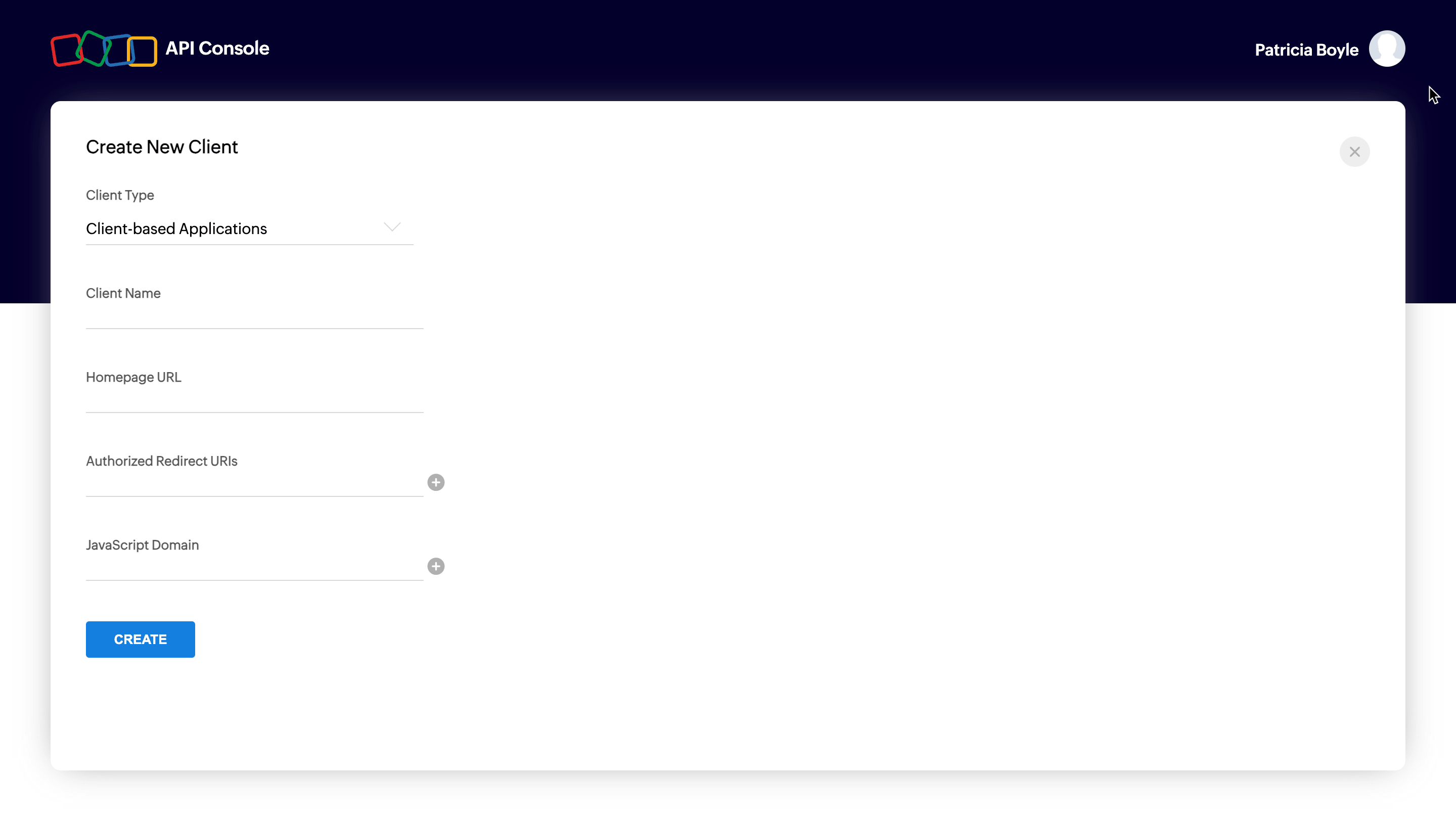
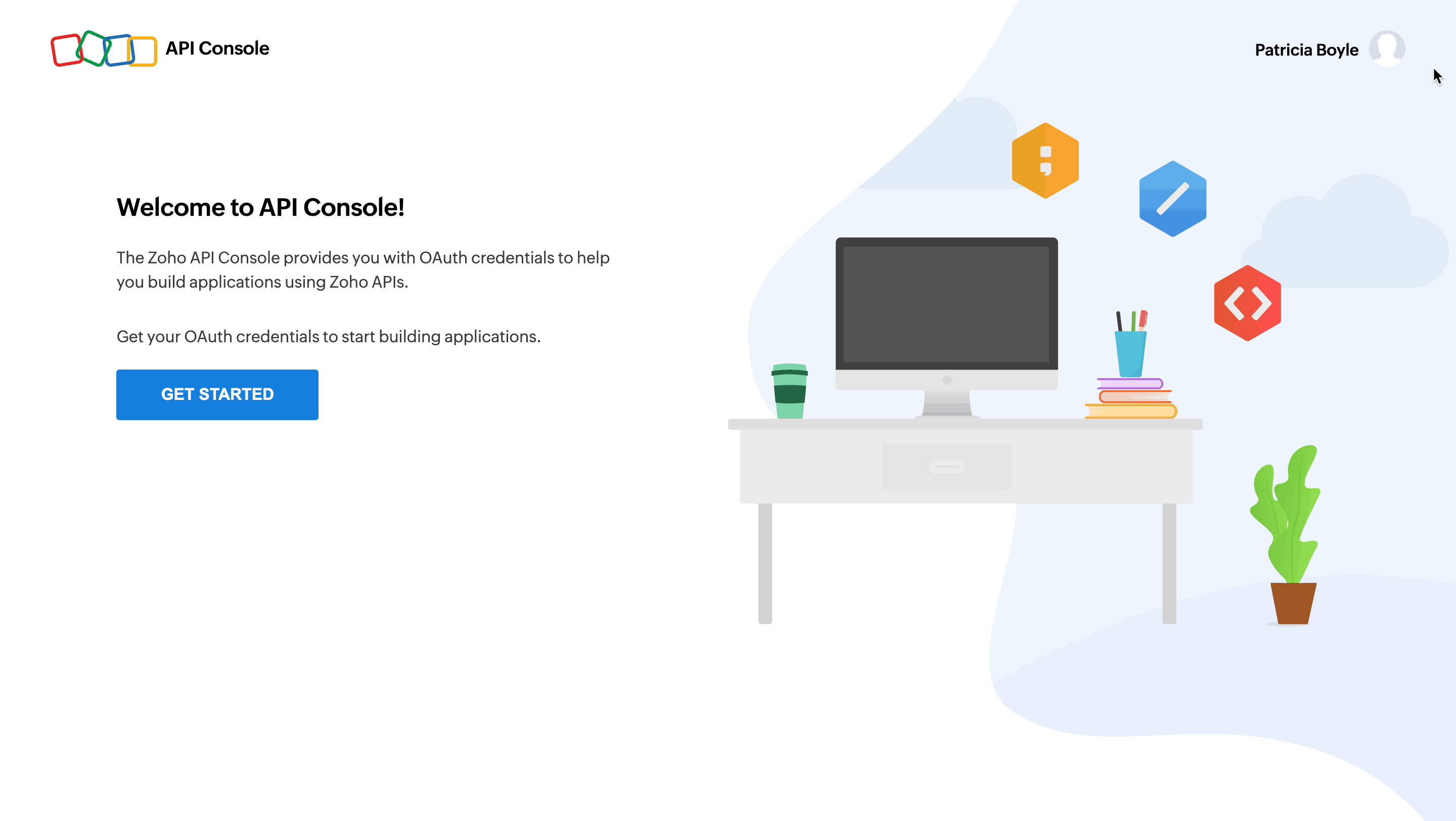 立即创建 客户端类型:
基于客户端的应用程序
完全在浏览器上运行,独立于 Web 服务器的应用程序。
基于服务器的应用程序
供多个 Zoho 账户使用的应用程序。该应用可能解决所有 Zoho 账户的特殊使用场景,需具备专用后台服务器和 Web 界面以处理授权流程和应用逻辑。此应用通过 Web 浏览器将用户重定向至 Zoho 进行授权。用户授权该应用代表其访问 Zoho 数据。应用将代表授权用户消费数据以达到预期用途。
移动端应用程序
运行于智能手机和平板设备上的应用程序。
非浏览器移动应用程序
运行于无浏览器设备(如智能电视和打印机)上的应用程序。
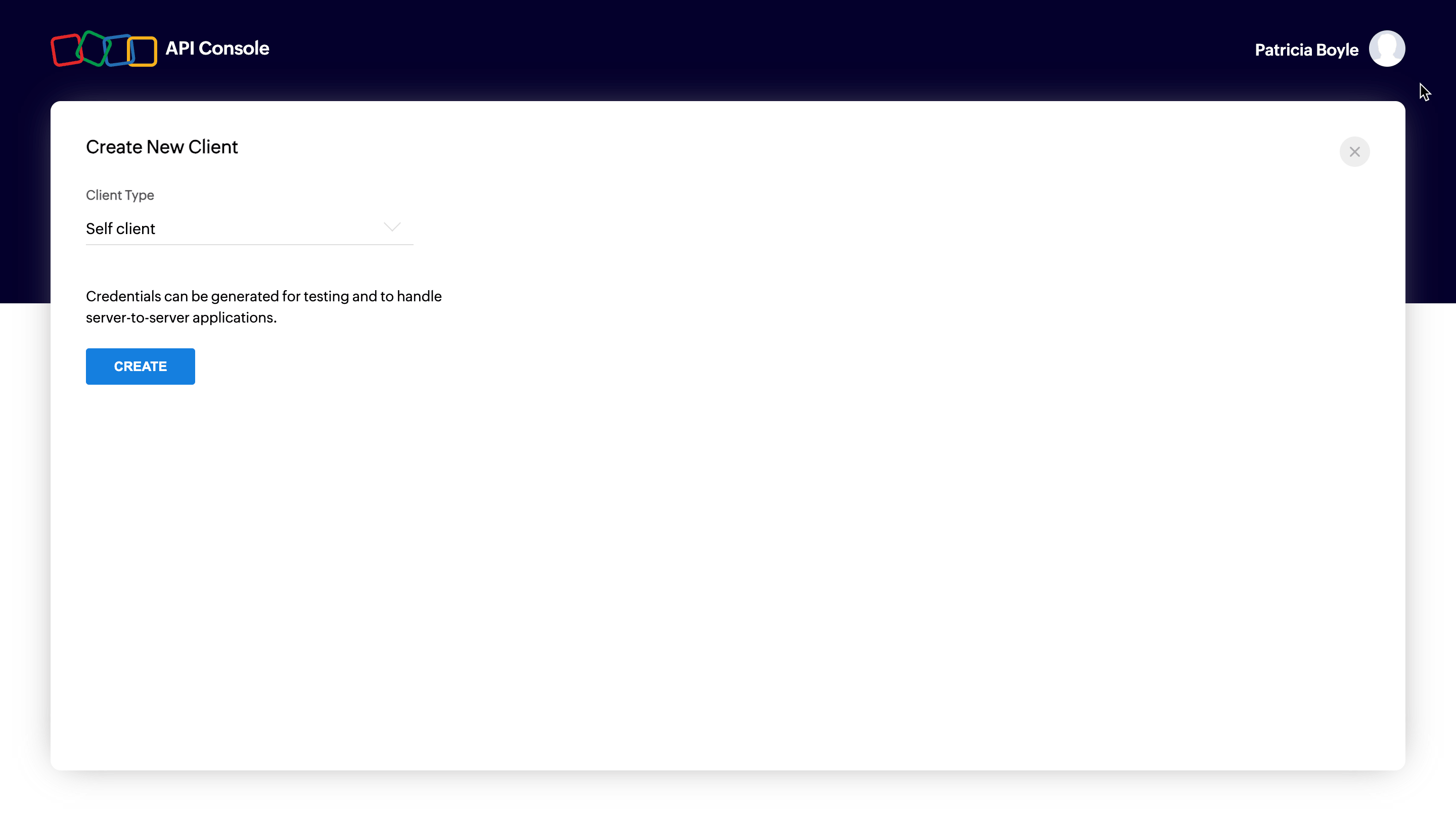
自有客户端
无重定向 URL 或 Web 界面,完全在后台操作不需用户交互的应用程序。自有客户端通常在应用与 Zoho 服务由同一人管理时使用,旨在建立它们之间的安全通信。
更多详情,请参阅
OAuth 概述 输入对应客户端类型的必填项并点击.
创建。 不同客户端类型的必填项
不同客户端类型的必填项如下。
客户端类型
| 客户端名称 | 主页 URL | 重定向 URI | JS 域 | JavaScript |
|---|---|---|---|---|
| 基于 Web | Y | Y | Y | Y |
| 不适用 | Y | Y | Y | 移动 |
| 设备 | Y | Y | Y | 移动 |
| 无重定向 URL 或 Web 界面,完全在后台操作不需用户交互的应用程序。自有客户端通常在应用与 Zoho 服务由同一人管理时使用,旨在建立它们之间的安全通信。 | N | N | N | 移动 |
| 基于服务器的应用 | Y | Y | N | 移动 |
基于客户端的应用
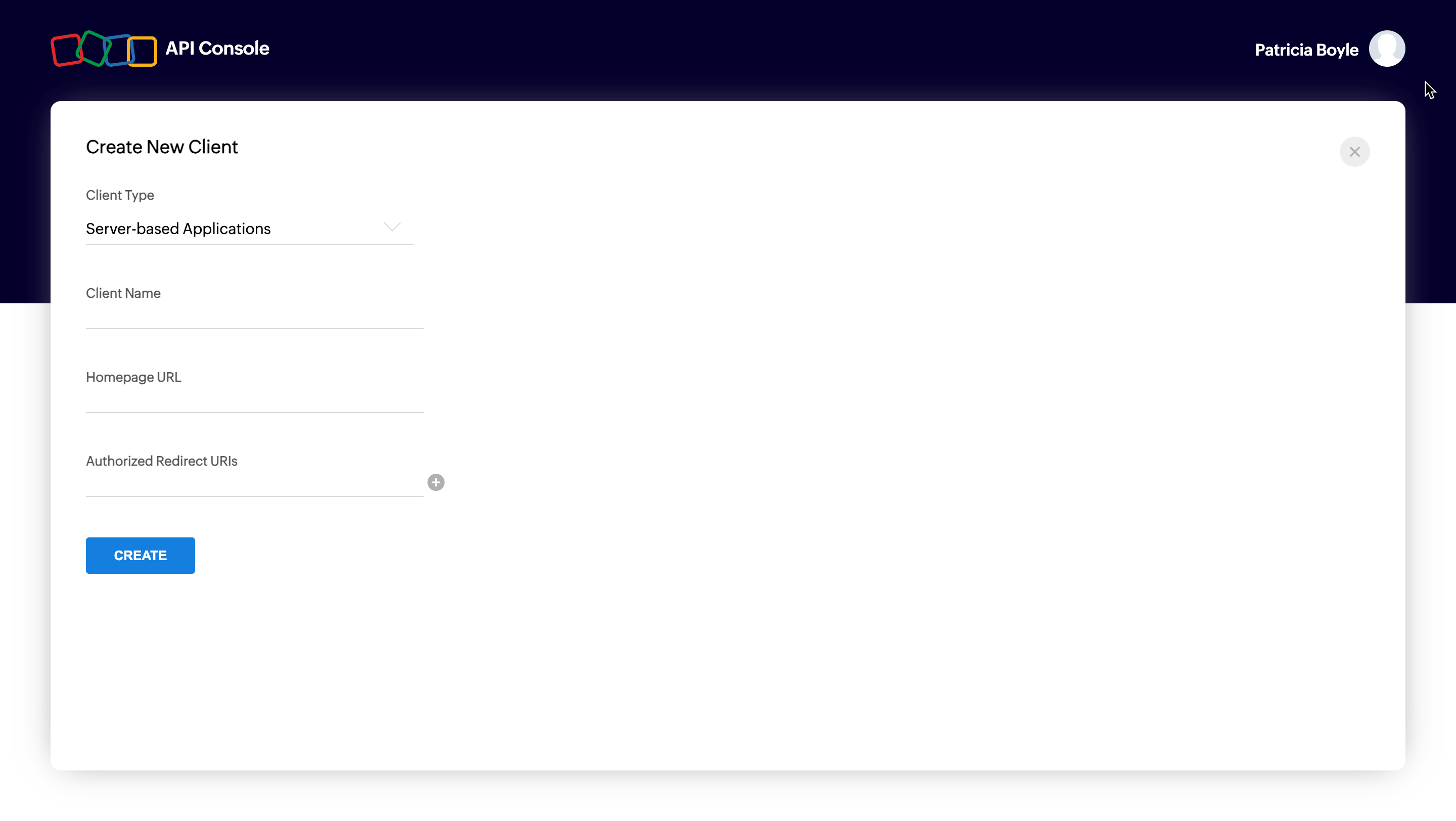
自有客户端
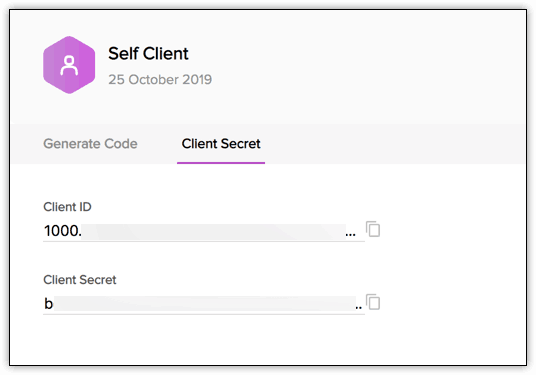
您将收到客户端凭证,如
和 客户端 ID 位于 客户端密钥 客户端密钥标签页。 可能的错误
错误
| 解决方案 | 输入有效的客户端名称 |
|---|---|
| 客户端名称含特殊字符。客户端名称不得包含除“_”和“&”以外的特殊字符。 | 输入有效的 JavaScript 域 URI |
| JavaScript 域不正确。请指定有效的 JavaScript 域,多域之间用逗号分隔,且必须以 'http' 或 'https' 开头。 | 输入有效的重定向 URI |
| 重定向 URI 不正确。请指定格式为 "https://www.your-domain.com/callback" 的有效重定向 URI。 | 输入有效的主页 URL |
| 主页 URL 无效。请指定格式为 "https://www.yourdomain.com" 的有效主页 URL。 | 授权请求 |
© 2025,Zoho Corporation Pvt. Ltd. 保留所有权利。
使用 EndpointCentralCloud APIs 时,用户必须认证应用程序,以便用
访问令牌 代表他们发起 API 调用。.
访问令牌必须通过授权代码获得。EndpointCentralCloud APIs 使用授权代码授权类型以提供对受保护资源的访问。
根据客户端类型,有两种生成授权代码的方式。
自有客户端选项
如果您的应用程序没有域和重定向URL,使用此方法生成特定组织的授权码。当您的应用程序是执行后端任务的独立服务器端应用程序时,也可以使用此选项。
访问 并点击 并使用您的 EndpoCentralCloud 用户名和密码登录。
从列表中选择 无重定向 URL 或 Web 界面,完全在后台操作不需用户交互的应用程序。自有客户端通常在应用与 Zoho 服务由同一人管理时使用,旨在建立它们之间的安全通信。 客户端类型,然后点击 立即创建.
点击 确定 弹出窗口中启用您的帐户自客户端。
现在,您的客户端ID和客户端密钥显示在“客户端密钥”选项卡下。
点击 生成代码 选项卡,并输入以逗号分隔的所需作用域。有关更多详细信息,请参阅我们的 范围列表。当您输入一个或多个错误的作用域时,系统会抛出“请输入有效的作用域”错误。
选择 有效时间 作为授权码的有效期限。请注意,超出此时间后,授权码将失效。
输入描述

点击 创建 以生成< code>

注意
- 授权码的生成是一次性过程,前提是您在授权码有效期内生成访问令牌和刷新令牌。
基于 Web 的应用程序
当您的应用程序由多个用户使用且授权期间需要用户干预时,选择基于Web的应用程序。对于此客户端类型,必须使用基于重定向的代码生成。在此授权流程中,
用户点击 使用Zoho登录 按钮访问任何第三方基于Web的应用程序。
应用程序将用户重定向到Zoho登录页面,用户输入Zoho凭据。
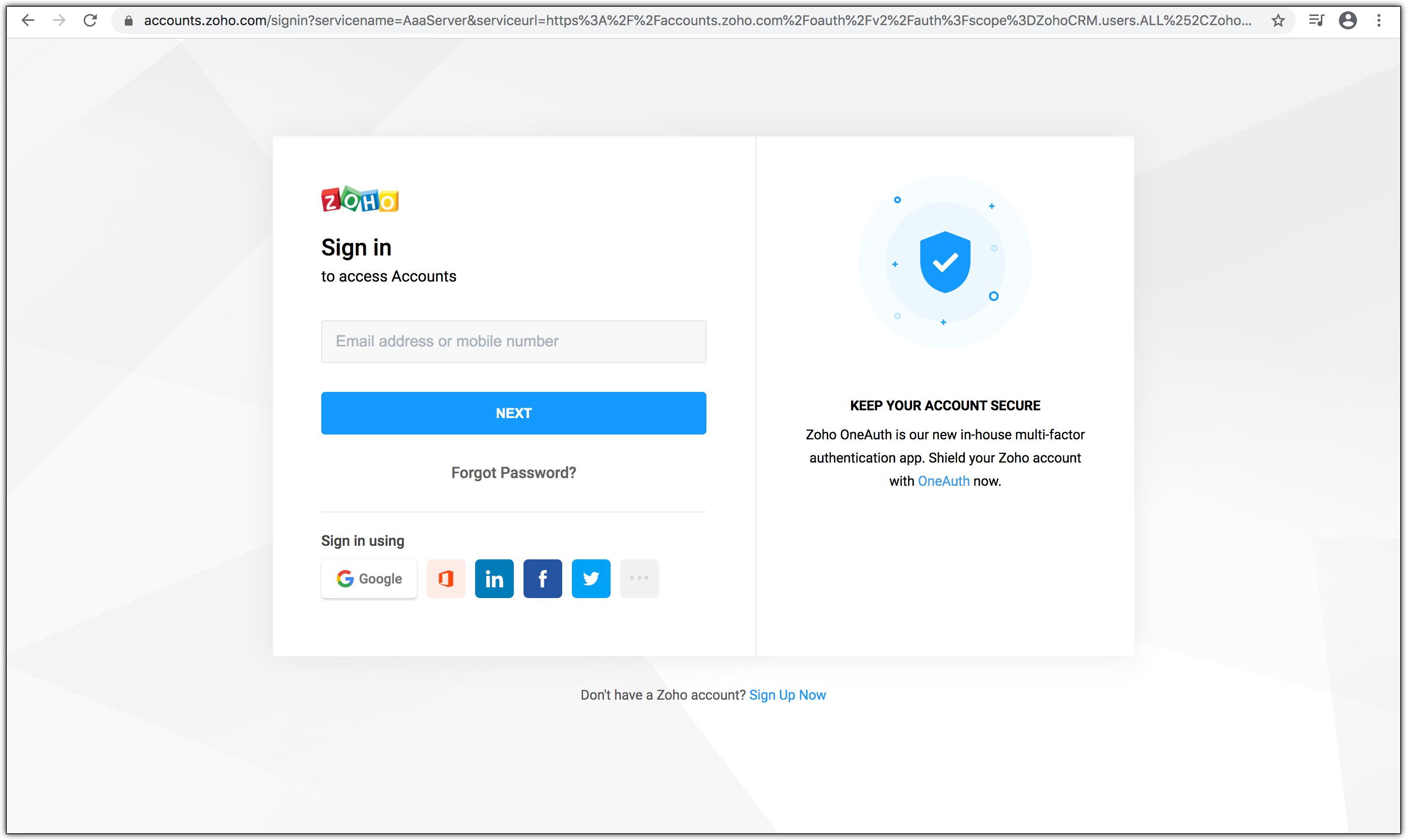
Web应用程序将用户重定向至Zoho OAuth服务器,并在帐户URL中包含所需的作用域:
https://accounts.zoho.com/oauth/v2/auth?scope=DesktopCentralCloud.Common.READ&client_id={client_id}&response_type=code&access_type={"offline"or"online"}&redirect_uri={redirect_uri}

页面显示 组织 以及 应用程序希望访问的数据(作用域)。此外,请求URL包含以下参数:
- scope:作用域限制应用程序访问受保护资源的权限级别。请参阅 范围 获取更多详细信息。
- client_id:客户端ID(消费者密钥),您在客户端注册期间获得。
- response_type:此参数的值为 code
- access_type:输入 access_type 为 online 或者 offline。如果要生成刷新令牌,请将此值设置为 offline.
- redirect_uri:授权服务器将在浏览器中重定向到此URI,并附带授权码。它必须与API控制台中注册的URI相同,且应以https://或https://开头。例如: https://www.zylker.com/oauthredirect
- 根据用户的登录信息,系统会自动检测用户域并使用特定域的身份验证URL以获取授权码。
当用户点击“接受”时: 应用程序获得授权。授权码作为参数发送至redirect_uri。

- 您的后端脚本需要从上述URL存储以下详细信息:
- code={authorization_code} - 用于生成访问令牌和刷新令牌。
- location={domain} - 告诉您用户的域,您需要从该域发起API调用。
- accounts-server={accounts_URL} - 这是您的帐户URL,您需要使用它来 生成访问令牌和刷新令牌。.
- 应用程序用授权码交换访问令牌。
- 当用户点击“拒绝”时: 浏览器将带参数 error=access_denied重定向到redirect URI,您的应用被拒绝访问用户的Zoho服务数据。
注意
- 授权码仅在 两分钟内有效。有关详细信息,请参阅 令牌有效期 页面。
- 授权URL中包含用户作用域。您可以根据需要更改作用域。
错误
| 解决方案 | 输入有效的客户端名称 |
|---|---|
| ERROR_invalid_response_type | “response_type”键的值不是“code”。请将值更新为“code”。(或)您未在请求中传递必须的键。请在请求中传递所有必需的键以生成授权码。 |
| ERROR_invalid_client | 客户端ID错误或为空。请传递正确的客户端ID。您可以从开发者控制台检查客户端ID。 |
| ERROR_invalid_redirect_uri | 传递的重定向URI值与开发者控制台中注册的不匹配。请传递正确的重定向URI。 |
| ERROR_invalid_scope | 作用域无效。请传递有效的作用域。您可以参考作用域列表 这里. |
© 2025,Zoho Corporation Pvt. Ltd. 保留所有权利。
生成访问令牌和刷新令牌
OAuth2.0请求通常通过访问令牌进行身份验证,访问令牌作为承载令牌传递。要使用此访问令牌,您需要构造普通的HTTP请求,并在Authorization头中包含关键字Bearer和令牌值。
生成访问令牌和刷新令牌:
使用以下URL发出POST请求。发出请求时,将{accounts_URL}替换为您的特定域的 Zoho帐户URL 。
{accounts_URL}/oauth/v2/token
注意: 出于安全原因,请在请求主体中以 form-data.
格式传递以下参数。
| 请求参数 | 描述 |
|---|---|
| 参数 | grant_type 输入值为. |
| client_id | "authorization_code" |
| 指定从连接的应用获得的client-id。 | client_secret |
| redirect_uri | 指定从连接的应用获得的client-secret。 |
| code | 指定在应用注册时注册的回调URL。 输入您在发出. |
授权码请求后收到的授权码。
{
"access_token": "{access_token}",
"refresh_token": "{refresh_token}",
"api_domain": "https://www.zohoapis.com",
"token_type": "Bearer",
"expires_in": 3600
}如果请求成功,您将收到以下内容:
| 请求参数 | 描述 |
|---|---|
| 响应参数 | access_token |
| 访问EndpointCentralCloud API的访问令牌。 | refresh_token |
| 用于获取新访问令牌的刷新令牌。 | expires_in |
| 访问令牌过期前的时间,单位为秒。 | token_type |
令牌类型。"Bearer"表示这是访问令牌。 认证完成后,一旦您的应用收到访问令牌,请在发送到EndpointCentralCloud API的HTTP授权头中带上令牌,格式为 Zoho-oauthtoken {access_token}
注意
- ,用于每个端点(每个请求)。 每个访问令牌仅有效 一小时
- ,且仅可用于所定义作用域内的操作。 令牌有效期 刷新令牌不会过期。令牌过期时,使用它刷新访问令牌。有关令牌有效性的更多详情,请参阅
错误
| 解决方案 | 输入有效的客户端名称 |
|---|---|
| 页面。 | invalid_client |
| 您提供了无效的客户端ID或密钥。请指定正确的客户端ID和密钥。(或者)存在域不匹配。您在某个域(US)注册客户端并生成授权码,但在另一个域(EU)生成令牌。请确保使用相同域URL在同一域中生成授权码、访问令牌和刷新令牌,或者启用多数据中心(Multi-DC)以从任一域生成令牌。(或者)启用多数据中心时传递了错误的客户端密钥。每个数据中心都有唯一的客户端密钥。请确保为该数据中心传递正确的客户端密钥。 | invalid_code |
| 授权码已过期。基于重定向的流程中授权码仅有效两分钟。请在授权码过期前生成访问和刷新令牌。(或者)您已使用过该授权码。授权码只能使用一次。(或者)用于生成新访问令牌的刷新令牌错误或已被撤销。刷新访问令牌时请传递正确的刷新令牌值。 | invalid_redirect_uri |
© 2025,Zoho Corporation Pvt. Ltd. 保留所有权利。
请求中的重定向URI与开发者控制台注册的不匹配。请在请求中指定正确的重定向URI。
管理OAuth令牌
授权码生成后,按以下流程刷新过期访问令牌并在必要时撤销刷新令牌。
刷新访问令牌
访问令牌生成后一个小时过期。要生成新访问令牌,请使用之前生成的刷新令牌。
发出以下URL的POST请求:
{Accounts_URL}/oauth/v2/token?refresh_token={refresh_token}&client_id={client_id}&client_secret={client_secret}&grant_type=refresh_token Zoho帐户URL 您必须使用您的特定域
来刷新访问令牌。
{
"access_token": "{new_access_token}",
"expires_in": 3600,
"api_domain": "https://www.zohoapis.com",
"token_type": "Bearer"
}如果请求成功,您将收到以下输出:
撤销刷新令牌
访问令牌生成后一个小时过期。要生成新访问令牌,请使用之前生成的刷新令牌。
如果您想撤销刷新令牌,
{Accounts_URL}/oauth/v2/token?refresh_token={refresh_token}&client_id={client_id}&client_secret={client_secret}&grant_type=refresh_token Zoho帐户URL {Accounts_URL}/oauth/v2/token/revoke?token={refresh_token}
© 2025,Zoho Corporation Pvt. Ltd. 保留所有权利。
增量授权
用于撤销您的刷新令牌。
- 递增授权是一种OAuth策略,允许客户端根据需要请求特定授权作用域。这意味着客户端无需一开始请求所有可能需要的作用域,从而避免影响用户体验。递增授权被视为OAuth授权请求中的最佳实践,因为:
- 用户在初始阶段不会被过多的作用域淹没
用户可以控制共享的数据量 有关在您的应用中实现递增授权的详细信息,请参阅 刷新令牌不会过期。令牌过期时,使用它刷新访问令牌。有关令牌有效性的更多详情,请参阅
© 2025,Zoho Corporation Pvt. Ltd. 保留所有权利。
令牌有效期
Zoho Accounts递增授权
- 授权码
- 授权码是一次性使用令牌,默认有效期为三分钟。如果要延长有效期,可在API控制台生成令牌时从下拉菜单选择所需时间(仅适用于自客户端)。
访问令牌
- 每个客户端ID最多可在10分钟内生成10个授权码。达到限制时,剩余时间将抛出“access_denied”异常。
- 每个访问令牌有效期为一小时。 无效的 OAUTHTOKEN 将抛出异常。
- 您可以在 10 分钟内从刷新令牌生成最多 10 个访问令牌。
- 如果达到 10 分钟的限流限制, 访问被拒绝 将抛出错误。请重用有效令牌以避免此异常。
{
"error_description":"You have made too many requests continuously. Please try again after some time.",
"error":"Access Denied"
}刷新令牌
- 刷新令牌在用户撤销之前不会过期。
- 每个用户最多可以存储 20 个刷新令牌。
- 当生成第 21 个刷新令牌时,第一个创建的刷新令牌将被作废。
© 2025,Zoho Corporation Pvt. Ltd. 保留所有权利。
多个数据中心
Endpoint Central cloud 托管在多个数据中心,因此可在不同的域名上使用。共有 9 个不同的域名 用于 Endpoint Central cloud API,您可以使用适合您的那个域名。
数据中心 | 域名 | EndpointCentral_Server_URI | ZohoAccounts_Server_URI | DeveloperConsole |
|---|---|---|---|---|
美国。 | .com | |||
欧洲 | .eu | |||
印度 | .in | |||
澳大利亚 | .com.au | |||
中国 | .cn | |||
日本 | .jp | |||
加拿大 | .ca | |||
英国 | .uk | |||
沙特阿拉伯 | .sa |
本页面上的 API 适用于托管在 .com 域名下的组织。如果您的组织位于其他域名, 请在使用 API 端点之前将 “.com” 替换为适用的域名。
注意: 您可以通过访问 Endpoint Central 时检查 URL 来确定您访问的是哪个域名。
© 2025,Zoho Corporation Pvt. Ltd. 保留所有权利。
Open API 规范 (OAS)
概述
OpenAPI 规范 (OAS) 是描述 RESTful API 的标准化方式。它以 JSON 或 YAML 格式定义 API 结构、认证方法、端点、请求和响应格式。
为什么使用 Open API 规范?
Open API 规范旨在提供:
API 端点:指定请求 URL 和 HTTP 方法,以及发起 API 调用请求所需的可选和必填参数。所有可能的 HTTP 响应代码的响应格式均可获知。
授权:支持 OAuth 认证以实现安全访问。
请求和响应格式:为 GET、POST、PUT 和 DELETE 操作提供标准化请求格式,详细的响应模式解释返回的数据结构,以及帮助开发者调试 API 请求的错误处理指南。
Swagger API Hub
有多种工具可用于处理 OpenAPI 规范 (OAS) 文件。本指南中,使用 Swagger API Hub 演示如何使用 OpenAPI 规范版本 3.0.0 用于Endpoint.
CentralCloud APIs
将 OAS 文件导入 Swagger 的步骤
第 1 步:访问 Swagger UI 在您的网页浏览器中打开 Swagger UI 。您可以使用公共 Swagger Editor

或您组织托管的 Swagger UI 实例继续。
第 2 步:将 OAS 文件导入 Swagger 在 Swagger 中,从侧边导航菜单中点击 新建 ,然后选择 位于 导入接口文档 选项。

第 3 步:上传 OAS 文件以创建 Swagger API 文档
导入文件后,点击 上传文件 选项以生成 Swagger API 文档。

第 4 步:测试 API
在 Swagger 中创建 API 文档后,使用 在您的网页浏览器中打开 发送示例请求并验证 API 响应。

© 2025,Zoho Corporation Pvt. Ltd. 保留所有权利。
API 集合
什么是 API 集合?
REST API Postman 集合是一组经过精选的 API 请求,集合在一个文件中。这些预定义请求使您能够高效地测试和探索不同环境和组织中的 API。
为什么使用 API 集合?
手动每次查阅完整 API 文档以配置环境、变量、认证和请求详情既耗时又容易出错。
使用 Postman API 集合简化了此过程,提供现成的请求,使得 API 探索更快,同时大大减少配置错误的可能性。
导入 Postman 集合的步骤
第 1 步: 下载并打开 Postman 应用程序。
第 2 步: 导入集合
导航至 集合 选项卡。
点击 ,然后选择 并选择集合文件。

第 3 步: 导入下载的集合文件
将集合文件拖放到 Postman 以完成导入。

第 4 步: 生成 OAuth 令牌
导入 Postman 集合后,参照 OAuth 令牌生成页面,使用所需的权限范围生成 OAuth 令牌。
生成令牌后,在 Postman 集合中添加一个 授权 头部,值设置为:
Zoho-oauthtoken <access-token>
第 5 步: 使用 OAuth 令牌发送请求
头部配置好 OAuth 令牌后,填写所需的请求查询参数及请求体(如适用)。 授权 完成请求详情后,发送请求以获取响应,如下所示
获取系统健康策略

© 2025,Zoho Corporation Pvt. Ltd. 保留所有权利。
获取 Endpoint Central 中当前配置的系统健康策略
请求 URL
https://
{serverurl}权限范围/api/1.4/patch/healthpolicy
DesktopCentralCloud.PatchMgmt.READ
头部
Authorization: Zoho-oauthtoken d92d4xxxxxxxxxxxxx15f52
- HTTP 代码 200
如果请求成功,您将收到以下内容:
响应体 - application/json
可能的 HTTP 状态码
HTTP 代码
200 成功
获取漏洞列表
获取系统中检测到的漏洞的完整列表,并提供多种过滤选项以便精准查询
DesktopCentralCloud.VulnerabilityMgmt.READ
https://
{serverurl}权限范围/dcapi/threats/vulnerabilities
DesktopCentralCloud.PatchMgmt.READ
- 查询参数
Authorization: Zoho-oauthtoken d92d4xxxxxxxxxxxxx15f52
- HTTP 代码 200
格式传递以下参数。
严重性
可选 可能的 HTTP 状态码 根据提供的严重性过滤漏洞。
发布时间
publishedtime 可能的 HTTP 状态码 根据提供的严重性过滤漏洞。
根据提供的发布时间过滤漏洞。
cvss_2_score number 根据提供的严重性过滤漏洞。
根据提供的 CVSS 2.0 分数过滤漏洞
os_platform 可能的 HTTP 状态码 根据提供的严重性过滤漏洞。
根据提供的平台过滤漏洞。
supportedtime 可能的 HTTP 状态码 根据提供的严重性过滤漏洞。
根据提供的支持时间过滤漏洞。
exploit_status 可能的 HTTP 状态码 根据提供的严重性过滤漏洞。
根据提供的漏洞利用状态过滤漏洞。
updatedtime 可能的 HTTP 状态码 根据提供的严重性过滤漏洞。
根据批准时间过滤漏洞。
pageLimit 可能的 HTTP 状态码 根据提供的严重性过滤漏洞。
每页显示提供数量的漏洞详细信息。
patchid 可能的 HTTP 状态码 根据提供的严重性过滤漏洞。
根据提供的补丁 ID 过滤漏洞。
vulnerabilityid 可能的 HTTP 状态码 根据提供的严重性过滤漏洞。
根据提供的漏洞 ID 过滤漏洞。
vulnerabilityname 可能的 HTTP 状态码 根据提供的严重性过滤漏洞。
过滤包含提供的漏洞名称的漏洞。
solution 可能的 HTTP 状态码 根据提供的严重性过滤漏洞。
根据提供的解决方案过滤漏洞。
reboot_required 可能的 HTTP 状态码 根据提供的严重性过滤漏洞。
根据提供的重启选项过滤漏洞。
cveids 可能的 HTTP 状态码 根据提供的严重性过滤漏洞。
根据提供的 CVE ID 过滤漏洞。
page 可能的 HTTP 状态码 根据提供的严重性过滤漏洞。
显示提供的页码内容。
cvss_3_score number 根据提供的严重性过滤漏洞。
根据提供的 CVSS 3.0 分数过滤漏洞
patch_availability 可能的 HTTP 状态码 根据提供的严重性过滤漏洞。
根据提供的补丁可用性过滤漏洞。
如果请求成功,您将收到以下内容:
响应体 - application/json
可能的 HTTP 状态码
HTTP 代码
200 成功
获取漏洞列表
检索网络内检测到的所有文件活动。
本 API 获取发生在所有网络设备上的文件相关操作(创建、打开、修改、删除等)的详细列表。同时提供筛选器,可按事件类型、设备、文件扩展名、域、计算机/组和时间范围缩小结果。
https://
{serverurl}权限范围/api/1.4/reports/dcm/filetrace
DesktopCentralCloud.PatchMgmt.READ
DesktopCentralCloud.DeviceControl.READ
Authorization: Zoho-oauthtoken d92d4xxxxxxxxxxxxx15f52
- HTTP 代码 200
格式传递以下参数。
严重性
fileExtnGrp 可能的 HTTP 状态码 根据提供的严重性过滤漏洞。
按文件扩展名组过滤文件活动。
period integer 根据提供的严重性过滤漏洞。
基于时间段过滤
0 - 本周
1 - 本月
2 - 本年
3 - 上周
4 - 上月
5 - 最近两个月
6 - 最近三个月
7 - 最近六个月
8 - 最近九个月
9 - 去年
gid 可能的 HTTP 状态码 根据提供的严重性过滤漏洞。
过滤连接到特定计算机组的设备。
组 ID 可从以下位置获取:
/api/1.4/customgroup/getCGList
fileExtn 可能的 HTTP 状态码 根据提供的严重性过滤漏洞。
按文件扩展名过滤文件活动。
numberOfDays 可能的 HTTP 状态码 根据提供的严重性过滤漏洞。
过滤过去 N 天内发生的文件活动。
pagelimit 可能的 HTTP 状态码 根据提供的严重性过滤漏洞。
每页记录数。
computer 可能的 HTTP 状态码 根据提供的严重性过滤漏洞。
过滤连接到特定计算机的设备。
资源 ID 可从以下位置获取:
:Key: resource_id /api/1.4/som/computers
isblocked integer 根据提供的严重性过滤漏洞。
0 - 允许
1 - 阻止
dipId 可能的 HTTP 状态码 根据提供的严重性过滤漏洞。
通过设备实例路径过滤特定设备的文件活动。
domain 可能的 HTTP 状态码 根据提供的严重性过滤漏洞。
按域名过滤记录。
page 可能的 HTTP 状态码 根据提供的严重性过滤漏洞。
分页的当前页码。
event integer 根据提供的严重性过滤漏洞。
按文件事件类型过滤
0 - 未知
1 - 创建
2 - 打开
3 - 删除
4 - 重命名
5 - 修改
6 - 读取
7 - 移动
8 - 复制
如果请求成功,您将收到以下内容:
响应体 - application/json
object
显示子属性
response_code integer
响应代码。
message_type integer
模块代码
message_response object
响应。
显示子属性
total integer
记录总数。
limit integer
本次响应中包含的最大记录数。
page integer
页码。
dcm array
DCM。
显示子属性
object
显示子属性
created_time integer
创建时间。
extension 可能的 HTTP 状态码
文件扩展名
is_directory integer
是否为目录。
file_name 可能的 HTTP 状态码
文件名(例如,metadata.xml)
managedcomputer.friendly_name 可能的 HTTP 状态码
计算机友好名称
domain_netbios_name 可能的 HTTP 状态码
域/工作组
userresource.name 可能的 HTTP 状态码
执行动作的用户
file_size integer
文件大小(字节)
event_notified_time long
事件检测时间
device_name 可能的 HTTP 状态码
访问的设备名称
source_file_path 可能的 HTTP 状态码
原始文件路径
operation_blocked integer
文件操作是否被阻止
0-允许,
1-阻止)
event_type 可能的 HTTP 状态码
文件事件类型(读取/写入/删除)
modified_time integer
修改时间。
new_file_name 可能的 HTTP 状态码
新创建文件的名称
process_name 可能的 HTTP 状态码
访问文件的进程
message_version integer
Api 版本。
status integer
Api 调用状态。
HTTP 代码
200 成功
获取漏洞列表
获取用户数据类型长度
本 API 可用于获取特定自定义字段的用户数据类型允许的最大字符数
https://
{serverurl}权限范围/dcapi/customColumn/udtLength
DesktopCentralCloud.PatchMgmt.READ
DesktopCentralCloud.CustomField.READ
Authorization: Zoho-oauthtoken d92d4xxxxxxxxxxxxx15f52
- HTTP 代码 200
格式传递以下参数。
- 请求头
accept 可能的 HTTP 状态码 必填application/udtLengthDetails.v1+jsonapplication/udtLengthDetails.v1+json已复制!
application/udtLengthDetails.v1+json
严重性
actualColumnName 可能的 HTTP 状态码 必填
需要获取用户数据类型长度的自定义字段列的实际名称
actualColumnName 可从以下响应中的 columName 键获取 /dcapi/customFields/computers/{ID}
tableName 可能的 HTTP 状态码 必填
表名可以是下面列表中提供的任何名称
1.ManagedComputerCustomFields- 如果自定义字段是在计算机视图中创建
2.InvSWCustomFields- 如果在软件视图中创建了自定义字段。
如果请求成功,您将收到以下内容:
响应体 - application/json
object
显示子属性
lengthOfUDT 可能的 HTTP 状态码
返回给定自定义字段的用户数据类型的最大长度
HTTP 代码
200 成功
获取漏洞列表
卸载所有系统中特定的补丁
卸载所有系统中特定的补丁
https://
{serverurl}权限范围/api/1.4/patch/uninstallpatch
DesktopCentralCloud.PatchMgmt.READ
DesktopCentralCloud.PatchMgmt.UPDATE
Authorization: Zoho-oauthtoken d92d4xxxxxxxxxxxxx15f52
- HTTP 代码 200
格式传递以下参数。
- 请求体
application/json
object
显示子属性
PatchIDs array
输入您网络中检测到的缺失补丁列表,例如 PatchIDs:[103980,103981,103980]
ConfigName 可能的 HTTP 状态码
提供安装补丁配置的名称,例如 ConfigName:API install patch test1
actionToPerform 可能的 HTTP 状态码
这将根据提供的条件启动定义的安装补丁配置的部署到指定目标,例如 actionToPerform:Deploy/ Deploy Immediately/ Draft,Deploy:部署将在代理与服务器联系时启动,Deploy Immediately:立即部署,无需等待代理联系,Draft:将配置保存为草稿。
ConfigDescription 可能的 HTTP 状态码
提供安装补丁配置的描述,例如 ConfigDescription:API test
DeploymentPolicyTemplateID 可能的 HTTP 状态码
通过执行以下 API 获取部署策略 ID,api/1.4/patch/deploymentpolicies 并提供 template_id 参数的值。此参数为必填。
如果请求成功,您将收到以下内容:
响应体 - application/json
可能的 HTTP 状态码
HTTP 代码
200 成功
获取漏洞列表
获取补丁部署策略列表
检索 Endpoint Central 中配置的所有补丁部署策略列表
https://
{serverurl}权限范围/api/1.4/patch/deploymentpolicies
DesktopCentralCloud.PatchMgmt.READ
头部
Authorization: Zoho-oauthtoken d92d4xxxxxxxxxxxxx15f52
- HTTP 代码 200
如果请求成功,您将收到以下内容:
响应体 - application/json
可能的 HTTP 状态码
HTTP 代码
200 成功
获取漏洞列表
检索所有已下载补丁的详细信息
检索所有已下载补丁的详细信息
https://
{serverurl}权限范围/api/1.4/patch/downloadedpatches
DesktopCentralCloud.PatchMgmt.READ
头部
Authorization: Zoho-oauthtoken d92d4xxxxxxxxxxxxx15f52
- HTTP 代码 200
如果请求成功,您将收到以下内容:
响应体 - application/json
可能的 HTTP 状态码
HTTP 代码
200 成功
获取漏洞列表
获取所有自定义数据类型名称列表
此 API 可用于获取现有自定义数据类型列表,有助于在创建或更新自定义字段时管理和重用数据类型。
https://
{serverurl}权限范围/dcapi/customColumn/customColumnPage
DesktopCentralCloud.PatchMgmt.READ
DesktopCentralCloud.CustomField.READ
Authorization: Zoho-oauthtoken d92d4xxxxxxxxxxxxx15f52
- HTTP 代码 200
格式传递以下参数。
- 请求头
accept 可能的 HTTP 状态码 必填application/customColumnDetails.v1+jsonapplication/customColumnDetails.v1+json已复制!
application/customColumnDetails.v1+json
如果请求成功,您将收到以下内容:
响应体 - application/json
object
显示子属性
customDataTypeList array
包含可用自定义数据类型列表的数组
containsCustomDataType 可能的 HTTP 状态码
布尔值,表示是否存在自定义数据类型(存在为 true,不存在为 false)
HTTP 代码
200 成功
获取漏洞列表
检索包含安装数量、安装程序类型及卸载支持详情的禁止软件列表
Inventory Prohibited Software API 返回网络中检测到的禁止应用程序信息,包括总安装数、安装程序格式及是否支持卸载
https://
{serverurl}权限范围/api/1.4/inventory/prohibitedsw
DesktopCentralCloud.PatchMgmt.READ
DesktopCentralCloud.Inventory.READ
Authorization: Zoho-oauthtoken d92d4xxxxxxxxxxxxx15f52
- HTTP 代码 200
格式传递以下参数。
严重性
uninstallsupportfilter 可能的 HTTP 状态码 根据提供的严重性过滤漏洞。
是:支持卸载。
否:不支持卸载。
installerformatfilter 可能的 HTTP 状态码 根据提供的严重性过滤漏洞。
MSI:通过 MSI 安装程序安装。
EXE:通过 EXE 安装程序安装。
如果请求成功,您将收到以下内容:
响应体 - application/json
object
显示子属性
response_code integer
HTTP 响应代码。例如:200 - 成功,400 - 错误请求,500 - 服务器错误
message_type 可能的 HTTP 状态码
消息类型 - 表示响应是针对 Inventory 禁止软件的。
message_response object
响应消息,包含禁止软件列表
显示子属性
total 可能的 HTTP 状态码
发现的计算机总数
limit 可能的 HTTP 状态码
每页返回的条目数
page 可能的 HTTP 状态码
分页响应中的当前页码
computers array
具有禁止软件的计算机列表
显示子属性
object
显示子属性
not_requested_count 可能的 HTTP 状态码
未提交审批的禁止软件安装数量
uninstall_remarks 可能的 HTTP 状态码
卸载状态备注
sw_usage_type 可能的 HTTP 状态码
软件合规状态:
1 - 允许。
2 - 禁止。
0 - 未分配。
total_prohibited_count 可能的 HTTP 状态码
计算机上发现的禁止软件总数
branch_office_id integer
分支机构标识
resource_id_string 可能的 HTTP 状态码
资源标识的字符串表示形式。
model 可能的 HTTP 状态码
计算机型号
installed_date integer
软件安装时间戳
software_version 可能的 HTTP 状态码
安装的软件版本
software_name 可能的 HTTP 状态码
计算机上检测到的禁止软件名称
computer_resource_id integer
计算机资源标识
asset_tag 可能的 HTTP 状态码
计算机资产标签
os_platform 可能的 HTTP 状态码
操作系统平台标识
agent_logged_on_users 可能的 HTTP 状态码
当前登录计算机的用户
display_name 可能的 HTTP 状态码
安装软件的显示名称
osflavor_id integer
表示操作系统版本或版本类型的标识符。
computer_description 可能的 HTTP 状态码
计算机描述
approved_prohibited_count 可能的 HTTP 状态码
管理员批准异常的禁止软件请求数量。
no_of_processors 可能的 HTTP 状态码
计算机中的处理器数量
system_type 可能的 HTTP 状态码
计算机系统类型(例如,基于 x64 的 PC)
domain 可能的 HTTP 状态码
域名
last_successful_scan integer
最近成功扫描的时间戳
computer_status_update_time integer
最近计算机状态更新时间戳
computer_status 可能的 HTTP 状态码
计算机状态
total_requested_count 可能的 HTTP 状态码
用户请求批准的禁止软件安装数量。
branch_office_name 可能的 HTTP 状态码
分支机构名称
user_name 可能的 HTTP 状态码
用户名
rejected_prohibited_count 可能的 HTTP 状态码
被拒绝的禁止软件计数
domain_netbios_name 可能的 HTTP 状态码
NetBIOS 域名
user_component_id integer
用户组件的唯一标识符
fqdn_name 可能的 HTTP 状态码
计算机的完全限定域名。
primary_owner_name 可能的 HTTP 状态码
计算机的主要所有者
pending_approval_count 可能的 HTTP 状态码
当前等待管理员批准的禁止软件请求数量。
boot_up_state 可能的 HTTP 状态码
计算机启动状态
mac_address 可能的 HTTP 状态码
计算机的 MAC 地址
architecture 可能的 HTTP 状态码
系统架构,例如(32 位,64 位)
managedcomputer.friendly_name 可能的 HTTP 状态码
受管理计算机的用户友好名称。
last_sync_time integer
最近与服务器同步的时间戳
ip_address 可能的 HTTP 状态码
计算机的 IP 地址
sw_family 可能的 HTTP 状态码
软件系列标识
servicetag 可能的 HTTP 状态码
计算机服务标签
total_ram_memory integer
RAM 总内存(以字节为单位)
resource_id integer
计算机的唯一资源标识符
os_name 可能的 HTTP 状态码
计算机上安装的操作系统。
computer_live_status 可能的 HTTP 状态码
计算机在线状态:
1 - 在线。
2 - 离线。
3 - 未知
location 可能的 HTTP 状态码
软件位置路径
uninstall_status 可能的 HTTP 状态码
软件卸载状态
resource_name 可能的 HTTP 状态码
计算机资源名称
customer_id integer
客户唯一标识符
prohibited_sw_resource_id integer
与禁止软件相关的资源 ID
message_version 可能的 HTTP 状态码
API 版本
status 可能的 HTTP 状态码
请求状态(例如,成功,失败)
HTTP 代码
200 成功
获取漏洞列表
获取库存过滤参数列表
此API提供硬件制造商、软件制造商、软件类别及其他与库存相关API中使用的相关过滤参数列表
https://
{serverurl}权限范围/api/1.4/inventory/filterParams
DesktopCentralCloud.PatchMgmt.READ
DesktopCentralCloud.Inventory.READ
Authorization: Zoho-oauthtoken d92d4xxxxxxxxxxxxx15f52
- HTTP 代码 200
如果请求成功,您将收到以下内容:
响应体 - application/json
object
HTTP 代码
200 成功
获取漏洞列表
获取SoM计算机的详细汇总
根据代理安装状态和最近代理联系时间获取SoM计算机汇总
https://
{serverurl}权限范围/api/1.4/som/summary
DesktopCentralCloud.PatchMgmt.READ
DesktopCentralCloud.Common.READ
Authorization: Zoho-oauthtoken d92d4xxxxxxxxxxxxx15f52
- HTTP 代码 200
如果请求成功,您将收到以下内容:
响应体 - application/json
object
显示子属性
message_type 可能的 HTTP 状态码
模块名称
message_response object
包含汇总详情的响应消息
显示子属性
summary object
显示子属性
last_contact_time_summary object
显示子属性
equal_3_day integer
最近3天内联系服务器的代理数量
8_day_to_15_day integer
8至15天前联系服务器的代理数量
16_day_to_30_day integer
16至30天前联系服务器的代理数量
greater_30_day integer
代理在最近30天内未联系服务器
4_day_to_7_day integer
4至7天前联系服务器的代理数量
installation_status_summary object
显示子属性
uninstallation_failed integer
代理卸载失败的计算机数量
installed integer
代理安装成功的计算机数量
total integer
Endpoint Central中的计算机数量
installation_failed integer
代理安装失败的计算机数量
yet_to_install integer
尚未安装代理的计算机数量
uninstalled integer
代理成功卸载的计算机数量
live_status_summary object
message_version 可能的 HTTP 状态码
API版本
status 可能的 HTTP 状态码
请求状态
HTTP 代码
200 成功
请求处理成功
获取Web服务器错误配置汇总详情
提供关联服务器错误配置(例如,Web服务器加固问题)的计算机列表。支持基于资源属性过滤
https://
{serverurl}权限范围/dcapi/threats/servermisconfigurations
DesktopCentralCloud.PatchMgmt.READ
- 查询参数
Authorization: Zoho-oauthtoken d92d4xxxxxxxxxxxxx15f52
- HTTP 代码 200
格式传递以下参数。
严重性
os_platform_name 可能的 HTTP 状态码 根据提供的严重性过滤漏洞。
根据提供的平台过滤Web服务器错误配置
可选 可能的 HTTP 状态码 根据提供的严重性过滤漏洞。
根据提供的严重性过滤Web服务器错误配置
updated_time 可能的 HTTP 状态码 根据提供的严重性过滤漏洞。
根据提供的更新时间过滤Web服务器错误配置
pageLimit 可能的 HTTP 状态码 根据提供的严重性过滤漏洞。
每页显示指定数量的服务器错误配置详情
published_time 可能的 HTTP 状态码 根据提供的严重性过滤漏洞。
根据提供的发布时间过滤Web服务器错误配置
hardeningid 可能的 HTTP 状态码 根据提供的严重性过滤漏洞。
根据提供的加固ID过滤Web服务器错误配置
description 可能的 HTTP 状态码 根据提供的严重性过滤漏洞。
过滤包含提供的加固描述的Web服务器错误配置
page 可能的 HTTP 状态码 根据提供的严重性过滤漏洞。
显示提供的页码内容。
hardeningname 可能的 HTTP 状态码 根据提供的严重性过滤漏洞。
过滤包含提供的加固名称的Web服务器错误配置
category 可能的 HTTP 状态码 根据提供的严重性过滤漏洞。
根据提供的类别过滤Web服务器错误配置
resolution 可能的 HTTP 状态码 根据提供的严重性过滤漏洞。
过滤包含提供的加固解决方案的Web服务器错误配置
如果请求成功,您将收到以下内容:
响应体 - application/json
可能的 HTTP 状态码
HTTP 代码
200 成功
获取漏洞列表
列出所有查询报告
此API列出所有查询报告及其元数据,如报告ID、标签、所有者、视图名称、描述和最后修改时间
https://
{serverurl}权限范围/dcapi/reports/queryReports
DesktopCentralCloud.PatchMgmt.READ
DesktopCentralCloud.QueryReport.READ
Authorization: Zoho-oauthtoken d92d4xxxxxxxxxxxxx15f52
- HTTP 代码 200
格式传递以下参数。
- 请求头
accept 可能的 HTTP 状态码 必填application/allQueryReports.v1+jsonapplication/allQueryReports.v1+json已复制!
application/allQueryReports.v1+json
如果请求成功,您将收到以下内容:
响应体 - application/json
object
显示子属性
parent 可能的 HTTP 状态码
报告所属的父报告/类别(根节点为null)
children array
可用查询报告列表
显示子属性
object
显示子属性
parent 可能的 HTTP 状态码
连接子节点到其父组的父标识符
children 可能的 HTTP 状态码
children键为null表示该节点无子节点
root boolean
标记节点是否为根元素
id 可能的 HTTP 状态码
报告唯一标识符
label 可能的 HTTP 状态码
报告显示名称
leaf boolean
标记节点是否为叶节点
properties object
子报告元数据
显示子属性
owner 可能的 HTTP 状态码
创建/拥有报告的用户名称
viewName 可能的 HTTP 状态码
查询报告名称
expandable boolean
指示节点是否允许包含子节点
selectable boolean
指示节点是否可以单独选择
description 可能的 HTTP 状态码
默认描述设置为Test Description
lastModified 可能的 HTTP 状态码
报告最后修改时间戳
root boolean
布尔标志,指定当前对象是否为根节点
id 可能的 HTTP 状态码
报告唯一名称
label 可能的 HTTP 状态码
报告显示名称
leaf boolean
布尔标志,指定当前对象是否为叶节点
properties object
报告元数据
显示子属性
reportType 可能的 HTTP 状态码
表示报告类型的数字标识符
expandable boolean
指示节点是否可以有子节点(true/false)
selectable boolean
指示报告是否可以单独选择(true/false)
HTTP 代码
200 成功
获取漏洞列表
在计算机上安装代理
启动在当前未管理目标终端上安装Endpoint Central代理
https://
{serverurl}权限范围/api/1.4/som/computers/installagent
DesktopCentralCloud.PatchMgmt.READ
DesktopCentralCloud.SOM.UPDATE
Authorization: Zoho-oauthtoken d92d4xxxxxxxxxxxxx15f52
- HTTP 代码 200
格式传递以下参数。
- 请求体
application/json
object
显示子属性
resourceids array
指定计算机的资源ID。您可以通过响应中的resource_id_string字段获取这些ID。 /api/1.4/som/computers
如果请求成功,您将收到以下内容:
响应体 - application/json
object
HTTP 代码
200 成功
请求处理成功
获取计算机上的TPM详细信息
此API提供所有计算机的可信平台模块(TPM)详细信息,包括制造商名称和版本。结果可按域或特定资源ID过滤。
https://
{serverurl}权限范围/api/1.4/bitlocker/tpmreport
DesktopCentralCloud.PatchMgmt.READ
DesktopCentralCloud.DataEncryption.READ
Authorization: Zoho-oauthtoken d92d4xxxxxxxxxxxxx15f52
- HTTP 代码 200
格式传递以下参数。
严重性
residfilter 可能的 HTTP 状态码 根据提供的严重性过滤漏洞。
按特定资源ID过滤BitLocker报告
domainfilter 可能的 HTTP 状态码 根据提供的严重性过滤漏洞。
如果请求成功,您将收到以下内容:
响应体 - application/json
object
显示子属性
response_code integer
响应代码。
message_type 可能的 HTTP 状态码
模块代码
message_response object
响应。
显示子属性
total integer
记录总数。
bitlockerreports array
Bitlocker报告。
显示子属性
object
显示子属性
blmtpmvendor.manufacturer_name 可能的 HTTP 状态码
TPM供应商/制造商名称
manufacturer_version 可能的 HTTP 状态码
TPM固件版本
spec_version 可能的 HTTP 状态码
TPM规范版本
managedcomputer.friendly_name 可能的 HTTP 状态码
计算机友好名称/主机名
is_owned 可能的 HTTP 状态码
TPM是否拥有
domain_netbios_name 可能的 HTTP 状态码
域或工作组名称
is_enabled 可能的 HTTP 状态码
TPM是否启用
resource_id_string 可能的 HTTP 状态码
资源ID字符串
is_activated 可能的 HTTP 状态码
TPM 是否已激活
resource_id integer
计算机资源 ID
resource_name 可能的 HTTP 状态码
计算机资源名称
customer_id integer
客户/账户 ID
manufacturer_id_txt 可能的 HTTP 状态码
TPM 制造商 ID 文本(简码,例如 STM)
limit integer
本次响应中包含的最大记录数。
page integer
页码。
message_version integer
Api 版本。
status integer
Api 调用状态。
HTTP 代码
200 成功
获取漏洞列表
检索网络中检测到的所有设备活动。
此 API 提供网络中发生的所有设备活动事件的详细列表。可根据操作系统平台、设备类型、域、计算机/组及特定时间范围进行筛选。
https://
{serverurl}权限范围/api/1.4/reports/dcm/deviceaudit
DesktopCentralCloud.PatchMgmt.READ
DesktopCentralCloud.DeviceControl.READ
Authorization: Zoho-oauthtoken d92d4xxxxxxxxxxxxx15f52
- HTTP 代码 200
格式传递以下参数。
严重性
period integer 根据提供的严重性过滤漏洞。
按时间范围筛选
0 - 本周
1 - 本月
2 - 本年
3 - 上周
4 - 上月
5 - 最近两个月
6 - 最近三个月
7 - 最近六个月
8 - 最近九个月
9 - 去年
computer 可能的 HTTP 状态码 根据提供的严重性过滤漏洞。
过滤连接到特定计算机的设备。
所有计算机的资源 ID 可从以下位置获取:
:Key: resource_id /api/1.4/som/computers
isblocked integer 根据提供的严重性过滤漏洞。
0 - 允许
1 - 阻止
gid 可能的 HTTP 状态码 根据提供的严重性过滤漏洞。
过滤连接到特定计算机组的设备。
组 ID 可从以下位置获取:
/api/1.4/customgroup/getCGList
dipId 可能的 HTTP 状态码 根据提供的严重性过滤漏洞。
按设备实例路径筛选记录。
os_platform 可能的 HTTP 状态码 根据提供的严重性过滤漏洞。
1 - Windows
2 - Mac
domain 可能的 HTTP 状态码 根据提供的严重性过滤漏洞。
按域名过滤记录。
page 可能的 HTTP 状态码 根据提供的严重性过滤漏洞。
分页的当前页码。
pagelimit 可能的 HTTP 状态码 根据提供的严重性过滤漏洞。
每页记录数。
devicetype 可能的 HTTP 状态码 根据提供的严重性过滤漏洞。
2 - 生物识别
3 - 蓝牙
4 - CD-ROM
5 - 磁盘驱动器
9 - 软盘
19 - 图像
20 - 红外线
21 - 键盘
24 - 调制解调器
26 - 鼠标
37 - 打印机
42 - 智能卡阅读器
46 - 磁带驱动器
49 - WPD
100 - WPD Apple 设备
102 - 串口(COM)
103 - 并口(LPT)
104 - 无线适配器
如果请求成功,您将收到以下内容:
响应体 - application/json
object
显示子属性
response_code integer
响应代码。
message_type integer
模块代码
message_response object
响应。
显示子属性
total integer
记录总数。
limit integer
本次响应中包含的最大记录数。
page integer
页码。
dcm array
DCM。
显示子属性
object
显示子属性
custom_device_name 可能的 HTTP 状态码
用户定义的设备名称
deviceaudit_id integer
设备审计条目的唯一 ID
device_removed_time long
设备移除的时间戳
managedcomputer.friendly_name 可能的 HTTP 状态码
计算机的主机名/友好名称
vendor_hex_id 可能的 HTTP 状态码
设备制造商十六进制编码
vendor_name 可能的 HTTP 状态码
设备制造商名称
serial_number 可能的 HTTP 状态码
唯一硬件序列号
device_type 可能的 HTTP 状态码
设备类型(USB、可移动存储等)
domain_netbios_name 可能的 HTTP 状态码
域/工作组
userresource.name 可能的 HTTP 状态码
登录用户名
product_name 可能的 HTTP 状态码
设备产品名称
deviceauditevents.target_device_name 可能的 HTTP 状态码
设备显示名称
is_blocked integer
设备是否被阻止
1=是,
0=否)
product_hex_id 可能的 HTTP 状态码
设备产品十六进制编码
device_inserted_time long
设备插入的时间戳
class_guid 可能的 HTTP 状态码
Windows 设备类标识符
resource_name 可能的 HTTP 状态码
计算机名称
usage_duration integer
设备使用时长(毫秒)
computer_resource_id integer
计算机内部资源 ID
db_updated_time long
数据库最后更新时间戳
deviceauditevents.target_manufacturer_name 可能的 HTTP 状态码
来自操作系统的制造商
message_version integer
Api 版本。
status integer
Api 调用状态。
HTTP 代码
200 成功
获取漏洞列表
检索所有计算机及其扫描和安装状态详细信息
返回库存中计算机的列表及相关扫描状态、安装状态和实时状态。支持多重筛选以进行定向查询
https://
{serverurl}权限范围/api/1.4/inventory/scancomputers
DesktopCentralCloud.PatchMgmt.READ
DesktopCentralCloud.Inventory.READ
Authorization: Zoho-oauthtoken d92d4xxxxxxxxxxxxx15f52
- HTTP 代码 200
格式传递以下参数。
严重性
branchofficefilter 可能的 HTTP 状态码 根据提供的严重性过滤漏洞。
获取分支机构列表自 api/1.4/desktop/serverproperties
residfilter integer 根据提供的严重性过滤漏洞。
按特定资源 ID 筛选计算机
installstatusfilter integer 根据提供的严重性过滤漏洞。
21:尚未安装(代理未安装)。
22:已安装(代理当前已安装)。
23:已卸载(代理已被移除)。
24:尚未卸载(已标记为卸载但尚未移除)。
29:安装失败(安装过程中发生错误)。
scanstatusfilter integer 根据提供的严重性过滤漏洞。
-1:未扫描,扫描未开始。
0:失败,扫描失败。
1:进行中,扫描正在进行。
2:成功,扫描成功完成。
domainfilter 可能的 HTTP 状态码 根据提供的严重性过滤漏洞。
livestatusfilter integer 根据提供的严重性过滤漏洞。
1 - 运行中:系统正常工作。
2 - 停止:系统停止工作。
3 - 未知:系统状态未知。
如果请求成功,您将收到以下内容:
响应体 - application/json
object
显示子属性
response_code integer
HTTP 响应代码。例如:200 - 成功,400 - 错误请求,500 - 服务器错误
message_type 可能的 HTTP 状态码
消息类型 - 指示响应是针对已扫描计算机的库存
message_response object
包含已扫描计算机详细信息的响应消息
显示子属性
scancomputers array
已扫描计算机及其详细信息列表
显示子属性
object
显示子属性
branch_office_name 可能的 HTTP 状态码
计算机所在分支机构名称
agent_last_contact_time integer
代理最后联系时间戳
description 可能的 HTTP 状态码
计算机描述或备注
domain_netbios_name 可能的 HTTP 状态码
计算机的 NETBIOS 域名
agent_installed_on integer
代理安装时间戳
process_start_time integer
扫描进程开始时间戳
fqdn_name 可能的 HTTP 状态码
计算机完全合格域名
resource_id_string 可能的 HTTP 状态码
资源 ID(字符串形式)
agent_installed_dir 可能的 HTTP 状态码
代理安装目录路径
mac_address 可能的 HTTP 状态码
计算机网络接口的 MAC 地址
scan_remarks_en 可能的 HTTP 状态码
英文扫描备注
service_pack 可能的 HTTP 状态码
服务包或操作系统版本详细信息
software_name 可能的 HTTP 状态码
软件名称
invclientscanstatus.mdm_last_successful_scan integer
最后一次成功 MDM 扫描的时间戳
service_pack_minor_version integer
服务包的次要版本号
modernappdetails.last_contact_time 可能的 HTTP 状态码
现代应用详细信息的最后联系时间
scan_status 可能的 HTTP 状态码
库存系统扫描状态:
1 - 未完成。
0 - 失败。
1 - 进行中。
2 - 成功
scan_remarks 可能的 HTTP 状态码
详细扫描备注或状态代码
managedcomputer.friendly_name 可能的 HTTP 状态码
计算机的用户友好名称
os_platform 可能的 HTTP 状态码
操作系统平台的数字标识符
os_version 可能的 HTTP 状态码
操作系统版本号
agent_logged_on_users 可能的 HTTP 状态码
登录用户列表
last_sync_time integer
最后同步时间戳
process_end_time integer
扫描进程结束时间戳
ip_address 可能的 HTTP 状态码
计算机的 IP 地址
osflavor_id integer
操作系统版本标识
agent_version 可能的 HTTP 状态码
已安装代理版本
status_label 可能的 HTTP 状态码
表示安装或扫描状态的状态标签
error_kb_url 可能的 HTTP 状态码
错误解决知识库文章的 URL
servicetag 可能的 HTTP 状态码
计算机的服务标签或序列号
installation_status 可能的 HTTP 状态码
代理安装状态:
21 - 尚未安装。
22 - 已安装。
23 - 已卸载。
24 - 尚未卸载。
29 - 安装失败
resource_id integer
资源ID(数字形式)
build_number 可能的 HTTP 状态码
OS版本号
service_pack_major_version integer
服务包的主版本号
os_name 可能的 HTTP 状态码
操作系统名称
computer_live_status 可能的 HTTP 状态码
计算机在线状态:
1 - 在线。
2 - 离线。
3 - 未知
resource_name 可能的 HTTP 状态码
资源或计算机名称
customer_id integer
客户标识符
last_successful_scan integer
上次成功扫描的时间戳
computer_status_update_time integer
最近计算机状态更新时间戳
total 可能的 HTTP 状态码
返回的计算机总数
limit 可能的 HTTP 状态码
每页最大结果数
page 可能的 HTTP 状态码
当前页码
message_version 可能的 HTTP 状态码
API 版本
status 可能的 HTTP 状态码
请求状态(例如,成功,失败)
HTTP 代码
200 成功
获取漏洞列表
更新自定义字段
更新现有自定义字段的属性
https://
{serverurl}权限范围/dcapi/customColumn/modifyCustomColumn
DesktopCentralCloud.PatchMgmt.READ
DesktopCentralCloud.CustomField.UPDATE
Authorization: Zoho-oauthtoken d92d4xxxxxxxxxxxxx15f52
- HTTP 代码 200
格式传递以下参数。
- 请求头
accept 可能的 HTTP 状态码 必填application/editCustomColumnStatus.v1+jsonapplication/editCustomColumnStatus.v1+json已复制!
application/editCustomColumnStatus.v1+json
Content-Type 可能的 HTTP 状态码 必填application/customColumnDetails.v1+jsonapplication/customColumnDetails.v1+json已复制!
application/customColumnDetails.v1+json
严重性
forceUpdate boolean 根据提供的严重性过滤漏洞。
即使自定义字段在其它报告或依赖列中使用,也强制更新该字段
- 请求体
application/json
object
显示子属性
size 可能的 HTTP 状态码
自定义字段值允许的最大字符数
actualColumnName 可能的 HTTP 状态码
自定义字段列的实际名称
actualColumnName 可从以下响应中的 columName 键获取 /dcapi/customFields/computers/{ID}
defaultValue 可能的 HTTP 状态码
若未提供值,则使用此默认值
dataType 可能的 HTTP 状态码
自定义字段的数据类型可以是以下之一:
1.CHAR
2.INTEGER
3.BOOLEAN
4.FILE
也可以指定自定义数据类型作为字段的数据类型,该类型可以使用 /dcapi/customColumn/customDataType API
description 可能的 HTTP 状态码
字段的元数据
isPII boolean
指示字段是否包含敏感数据
tableName 可能的 HTTP 状态码
表名可以是下面列表中提供的任何名称
1.ManagedComputerCustomFields- 如果自定义字段是在计算机视图中创建
2.InvSWCustomFields- 如果在软件视图中创建了自定义字段。
columnName 可能的 HTTP 状态码
字段的自定义名称
如果请求成功,您将收到以下内容:
响应体 - application/json
object
HTTP 代码
200 成功
获取漏洞列表
获取网络中的文件影子操作详情
此API列出所有在网络连接设备上执行的文件影子操作。支持基于状态、时间段、域、计算机、组和最近活动的过滤。
https://
{serverurl}权限范围/api/1.4/reports/dcm/fileshadow
DesktopCentralCloud.PatchMgmt.READ
DesktopCentralCloud.DeviceControl.READ
Authorization: Zoho-oauthtoken d92d4xxxxxxxxxxxxx15f52
- HTTP 代码 200
格式传递以下参数。
严重性
period integer 根据提供的严重性过滤漏洞。
基于时间段过滤
0 - 本周
1 - 本月
2 - 本年
3 - 上周
4 - 上月
5 - 最近两个月
6 - 最近三个月
7 - 最近六个月
8 - 最近九个月
9 - 去年
computer 可能的 HTTP 状态码 根据提供的严重性过滤漏洞。
过滤连接到特定计算机的设备。
资源 ID 可从以下位置获取:
:Key: resource_id /api/1.4/som/computers
gid 可能的 HTTP 状态码 根据提供的严重性过滤漏洞。
根据计算机组ID过滤连接到该组的设备
组 ID 可从以下位置获取:
/api/1.4/customgroup/getCGList
domain 可能的 HTTP 状态码 根据提供的严重性过滤漏洞。
按域名过滤记录。
page 可能的 HTTP 状态码 根据提供的严重性过滤漏洞。
分页的当前页码。
numberOfDays 可能的 HTTP 状态码 根据提供的严重性过滤漏洞。
过滤过去 N 天内发生的文件活动。
pagelimit 可能的 HTTP 状态码 根据提供的严重性过滤漏洞。
每页记录数。
status 可能的 HTTP 状态码 根据提供的严重性过滤漏洞。
根据文件影子状态过滤记录
1 - 尚未开始
2 - 已排除
3 - 等待
4 - 准备就绪
5 - 进行中
6 - 成功
7 - 失败
8 - 已取消
如果请求成功,您将收到以下内容:
响应体 - application/json
object
显示子属性
response_code integer
响应代码。
message_type integer
模块代码
message_response object
响应。
显示子属性
total integer
记录总数。
limit integer
本次响应中包含的最大记录数。
page integer
页码。
dcm array
DCM。
显示子属性
object
显示子属性
custom_device_name 可能的 HTTP 状态码
自定义或用户定义的设备名称(如果有)
extension 可能的 HTTP 状态码
文件扩展名,表示类型(如xml, txt, pdf)
last_modified_time integer
文件最后修改的时间戳
computerresource.domain_netbios_name 可能的 HTTP 状态码
计算机所属域或工作组
file_name 可能的 HTTP 状态码
文件名(例如 metadata.xml)
managedcomputer.friendly_name 可能的 HTTP 状态码
计算机的友好显示名称
vendor_hex_id 可能的 HTTP 状态码
设备厂商的十六进制标识符
serial_number 可能的 HTTP 状态码
硬件分配的唯一设备序列号
remote_shadow_path 可能的 HTTP 状态码
系统中文件的影子复制存储路径
userresource.name 可能的 HTTP 状态码
登录用户账户名
connected_time integer
设备连接的时间戳
device_name 可能的 HTTP 状态码
检测到的设备名称(如 USB 驱动器名称)
source_file_path 可能的 HTTP 状态码
文件在系统上的原始位置
product_hex_id 可能的 HTTP 状态码
产品型号的十六进制标识符
finalstatus.overall_status 可能的 HTTP 状态码
影子复制过程的最终状态(例如成功/失败)
file_shadow_remarks 可能的 HTTP 状态码
与影子复制相关的附加备注或状态信息
file_length integer
文件大小(字节)
computerresource.name 可能的 HTTP 状态码
计算机的实际主机名
message_version integer
Api 版本。
status integer
Api 调用状态。
HTTP 代码
200 成功
获取漏洞列表
获取资源漏洞详情
获取受已知漏洞影响的计算机列表,并提供相关筛选选项以细化结果
https://
{serverurl}权限范围/dcapi/threats/systemreport/vulnerabilities
DesktopCentralCloud.PatchMgmt.READ
- 查询参数
Authorization: Zoho-oauthtoken d92d4xxxxxxxxxxxxx15f52
- HTTP 代码 200
格式传递以下参数。
严重性
updatedtime 可能的 HTTP 状态码 根据提供的严重性过滤漏洞。
根据提供的更新时间筛选系统
可选 可能的 HTTP 状态码 根据提供的严重性过滤漏洞。
根据提供的严重性筛选系统
pageLimit 可能的 HTTP 状态码 根据提供的严重性过滤漏洞。
显示每页指定数量的计算机
vulnerabilityid 可能的 HTTP 状态码 根据提供的严重性过滤漏洞。
根据提供的漏洞ID筛选系统
vulnerabilityname 可能的 HTTP 状态码 根据提供的严重性过滤漏洞。
根据提供的漏洞名称筛选系统
resource_id 可能的 HTTP 状态码 根据提供的严重性过滤漏洞。
根据提供的资源ID筛选系统
page 可能的 HTTP 状态码 根据提供的严重性过滤漏洞。
显示提供的页码内容。
vulnerability_status 可能的 HTTP 状态码 根据提供的严重性过滤漏洞。
根据提供的漏洞状态筛选系统
如果请求成功,您将收到以下内容:
响应体 - application/json
可能的 HTTP 状态码
HTTP 代码
200 成功
获取漏洞列表
获取补丁扫描系统列表
获取所有系统及其补丁扫描状态列表
https://
{serverurl}权限范围/api/1.4/patch/scandetails
DesktopCentralCloud.PatchMgmt.READ
头部
Authorization: Zoho-oauthtoken d92d4xxxxxxxxxxxxx15f52
- HTTP 代码 200
格式传递以下参数。
严重性
branchofficefilter 可能的 HTTP 状态码 根据提供的严重性过滤漏洞。
获取分支机构列表自 api/1.4/desktop/serverproperties
healthfilter integer 根据提供的严重性过滤漏洞。
0:未知 — 无补丁状态,1:健康 — 系统已更新,2:易受攻击 — 系统缺少补丁,3:高度易受攻击 — 系统缺少关键或高风险补丁
customgroupfilter 可能的 HTTP 状态码 根据提供的严重性过滤漏洞。
获取自定义组列表自 api/1.4/desktop/serverproperties
agentinstallationstatusfilter integer 根据提供的严重性过滤漏洞。
21:未安装(代理未安装),22:已安装(代理已安装)
resid 可能的 HTTP 状态码 根据提供的严重性过滤漏洞。
资源ID筛选系统
domainfilter 可能的 HTTP 状态码 根据提供的严重性过滤漏洞。
livestatusfilter integer 根据提供的严重性过滤漏洞。
1:代理在线(代理正在运行),2:代理离线(代理无响应)
platformfilter 可能的 HTTP 状态码 根据提供的严重性过滤漏洞。
Windows/Mac/Linux
如果请求成功,您将收到以下内容:
响应体 - application/json
object
显示子属性
scan_status integer
226-失败,227-进行中,228-成功,229-未扫描
resource_health_status integer
0-未知,1-健康,2-易受攻击,3-高度易受攻击
os_platform integer
1-Windows,2-Mac
installation_status integer
21-代理未安装,22-代理已安装
computer_live_status integer
1-在线,2-离线
HTTP 代码
200 成功
获取漏洞列表
获取所有带有自定义组关联计数的USB打印机
此API列出网络中部署的所有USB打印机,并显示每个USB打印机关联的自定义组数量。支持分页。
https://
{serverurl}权限范围/api/1.4/reports/dlp/networkusbprinterreport
DesktopCentralCloud.PatchMgmt.READ
DesktopCentralCloud.EndpointDLP.READ
Authorization: Zoho-oauthtoken d92d4xxxxxxxxxxxxx15f52
- HTTP 代码 200
格式传递以下参数。
严重性
page integer 根据提供的严重性过滤漏洞。
用于跳转到指定页面。此字段表示当前页码。
pagelimit 可能的 HTTP 状态码 根据提供的严重性过滤漏洞。
指定每页显示的记录数
如果请求成功,您将收到以下内容:
响应体 - application/json
object
HTTP 代码
200 成功
获取漏洞列表
获取所有带有自定义组关联计数的网络打印机
此API列出环境中部署的所有网络打印机,并显示每台打印机关联的自定义组数量。支持分页。
https://
{serverurl}权限范围/api/1.4/reports/dlp/networkprinterreport
DesktopCentralCloud.PatchMgmt.READ
DesktopCentralCloud.EndpointDLP.READ
Authorization: Zoho-oauthtoken d92d4xxxxxxxxxxxxx15f52
- HTTP 代码 200
格式传递以下参数。
严重性
page integer 根据提供的严重性过滤漏洞。
用于跳转到指定页面。此字段表示当前页码。
pagelimit 可能的 HTTP 状态码 根据提供的严重性过滤漏洞。
指定每页显示的记录数
如果请求成功,您将收到以下内容:
响应体 - application/json
object
显示子属性
response_code integer
响应代码。
message_type integer
模块代码
message_response object
响应。
message_version integer
Api 版本。
status integer
Api 调用状态。
HTTP 代码
200 成功
获取漏洞列表
修改选定资源的自定义列值
此API可用于更新给定资源集合的自定义字段值
https://
{serverurl}权限范围/dcapi/customColumn/modifyCustomColumnValue
DesktopCentralCloud.PatchMgmt.READ
DesktopCentralCloud.CustomField.CREATE
Authorization: Zoho-oauthtoken d92d4xxxxxxxxxxxxx15f52
- HTTP 代码 200
格式传递以下参数。
- 请求头
accept 可能的 HTTP 状态码 必填application/modifyCustomColumn.v1+jsonapplication/modifyCustomColumn.v1+json已复制!
application/modifyCustomColumn.v1+json
- 请求体
application/json
object
显示子属性
actualColumnName 可能的 HTTP 状态码
自定义字段名称
actualColumnName 可从以下响应中的 columName 键获取 /dcapi/customFields/computers/{ID}
customColumnValue 可能的 HTTP 状态码
要设置的自定义字段新值
resourceName 可能的 HTTP 状态码
资源可以是以下之一,取决于创建自定义字段的视图:
RESOURCE_ID — 如果自定义字段是在计算机视图中创建
SOFTWARE_ID — 如果自定义字段是在软件视图中创建
selectedResources 可能的 HTTP 状态码
根据创建自定义字段的视图提供ID。
1. 如果自定义字段在计算机视图中创建,使用从 /api/1.4/som/computers.
2. 如果自定义字段在软件视图中创建,使用从 /api/1.4/inventory/software
tableName 可能的 HTTP 状态码
表名可以是下面列表中提供的任何名称
1.ManagedComputerCustomFields- 如果在计算机视图中创建自定义字段
2.InvSWCustomFields- 如果在软件视图中创建自定义字段。
HTTP 代码
200 成功
获取漏洞列表
获取所有可用自定义组列表
此API返回所有自定义组的详细信息,包括组ID、名称、类型、类别、关联域以及创建和修改时间戳
https://
{serverurl}权限范围/api/1.4/customgroup/getCGList
DesktopCentralCloud.PatchMgmt.READ
DesktopCentralCloud.Common.READ
Authorization: Zoho-oauthtoken d92d4xxxxxxxxxxxxx15f52
- HTTP 代码 200
如果请求成功,您将收到以下内容:
响应体 - application/json
object
显示子属性
Status 可能的 HTTP 状态码
执行状态
message_type 可能的 HTTP 状态码
标识返回消息的类型
message_response object
包含实际API响应的包装对象
message_version 可能的 HTTP 状态码
API响应格式的版本
HTTP 代码
200 成功
获取漏洞列表
获取所有易受攻击资源的系统报告
检索带有漏洞、配置错误和补丁信息的计算机列表及相关详细信息
https://
{serverurl}权限范围/dcapi/threats/systemreport
DesktopCentralCloud.PatchMgmt.READ
- 查询参数
Authorization: Zoho-oauthtoken d92d4xxxxxxxxxxxxx15f52
- HTTP 代码 200
格式传递以下参数。
严重性
pageLimit 可能的 HTTP 状态码 根据提供的严重性过滤漏洞。
显示每页指定数量的计算机
resource_id 可能的 HTTP 状态码 根据提供的严重性过滤漏洞。
根据提供的资源ID筛选系统
page 可能的 HTTP 状态码 根据提供的严重性过滤漏洞。
显示提供的页码内容。
如果请求成功,您将收到以下内容:
响应体 - application/json
可能的 HTTP 状态码
HTTP 代码
200 成功
获取漏洞列表
检索计算机驱动级别的BitLocker加密详细信息
此API列出所有驱动器及其BitLocker详细信息,包括加密状态、保护状态、加密方法和驱动器类型。结果可按域或特定资源ID过滤。
https://
{serverurl}权限范围/api/1.4/bitlocker/bitlockerreports
DesktopCentralCloud.PatchMgmt.READ
DesktopCentralCloud.DataEncryption.READ
Authorization: Zoho-oauthtoken d92d4xxxxxxxxxxxxx15f52
- HTTP 代码 200
格式传递以下参数。
严重性
residfilter 可能的 HTTP 状态码 根据提供的严重性过滤漏洞。
按特定资源ID过滤BitLocker报告
domainfilter 可能的 HTTP 状态码 根据提供的严重性过滤漏洞。
如果请求成功,您将收到以下内容:
响应体 - application/json
object
显示子属性
response_code integer
响应代码。
message_type 可能的 HTTP 状态码
模块代码
message_response object
响应。
显示子属性
total integer
记录总数。
bitlockerreports array
Bitlocker报告。
显示子属性
object
显示子属性
protection_status integer
0-未受保护,
1-已保护,
2-未知
volume_type integer
0-操作系统驱动器,
1-数据驱动器
lock_status integer
0-未锁定,
1-已锁定
encryption_method integer
-1-未知,
0-无,
1-AES_128_WITH_DIFFUSER,
2-AES_256_WITH_DIFFUSER,
3-AES_128,
4-AES_256,
5-硬件加密,
6-XTS_AES_128,
7-XTS_AES_256
device_id 可能的 HTTP 状态码
BitLocker卷的唯一标识符
persistent_volume_id 可能的 HTTP 状态码
持久卷GUID
managedcomputer.friendly_name 可能的 HTTP 状态码
计算机友好名称/主机名
encryption_flag_id integer
内部分配的加密标志ID
domain_netbios_name 可能的 HTTP 状态码
域或工作组名称
version integer
BitLocker架构版本
encryption_status integer
0-完全解密,
1-完全加密,
2-加密进行中,
3-解密进行中,
4-加密暂停,
5-解密暂停
resource_id_string 可能的 HTTP 状态码
资源ID字符串
drive_size long
驱动器大小(字节)
resource_id integer
计算机资源 ID
os_name 可能的 HTTP 状态码
操作系统名称
resource_name 可能的 HTTP 状态码
计算机资源名称
customer_id integer
客户/账户 ID
bitlockerdrive.drive_letter 可能的 HTTP 状态码
卷的驱动器字母
resource.resource_id integer
计算机资源ID(用于关联,冗余)
limit integer
本次响应中包含的最大记录数。
page integer
页码。
message_version integer
Api 版本。
status integer
Api 调用状态。
HTTP 代码
200 成功
获取漏洞列表
在特定系统中安装所有缺失的补丁
https://
{serverurl}权限范围/api/1.4/patch/installpatch
DesktopCentralCloud.PatchMgmt.READ
DesktopCentralCloud.PatchMgmt.UPDATE
Authorization: Zoho-oauthtoken d92d4xxxxxxxxxxxxx15f52
- HTTP 代码 200
格式传递以下参数。
- 请求体
application/json
object
显示子属性
PatchIDs array
输入您网络中检测到的缺失补丁列表,例如 PatchIDs:[103980,103981,103980]
customGroups
指定用于部署的所需自定义组名称列表,例如:customGroups:[cg-1,cg-2]
deadlineTime 可能的 HTTP 状态码
指定强制部署补丁到未打补丁系统的时间,单位为毫秒,例如 deadlineTime: 1691393760(毫秒时间),注意:支持最长1年
actionToPerform 可能的 HTTP 状态码
这将根据提供的条件启动定义的安装补丁配置的部署到指定目标,例如 actionToPerform:Deploy/ Deploy Immediately/ Draft,Deploy:部署将在代理与服务器联系时启动,Deploy Immediately:立即部署,无需等待代理联系,Draft:将配置保存为草稿。
expirytime 可能的 HTTP 状态码
指定配置不再应用的时间,格式为 yyyy-MM-dd HH:MM
message_type 可能的 HTTP 状态码
ConfigDescription 可能的 HTTP 状态码
提供安装补丁配置的描述,例如 ConfigDescription:API test
forceRebootOption 可能的 HTTP 状态码
根据选择的部署策略,您可以选择启用强制重启在部署窗口内或窗口外。可接受值: 0/1/2,例如 forceRebootOption:0/1/2,0 - 未配置,1 - 在部署/重启窗口内,2 - 在部署/重启窗口外
message_version 可能的 HTTP 状态码
modify 可能的 HTTP 状态码
resourceNames
指定用于部署的所需资源名称列表,例如:resourceNames:[win-1422,wind-144d]
retrySettings object
启用此选项将在失败目标上重新部署配置,例如 "retrySettings":{"enableRetrySettings": true,"noOfRetries": 2,"logonStartupMinRetry": 1,"refreshMinRetry": 1},enableRetrySettings,true:启用重试设置,false:禁用重试设置,noOfRetries:重试总次数,接受值1-10,logonStartupMinRetry:系统启动时重试,refreshMinRetry:刷新周期重试,注意: 默认启用。禁用请设置 'enableRetrySettings' 为 false。重试次数= logonStartupMinRetry + refreshMinRetry。
显示子属性
logonStartupMinRetry 可能的 HTTP 状态码
noOfRetries 可能的 HTTP 状态码
refreshMinRetry 可能的 HTTP 状态码
enableRetrySettings boolean
deploymentType 可能的 HTTP 状态码
指定首选的部署选项。接受值:0/1/2,例如 deploymentType: 0/1/2,0 - 仅部署(默认)此选项根据相关部署策略将选定补丁部署到目标端点,1 - 仅在自助服务门户发布(忽略 DeploymentPolicyTemplateID),此选项允许管理员将选定补丁发布到自助服务门户,最终用户和服务器所有者可自行启动安装过程,2 - 同时执行部署和发布操作。注意:当 deploymentType 设置为 0 或 1 时,DeploymentPolicyTemplateID 字段为必填项。
isOnlyApproved 可能的 HTTP 状态码
(可选):true = 仅部署已批准补丁,false = 部署所有补丁
ConfigName 可能的 HTTP 状态码
提供安装补丁配置的名称,例如 ConfigName:API install patch test1
ResourceIDs array
输入网络中缺少补丁的资源列表,例如 ResourceIDs:[601,602]
remoteOffices
指定用于部署的所需IP地址列表,例如 remoteOffices:[Local Office,Remote-1]
collId 可能的 HTTP 状态码
ipAddresses
指定用于部署的所需自定义组名称列表,例如 ipAddresses:[127.0.0.1,126.0.0.1]
installaftertime 可能的 HTTP 状态码
指定补丁安装开始的日期和时间。补丁将在计划时间后根据选定选项安装。格式:yyyy-MM-dd HH:MM
DeploymentPolicyTemplateID 可能的 HTTP 状态码
通过执行以下 API 获取部署策略 ID,api/1.4/patch/deploymentpolicies 并提供 template_id 参数的值。此参数为必填。
ticketId 可能的 HTTP 状态码
如果请求成功,您将收到以下内容:
响应体 - application/json
可能的 HTTP 状态码
HTTP 代码
200 成功
获取漏洞列表
在特定系统中安装特定补丁
https://
{serverurl}权限范围/api/1.4/patch/installpatch
DesktopCentralCloud.PatchMgmt.READ
DesktopCentralCloud.PatchMgmt.UPDATE
Authorization: Zoho-oauthtoken d92d4xxxxxxxxxxxxx15f52
- HTTP 代码 200
格式传递以下参数。
- 请求体
application/json
object
显示子属性
PatchIDs array
输入您网络中检测到的缺失补丁列表,例如 PatchIDs:[103980,103981,103980]
customGroups
指定用于部署的所需自定义组名称列表,例如:customGroups:[cg-1,cg-2]
deadlineTime 可能的 HTTP 状态码
指定强制部署补丁到未打补丁系统的时间,单位为毫秒,例如 deadlineTime: 1691393760(毫秒时间),注意:支持最长1年
actionToPerform 可能的 HTTP 状态码
这将根据提供的条件启动定义的安装补丁配置的部署到指定目标,例如 actionToPerform:Deploy/ Deploy Immediately/ Draft,Deploy:部署将在代理与服务器联系时启动,Deploy Immediately:立即部署,无需等待代理联系,Draft:将配置保存为草稿。
expirytime 可能的 HTTP 状态码
指定配置不再应用的时间,格式为 yyyy-MM-dd HH:MM
message_type 可能的 HTTP 状态码
ConfigDescription 可能的 HTTP 状态码
提供安装补丁配置的描述,例如 ConfigDescription:API test
forceRebootOption 可能的 HTTP 状态码
根据选择的部署策略,您可以选择启用强制重启在部署窗口内或窗口外。可接受值: 0/1/2,例如 forceRebootOption:0/1/2,0 - 未配置,1 - 在部署/重启窗口内,2 - 在部署/重启窗口外
message_version 可能的 HTTP 状态码
modify 可能的 HTTP 状态码
resourceNames
指定用于部署的所需资源名称列表,例如:resourceNames:[win-1422,wind-144d]
retrySettings object
启用此选项将在失败目标上重新部署配置,例如 "retrySettings":{"enableRetrySettings": true,"noOfRetries": 2,"logonStartupMinRetry": 1,"refreshMinRetry": 1},enableRetrySettings,true:启用重试设置,false:禁用重试设置,noOfRetries:重试总次数,接受值1-10,logonStartupMinRetry:系统启动时重试,refreshMinRetry:刷新周期重试,注意: 默认启用。禁用请设置 'enableRetrySettings' 为 false。重试次数= logonStartupMinRetry + refreshMinRetry。
显示子属性
logonStartupMinRetry 可能的 HTTP 状态码
noOfRetries 可能的 HTTP 状态码
refreshMinRetry 可能的 HTTP 状态码
enableRetrySettings boolean
deploymentType 可能的 HTTP 状态码
指定首选的部署选项。接受值:0/1/2,例如 deploymentType: 0/1/2,0 - 仅部署(默认)此选项根据相关部署策略将选定补丁部署到目标端点,1 - 仅在自助服务门户发布(忽略 DeploymentPolicyTemplateID),此选项允许管理员将选定补丁发布到自助服务门户,最终用户和服务器所有者可自行启动安装过程,2 - 同时执行部署和发布操作。注意:当 deploymentType 设置为 0 或 1 时,DeploymentPolicyTemplateID 字段为必填项。
isOnlyApproved 可能的 HTTP 状态码
(可选):true = 仅部署已批准补丁,false = 部署所有补丁
ConfigName 可能的 HTTP 状态码
提供安装补丁配置的名称,例如 ConfigName:API install patch test1
ResourceIDs array
输入网络中缺少补丁的资源列表,例如 ResourceIDs:[601,602]
remoteOffices
指定用于部署的所需IP地址列表,例如 remoteOffices:[Local Office,Remote-1]
collId 可能的 HTTP 状态码
ipAddresses
指定用于部署的所需自定义组名称列表,例如 ipAddresses:[127.0.0.1,126.0.0.1]
installaftertime 可能的 HTTP 状态码
指定补丁安装开始的日期和时间。补丁将在计划时间后根据选定选项安装。格式:yyyy-MM-dd HH:MM
DeploymentPolicyTemplateID 可能的 HTTP 状态码
通过执行以下 API 获取部署策略 ID,api/1.4/patch/deploymentpolicies 并提供 template_id 参数的值。此参数为必填。
ticketId 可能的 HTTP 状态码
如果请求成功,您将收到以下内容:
响应体 - application/json
可能的 HTTP 状态码
HTTP 代码
200 成功
获取漏洞列表
检索特定计算机的资产清单摘要详细信息
检索特定计算机的详细摘要
https://
{serverurl}权限范围/api/1.4/inventory/compdetailssummary
DesktopCentralCloud.PatchMgmt.READ
DesktopCentralCloud.Inventory.READ
Authorization: Zoho-oauthtoken d92d4xxxxxxxxxxxxx15f52
- HTTP 代码 200
格式传递以下参数。
严重性
resid 可能的 HTTP 状态码 必填
{resid} - 计算机的唯一标识符
如果请求成功,您将收到以下内容:
响应体 - application/json
object
显示子属性
response_code integer
HTTP 响应代码。例如:200 - 成功,400 - 错误请求,500 - 服务器错误
message_type 可能的 HTTP 状态码
消息类型 - 表示响应是资产清单计算机详细摘要
message_response object
包含基于计算机的摘要详细信息的响应消息
显示子属性
compdetailssummary object
计算机摘要详细信息
显示子属性
asset_summary object
硬件和软件资产摘要
显示子属性
noncommercial_software 可能的 HTTP 状态码
安装的非商业软件数量
commercial_software 可能的 HTTP 状态码
安装的商业软件数量
total_software 可能的 HTTP 状态码
安装的软件总数
prohibited_software 可能的 HTTP 状态码
安装的禁止软件数量
total_hardware 可能的 HTTP 状态码
硬件总数
computer_os_summary object
计算机操作系统详细信息
显示子属性
os_build_number 可能的 HTTP 状态码
计算机的操作系统构建号
os_service_pack 可能的 HTTP 状态码
操作系统服务包信息
os_version 可能的 HTTP 状态码
OS version
product_id 可能的 HTTP 状态码
操作系统产品ID
os_name 可能的 HTTP 状态码
操作系统名称
registered_to 可能的 HTTP 状态码
操作系统注册用户
os_cd_key 可能的 HTTP 状态码
操作系统序列号
computer_disk_summary object
计算机磁盘使用和大小摘要
显示子属性
percent_used 可能的 HTTP 状态码
磁盘空间使用百分比
total_size 可能的 HTTP 状态码
磁盘总大小(GB)
percent_free 可能的 HTTP 状态码
磁盘空间空闲百分比
used_space 可能的 HTTP 状态码
使用的磁盘空间(GB)
free_space 可能的 HTTP 状态码
空闲磁盘空间(GB)
computer_summary object
基本计算机信息
显示子属性
computer_name 可能的 HTTP 状态码
计算机名称
primary_owner 可能的 HTTP 状态码
计算机的主要所有者
domain_name 可能的 HTTP 状态码
计算机所在域名
currently_logged_on_user 可能的 HTTP 状态码
当前登录用户
last_logon_user 可能的 HTTP 状态码
上次登录用户
computer_hardware_summary object
计算机的硬件详细信息
显示子属性
内存 可能的 HTTP 状态码
已安装内存(MB)
shipping_date 可能的 HTTP 状态码
计算机的出厂日期
device_model 可能的 HTTP 状态码
计算机型号
device_type 可能的 HTTP 状态码
设备类型(例如,笔记本、台式机、其他)
serial_number 可能的 HTTP 状态码
设备序列号
processor 可能的 HTTP 状态码
处理器详细信息
device_manufacturer 可能的 HTTP 状态码
设备制造商
warranty_expiry_date 可能的 HTTP 状态码
保修截止日期
product_number 可能的 HTTP 状态码
设备产品编号
message_version 可能的 HTTP 状态码
API 版本
status 可能的 HTTP 状态码
请求状态(例如,成功,失败)
HTTP 代码
200 成功
获取漏洞列表
启动拒绝补丁操作
对 Endpoint Central 服务器管理的所有计算机启动指定补丁的拒绝操作
https://
{serverurl}权限范围/api/1.4/patch/declinepatch
DesktopCentralCloud.PatchMgmt.READ
DesktopCentralCloud.PatchMgmt.UPDATE
Authorization: Zoho-oauthtoken d92d4xxxxxxxxxxxxx15f52
- HTTP 代码 200
格式传递以下参数。
- 请求体
application/json
object
显示子属性
patchids array
此参数包含补丁 ID 列表
如果请求成功,您将收到以下内容:
响应体 - application/json
可能的 HTTP 状态码
HTTP 代码
200 成功
获取漏洞列表
在所有系统中安装特定补丁
https://
{serverurl}权限范围/api/1.4/patch/installpatch
DesktopCentralCloud.PatchMgmt.READ
DesktopCentralCloud.PatchMgmt.UPDATE
Authorization: Zoho-oauthtoken d92d4xxxxxxxxxxxxx15f52
- HTTP 代码 200
格式传递以下参数。
- 请求体
application/json
object
显示子属性
PatchIDs array
输入您网络中检测到的缺失补丁列表,例如 PatchIDs:[103980,103981,103980]
customGroups
指定用于部署的所需自定义组名称列表,例如:customGroups:[cg-1,cg-2]
deadlineTime 可能的 HTTP 状态码
指定强制部署补丁到未打补丁系统的时间,单位为毫秒,例如 deadlineTime: 1691393760(毫秒时间),注意:支持最长1年
actionToPerform 可能的 HTTP 状态码
这将根据提供的条件启动定义的安装补丁配置的部署到指定目标,例如 actionToPerform:Deploy/ Deploy Immediately/ Draft,Deploy:部署将在代理与服务器联系时启动,Deploy Immediately:立即部署,无需等待代理联系,Draft:将配置保存为草稿。
expirytime 可能的 HTTP 状态码
指定配置不再应用的时间,格式为 yyyy-MM-dd HH:MM
message_type 可能的 HTTP 状态码
ConfigDescription 可能的 HTTP 状态码
提供安装补丁配置的描述,例如 ConfigDescription:API test
forceRebootOption 可能的 HTTP 状态码
根据选择的部署策略,您可以选择启用强制重启在部署窗口内或窗口外。可接受值: 0/1/2,例如 forceRebootOption:0/1/2,0 - 未配置,1 - 在部署/重启窗口内,2 - 在部署/重启窗口外
message_version 可能的 HTTP 状态码
modify 可能的 HTTP 状态码
resourceNames
指定用于部署的所需资源名称列表,例如:resourceNames:[win-1422,wind-144d]
retrySettings object
启用此选项将在失败目标上重新部署配置,例如 "retrySettings":{"enableRetrySettings": true,"noOfRetries": 2,"logonStartupMinRetry": 1,"refreshMinRetry": 1},enableRetrySettings,true:启用重试设置,false:禁用重试设置,noOfRetries:重试总次数,接受值1-10,logonStartupMinRetry:系统启动时重试,refreshMinRetry:刷新周期重试,注意: 默认启用。禁用请设置 'enableRetrySettings' 为 false。重试次数= logonStartupMinRetry + refreshMinRetry。
显示子属性
logonStartupMinRetry 可能的 HTTP 状态码
noOfRetries 可能的 HTTP 状态码
refreshMinRetry 可能的 HTTP 状态码
enableRetrySettings boolean
deploymentType 可能的 HTTP 状态码
指定首选的部署选项。接受值:0/1/2,例如 deploymentType: 0/1/2,0 - 仅部署(默认)此选项根据相关部署策略将选定补丁部署到目标端点,1 - 仅在自助服务门户发布(忽略 DeploymentPolicyTemplateID),此选项允许管理员将选定补丁发布到自助服务门户,最终用户和服务器所有者可自行启动安装过程,2 - 同时执行部署和发布操作。注意:当 deploymentType 设置为 0 或 1 时,DeploymentPolicyTemplateID 字段为必填项。
isOnlyApproved 可能的 HTTP 状态码
(可选):true = 仅部署已批准补丁,false = 部署所有补丁
ConfigName 可能的 HTTP 状态码
提供安装补丁配置的名称,例如 ConfigName:API install patch test1
ResourceIDs array
输入网络中缺少补丁的资源列表,例如 ResourceIDs:[601,602]
remoteOffices
指定用于部署的所需IP地址列表,例如 remoteOffices:[Local Office,Remote-1]
collId 可能的 HTTP 状态码
ipAddresses
指定用于部署的所需自定义组名称列表,例如 ipAddresses:[127.0.0.1,126.0.0.1]
installaftertime 可能的 HTTP 状态码
指定补丁安装开始的日期和时间。补丁将在计划时间后根据选定选项安装。格式:yyyy-MM-dd HH:MM
DeploymentPolicyTemplateID 可能的 HTTP 状态码
通过执行以下 API 获取部署策略 ID,api/1.4/patch/deploymentpolicies 并提供 template_id 参数的值。此参数为必填。
ticketId 可能的 HTTP 状态码
如果请求成功,您将收到以下内容:
响应体 - application/json
可能的 HTTP 状态码
HTTP 代码
200 成功
获取漏洞列表
检索网络中检测到的唯一设备列表。
此 API 列出网络中所有已发现的唯一设备。支持按操作系统平台、设备类型和阻止状态过滤。
https://
{serverurl}权限范围/api/1.4/reports/dcm/devicesummary
DesktopCentralCloud.PatchMgmt.READ
DesktopCentralCloud.DeviceControl.READ
Authorization: Zoho-oauthtoken d92d4xxxxxxxxxxxxx15f52
- HTTP 代码 200
格式传递以下参数。
严重性
isblocked integer 根据提供的严重性过滤漏洞。
0 - 允许(设备被允许)
1 - 阻止(限制设备访问)
os_platform 可能的 HTTP 状态码 根据提供的严重性过滤漏洞。
1 - Windows
2 - Mac
page 可能的 HTTP 状态码 根据提供的严重性过滤漏洞。
分页的当前页码。
pagelimit 可能的 HTTP 状态码 根据提供的严重性过滤漏洞。
每页记录数。
devicetype 可能的 HTTP 状态码 根据提供的严重性过滤漏洞。
2 - 生物识别
3 - 蓝牙
4 - CD-ROM
5 - 磁盘驱动器
9 - 软盘
19 - 成像设备
20 - 红外线
21 - 键盘
24 - 调制解调器
26 - 鼠标
37 - 打印机
42 - 智能卡阅读器
46 - 磁带驱动器
49 - WPD
100 - WPD Apple 设备
102 - 串口(COM)
103 - 并口(LPT)
104 - 无线网络适配器
如果请求成功,您将收到以下内容:
响应体 - application/json
object
显示子属性
response_code integer
响应代码。
message_type integer
模块代码
message_response object
响应。
显示子属性
total integer
记录总数。
limit integer
本次响应中包含的最大记录数。
page integer
页码。
dcm array
DCM。
显示子属性
object
显示子属性
custom_device_name 可能的 HTTP 状态码
用户定义的设备名称
deviceaudit_id integer
设备审计条目的唯一 ID
device_removed_time long
设备被移除的时间戳(纪元毫秒)
managedcomputer.friendly_name 可能的 HTTP 状态码
计算机的主机名/友好名称
vendor_hex_id 可能的 HTTP 状态码
设备制造商十六进制编码
vendor_name 可能的 HTTP 状态码
设备制造商名称
serial_number 可能的 HTTP 状态码
唯一硬件序列号
device_type 可能的 HTTP 状态码
设备类型(USB、可移动存储等)
domain_netbios_name 可能的 HTTP 状态码
域/工作组
userresource.name 可能的 HTTP 状态码
登录用户名
product_name 可能的 HTTP 状态码
设备产品名称
deviceauditevents.target_device_name 可能的 HTTP 状态码
设备显示名称
is_blocked integer
设备是否被阻止(1=是,0=否)
product_hex_id 可能的 HTTP 状态码
设备产品十六进制编码
device_inserted_time long
设备被插入的时间戳(纪元毫秒)
class_guid 可能的 HTTP 状态码
Windows 设备类标识符
resource_name 可能的 HTTP 状态码
计算机名称
usage_duration integer
设备使用时长(毫秒)
computer_resource_id integer
计算机内部资源 ID
db_updated_time long
数据库最后更新时间戳
deviceauditevents.target_manufacturer_name 可能的 HTTP 状态码
来自操作系统的制造商
message_version integer
Api 版本。
status integer
Api 调用状态。
HTTP 代码
200 成功
获取漏洞列表
检索所有计算机详细信息
提供包含所有计算机关键信息的 JSON 对象,如主机名、IP 地址、操作系统、状态和远程办公详情。
https://
{serverurl}权限范围/api/1.4/som/computers
DesktopCentralCloud.PatchMgmt.READ
DesktopCentralCloud.Common.READ
Authorization: Zoho-oauthtoken d92d4xxxxxxxxxxxxx15f52
- HTTP 代码 200
格式传递以下参数。
严重性
branchofficefilter 可能的 HTTP 状态码 根据提供的严重性过滤漏洞。
根据映射的远程办公检索计算机
pagelimit 可能的 HTTP 状态码 根据提供的严重性过滤漏洞。
指定每页返回的最大条目数。默认值为 25。单次请求最多可检索 1000 条记录
fqdnfilter 可能的 HTTP 状态码 根据提供的严重性过滤漏洞。
使用完全限定域名检索计算机(例如,clientpc01.corp.example.com)。
computernamefilter 可能的 HTTP 状态码 根据提供的严重性过滤漏洞。
根据计算机名称检索计算机
domainfilter 可能的 HTTP 状态码 根据提供的严重性过滤漏洞。
根据计算机所映射的域检索计算机
platformfilter 可能的 HTTP 状态码 根据提供的严重性过滤漏洞。
0 - 未知
1 - Windows 操作系统
2 - macOS
3 - Linux 操作系统
residfilter 可能的 HTTP 状态码 根据提供的严重性过滤漏洞。
使用计算机的唯一 resource_id 检索特定计算机
installstatusfilter 可能的 HTTP 状态码 根据提供的严重性过滤漏洞。
根据代理安装状态检索计算机。<br>21:待安装(代理未安装)<br> 22:已安装(代理当前已安装)<br> 23:已卸载(代理已移除)<br> 31:卸载失败(代理卸载时发生错误)<br> 29:安装失败(安装时发生错误)
liveStatusfilter integer 根据提供的严重性过滤漏洞。
根据计算机实时状态检索计算机,支持以下值:<br>1 - 正常运行:系统正在工作 <br> 2 - 停机:系统未工作 <br> 3 - 未知:系统状态未知。
searchcomputerfilter 可能的 HTTP 状态码 根据提供的严重性过滤漏洞。
检索名称包含指定子串的计算机
servicetagfilter 可能的 HTTP 状态码 根据提供的严重性过滤漏洞。
根据唯一服务标签检索计算机
page 可能的 HTTP 状态码 根据提供的严重性过滤漏洞。
指定要检索的页码,默认值为 1
agentcontactfilter 可能的 HTTP 状态码 根据提供的严重性过滤漏洞。
根据代理最后联系时间检索计算机,支持以下值:<br>equal_3_day - 代理在最近 3 天内联系过服务器 <br> 4_day_to_7_day - 代理在 4 到 7 天前联系过服务器 <br> 8_day_to_15_day - 代理在 8 到 15 天前联系过服务器 <br> 16_day_to_30_day - 代理在 16 到 30 天前联系过服务器 <br> greater_30_day - 代理在最近 30 天内未联系服务器
如果请求成功,您将收到以下内容:
响应体 - application/json
object
显示子属性
message_type 可能的 HTTP 状态码
模块名称
message_response object
包含计算机详细信息的响应消息
显示子属性
total integer
计算机总数
limit integer
每页计算机数
page integer
当前页码
computers array
显示子属性
object
显示子属性
modernappdetails.remarks 可能的 HTTP 状态码
提供有关设备 MDM 注册的备注或状态信息
remarks_args 可能的 HTTP 状态码
备注列表
agent_installed_on integer
显示代理在计算机上安装的时间(毫秒)
agent_executed_on integer
显示计算机上代理安装进程开始的时间(毫秒)
processorarchtype.processor_arch_name 可能的 HTTP 状态码
指示计算机使用的处理器架构类型
os_platform_name 可能的 HTTP 状态码
显示设备运行的操作系统平台
resource_id_string 可能的 HTTP 状态码
分配给计算机的唯一字符串标识
service_pack 可能的 HTTP 状态码
显示操作系统的服务包信息
computer.processor_arch_type_id integer
表示处理器架构的数字 ID。 (可能的值如下)
1 - 未知
2 - 基于 x86 的 PC
3 - 基于 x64 的 PC
4 - 基于 ARM32 的 PC
5 - 基于 ARM64 的 PC
computer.processor_architecture integer
处理器架构名称。 (可能的值如下)
0 - 未知
1 - 基于 x86 的 PC
2 - 基于 x64 的 PC
3 - 基于 ARM32 的 PC
4 - 基于 ARM64 的 PC
os_platform integer
表示计算机操作系统平台类型。 (可能的值如下)
0 - 未知
1 - Windows
2 - macOS
3 - Linux
managedcomputer.previous_installation_status integer
显示代理之前的安装状态
agent_logged_on_users 可能的 HTTP 状态码
列出当前登录计算机的用户
resourcemacip.dhcp_server_ip_address 可能的 HTTP 状态码
显示分配给此计算机的 DHCP 服务器 IP 地址
osflavor_id integer
标识操作系统版本的唯一标识符
search_tag 可能的 HTTP 状态码
根据客户提供的值唯一标识计算机。客户可以在服务器控制台的 Admin -> Global settings -> Add Custom Data for Computers 导入该值
status_label 可能的 HTTP 状态码
描述代理安装的当前状态
error_kb_url 可能的 HTTP 状态码
提供相关错误的知识库文章链接
full_name 可能的 HTTP 状态码
显示计算机的完整设备名称
owner_email_id 可能的 HTTP 状态码
显示计算机所有者的电子邮件地址。客户可在服务器控制台的 Admin -> Global settings -> Add Custom Data for Computers 导入该信息
managedcomputertoerrcode.operation_type integer
显示发生错误时的操作类型
agent_upgraded_on integer
显示代理最后升级时间(毫秒)
installation_status integer
计算机上的代理安装状态。(可能的值如下)
21 - 待安装
22 - 已安装
23 - 已卸载
24 - 待卸载
29 - 安装失败
error_code integer
显示与代理安装状态相关的错误代码
managedcomputer.agent_status integer
显示代理的当前升级状态
modernappdetails.enrollment_type 可能的 HTTP 状态码
显示使用的 MDM 注册类型
computer_status_update_time integer
显示计算机状态最后更新时间(毫秒)
managed_status integer
指示计算机是否被管理。(可能的值如下)
61 - 由 DC 管理
62 - 未由 DC 管理
68 - 非活动状态
65 - 由 SDP 管理
branch_office_name 可能的 HTTP 状态码
计算机所属的分支或远程办公名称
managedcomputer.re_installation_status integer
指示代理安装状态。(可能的值如下)
-1 - 不适用
21 - 待安装
22 - 已安装
23 - 已卸载
29 - 安装失败
agent_last_contact_time integer
显示代理最后一次联系服务器的时间(毫秒)
description 可能的 HTTP 状态码
关于计算机的简短描述
domain_netbios_name 可能的 HTTP 状态码
显示计算机的 NetBIOS 域名
fqdn_name 可能的 HTTP 状态码
显示计算机的完整网络域名(FQDN)
managedcomputer.agent_version_num integer
以数字格式显示代理版本号
mac_address 可能的 HTTP 状态码
此计算机的网络适配器 MAC 地址
owner 可能的 HTTP 状态码
计算机指定所有人的名称。客户可以在服务器控制台 Admin -> Global settings -> Add Custom Data for Computers 导入该信息
modernappdetails.last_contact_time integer
显示 MDM 代理最后一次联系服务器的时间(毫秒)
managedcomputer.friendly_name 可能的 HTTP 状态码
计算机的友好名称,由用户选择
resourcemacip.gateway_ip_address 可能的 HTTP 状态码
计算机配置的默认网关 IP
resourcemacip.subnet_mask 可能的 HTTP 状态码
计算机使用的子网掩码
os_version 可能的 HTTP 状态码
已安装操作系统的版本
last_sync_time integer
显示计算机上次与服务器从 Active Directory 同步的时间(毫秒)
modernappdetails.installed_at integer
显示 MDM 代理安装时间(毫秒)
ip_address 可能的 HTTP 状态码
当前分配给计算机的 IP 地址
agent_uninstalled_on integer
显示代理从计算机卸载的时间(毫秒)
agent_version 可能的 HTTP 状态码
当前安装的代理版本
resourcemacip.subnet_ip_address 可能的 HTTP 状态码
分配给计算机的子网IP地址
agent_last_bootup_time integer
显示计算机上次启动时间(以毫秒为单位)
resource_id integer
唯一标识计算机的ID
os_name 可能的 HTTP 状态码
显示安装的操作系统名称
location 可能的 HTTP 状态码
显示计算机的实际位置。客户可以通过服务器控制台的 Admin -> Global settings -> Add Custom Data for Computers 导入此信息
managedcomputer.friendly_name_type integer
指示设备的友好名称格式是否被更改
computer_live_status integer
显示计算机是否在线/可达。(以下列出可能的值)
1 - 在线
2 - 离线
3 - 未知
customer_name 可能的 HTTP 状态码
显示与计算机关联的客户名称
modernappdetails.status 可能的 HTTP 状态码
显示计算机是否已注册到 MDM
resource_name 可能的 HTTP 状态码
计算机的显示名称
customer_id integer
与计算机关联的客户唯一ID
remarks 可能的 HTTP 状态码
为计算机记录的备注或说明
message_version 可能的 HTTP 状态码
API版本
status 可能的 HTTP 状态码
请求状态
HTTP 代码
200 成功
请求处理成功
检索所有补丁列表
该API提供适用于系统的完整补丁列表,包括其状态、严重性及其他详细信息
https://
{serverurl}权限范围/api/1.4/patch/allpatches
DesktopCentralCloud.PatchMgmt.READ
头部
Authorization: Zoho-oauthtoken d92d4xxxxxxxxxxxxx15f52
- HTTP 代码 200
格式传递以下参数。
严重性
branchofficefilter 可能的 HTTP 状态码 根据提供的严重性过滤漏洞。
获取分支机构列表自 api/1.4/desktop/serverproperties
patchid 可能的 HTTP 状态码 根据提供的严重性过滤漏洞。
根据特定补丁ID进行过滤
bulletinid 可能的 HTTP 状态码 根据提供的严重性过滤漏洞。
根据特定公告ID过滤补丁
patchstatusfilter integer 根据提供的严重性过滤漏洞。
201: 已安装 — 补丁已安装,202: 缺失 — 补丁未安装
approvalstatusfilter integer 根据提供的严重性过滤漏洞。
211: 已批准 — 补丁已获部署批准,0: 未批准 — 补丁批准待定,212: 拒绝 — 补丁已被拒绝
customgroupfilter 可能的 HTTP 状态码 根据提供的严重性过滤漏洞。
获取自定义组列表自 api/1.4/desktop/serverproperties
severityfilter integer 根据提供的严重性过滤漏洞。
0: 未评级 — 未分配严重性,1: 低 — 影响微小,2: 中等 — 影响一般,3: 重要 — 影响显著,4: 严重 — 高影响或安全风险
domainfilter 可能的 HTTP 状态码 根据提供的严重性过滤漏洞。
platformfilter 可能的 HTTP 状态码 根据提供的严重性过滤漏洞。
Windows/Mac/Linux
如果请求成功,您将收到以下内容:
响应体 - application/json
object
显示子属性
可选 integer
0 - 未评级,1 - 低,2 - 中等,3 - 重要
download_status_id integer
221 - 已下载,-- - 尚未下载
uninstall_status integer
0 - 不支持,1 - 支持
patch_noreboot integer
0 - 不需要重启,1 - 需要重启
HTTP 代码
200 成功
获取漏洞列表
检索企业边界内终端报告的误报
该API列出所有企业边界内终端产生的误报,支持按边界类型过滤,并包含分页功能以便于结果导航。响应还会指出产生误报的终端数量。
https://
{serverurl}权限范围/api/1.4/reports/dlp/networkcbfpreport
DesktopCentralCloud.PatchMgmt.READ
DesktopCentralCloud.EndpointDLP.READ
Authorization: Zoho-oauthtoken d92d4xxxxxxxxxxxxx15f52
- HTTP 代码 200
格式传递以下参数。
严重性
boundarytype integer 根据提供的严重性过滤漏洞。
根据边界类型过滤误报报告记录。1 - 存储设备,5 - 网络打印机,6 - USB打印机,8 - Web域名,16 - 邮件域名
page integer 根据提供的严重性过滤漏洞。
用于跳转到指定页面。此字段表示当前页码。
pagelimit 可能的 HTTP 状态码 根据提供的严重性过滤漏洞。
指定每页显示的记录数
如果请求成功,您将收到以下内容:
响应体 - application/json
object
显示子属性
response_code integer
响应代码。
message_type integer
模块代码
message_response object
响应。
message_version integer
Api 版本。
status integer
Api 调用状态。
HTTP 代码
200 成功
获取漏洞列表
对所有计算机执行补丁扫描
启动 Endpoint Central 服务器管理的所有计算机的补丁扫描
https://
{serverurl}权限范围/api/1.4/patch/computers/scanall
DesktopCentralCloud.PatchMgmt.READ
DesktopCentralCloud.PatchMgmt.UPDATE
Authorization: Zoho-oauthtoken d92d4xxxxxxxxxxxxx15f52
- HTTP 代码 200
如果请求成功,您将收到以下内容:
响应体 - application/json
可能的 HTTP 状态码
HTTP 代码
200 成功
获取漏洞列表
添加自定义字段
使用提供的属性添加新的自定义字段到系统
https://
{serverurl}权限范围/dcapi/customColumn/addCustomColumn
DesktopCentralCloud.PatchMgmt.READ
DesktopCentralCloud.CustomField.CREATE
Authorization: Zoho-oauthtoken d92d4xxxxxxxxxxxxx15f52
- HTTP 代码 200
格式传递以下参数。
- 请求头
accept 可能的 HTTP 状态码 必填application/addCustomColumnStatus.v1+jsonapplication/addCustomColumnStatus.v1+json已复制!
application/addCustomColumnStatus.v1+json
Content-Type 可能的 HTTP 状态码 必填application/customColumnDetails.v1+jsonapplication/customColumnDetails.v1+json已复制!
application/customColumnDetails.v1+json
- 请求体
application/json
object
显示子属性
size 可能的 HTTP 状态码
自定义字段值允许的最大字符数
defaultValue 可能的 HTTP 状态码
若未提供,则使用的默认值
dataType 可能的 HTTP 状态码
自定义字段的数据类型可以是以下之一:
1.CHAR
2.INTEGER
3.BOOLEAN
4.FILE
也可以指定自定义数据类型作为字段的数据类型,该类型可以使用 /dcapi/customColumn/customDataType API
description 可能的 HTTP 状态码
字段的元数据
isPII boolean
指示字段是否包含敏感/个人身份信息数据(true/false)
tableName 可能的 HTTP 状态码
表名可以是下面列表中提供的任何名称
1.ManagedComputerCustomFields- 在计算机视图中显示
2.InvSWCustomFields- 在软件视图中显示
columnName 可能的 HTTP 状态码
要创建的自定义字段名称
如果请求成功,您将收到以下内容:
响应体 - application/json
object
HTTP 代码
200 成功
获取漏洞列表
上传文件到指定资源的自定义字段
该API用于将文件上传到计算机资源中的指定自定义字段
https://
{serverurl}权限范围/dcapi/customFields/values/file
DesktopCentralCloud.PatchMgmt.READ
DesktopCentralCloud.CustomField.CREATE
Authorization: Zoho-oauthtoken d92d4xxxxxxxxxxxxx15f52
- HTTP 代码 200
格式传递以下参数。
- 请求头
accept 可能的 HTTP 状态码 必填application/uploadCustomFieldFile.v1+jsonapplication/uploadCustomFieldFile.v1+json已复制!
application/uploadCustomFieldFile.v1+json
严重性
selectedResources 可能的 HTTP 状态码 根据提供的严重性过滤漏洞。
资源可以是以下之一,取决于创建自定义字段的视图:
RESOURCE_ID — 如果自定义字段是在计算机视图中创建
SOFTWARE_ID — 如果自定义字段是在软件视图中创建
columnName 可能的 HTTP 状态码 根据提供的严重性过滤漏洞。
映射上传文件的列名
tableName 可能的 HTTP 状态码 根据提供的严重性过滤漏洞。
表名可以是下面列表中提供的任何名称
1.ManagedComputerCustomFields- 在计算机视图中显示
2.InvSWCustomFields- 在软件视图中显示
- 请求体
multipart/form-data
object
显示子属性
uploadedFile 可能的 HTTP 状态码
文件仅支持以下格式上传:压缩档案 (.7z, .arj, .pkg, .rar, .tar.gz, .z, .zip),数据文件 (.csv, .dat, .log, .sav, .tar, .xml),图像文件 (.bmp, .gif, .ico, .jpeg, .jpg, .png, .tif, .tiff),演示文稿文件 (.key, .odp, .pps, .pptx),脚本文件 (.sh),电子表格文件 (.ods, .xlsx),文档文件 (.docx, .odt, .pdf, .rtf, .tex, .txt)
HTTP 代码
200 成功
获取漏洞列表
获取补丁摘要
该API提供与补丁模块相关的各种摘要,如健康状态、扫描摘要和其他关键指标
https://
{serverurl}权限范围/api/1.4/patch/summary
DesktopCentralCloud.PatchMgmt.READ
头部
Authorization: Zoho-oauthtoken d92d4xxxxxxxxxxxxx15f52
- HTTP 代码 200
格式传递以下参数。
严重性
page integer 根据提供的严重性过滤漏洞。
分页的当前页码。
pagelimit 可能的 HTTP 状态码 根据提供的严重性过滤漏洞。
每页记录数。
如果请求成功,您将收到以下内容:
响应体 - application/json
可能的 HTTP 状态码
HTTP 代码
200 成功
获取漏洞列表
检索指定软件的许可证详情及相关计算机
检索与指定软件许可相关的所有计算机
https://
{serverurl}权限范围/api/1.4/inventory/licenses
DesktopCentralCloud.PatchMgmt.READ
DesktopCentralCloud.Inventory.READ
Authorization: Zoho-oauthtoken d92d4xxxxxxxxxxxxx15f52
- HTTP 代码 200
格式传递以下参数。
严重性
swid 可能的 HTTP 状态码 必填
{swid} - 许可软件的唯一标识符
如果请求成功,您将收到以下内容:
响应体 - application/json
object
显示子属性
response_code integer
HTTP 响应代码。例如:200 - 成功,400 - 错误请求,500 - 服务器错误
message_type 可能的 HTTP 状态码
消息类型 - 表示响应为存货许可响应
message_response object
含许可证列表的响应消息
显示子属性
licenses array
许可详情列表
显示子属性
object
显示子属性
invswlicensedetails.po_number 可能的 HTTP 状态码
许可关联的采购订单号
invswlicenseedition.license_type 可能的 HTTP 状态码
许可类型
invoice_canonical_path 可能的 HTTP 状态码
发票文件的规范路径
license_file_name 可能的 HTTP 状态码
许可证文件名
invoice_file_name 可能的 HTTP 状态码
发票文件名
license_canonical_path 可能的 HTTP 状态码
许可证文件的规范路径
invswlicensedetails.po_file_name 可能的 HTTP 状态码
上传的采购订单文件名
software_id integer
软件唯一标识符
license_name 可能的 HTTP 状态码
许可名称
invswlicensedetails.cost 可能的 HTTP 状态码
许可费用
invswlicensedetails.vendor 可能的 HTTP 状态码
购买许可的供应商
software_version 可能的 HTTP 状态码
软件版本
software_name 可能的 HTTP 状态码
软件名称
sw_type 可能的 HTTP 状态码
软件分类:
1 - 商业软件
2 - 非商业软件
0 - 未识别
invswlicensedetails.po_canonical_path 可能的 HTTP 状态码
采购订单文件路径
invswlicensedetails.invoice_number 可能的 HTTP 状态码
与许可购买对应的发票号
managed_sw_id integer
托管软件的唯一标识符
invswlicenseedition.edition_name 可能的 HTTP 状态码
软件许可版本名称,如(Professional, Enterprise)
license_details_id integer
许可详情唯一标识符
manufacturer_id integer
制造商唯一标识符
licensed_to 可能的 HTTP 状态码
授权对象(人员或实体)
expiry_date integer
许可到期时间戳
no_of_copies 可能的 HTTP 状态码
许可副本数量
manufacturer_name 可能的 HTTP 状态码
软件制造商/供应商名称
display_name 可能的 HTTP 状态码
软件显示名称
license_key 可能的 HTTP 状态码
关联软件的许可证密钥
mapped_resource_count 可能的 HTTP 状态码
映射到此许可证的资源数量
invswlicenseedition.license_metric 可能的 HTTP 状态码
许可计量模型,如按用户或按设备计费
license_id integer
许可唯一标识符
invswlicensedetails.location 可能的 HTTP 状态码
许可分配地点或站点
customer_name 可能的 HTTP 状态码
客户名称
purchase_date integer
许可购买时间戳
customer_id integer
与许可关联的客户唯一标识符
invswlicensedetails.license_ref_number 可能的 HTTP 状态码
与许可关联的参考编号
remarks 可能的 HTTP 状态码
许可相关备注
total 可能的 HTTP 状态码
查找到的许可总数
limit 可能的 HTTP 状态码
每页返回的许可条目数
page 可能的 HTTP 状态码
分页响应中的当前页码
message_version 可能的 HTTP 状态码
API 版本
status 可能的 HTTP 状态码
请求状态(例如,成功,失败)
HTTP 代码
200 成功
获取漏洞列表
获取网络中所有被阻止设备列表
该API提供网络中所有被阻止设备的详细信息,支持按操作系统平台、设备类型、域、计算机/组和特定时间段过滤
https://
{serverurl}权限范围/api/1.4/reports/dcm/blockdeviceaudit
DesktopCentralCloud.PatchMgmt.READ
DesktopCentralCloud.DeviceControl.READ
Authorization: Zoho-oauthtoken d92d4xxxxxxxxxxxxx15f52
- HTTP 代码 200
格式传递以下参数。
严重性
period integer 根据提供的严重性过滤漏洞。
按时间范围筛选
0 - 本周
1 - 本月
2 - 本年
3 - 上周
4 - 上月
5 - 最近两个月
6 - 最近三个月
7 - 最近六个月
8 - 最近九个月
9 - 去年
computer 可能的 HTTP 状态码 根据提供的严重性过滤漏洞。
过滤连接到特定计算机的设备。
资源 ID 可从以下位置获取:
:Key: resource_id /api/1.0/som/computers
gid 可能的 HTTP 状态码 根据提供的严重性过滤漏洞。
过滤连接到特定计算机组的设备。
组 ID 可从以下位置获取:
/api/1.4/customgroup/getCGList
dipId 可能的 HTTP 状态码 根据提供的严重性过滤漏洞。
按设备实例路径筛选记录。
os_platform 可能的 HTTP 状态码 根据提供的严重性过滤漏洞。
1 - Windows
2 - Mac
domain 可能的 HTTP 状态码 根据提供的严重性过滤漏洞。
按域名过滤记录。
page 可能的 HTTP 状态码 根据提供的严重性过滤漏洞。
分页的当前页码。
pagelimit 可能的 HTTP 状态码 根据提供的严重性过滤漏洞。
每页记录数。
devicetype 可能的 HTTP 状态码 根据提供的严重性过滤漏洞。
2 - 生物识别
3 - 蓝牙
4 - CD-ROM
5 - 磁盘驱动器
9 - 软盘
19 - 图像
20 - 红外线
21 - 键盘
24 - 调制解调器
26 - 鼠标
37 - 打印机
42 - 智能卡阅读器
46 - 磁带驱动器
49 - WPD
100 - WPD Apple 设备
102 - 串口(COM)
103 - 并口(LPT)
104 - 无线适配器
如果请求成功,您将收到以下内容:
响应体 - application/json
object
显示子属性
response_code integer
响应代码。
message_type integer
模块代码
message_response object
响应。
显示子属性
total integer
记录总数。
limit integer
本次响应中包含的最大记录数。
page integer
页码。
dcm array
DCM。
显示子属性
object
显示子属性
custom_device_name 可能的 HTTP 状态码
用户定义的设备名称
deviceaudit_id integer
设备审计条目的唯一 ID
device_removed_time long
设备移除的时间戳
managedcomputer.friendly_name 可能的 HTTP 状态码
计算机的主机名/友好名称
vendor_hex_id 可能的 HTTP 状态码
设备制造商十六进制编码
vendor_name 可能的 HTTP 状态码
设备制造商名称
serial_number 可能的 HTTP 状态码
唯一硬件序列号
device_type 可能的 HTTP 状态码
设备类型(USB、可移动存储等)
domain_netbios_name 可能的 HTTP 状态码
域/工作组
userresource.name 可能的 HTTP 状态码
登录用户名
product_name 可能的 HTTP 状态码
设备产品名称
deviceauditevents.target_device_name 可能的 HTTP 状态码
设备显示名称
is_blocked integer
设备是否被阻止
1=是,
0=否)
product_hex_id 可能的 HTTP 状态码
设备产品十六进制编码
device_inserted_time long
设备插入的时间戳
class_guid 可能的 HTTP 状态码
Windows 设备类标识符
resource_name 可能的 HTTP 状态码
计算机名称
usage_duration integer
设备使用时长(毫秒)
computer_resource_id integer
计算机内部资源 ID
db_updated_time long
数据库最后更新时间戳
deviceauditevents.target_manufacturer_name 可能的 HTTP 状态码
来自操作系统的制造商
message_version integer
Api 版本。
status integer
Api 调用状态。
HTTP 代码
200 成功
获取漏洞列表
获取网络中所有 Mac 计算机的设备状态详情
该API提供网络中每台 Mac 计算机连接的设备状态,支持分页,并返回所有连接设备的状态指标
https://
{serverurl}权限范围/api/1.4/reports/dcm/maccomputerdevstatus
DesktopCentralCloud.PatchMgmt.READ
DesktopCentralCloud.DeviceControl.READ
Authorization: Zoho-oauthtoken d92d4xxxxxxxxxxxxx15f52
- HTTP 代码 200
格式传递以下参数。
严重性
page 可能的 HTTP 状态码 根据提供的严重性过滤漏洞。
分页的当前页码。
pagelimit 可能的 HTTP 状态码 根据提供的严重性过滤漏洞。
每页记录数。
如果请求成功,您将收到以下内容:
响应体 - application/json
object
显示子属性
response_code integer
响应代码。
message_type integer
模块代码
message_response object
响应。
显示子属性
total integer
记录总数。
limit integer
本次响应中包含的最大记录数。
page integer
页码。
dcm array
DCM。
显示子属性
object
显示子属性
image.status_id integer
磁盘映像的设备状态
0 - 阻止,1 - 允许,2 - 只读,4 - 无变化
cdrom.status_id integer
CD/DVD 驱动器的设备状态
0 - 阻止,1 - 允许,2 - 只读,4 - 无变化
wirelessnetworkadapters.status_id integer
无线网卡的设备状态
0 - 阻止,1 - 允许,2 - 只读,4 - 无变化
wpd.status_id integer
Windows便携设备(WPD)的设备状态
0 - 阻止,1 - 允许,2 - 只读,4 - 无变化
bluetooth.status_id integer
蓝牙适配器的设备状态
0 - 阻止,1 - 允许,2 - 只读,4 - 无变化
os_platform integer
操作系统类型
1 - Windows,2 - Mac
agent_logged_on_users 可能的 HTTP 状态码
当前登录到代理的用户的逗号分隔列表
domain_netbios_name 可能的 HTTP 状态码
计算机所属的域或工作组名称
diskdrive.status_id integer
外部/内部磁盘驱动器的设备状态
0 - 阻止,1 - 允许,2 - 只读,4 - 无变化
mouse.status_id integer
鼠标/指点设备的设备状态
0 - 阻止,1 - 允许,2 - 只读,4 - 无变化
resource_id_string 可能的 HTTP 状态码
资源的唯一标识符(字符串格式)
resource_id integer
资源的唯一标识符(数字)
appledevices.status_id integer
Apple设备(iPhone/iPad/iPod)的设备状态
0 - 阻止,1 - 允许,2 - 只读,4 - 无变化
resource_name 可能的 HTTP 状态码
系统/计算机名称
printer.status_id integer
打印机的设备状态
0 - 阻止,1 - 允许,2 - 只读,4 - 无变化
message_version integer
Api 版本。
status integer
Api 调用状态。
HTTP 代码
200 成功
获取漏洞列表
获取系统及其补丁详细信息列表
获取系统列表及其对应的补丁详细信息,支持广泛筛选
https://
{serverurl}权限范围/dcapi/threats/systemreport/patches
DesktopCentralCloud.PatchMgmt.READ
头部
Authorization: Zoho-oauthtoken d92d4xxxxxxxxxxxxx15f52
- HTTP 代码 200
格式传递以下参数。
严重性
可选 可能的 HTTP 状态码 根据提供的严重性过滤漏洞。
根据提供的严重性筛选系统
patchname 可能的 HTTP 状态码 根据提供的严重性过滤漏洞。
筛选包含提供的补丁名称的系统。
update_type 可能的 HTTP 状态码 根据提供的严重性过滤漏洞。
根据提供的补丁类型筛选系统。(适用输入:安全更新、非安全更新、第三方更新、定义更新、服务包、功能包、汇总更新、工具、驱动程序、可选更新、预览汇总和BIOS)
patch_id 可能的 HTTP 状态码 根据提供的严重性过滤漏洞。
根据提供的补丁ID筛选系统
patch_description 可能的 HTTP 状态码 根据提供的严重性过滤漏洞。
筛选包含提供补丁描述的系统。
vendor_name 可能的 HTTP 状态码 根据提供的严重性过滤漏洞。
根据提供的供应商名称筛选系统。
install_error_code 可能的 HTTP 状态码 根据提供的严重性过滤漏洞。
根据提供的安装错误代码筛选系统。
fqdn_name 可能的 HTTP 状态码 根据提供的严重性过滤漏洞。
根据提供的FQDN名称筛选系统。
patch_released_time 可能的 HTTP 状态码 根据提供的严重性过滤漏洞。
根据提供的补丁发布日期筛选系统。
pageLimit 可能的 HTTP 状态码 根据提供的严重性过滤漏洞。
每页显示提供数量的补丁详细信息。
reboot_required 可能的 HTTP 状态码 根据提供的严重性过滤漏洞。
根据提供的重启选项筛选系统。(必需,不必需,自动重启,可能需要)
platform_name 可能的 HTTP 状态码 根据提供的严重性过滤漏洞。
根据提供的平台筛选系统。
cveids 可能的 HTTP 状态码 根据提供的严重性过滤漏洞。
根据提供的CVE ID筛选系统。
resource_id 可能的 HTTP 状态码 根据提供的严重性过滤漏洞。
根据提供的资源ID筛选系统
page 可能的 HTTP 状态码 根据提供的严重性过滤漏洞。
显示提供的页码内容。
installed_time 可能的 HTTP 状态码 根据提供的严重性过滤漏洞。
根据提供的补丁安装时间筛选系统。
patch_status 可能的 HTTP 状态码 根据提供的严重性过滤漏洞。
根据提供的补丁状态筛选系统。(适用输入:缺失,失败,已安装)
patch_approval_status 可能的 HTTP 状态码 根据提供的严重性过滤漏洞。
根据提供的补丁批准状态筛选系统。(适用输入:已批准,未批准)
如果请求成功,您将收到以下内容:
响应体 - application/json
可能的 HTTP 状态码
HTTP 代码
200 成功
获取漏洞列表
删除 APD 任务。
删除 APD 任务。
https://
{serverurl}权限范围/api/1.4/patch/deleteAPDTask
DesktopCentralCloud.PatchMgmt.READ
DesktopCentralCloud.PatchMgmt.UPDATE
Authorization: Zoho-oauthtoken d92d4xxxxxxxxxxxxx15f52
- HTTP 代码 200
格式传递以下参数。
严重性
taskname 可能的 HTTP 状态码 根据提供的严重性过滤漏洞。
提供apd任务名称
如果请求成功,您将收到以下内容:
响应体 - application/json
可能的 HTTP 状态码
HTTP 代码
200 成功
获取漏洞列表
检索所有系统列表
检索Endpoint Central管理的所有系统及其补丁健康和扫描状态
https://
{serverurl}权限范围/api/1.4/patch/allsystems
DesktopCentralCloud.PatchMgmt.READ
头部
Authorization: Zoho-oauthtoken d92d4xxxxxxxxxxxxx15f52
- HTTP 代码 200
格式传递以下参数。
严重性
branchofficefilter 可能的 HTTP 状态码 根据提供的严重性过滤漏洞。
获取分支机构列表自 api/1.4/desktop/serverproperties
healthfilter integer 根据提供的严重性过滤漏洞。
0:未知 — 无补丁状态,1:健康 — 系统已更新,2:易受攻击 — 系统缺少补丁,3:高度易受攻击 — 系统缺少关键或高风险补丁
customgroupfilter 可能的 HTTP 状态码 根据提供的严重性过滤漏洞。
获取自定义组列表自 api/1.4/desktop/serverproperties
resid 可能的 HTTP 状态码 根据提供的严重性过滤漏洞。
资源ID筛选系统
domainfilter 可能的 HTTP 状态码 根据提供的严重性过滤漏洞。
platformfilter 可能的 HTTP 状态码 根据提供的严重性过滤漏洞。
Windows/Mac/Linux
如果请求成功,您将收到以下内容:
响应体 - application/json
object
显示子属性
scan_status integer
226-失败,227-进行中,228-成功,229-未扫描
resource_health_status integer
0-未知,1-健康,2-易受攻击,3-高度易受攻击
computer_live_status integer
1-在线,2-离线
HTTP 代码
200 成功
获取漏洞列表
获取可应用补丁列表
检索适用于系统的所有补丁的综合列表,支持广泛筛选以实现定向查询
https://
{serverurl}权限范围/dcapi/threats/patches
DesktopCentralCloud.PatchMgmt.READ
头部
Authorization: Zoho-oauthtoken d92d4xxxxxxxxxxxxx15f52
- HTTP 代码 200
格式传递以下参数。
严重性
updated_time 可能的 HTTP 状态码 根据提供的严重性过滤漏洞。
根据批准时间筛选补丁。
patch_released_time 可能的 HTTP 状态码 根据提供的严重性过滤漏洞。
根据提供的补丁发布日期筛选补丁。
patch_size 可能的 HTTP 状态码 根据提供的严重性过滤漏洞。
根据提供的大小筛选补丁。
patch_uninstall 可能的 HTTP 状态码 根据提供的严重性过滤漏洞。
根据补丁卸载支持(由供应商指定)筛选补丁。
platform_name 可能的 HTTP 状态码 根据提供的严重性过滤漏洞。
根据提供的平台筛选适用补丁。
download_status 可能的 HTTP 状态码 根据提供的严重性过滤漏洞。
根据提供的下载状态筛选补丁。
patch_status 可能的 HTTP 状态码 根据提供的严重性过滤漏洞。
根据提供的补丁状态筛选补丁。
可选 可能的 HTTP 状态码 根据提供的严重性过滤漏洞。
根据提供的严重性筛选补丁。
patchname 可能的 HTTP 状态码 根据提供的严重性过滤漏洞。
筛选包含提供的补丁名称的补丁。
update_type 可能的 HTTP 状态码 根据提供的严重性过滤漏洞。
根据提供的补丁类型筛选补丁。(适用输入:安全更新、非安全更新、第三方更新、定义更新、服务包、功能包、汇总更新、工具、驱动程序、可选更新、预览汇总和BIOS)
patch_description 可能的 HTTP 状态码 根据提供的严重性过滤漏洞。
筛选包含提供补丁描述的补丁。
kb_number 可能的 HTTP 状态码 根据提供的严重性过滤漏洞。
根据提供的KB编号筛选补丁。
vendor_name 可能的 HTTP 状态码 根据提供的严重性过滤漏洞。
根据提供的供应商名称筛选补丁。
patch_supported_time 可能的 HTTP 状态码 根据提供的严重性过滤漏洞。
根据提供的补丁支持日期筛选补丁。
pageLimit 可能的 HTTP 状态码 根据提供的严重性过滤漏洞。
每页显示提供数量的补丁详细信息
patchid 可能的 HTTP 状态码 根据提供的严重性过滤漏洞。
根据提供的补丁ID筛选补丁。
approveduser_first_name 可能的 HTTP 状态码 根据提供的严重性过滤漏洞。
根据配置的部署后重启选项筛选补丁。(适用输入:必需,不必需,自动重启,可能需要)
reboot_required 可能的 HTTP 状态码 根据提供的严重性过滤漏洞。
根据配置的部署后重启选项筛选补丁。(适用输入:必需,不必需,自动重启,可能需要)
cveids 可能的 HTTP 状态码 根据提供的严重性过滤漏洞。
根据提供的CVE ID筛选补丁。
page 可能的 HTTP 状态码 根据提供的严重性过滤漏洞。
显示提供的页码内容。
如果请求成功,您将收到以下内容:
响应体 - application/json
可能的 HTTP 状态码
HTTP 代码
200 成功
获取漏洞列表
检索系统的补丁及其状态列表
检索Endpoint Central管理的特定计算机的补丁及其状态列表
https://
{serverurl}权限范围/api/1.4/patch/systemreport
DesktopCentralCloud.PatchMgmt.READ
头部
Authorization: Zoho-oauthtoken d92d4xxxxxxxxxxxxx15f52
- HTTP 代码 200
格式传递以下参数。
严重性
patchstatusfilter integer 根据提供的严重性过滤漏洞。
201: 已安装 — 补丁已安装,202: 缺失 — 补丁未安装
approvalstatusfilter integer 根据提供的严重性过滤漏洞。
211: 已批准 — 补丁已获部署批准,0: 未批准 — 补丁批准待定,212: 拒绝 — 补丁已被拒绝
resid 可能的 HTTP 状态码 必填
根据提供的特定资源ID筛选系统
severityfilter integer 根据提供的严重性过滤漏洞。
0: 未评级 — 未分配严重性,1: 低 — 影响微小,2: 中等 — 影响一般,3: 重要 — 影响显著,4: 严重 — 高影响或安全风险
platformfilter 可能的 HTTP 状态码 根据提供的严重性过滤漏洞。
Windows/Mac/Linux
如果请求成功,您将收到以下内容:
响应体 - application/json
object
显示子属性
可选 integer
0-未评级,1-低,2-中等,3-重要
affected_patch_status integer
201-已安装,202-缺失,206-安装失败
download_status_id integer
221-已下载,-- -尚未下载
patch_noreboot integer
0-不需要,1-需要重启
patch_status integer
211-已批准,212-已拒绝,0-未批准
HTTP 代码
200 成功
获取漏洞列表
检索所有终端执行的活动。
此API提供终端执行的所有活动的综合列表,包括泄漏防护采取的操作、涉及的边界类型和敏感分类。支持动作类型筛选,并包括分页以管理结果集。
https://
{serverurl}权限范围/api/1.4/reports/dlp/endpointactivityreport
DesktopCentralCloud.PatchMgmt.READ
DesktopCentralCloud.EndpointDLP.READ
Authorization: Zoho-oauthtoken d92d4xxxxxxxxxxxxx15f52
- HTTP 代码 200
格式传递以下参数。
严重性
actionFilter integer 根据提供的严重性过滤漏洞。
根据执行的泄漏防护动作筛选终端活动报告记录。0 - 允许,1 - 阻止,2 - 用户覆盖,3 - 报告误报
page integer 根据提供的严重性过滤漏洞。
用于跳转到指定页面。此字段表示当前页码。
pagelimit 可能的 HTTP 状态码 根据提供的严重性过滤漏洞。
指定每页显示的记录数
如果请求成功,您将收到以下内容:
响应体 - application/json
object
显示子属性
response_code integer
响应代码。
message_type integer
模块代码
message_response object
响应。
显示子属性
total integer
记录总数。
limit integer
本次响应中包含的最大记录数。
dlp array
DLP。
显示子属性
object
显示子属性
resfileaudit.user 可能的 HTTP 状态码
执行动作的用户
file_path 可能的 HTTP 状态码
活动涉及的文件路径
resfileaudit.event_type integer
0-允许,
1-阻止,
2-用户覆盖,
3-报告误报
resfileaudit.boundary_value 可能的 HTTP 状态码
涉及的边界应用/域(例如powershell.exe)
classification_category 可能的 HTTP 状态码
分类类别(例如,自定义规则)
override_comment 可能的 HTTP 状态码
用户覆盖注释
classification_type integer
64-密码保护文件,
128-受信任应用,
256-受信任电子邮件域,
1024-受信任网页域
resfileaudit.event_time long
事件时间戳
classification_rule 可能的 HTTP 状态码
匹配的分类规则
page integer
页码。
message_version integer
Api 版本。
status integer
Api 调用状态。
HTTP 代码
200 成功
获取漏洞列表
检索BitLocker恢复密钥。
此API列出所有计算机的BitLocker恢复密钥信息。结果可按域、计算机名称或密钥保护器ID筛选。
https://
{serverurl}权限范围/api/1.4/bitlocker/recoverykeydetails
DesktopCentralCloud.PatchMgmt.READ
DesktopCentralCloud.DataEncryption.READ
Authorization: Zoho-oauthtoken d92d4xxxxxxxxxxxxx15f52
- HTTP 代码 200
格式传递以下参数。
严重性
keyProtectorId 可能的 HTTP 状态码 根据提供的严重性过滤漏洞。
使用密钥保护器ID筛选恢复密钥详细信息
compName 可能的 HTTP 状态码 根据提供的严重性过滤漏洞。
使用特定计算机名称筛选恢复密钥详细信息
domainfilter 可能的 HTTP 状态码 根据提供的严重性过滤漏洞。
如果请求成功,您将收到以下内容:
响应体 - application/json
object
HTTP 代码
200 成功
获取漏洞列表
检索终端使用的业务理由。
此API列出终端为特定操作提供的所有业务理由消息。支持理由消息筛选,并包括分页。响应还包括边界和事件类型详情。
https://
{serverurl}权限范围/api/1.4/reports/dlp/justificationreport
DesktopCentralCloud.PatchMgmt.READ
DesktopCentralCloud.EndpointDLP.READ
Authorization: Zoho-oauthtoken d92d4xxxxxxxxxxxxx15f52
- HTTP 代码 200
格式传递以下参数。
严重性
page integer 根据提供的严重性过滤漏洞。
用于跳转到指定页面。此字段表示当前页码。
pagelimit 可能的 HTTP 状态码 根据提供的严重性过滤漏洞。
指定每页显示的记录数
justificationmsg 可能的 HTTP 状态码 根据提供的严重性过滤漏洞。
基于理由消息筛选业务理由报告记录
如果请求成功,您将收到以下内容:
响应体 - application/json
object
HTTP 代码
200 成功
获取漏洞列表
获取指定报告ID的查询报告数据
此API返回特定查询报告的元数据和数据。在dc_longvalue_pathparam字段中包含查询报告ID以检索所需报告。
https://
{serverurl}权限范围/dcapi/reports/queryReports/{dc_longvalue_pathparam}/data
DesktopCentralCloud.PatchMgmt.READ
DesktopCentralCloud.QueryReport.READ
Authorization: Zoho-oauthtoken d92d4xxxxxxxxxxxxx15f52
- HTTP 代码 200
格式传递以下参数。
- 请求头
accept 可能的 HTTP 状态码 必填application/queryResult.v1+jsonapplication/queryResult.v1+json已复制!
application/queryResult.v1+json
- 路径参数
dc_longvalue_pathparam 可能的 HTTP 状态码 必填
从响应返回的id键中检索报告ID /dcapi/reports/queryReports
严重性
startIndex integer 根据提供的严重性过滤漏洞。
开始索引位置以获取响应。根据页面限制递增此参数以获取下一组/页记录
limit 可能的 HTTP 状态码 根据提供的严重性过滤漏洞。
限制每个API响应的行数
如果请求成功,您将收到以下内容:
响应体 - application/json
object
HTTP 代码
200 成功
获取漏洞列表
获取网络中所有Windows计算机的设备状态详细信息。
此API获取连接到网络中每台Windows计算机的设备状态。它支持分页,并返回每个连接设备的状态指示器。
https://
{serverurl}权限范围/api/1.4/reports/dcm/computerdevstatus
DesktopCentralCloud.PatchMgmt.READ
DesktopCentralCloud.DeviceControl.READ
Authorization: Zoho-oauthtoken d92d4xxxxxxxxxxxxx15f52
- HTTP 代码 200
格式传递以下参数。
严重性
page 可能的 HTTP 状态码 根据提供的严重性过滤漏洞。
分页的当前页码。
pagelimit 可能的 HTTP 状态码 根据提供的严重性过滤漏洞。
每页记录数。
如果请求成功,您将收到以下内容:
响应体 - application/json
object
显示子属性
response_code integer
响应代码。
message_type integer
模块代码
message_response object
响应。
显示子属性
total integer
记录总数。
limit integer
本次响应中包含的最大记录数。
page integer
页码。
dcm array
DCM。
显示子属性
object
显示子属性
biometric.status_id integer
0-阻止
1-允许
2-只读
4-无变化
wirelessnetworkadapters.status_id integer
0-阻止
1-允许
2-只读
4-无变化
smartcardreader.status_id integer
0-阻止
1-允许
2-只读
4-无变化
wpd.status_id integer
0-阻止
1-允许
2-只读
4-无变化
bluetooth.status_id integer
0-阻止
1-允许
2-只读
4-无变化
domain_netbios_name 可能的 HTTP 状态码
域/工作组
modem.status_id integer
0-阻止
1-允许
2-只读
4-无变化
serialports.status_id integer
0-阻止
1-允许
2-只读
4-无变化
resource_id_string 可能的 HTTP 状态码
唯一资源ID(字符串格式)
parallelports.status_id integer
0-阻止
1-允许
2-只读
4-无变化
infrared.status_id integer
0-阻止
1-允许
2-只读
4-无变化
printer.status_id integer
0-阻止
1-允许
2-只读
4-无变化
floppydisk.status_id integer
0-阻止
1-允许
2-只读
4-无变化
image.status_id integer
0-阻止
1-允许
2-只读
4-无变化
cdrom.status_id integer
0-阻止
1-允许
2-只读
4-无变化
managedcomputer.friendly_name 可能的 HTTP 状态码
计算机友好名称
os_platform integer
操作系统标识符(1=Windows,
2=Mac)
agent_logged_on_users 可能的 HTTP 状态码
登录代理的用户
diskdrive.status_id integer
0-阻止
1-允许
2-只读
4-无变化
mouse.status_id integer
0-阻止
1-允许
2-只读
4-无变化
resource_id integer
唯一资源ID
tapedrive.status_id integer
0-阻止
1-允许
2-只读
4-无变化
appledevices.status_id integer
0-阻止
1-允许
2-只读
4-无变化
keyboard.status_id integer
0-阻止
1-允许
2-只读
4-无变化
resource_name 可能的 HTTP 状态码
计算机名称
message_version integer
Api 版本。
status integer
Api 调用状态。
HTTP 代码
200 成功
获取漏洞列表
暂停 APD 任务。
暂停 APD 任务。
https://
{serverurl}权限范围/api/1.4/patch/suspendAPDTask
DesktopCentralCloud.PatchMgmt.READ
DesktopCentralCloud.PatchMgmt.UPDATE
Authorization: Zoho-oauthtoken d92d4xxxxxxxxxxxxx15f52
- HTTP 代码 200
格式传递以下参数。
严重性
taskname 可能的 HTTP 状态码 根据提供的严重性过滤漏洞。
提供apd任务名称
如果请求成功,您将收到以下内容:
响应体 - application/json
可能的 HTTP 状态码
HTTP 代码
200 成功
获取漏洞列表
获取所有已部署规则及其自定义组关联计数。
此API提供网络中所有已部署规则的列表,以及每条规则关联的自定义组数量。它支持规则类别的筛选,并包含分页以提高数据检索效率。
https://
{serverurl}权限范围/api/1.4/reports/dlp/networkrulesreport
DesktopCentralCloud.PatchMgmt.READ
DesktopCentralCloud.EndpointDLP.READ
Authorization: Zoho-oauthtoken d92d4xxxxxxxxxxxxx15f52
- HTTP 代码 200
格式传递以下参数。
严重性
page integer 根据提供的严重性过滤漏洞。
用于跳转到指定页面。此字段表示当前页码。
ruleClass 可能的 HTTP 状态码 根据提供的严重性过滤漏洞。
根据数据类别筛选端点活动报告记录。财务 个人身份信息 健康 源代码 自定义规则
pagelimit 可能的 HTTP 状态码 根据提供的严重性过滤漏洞。
指定每页显示的记录数
如果请求成功,您将收到以下内容:
响应体 - application/json
object
显示子属性
response_code integer
响应代码。
message_type integer
模块代码
message_response object
响应。
message_version integer
Api 版本。
status integer
Api 调用状态。
HTTP 代码
200 成功
获取漏洞列表
检索补丁计算机列表
此API提供有关指定补丁(patchid)在Endpoint Central环境中所有适用计算机上的安装状态的详细信息。
https://
{serverurl}权限范围/api/1.4/patch/allpatchdetails
DesktopCentralCloud.PatchMgmt.READ
头部
Authorization: Zoho-oauthtoken d92d4xxxxxxxxxxxxx15f52
- HTTP 代码 200
格式传递以下参数。
严重性
branchofficefilter 可能的 HTTP 状态码 根据提供的严重性过滤漏洞。
获取分支机构列表自 api/1.4/desktop/serverproperties
patchid 可能的 HTTP 状态码 必填
根据特定补丁ID进行过滤
patchstatusfilter integer 根据提供的严重性过滤漏洞。
201: 已安装 — 补丁已安装,202: 缺失 — 补丁未安装
customgroupfilter 可能的 HTTP 状态码 根据提供的严重性过滤漏洞。
获取自定义组列表自 api/1.4/desktop/serverproperties
severityfilter integer 根据提供的严重性过滤漏洞。
0: 未评级 — 未分配严重性,1: 低 — 影响微小,2: 中等 — 影响一般,3: 重要 — 影响显著,4: 严重 — 高影响或安全风险
domainfilter 可能的 HTTP 状态码 根据提供的严重性过滤漏洞。
platformfilter 可能的 HTTP 状态码 根据提供的严重性过滤漏洞。
Windows/Mac/Linux
如果请求成功,您将收到以下内容:
响应体 - application/json
object
显示子属性
可选 integer
严重级别:0 - 未评级,1 - 低,2 - 中等,3 - 重要
affected_patch_status integer
补丁状态:201 - 已安装,202 - 缺失,206 - 安装失败
HTTP 代码
200 成功
获取漏洞列表
对特定计算机执行扫描操作
对选定计算机或Endpoint Central服务器管理的所有计算机执行补丁扫描
https://
{serverurl}权限范围/api/1.4/patch/computers/scan
DesktopCentralCloud.PatchMgmt.READ
DesktopCentralCloud.PatchMgmt.UPDATE
Authorization: Zoho-oauthtoken d92d4xxxxxxxxxxxxx15f52
- HTTP 代码 200
格式传递以下参数。
- 请求体
application/json
object
显示子属性
resourceids array
此参数包含要执行补丁扫描的计算机的资源ID
如果请求成功,您将收到以下内容:
响应体 - application/json
可能的 HTTP 状态码
HTTP 代码
200 成功
获取漏洞列表
获取所有软件及相关库存详细信息列表
获取软件信息
https://
{serverurl}权限范围/api/1.4/inventory/software
DesktopCentralCloud.PatchMgmt.READ
DesktopCentralCloud.Inventory.READ
Authorization: Zoho-oauthtoken d92d4xxxxxxxxxxxxx15f52
- HTTP 代码 200
格式传递以下参数。
严重性
accesstypefilter integer 根据提供的严重性过滤漏洞。
1:允许(允许访问)
2:禁止(限制访问)
0:未分配(无访问配置)
licensetypefilter integer 根据提供的严重性过滤漏洞。
1:商业(用于商业或付费目的)
2:非商业(用于个人或教育目的)
0:未识别(未指定许可证类型)
domainfilter 可能的 HTTP 状态码 根据提供的严重性过滤漏洞。
compliancestatusfilter integer 根据提供的严重性过滤漏洞。
0:许可不足(许可证数量少于需求)
1:许可过剩(许可证数量多于需求)
2:合规(许可证使用与可用数量匹配)
3:已过期(许可证有效期结束)
-1:不可用(缺少合规数据)
如果请求成功,您将收到以下内容:
响应体 - application/json
object
显示子属性
response_code integer
HTTP 响应代码。例如:200 - 成功,400 - 错误请求,500 - 服务器错误
message_type 可能的 HTTP 状态码
消息类型 - 表示响应为Inventory软件
message_response object
包含库存软件详细信息的响应对象
显示子属性
total 可能的 HTTP 状态码
软件记录总数
software array
库存软件详细信息列表
显示子属性
object
显示子属性
manufacturer_id integer
制造商唯一ID
detected_time integer
软件检测时间
comments 可能的 HTTP 状态码
评论或附加说明
total_copies 可能的 HTTP 状态码
软件总副本数
manufacturer_name 可能的 HTTP 状态码
制造商名称
display_name 可能的 HTTP 状态码
软件显示名称
sw_family 可能的 HTTP 状态码
软件系列标识
managed_installations 可能的 HTTP 状态码
属于技术员管理范围的软件安装数量。
remaining_copies 可能的 HTTP 状态码
剩余副本数量
software_id integer
软件唯一ID
sw_category_name 可能的 HTTP 状态码
软件类别名称
software_compliance_description 可能的 HTTP 状态码
软件合规状态描述
installed_format 可能的 HTTP 状态码
软件安装格式,如:(EXE/MSI)
compliant_status 可能的 HTTP 状态码
许可证合规状态:
0 - 许可不足
1 - 许可过剩
2 - 合规
3 - 已过期
software_name 可能的 HTTP 状态码
软件名称
software_version 可能的 HTTP 状态码
软件版本
sw_type 可能的 HTTP 状态码
软件分类:
1 - 商业软件
2 - 非商业软件
0 - 未识别
is_usage_prohibited 可能的 HTTP 状态码
使用合规状态:
1 - 允许。
2 - 禁止。
0 - 未分配。
network_installations 可能的 HTTP 状态码
在网络中检测到的安装总数
managed_sw_id integer
管理软件唯一ID
limit 可能的 HTTP 状态码
每页的软件记录数
page 可能的 HTTP 状态码
响应的当前页码
message_version 可能的 HTTP 状态码
API 版本
status 可能的 HTTP 状态码
请求状态(例如,成功,失败)
HTTP 代码
200 成功
获取漏洞列表
具有筛选和分页功能的详细漏洞-计算机映射
此API以详细格式返回与每台计算机关联的每个漏洞信息。换句话说,data数组中的每个JSON对象都包含计算机信息和漏洞信息。
注意: 此API用于获取大量数据。支持Endpoint Central(适用于OP和云版本)和Vulnerability Manager Plus 11.3.2430.01及以上版本。不支持Endpoint Central MSP。
https://
{serverurl}权限范围/dcapi/threats/detailedinfo/vulnerabilities
DesktopCentralCloud.PatchMgmt.READ
- 查询参数
Authorization: Zoho-oauthtoken d92d4xxxxxxxxxxxxx15f52
- HTTP 代码 200
格式传递以下参数。
严重性
pageLimit 可能的 HTTP 状态码 根据提供的严重性过滤漏洞。
5000(默认)
page 可能的 HTTP 状态码 根据提供的严重性过滤漏洞。
显示提供的页码内容。
- 请求体
application/json
object
显示子属性
cursor 可能的 HTTP 状态码
第二次请求中需在请求体添加第一次API调用返回的cursor以获取下一组数据。
updatedTime 可能的 HTTP 状态码
若需获取更新大于updatedTime的数据,请以毫秒格式提供更新时间。
如果请求成功,您将收到以下内容:
响应体 - application/json
可能的 HTTP 状态码
HTTP 代码
200 成功
获取漏洞列表
获取所有已配置远程办公室的详细信息
提供远程办公室列表及其配置详细信息,如代理详情、分发服务器详情等。
https://
{serverurl}权限范围/api/1.4/som/remoteoffice
DesktopCentralCloud.PatchMgmt.READ
DesktopCentralCloud.SOM.READ
Authorization: Zoho-oauthtoken d92d4xxxxxxxxxxxxx15f52
- HTTP 代码 200
格式传递以下参数。
严重性
page 可能的 HTTP 状态码 根据提供的严重性过滤漏洞。
指定要检索的页码,默认值为 1
pagelimit 可能的 HTTP 状态码 根据提供的严重性过滤漏洞。
指定每页返回的最大条目数。默认值为 25。单次请求最多可检索 1000 条记录
如果请求成功,您将收到以下内容:
响应体 - application/json
object
显示子属性
message_type 可能的 HTTP 状态码
模块名称
message_response object
包含远程办公室详细信息的响应消息
显示子属性
total integer
远程办公室总数
limit integer
每页远程办公室数
page integer
当前页码
remoteoffice array
显示子属性
object
显示子属性
updated_time integer
表示远程办公室详细信息最后修改的时间
is_https boolean
指示远程办公室是否启用安全的HTTPS通信
ds_status integer
指定远程办公室中分发服务器的安装状态,(可能值如下)
21 - 待安装
22 - 已安装
23 - 已卸载
29 - 安装失败
branch_office_name 可能的 HTTP 状态码
指定远程办公室的显示名称
agent_arc_loc 可能的 HTTP 状态码
指定远程办公室代理安装文件的存储位置。该字段当前已弃用,不再使用。
compression_type integer
定义远程办公室数据传输时使用的压缩类型。(可能值如下)
1 - 最佳
0 - 快速
replicationpolicydetails.policy_name 可能的 HTTP 状态码
指示用于远程办公室与服务器间数据复制的策略名称
branch_office_id integer
远程办公室的唯一标识符
proxy_details_branch_office_id integer
唯一标识符,用于链接远程办公室与其代理服务器详情
resource_id_string 可能的 HTTP 状态码
远程办公室唯一标识符的字符串表示
policytobranchofficerel.policy_id integer
与该远程办公室关联的策略唯一标识符
agent_comm_branch_office_id integer
与代理通信设置相关的远程办公室唯一标识符
ds_dns_name 可能的 HTTP 状态码
连接到远程办公室的分发服务器DNS名称
branch_office_desc 可能的 HTTP 状态码
描述远程办公室的文本说明
ds_version 可能的 HTTP 状态码
远程办公室关联的分发服务器版本
policytobranchofficerel.branch_office_id integer
唯一标识符,将远程办公室与分支办公室策略配置关联起来
proxy_port_number integer
与远程办公室关联的代理服务器端口号
last_contact_time integer
远程办公室与服务器的最后联系时间
is_proxy boolean
指示是否为远程办公室配置了代理服务器
colorquality_type integer
定义与分支办公室关联的色彩质量类型。(可能值如下)
24 - 真彩色
16 - 高质量
8 - 中等质量
4 - 低质量
ds_https_port 可能的 HTTP 状态码
用于与分发服务器进行HTTPS通信的端口号
proxy_username 可能的 HTTP 状态码
与远程办公室关联的代理服务器用户名
adgroupremoteofficemapping.branch_office_id integer
与Active Directory组关联的远程办公室映射的唯一标识符
has_masteragent boolean
指示远程办公室是否与分发服务器关联
managed_computers integer
远程办公室管理的计算机数量
replicationpolicydetails.policy_id integer
与远程办公室关联的复制策略的唯一标识符
error_code_kb_url 可能的 HTTP 状态码
与错误代码相关的知识库文章URL
ds_sync_status integer
指示从服务器到分发服务器的补丁、配置和部署详情等数据的同步状态。(可能值如下)
101 - 同步开始
102 - 同步进行中
104 - 同步失败
error_kb_url 可能的 HTTP 状态码
与错误相关的知识库文章URL
ds_ipaddress 可能的 HTTP 状态码
远程办公室分发服务器的IP地址
branch_office_customer_id integer
与远程办公室关联的客户唯一标识符
proxy_server_name 可能的 HTTP 状态码
与远程办公室关联的代理服务器名称
resource_id integer
远程办公室唯一标识符
disserverdetails.branch_office_id integer
与分发服务器详情关联的远程办公室唯一标识符
error_code integer
指示远程办公室状态的错误代码
customer_name 可能的 HTTP 状态码
与远程办公室关联的客户名称
customer_id integer
与远程办公室关联的客户唯一标识符
resource_name 可能的 HTTP 状态码
与远程办公室关联的分发服务器名称
remarks 可能的 HTTP 状态码
与远程办公室相关的备注或评论
message_version 可能的 HTTP 状态码
API版本
status 可能的 HTTP 状态码
请求状态
HTTP 代码
200 成功
请求处理成功
检索启用了计量的软件列表
返回有关计量软件的信息,包括在网络中的总运行时间及其他使用统计
https://
{serverurl}权限范围/api/1.4/inventory/swmeteringsummary
DesktopCentralCloud.PatchMgmt.READ
DesktopCentralCloud.Inventory.READ
Authorization: Zoho-oauthtoken d92d4xxxxxxxxxxxxx15f52
- HTTP 代码 200
如果请求成功,您将收到以下内容:
响应体 - application/json
object
显示子属性
response_code integer
HTTP 响应代码。例如:200 - 成功,400 - 错误请求,500 - 服务器错误
message_type 可能的 HTTP 状态码
消息类型 - 指示响应是库存软件计量摘要
message_response object
包含软件计量摘要详情的响应消息
显示子属性
total 可能的 HTTP 状态码
发现的软件计量摘要项目总数
swmeteringsummary array
软件计量摘要详情列表
显示子属性
object
显示子属性
file_version 可能的 HTTP 状态码
计量软件的版本
rules_summary_app_definition_id integer
软件计量规则生成的唯一标识符
added_time integer
软件计量规则添加的时间戳
comments 可能的 HTTP 状态码
关于软件计量规则的附加评论
file_name 可能的 HTTP 状态码
软件的可执行文件名
total_run_time integer
软件的总运行时间(秒)
product_name 可能的 HTTP 状态码
计量软件的产品名称
swm_discovered_count 可能的 HTTP 状态码
发现的软件实例数量
app_definition_status boolean
软件计量规则状态(启用/禁用)
modified_time integer
记录最后修改的时间戳
added_by 可能的 HTTP 状态码
添加软件计量规则的用户
total_run_count integer
软件执行的总次数
definition_name 可能的 HTTP 状态码
用户设置的软件计量规则名称
modified_by 可能的 HTTP 状态码
最后修改软件计量规则的用户
app_definition_id integer
软件计量规则生成的唯一标识符
appdefinitiondetails.os_platform 可能的 HTTP 状态码
软件计量规则的操作系统平台
original_file_name 可能的 HTTP 状态码
应用程序的原始文件名
customer_id integer
客户的唯一标识符
limit 可能的 HTTP 状态码
每页返回的条目数
page 可能的 HTTP 状态码
分页响应中的当前页码
message_version 可能的 HTTP 状态码
API 版本
status 可能的 HTTP 状态码
请求状态(例如,成功,失败)
HTTP 代码
200 成功
获取漏洞列表
启动取消批准补丁动作
发起指定补丁在Endpoint Central服务器管理的所有计算机上的补丁撤销批准流程
https://
{serverurl}权限范围/api/1.4/patch/unapprovepatch
DesktopCentralCloud.PatchMgmt.READ
DesktopCentralCloud.PatchMgmt.UPDATE
Authorization: Zoho-oauthtoken d92d4xxxxxxxxxxxxx15f52
- HTTP 代码 200
格式传递以下参数。
- 请求体
application/json
object
显示子属性
patchids array
此参数包含补丁 ID 列表
如果请求成功,您将收到以下内容:
响应体 - application/json
可能的 HTTP 状态码
HTTP 代码
200 成功
获取漏洞列表
删除自定义字段
删除指定的自定义字段及其相关数据
https://
{serverurl}权限范围/dcapi/customColumn/removeCustomColumn
DesktopCentralCloud.PatchMgmt.READ
DesktopCentralCloud.CustomField.DELETE
Authorization: Zoho-oauthtoken d92d4xxxxxxxxxxxxx15f52
- HTTP 代码 200
格式传递以下参数。
- 请求头
Content-Type 可能的 HTTP 状态码 必填application/deletedCustomColumnDetails.v1+jsonapplication/deletedCustomColumnDetails.v1+json已复制!
application/deletedCustomColumnDetails.v1+json
严重性
forceDelete boolean 根据提供的严重性过滤漏洞。
即使自定义字段被其他报告或依赖字段使用,也强制删除
- 请求体
application/json
object
显示子属性
actualColumnName 可能的 HTTP 状态码
需要获取用户数据类型长度的自定义字段列的实际名称
actualColumnName 可从以下响应中的 columName 键获取 /dcapi/customFields/computers/{ID}
tableName 可能的 HTTP 状态码
表名可以是下面列表中提供的任何名称
1.ManagedComputerCustomFields- 如果该字段是在计算机视图中创建
2.InvSWCustomFields- 如果该字段是在软件视图中创建
HTTP 代码
200 成功
获取漏洞列表
创建自定义数据类型
该API可用于通过指定基础类型(例如CHAR、INTEGER)、数据类型名称、大小、允许值和默认值来创建自定义数据类型
https://
{serverurl}权限范围/dcapi/customColumn/customDataType
DesktopCentralCloud.PatchMgmt.READ
DesktopCentralCloud.CustomField.CREATE
Authorization: Zoho-oauthtoken d92d4xxxxxxxxxxxxx15f52
- HTTP 代码 200
格式传递以下参数。
- 请求头
accept 可能的 HTTP 状态码 必填application/newCustomDataDetails.v1+jsonapplication/newCustomDataDetails.v1+json已复制!
application/newCustomDataDetails.v1+json
- 请求体
application/json
object
显示子属性
allowedValues 可能的 HTTP 状态码
用于自定义字段的值
size 可能的 HTTP 状态码
自定义字段值允许的最大字符数
defaultValue 可能的 HTTP 状态码
若未提供值,则使用此默认值
dataType 可能的 HTTP 状态码
自定义字段的数据类型可以是以下之一:
1.CHAR
2.INTEGER
3.BOOLEAN
4.FILE.
baseType 可能的 HTTP 状态码
自定义字段的基础类型(INTEGER/CHAR)
如果请求成功,您将收到以下内容:
响应体 - application/json
object
显示子属性
dataType 可能的 HTTP 状态码
创建的自定义数据类型名称
message 可能的 HTTP 状态码
确认消息,表示自定义数据类型已成功添加
status 可能的 HTTP 状态码
操作结果,指示成功或失败
HTTP 代码
200 成功
获取漏洞列表
检索当前或最近一次补丁数据库更新的状态
检索当前或最近一次补丁数据库更新的状态
https://
{serverurl}权限范围/api/1.4/patch/dbupdatestatus
DesktopCentralCloud.PatchMgmt.READ
头部
Authorization: Zoho-oauthtoken d92d4xxxxxxxxxxxxx15f52
- HTTP 代码 200
如果请求成功,您将收到以下内容:
响应体 - application/json
可能的 HTTP 状态码
HTTP 代码
200 成功
获取漏洞列表
使用查询参数 hwid={hardware_id} 检索检测到的硬件计算机列表
使用查询参数 hwid={hardware_id} 获取与特定硬件组件关联的计算机列表
https://
{serverurl}权限范围/api/1.4/inventory/computers
DesktopCentralCloud.PatchMgmt.READ
DesktopCentralCloud.Inventory.READ
Authorization: Zoho-oauthtoken d92d4xxxxxxxxxxxxx15f52
- HTTP 代码 200
格式传递以下参数。
严重性
branchofficefilter 可能的 HTTP 状态码 根据提供的严重性过滤漏洞。
获取分支机构列表自 api/1.4/desktop/serverproperties
customgroupfilter 可能的 HTTP 状态码 根据提供的严重性过滤漏洞。
获取自定义组列表 api/1.4/desktop/serverproperties
domainfilter 可能的 HTTP 状态码 根据提供的严重性过滤漏洞。
hwid 可能的 HTTP 状态码 必填
{hwid} - 硬件的唯一标识符
swmeruleID 可能的 HTTP 状态码 根据提供的严重性过滤漏洞。
{swmeruleid} - 软件计量规则生成的唯一标识符
如果请求成功,您将收到以下内容:
响应体 - application/json
object
显示子属性
response_code integer
HTTP 响应代码。例如:200 - 成功,400 - 错误请求,500 - 服务器错误
message_type 可能的 HTTP 状态码
消息类型 - 指示响应是库存硬件计算机详情
message_response object
包含硬件计算机详情的响应消息
显示子属性
total 可能的 HTTP 状态码
发现的硬件计算机总数
limit 可能的 HTTP 状态码
每页返回的条目数
page 可能的 HTTP 状态码
分页响应中的当前页码
computers array
硬件计算机详情列表
显示子属性
object
显示子属性
computer_status 可能的 HTTP 状态码
计算机状态
shipping_date integer
计算机的出厂日期
branch_office_name 可能的 HTTP 状态码
分支机构名称
agent_last_contact_time integer
代理成功联系服务器的最后时间(自纪元起的毫秒数)
domain_netbios_name 可能的 HTTP 状态码
域的NetBIOS名称
branch_office_id integer
分支机构标识
invoslicensestatus.license_status 可能的 HTTP 状态码
计算机操作系统的授权状态
fqdn_name 可能的 HTTP 状态码
计算机的完整域名
product_number 可能的 HTTP 状态码
计算机的产品编号
primary_owner_name 可能的 HTTP 状态码
计算机的主要所有者
resource_id_string 可能的 HTTP 状态码
资源ID的字符串版本
copies 可能的 HTTP 状态码
与计算机关联的已安装副本数
boot_up_state 可能的 HTTP 状态码
计算机当前的启动状态
mac_address 可能的 HTTP 状态码
计算机的 MAC 地址
model 可能的 HTTP 状态码
计算机型号
live_status_resource_id integer
用于实时状态监控的资源ID
warranty_expiry_date integer
计算机的保修到期日期
managedcomputer.friendly_name 可能的 HTTP 状态码
计算机的友好名称
agent_logged_on_users 可能的 HTTP 状态码
当前通过代理登录的用户
ip_address 可能的 HTTP 状态码
计算机的 IP 地址
computer_description 可能的 HTTP 状态码
计算机描述
no_of_processors 可能的 HTTP 状态码
计算机中的处理器数量
system_type 可能的 HTTP 状态码
系统类型(例如基于x64的PC)
agent_last_bootup_time integer
系统最后一次启动时间(自纪元起的毫秒数)
servicetag 可能的 HTTP 状态码
计算机服务标签
total_ram_memory integer
RAM 总内存(以字节为单位)
resource_id integer
计算机的唯一资源标识符
computer_live_status 可能的 HTTP 状态码
计算机在线状态:
1 - 在线。
2 - 离线。
3 - 未知
resource_name 可能的 HTTP 状态码
计算机资源名称
computer_status_update_time integer
最近计算机状态更新时间戳
message_version 可能的 HTTP 状态码
API 版本
status 可能的 HTTP 状态码
请求状态(例如,成功,失败)
HTTP 代码
200 成功
获取漏洞列表
使用查询参数 swid={softwareID} 检索安装了指定软件的计算机列表
此API提供对计算机上已安装软件文档列表的访问。用户应在请求中使用查询参数“swid={softwareID}”来检索此信息。
https://
{serverurl}权限范围/api/1.4/inventory/computers
DesktopCentralCloud.PatchMgmt.READ
DesktopCentralCloud.Inventory.READ
Authorization: Zoho-oauthtoken d92d4xxxxxxxxxxxxx15f52
- HTTP 代码 200
格式传递以下参数。
严重性
branchofficefilter 可能的 HTTP 状态码 根据提供的严重性过滤漏洞。
获取分支机构列表自 api/1.4/desktop/serverproperties
swid 可能的 HTTP 状态码 必填
{swid} - 软件的唯一标识符
customgroupfilter 可能的 HTTP 状态码 根据提供的严重性过滤漏洞。
获取自定义组列表 api/1.4/desktop/serverproperties
oscompatibilityfilter 可能的 HTTP 状态码 根据提供的严重性过滤漏洞。
32位:适用于32位操作系统
64位:适用于64位操作系统
livestatusfilter integer 根据提供的严重性过滤漏洞。
1 - 运行中:系统正常工作。
2 - 停止:系统停止工作。
3 - 未知:系统状态未知。
domainfilter 可能的 HTTP 状态码 根据提供的严重性过滤漏洞。
如果请求成功,您将收到以下内容:
响应体 - application/json
object
显示子属性
response_code integer
HTTP 响应代码。例如:200 - 成功,400 - 错误请求,500 - 服务器错误
message_type 可能的 HTTP 状态码
消息类型 - 指示响应是库存软件计算机详情
message_response object
包含软件计算机详情的响应消息
显示子属性
total 可能的 HTTP 状态码
发现的软件计算机总数
limit 可能的 HTTP 状态码
每页返回的条目数
page 可能的 HTTP 状态码
分页响应中的当前页码
computers array
软件计算机详情列表
显示子属性
object
显示子属性
computer_status 可能的 HTTP 状态码
计算机状态
uninstall_remarks 可能的 HTTP 状态码
关于软件卸载的备注
branch_office_name 可能的 HTTP 状态码
分支机构名称
user_name 可能的 HTTP 状态码
登录计算机的用户名
sw_usage_type 可能的 HTTP 状态码
软件合规状态:
1 - 允许。
2 - 禁止。
0 - 未分配。
domain_netbios_name 可能的 HTTP 状态码
域的NetBIOS名称
branch_office_id integer
分支机构标识
user_component_id integer
用户组件标识符
fqdn_name 可能的 HTTP 状态码
计算机完全合格域名
processorarchtype.processor_arch_name 可能的 HTTP 状态码
处理器架构名称
primary_owner_name 可能的 HTTP 状态码
计算机的主要所有者
resource_id_string 可能的 HTTP 状态码
以字符串表示的资源标识符
boot_up_state 可能的 HTTP 状态码
计算机当前的启动状态
mac_address 可能的 HTTP 状态码
计算机的 MAC 地址
model 可能的 HTTP 状态码
计算机型号
installed_date integer
计算机安装日期
software_version 可能的 HTTP 状态码
安装的软件版本
software_name 可能的 HTTP 状态码
安装的软件名称
computer_resource_id integer
计算机资源的标识符
architecture 可能的 HTTP 状态码
系统架构(32位或64位)
asset_tag 可能的 HTTP 状态码
计算机资产标签
managedcomputer.friendly_name 可能的 HTTP 状态码
计算机的用户友好名称或别名
os_platform 可能的 HTTP 状态码
计算机的操作系统平台
agent_logged_on_users 可能的 HTTP 状态码
当前通过代理登录的用户
last_sync_time integer
上次同步的时间戳
ip_address 可能的 HTTP 状态码
计算机的 IP 地址
display_name 可能的 HTTP 状态码
软件显示名称
osflavor_id integer
操作系统版本标识
sw_family 可能的 HTTP 状态码
软件系列标识
computer_description 可能的 HTTP 状态码
计算机描述
no_of_processors 可能的 HTTP 状态码
计算机中的处理器数量
system_type 可能的 HTTP 状态码
系统类型(例如基于x64的PC)
domain 可能的 HTTP 状态码
计算机所在域名
servicetag 可能的 HTTP 状态码
计算机服务标签
total_ram_memory integer
RAM 总内存(以字节为单位)
resource_id integer
计算机的唯一资源标识符
os_name 可能的 HTTP 状态码
运行于计算机上的操作系统名称(例如,Windows 11 Professional Edition)
computer_live_status 可能的 HTTP 状态码
计算机在线状态:
1 - 在线。
2 - 离线。
3 - 未知
location 可能的 HTTP 状态码
计算机的位置
uninstall_status 可能的 HTTP 状态码
软件卸载状态
resource_name 可能的 HTTP 状态码
计算机资源名称
customer_id integer
客户标识符
last_successful_scan integer
最近成功扫描的时间戳
computer_status_update_time integer
最近计算机状态更新时间戳
message_version 可能的 HTTP 状态码
API 版本
status 可能的 HTTP 状态码
请求状态(例如,成功,失败)
HTTP 代码
200 成功
获取漏洞列表
使用查询参数 licswid={license_software_id} 检索与特定许可软件关联的计算机列表
此API通过使用查询参数 licswid={license_software_id},检索与指定许可软件关联的计算机列表。
https://
{serverurl}权限范围/api/1.4/inventory/computers
DesktopCentralCloud.PatchMgmt.READ
DesktopCentralCloud.Inventory.READ
Authorization: Zoho-oauthtoken d92d4xxxxxxxxxxxxx15f52
- HTTP 代码 200
格式传递以下参数。
严重性
licensefilter 可能的 HTTP 状态码 根据提供的严重性过滤漏洞。
从以下位置获取许可列表 api/1.4/inventory/licenses?swid={softwareID} 在消息响应中的 license_id 参数内
domainfilter 可能的 HTTP 状态码 根据提供的严重性过滤漏洞。
licswid 可能的 HTTP 状态码 必填
{licswid} - 许可软件的唯一标识符
如果请求成功,您将收到以下内容:
响应体 - application/json
object
显示子属性
response_code integer
HTTP 响应代码。例如:200 - 成功,400 - 错误请求,500 - 服务器错误
message_type 可能的 HTTP 状态码
消息类型 - 表示响应是关于Inventory许可软件计算机详情。
message_response object
包含许可软件计算机详情的响应消息
显示子属性
total 可能的 HTTP 状态码
发现的计算机总数
limit 可能的 HTTP 状态码
每页返回的条目数
page 可能的 HTTP 状态码
分页响应中的当前页码
computers array
许可软件计算机详情列表
显示子属性
object
显示子属性
computer_status 可能的 HTTP 状态码
计算机状态
branch_office_name 可能的 HTTP 状态码
分支机构名称
domain_netbios_name 可能的 HTTP 状态码
NetBIOS 域名
branch_office_id integer
分支机构标识
fqdn_name 可能的 HTTP 状态码
计算机的完全限定域名。
primary_owner_name 可能的 HTTP 状态码
计算机的主要所有者
resource_id_string 可能的 HTTP 状态码
资源ID的字符串表示
license_name 可能的 HTTP 状态码
与计算机关联的许可名称
boot_up_state 可能的 HTTP 状态码
计算机启动状态
mac_address 可能的 HTTP 状态码
计算机的 MAC 地址
service_pack 可能的 HTTP 状态码
计算机的服务包信息
model 可能的 HTTP 状态码
计算机型号
live_status_resource_id integer
用于实时状态监控的资源ID
software_name 可能的 HTTP 状态码
软件名称
asset_tag 可能的 HTTP 状态码
计算机资产标签
managedcomputer.friendly_name 可能的 HTTP 状态码
分配给管理计算机的用户友好名称
os_version 可能的 HTTP 状态码
计算机的操作系统版本
agent_logged_on_users 可能的 HTTP 状态码
当前登录计算机的用户
manufacturer_name 可能的 HTTP 状态码
计算机制造商
ip_address 可能的 HTTP 状态码
计算机的 IP 地址
computer_description 可能的 HTTP 状态码
计算机描述
no_of_processors 可能的 HTTP 状态码
计算机中的处理器数量
system_type 可能的 HTTP 状态码
计算机系统类型(例如,基于 x64 的 PC)
servicetag 可能的 HTTP 状态码
计算机服务标签
total_ram_memory integer
RAM 总内存(以字节为单位)
resource_id integer
计算机的唯一资源标识符
os_name 可能的 HTTP 状态码
已安装操作系统
computer_live_status 可能的 HTTP 状态码
计算机在线状态:
1 - 在线。
2 - 离线。
3 - 未知
resource_name 可能的 HTTP 状态码
计算机资源名称
computer_status_update_time integer
最近计算机状态更新时间戳
message_version 可能的 HTTP 状态码
API 版本
status 可能的 HTTP 状态码
请求状态(例如,成功,失败)
HTTP 代码
200 成功
获取漏洞列表
通过使用查询参数 swmeruleid={software_metering_rule_id},检索启用软件计量的计算机列表
通过使用查询参数 swmeruleid={software_metering_rule_id},检索与特定软件计量规则关联的计算机列表
https://
{serverurl}权限范围/api/1.4/inventory/computers
DesktopCentralCloud.PatchMgmt.READ
DesktopCentralCloud.Inventory.READ
Authorization: Zoho-oauthtoken d92d4xxxxxxxxxxxxx15f52
- HTTP 代码 200
格式传递以下参数。
严重性
branchofficefilter 可能的 HTTP 状态码 根据提供的严重性过滤漏洞。
获取分支机构列表自 api/1.4/desktop/serverproperties
customgroupfilter 可能的 HTTP 状态码 根据提供的严重性过滤漏洞。
获取自定义组列表 api/1.4/desktop/serverproperties
domainfilter 可能的 HTTP 状态码 根据提供的严重性过滤漏洞。
swmeruleid 可能的 HTTP 状态码 必填
{swmeruleid} - 软件计量规则生成的唯一标识符
如果请求成功,您将收到以下内容:
响应体 - application/json
object
显示子属性
response_code integer
HTTP 响应代码。例如:200 - 成功,400 - 错误请求,500 - 服务器错误
message_type 可能的 HTTP 状态码
消息类型 - 表示响应是关于Inventory软件计量计算机详情。
message_response object
包含软件计量计算机详情的响应消息
显示子属性
total 可能的 HTTP 状态码
发现的计算机总数
limit 可能的 HTTP 状态码
每页返回的条目数
page 可能的 HTTP 状态码
分页响应中的当前页码
computers array
软件计量计算机详情列表
显示子属性
object
显示子属性
invsoftwaremeteringusagesummary.resource_id integer
计算机的唯一资源标识符
branch_office_name 可能的 HTTP 状态码
远程办公地点名称
managedcomputer.friendly_name 可能的 HTTP 状态码
计算机的用户友好名称
invsoftwaremeteringusagesummary.total_run_time integer
软件的总运行时间(秒)
domain_netbios_name 可能的 HTTP 状态码
域的NetBIOS名称
branch_office_id 可能的 HTTP 状态码
远程办公地点的唯一标识符
invsoftwaremeteringusagesummary.app_definition_id integer
软件计量规则的唯一标识符
fqdn_name 可能的 HTTP 状态码
计算机完全合格域名
resource_id_string 可能的 HTTP 状态码
资源 ID(字符串形式)
invsoftwaremeteringusagesummary.file_version 可能的 HTTP 状态码
计量软件的文件版本
invsoftwaremeteringusagesummary.product_name 可能的 HTTP 状态码
计量软件的产品名称
invsoftwaremeteringusagesummary.updated_time integer
使用摘要最后更新的时间戳
invsoftwaremeteringusagesummary.last_used integer
软件最后使用的时间戳
invsoftwaremeteringusagesummary.product_version 可能的 HTTP 状态码
产品版本
resource_id integer
计算机的唯一资源标识符
computer_live_status 可能的 HTTP 状态码
计算机在线状态:
1 - 在线。
2 - 离线。
3 - 未知
live_status_resource_id integer
计算机的唯一资源标识符
invsoftwaremeteringusagesummary.total_run_count integer
软件在计算机上运行的总次数
resource_name 可能的 HTTP 状态码
计算机名称
customer_id integer
唯一客户标识符
computer_status_update_time integer
最近计算机状态更新时间戳
message_version 可能的 HTTP 状态码
API 版本
status 可能的 HTTP 状态码
请求状态(例如,成功,失败)
HTTP 代码
200 成功
获取漏洞列表
检索所有计算机硬件及相关详情列表
返回硬件清单信息,包括管理安装数、网络安装数等。支持多种过滤器以优化结果
https://
{serverurl}权限范围/api/1.4/inventory/hardware
DesktopCentralCloud.PatchMgmt.READ
DesktopCentralCloud.Inventory.READ
Authorization: Zoho-oauthtoken d92d4xxxxxxxxxxxxx15f52
- HTTP 代码 200
格式传递以下参数。
严重性
branchofficefilter 可能的 HTTP 状态码 根据提供的严重性过滤漏洞。
获取分支机构列表自 api/1.4/desktop/serverproperties
manufacturerFilter 可能的 HTTP 状态码 根据提供的严重性过滤漏洞。
从以下位置获取硬件制造商列表api/1.4/inventory/filterparams
hardwareTypeFilter 可能的 HTTP 状态码 根据提供的严重性过滤漏洞。
从以下位置获取硬件类型列表api/1.4/inventory/filterparams
domainfilter 可能的 HTTP 状态码 根据提供的严重性过滤漏洞。
如果请求成功,您将收到以下内容:
响应体 - application/json
object
显示子属性
response_code integer
HTTP 响应代码。例如:200 - 成功,400 - 错误请求,500 - 服务器错误
message_type 可能的 HTTP 状态码
消息类型 - 表示响应是关于Inventory硬件。
message_response object
包含库存硬件详情的响应消息
显示子属性
total 可能的 HTTP 状态码
发现的硬件项目总数
limit 可能的 HTTP 状态码
每页返回的硬件项目数
page 可能的 HTTP 状态码
分页响应中的当前页码
hardware array
库存中可用的硬件项目列表
message_version 可能的 HTTP 状态码
API 版本
status 可能的 HTTP 状态码
请求状态(例如,成功,失败)
HTTP 代码
200 成功
获取漏洞列表
检索所有部署的电子邮件域及其自定义组关联计数
此API列出网络中所有部署的电子邮件域以及与每个域关联的自定义组数量。它还支持分页。
https://
{serverurl}权限范围/api/1.4/reports/dlp/networkemailreport
DesktopCentralCloud.PatchMgmt.READ
DesktopCentralCloud.EndpointDLP.READ
Authorization: Zoho-oauthtoken d92d4xxxxxxxxxxxxx15f52
- HTTP 代码 200
格式传递以下参数。
严重性
page integer 根据提供的严重性过滤漏洞。
用于跳转到指定页面。此字段表示当前页码。
pagelimit 可能的 HTTP 状态码 根据提供的严重性过滤漏洞。
指定每页显示的记录数
如果请求成功,您将收到以下内容:
响应体 - application/json
object
显示子属性
response_code integer
响应代码。
message_type integer
模块代码
message_response object
响应。
message_version integer
Api 版本。
status integer
Api 调用状态。
HTTP 代码
200 成功
获取漏洞列表
创建 APD 任务。
创建 APD 任务。
https://
{serverurl}权限范围/api/1.4/patch/createAPDTask
DesktopCentralCloud.PatchMgmt.READ
DesktopCentralCloud.PatchMgmt.UPDATE
Authorization: Zoho-oauthtoken d92d4xxxxxxxxxxxxx15f52
- HTTP 代码 200
格式传递以下参数。
- 请求体
application/json
object
显示子属性
settings object
显示子属性
include_os_app_type 可能的 HTTP 状态码
定义操作系统应用程序的补丁方式(全部、特定或全部除外)。示例:补丁除外所有应用程序
NeedFailureAttachment 可能的 HTTP 状态码
是否在通知邮件中附加失败报告。示例:true
attachmentFormatForFailure 可能的 HTTP 状态码
失败报告附件的文件格式。示例:xls
description 可能的 HTTP 状态码
任务目的的简短描述。示例:windows任务
thirdparty_update 可能的 HTTP 状态码
包含来自外部供应商或第三方应用的更新(适用于Windows、Mac、Linux)。示例:true
platform 可能的 HTTP 状态码
部署的目标操作系统平台(Windows、Mac或Linux)。示例:Windows
rollups 可能的 HTTP 状态码
包含将多个补丁捆绑成一个包的整合更新(仅限Windows)。示例:true
failure_notify_duration integer
发送失败通知的天数间隔。示例:1
report_notify_enable 可能的 HTTP 状态码
启用或禁用成功报告通知。示例:false
NeedReportAttachment 可能的 HTTP 状态码
是否在通知邮件中附加成功报告。示例:true
os_applications 可能的 HTTP 状态码
在补丁过程中包含或排除的操作系统应用程序列表。示例:Windows Defender x64
email 可能的 HTTP 状态码
接收通知和报告的电子邮件地址。示例: xx@yy.com
servicepack_update 可能的 HTTP 状态码
包含累积的修复和增强集,通常是服务包(仅限Windows)。示例:true
attachmentFormatForReport 可能的 HTTP 状态码
成功报告附件的文件格式。示例:pdf
EXPIRY_TIME 可能的 HTTP 状态码
任务过期的日期和时间,过期后部署无效(MM/DD/YYYY,HH:MM)。示例:08/29/2018,00:00
optional_updates 可能的 HTTP 状态码
包含可选更新,如非关键性增强。对于所选平台,必须选择至少一种适用的更新类型。示例:true
delay_deployment_by_released_time 可能的 HTTP 状态码
通过补丁发布时间延迟部署的时间(以小时/天为单位)。示例:5
definition_update 可能的 HTTP 状态码
包含定义更新,如杀毒或Windows Defender签名(仅限Windows)。示例:true
target_type 可能的 HTTP 状态码
部署目标类型(DOMAIN、REMOTE_OFFICE、CUSTOM_GROUP)。示例:REMOTE_OFFICE
non_security_update 可能的 HTTP 状态码
包含解决功能或性能问题的非安全更新(仅适用于Windows和Mac)。示例:true
security_update 可能的 HTTP 状态码
包含修补漏洞的安全更新(适用于Windows、Mac、Linux)。示例:true
report_notify_duration integer
发送成功报告通知的天数间隔。示例:3
featurepack_update 可能的 HTTP 状态码
包含增加新功能的功能包(仅限Windows)。示例:true
target_list 可能的 HTTP 状态码
部署目标列表(例如远程办公室、自定义组或域)。示例:本地办公室
include_tp_app_type 可能的 HTTP 状态码
定义第三方应用程序的补丁方式(全部、特定或全部除外)。示例:补丁特定应用程序
delay_deployment_by_approved_time 可能的 HTTP 状态码
通过补丁审批时间延迟部署的时间(以小时/天为单位)。示例:5
templateName 可能的 HTTP 状态码
要使用的部署模板名称(必填字段)。示例:强制重启排除服务器
deadlineSettings object
补丁部署的截止时间配置详情
tp_applications 可能的 HTTP 状态码
包含或排除的第三方应用程序列表。示例:Notepad++
failure_notify_enable 可能的 HTTP 状态码
启用或禁用部署失败通知。示例:false
taskName 可能的 HTTP 状态码
补丁任务名称(必填字段)。示例:windows创建任务
如果请求成功,您将收到以下内容:
响应体 - application/json
可能的 HTTP 状态码
HTTP 代码
200 成功
获取漏洞列表
获取资源Web服务器配置错误详情
提供检测到的服务器端配置错误(例如Web服务器加固问题)的全面列表。支持丰富的过滤功能以缩小结果范围。
https://
{serverurl}权限范围/dcapi/threats/systemreport/servermisconfigurations
DesktopCentralCloud.PatchMgmt.READ
- 查询参数
Authorization: Zoho-oauthtoken d92d4xxxxxxxxxxxxx15f52
- HTTP 代码 200
格式传递以下参数。
严重性
updatedtime 可能的 HTTP 状态码 根据提供的严重性过滤漏洞。
根据提供的更新时间筛选系统
pageLimit 可能的 HTTP 状态码 根据提供的严重性过滤漏洞。
显示每页指定数量的计算机
hardening_status 可能的 HTTP 状态码 根据提供的严重性过滤漏洞。
根据提供的加固状态过滤系统。
hardeningid 可能的 HTTP 状态码 根据提供的严重性过滤漏洞。
根据提供的加固ID过滤系统。
resource_id 可能的 HTTP 状态码 根据提供的严重性过滤漏洞。
根据提供的资源ID筛选系统
page 可能的 HTTP 状态码 根据提供的严重性过滤漏洞。
显示提供的页码内容。
如果请求成功,您将收到以下内容:
响应体 - application/json
可能的 HTTP 状态码
HTTP 代码
200 成功
获取漏洞列表
检索网络中所有临时免除设备。
此API获取被授予设备控制策略临时豁免的设备列表。支持操作系统平台、豁免状态、设备类型、时间段和域的过滤,并支持分页。
https://
{serverurl}权限范围/api/1.4/reports/dcm/deviceexemption
DesktopCentralCloud.PatchMgmt.READ
DesktopCentralCloud.DeviceControl.READ
Authorization: Zoho-oauthtoken d92d4xxxxxxxxxxxxx15f52
- HTTP 代码 200
格式传递以下参数。
严重性
period integer 根据提供的严重性过滤漏洞。
基于时间段过滤
0 - 本周
1 - 本月
2 - 本年
3 - 上周
4 - 上月
5 - 最近两个月
6 - 最近三个月
7 - 最近六个月
8 - 最近九个月
9 - 去年
os_platform 可能的 HTTP 状态码 根据提供的严重性过滤漏洞。
基于操作系统平台过滤
1 - Windows
2 - Mac
domain 可能的 HTTP 状态码 根据提供的严重性过滤漏洞。
按域名过滤记录。
page 可能的 HTTP 状态码 根据提供的严重性过滤漏洞。
分页的当前页码。
pagelimit 可能的 HTTP 状态码 根据提供的严重性过滤漏洞。
每页记录数。
devicetype 可能的 HTTP 状态码 根据提供的严重性过滤漏洞。
基于类型过滤设备
2 - 生物识别
3 - 蓝牙
4 - CD-ROM
5 - 磁盘驱动器
9 - 软盘
19 - 图像
20 - 红外线
21 - 键盘
24 - 调制解调器
26 - 鼠标
37 - 打印机
42 - 智能卡阅读器
46 - 磁带驱动器
49 - WPD
100 - WPD Apple 设备
102 - 串口(COM)
103 - 并口(LPT)
104 - 无线网络适配器
status integer 根据提供的严重性过滤漏洞。
基于豁免状态过滤临时访问权限记录
0 - 尚未申请
1 - 等待安排
2 - 活跃
3 - 已过期
如果请求成功,您将收到以下内容:
响应体 - application/json
object
显示子属性
response_code integer
响应代码。
message_type integer
模块代码
message_response object
响应。
显示子属性
total integer
记录总数。
limit integer
本次响应中包含的最大记录数。
page integer
页码。
dcm array
DCM。
显示子属性
object
显示子属性
custom_device_name 可能的 HTTP 状态码
设备的自定义或友好名称
cr.domain_netbios_name 可能的 HTTP 状态码
计算机所属的域或工作组
ur.name 可能的 HTTP 状态码
分配给此策略的用户或用户组名称
policy_id integer
豁免策略的唯一标识符
ta_type integer
目标分配类型
managedcomputer.friendly_name 可能的 HTTP 状态码
人类可读的计算机名称
duration_type integer
策略持续时间类型
duration_to long
策略过期的时间戳
cr.name 可能的 HTTP 状态码
内部计算机资源名称
vendor_hex_id 可能的 HTTP 状态码
十六进制表示的设备供应商标识符
os_platform integer
操作系统平台
1 = Windows,
2 = Mac
allowed_devices integer
此政策允许的最大设备数量
policy_name 可能的 HTTP 状态码
豁免策略名称
is_agent_deployed_access 可能的 HTTP 状态码
访问控制代理部署状态
device_type 可能的 HTTP 状态码
设备类型(如 USB、可移动存储)
serial_number 可能的 HTTP 状态码
设备序列号
applied_time long
策略应用时间戳
duration_from long
策略开始时间戳
duration integer
策略持续时间(分钟)
modified_time long
策略最后修改的时间戳
product_hex_id 可能的 HTTP 状态码
十六进制表示的产品标识符
parent_device_instance_id 可能的 HTTP 状态码
父设备的实例ID(如适用)
message_version integer
Api 版本。
status integer
Api 调用状态。
HTTP 代码
200 成功
获取漏洞列表
检索所有已部署的 Web 域及自定义组关联计数
此 API 列出网络中所有已部署的 Web 域及其关联的自定义组数量,同时支持分页
https://
{serverurl}权限范围/api/1.4/reports/dlp/networkwebdomainreport
DesktopCentralCloud.PatchMgmt.READ
DesktopCentralCloud.EndpointDLP.READ
Authorization: Zoho-oauthtoken d92d4xxxxxxxxxxxxx15f52
- HTTP 代码 200
格式传递以下参数。
严重性
page integer 根据提供的严重性过滤漏洞。
用于跳转到指定页面。此字段表示当前页码。
pagelimit 可能的 HTTP 状态码 根据提供的严重性过滤漏洞。
指定每页显示的记录数
如果请求成功,您将收到以下内容:
响应体 - application/json
object
显示子属性
response_code integer
响应代码。
message_type integer
模块代码
message_response object
响应。
message_version integer
Api 版本。
status integer
Api 调用状态。
HTTP 代码
200 成功
获取漏洞列表
删除计算机
从 Endpoint Central 中删除指定计算机,计算机将不再由 Endpoint Central 管理
https://
{serverurl}权限范围/api/1.4/som/computers/removecomputer
DesktopCentralCloud.PatchMgmt.READ
DesktopCentralCloud.SOM.UPDATE
Authorization: Zoho-oauthtoken d92d4xxxxxxxxxxxxx15f52
- HTTP 代码 200
格式传递以下参数。
- 请求体
application/json
object
显示子属性
resourceids array
指定计算机的资源ID。您可以通过响应中的resource_id_string字段获取这些ID。 /api/1.4/som/computers
如果请求成功,您将收到以下内容:
响应体 - application/json
object
HTTP 代码
200 成功
请求处理成功
导入多个计算机的自定义字段数据
此 API 上传 CSV 文件以导入多个计算机的自定义字段值
https://
{serverurl}权限范围/dcapi/customFields/computers/values/import
DesktopCentralCloud.PatchMgmt.READ
DesktopCentralCloud.SOM.UPDATE
Authorization: Zoho-oauthtoken d92d4xxxxxxxxxxxxx15f52
- HTTP 代码 200
格式传递以下参数。
- 请求头
accept 可能的 HTTP 状态码 必填application/importComputerCustomFields.v1+jsonapplication/importComputerCustomFields.v1+json已复制!
application/importComputerCustomFields.v1+json
- 请求体
multipart/form-data
object
显示子属性
computerCSVFile 可能的 HTTP 状态码
CSV 文件应包含计算机名称、域名、客户名称、所有者、位置、搜索标签、所有者邮箱 ID、产品编号、发货日期、到期日期和备注,数据以逗号分隔。多条记录应换行
如果请求成功,您将收到以下内容:
响应体 - application/json
object
显示子属性
status 可能的 HTTP 状态码
显示导入结果的消息,展示总记录中成功导入的数量
HTTP 代码
200 成功
获取漏洞列表
检索特定计算机已安装软件详情列表
返回给定计算机安装的软件详情,包括合规状态、访问类型、许可证类型和操作系统兼容性
https://
{serverurl}权限范围/api/1.4/inventory/installedsoftware
DesktopCentralCloud.PatchMgmt.READ
DesktopCentralCloud.Inventory.READ
Authorization: Zoho-oauthtoken d92d4xxxxxxxxxxxxx15f52
- HTTP 代码 200
格式传递以下参数。
严重性
resid 可能的 HTTP 状态码 必填
{resid} - 计算机的唯一标识符
accesstypefilter integer 根据提供的严重性过滤漏洞。
1:允许(允许访问)
2:禁止(限制访问)
0:未分配(无访问配置)
oscompatibilityfilter 可能的 HTTP 状态码 根据提供的严重性过滤漏洞。
32位:适用于32位操作系统
64位:适用于64位操作系统
licensetypefilter integer 根据提供的严重性过滤漏洞。
1:商业(用于商业或付费目的)
2:非商业(用于个人或教育目的)
0:未识别(未指定许可证类型)
compliancestatusfilter integer 根据提供的严重性过滤漏洞。
0:许可不足(许可证数量少于需求)
1:许可过剩(许可证数量多于需求)
2:合规(许可证使用与可用数量匹配)
3:已过期(许可证有效期结束)
-1:不可用(缺少合规数据)
如果请求成功,您将收到以下内容:
响应体 - application/json
object
显示子属性
response_code integer
HTTP 响应代码。例如:200 - 成功,400 - 错误请求,500 - 服务器错误
message_type 可能的 HTTP 状态码
消息类型 - 表示响应为已安装软件的库存数据
message_response object
包含已安装软件列表的响应消息
显示子属性
total 可能的 HTTP 状态码
查找到的已安装软件总数
installedsoftware array
已安装软件详情列表
显示子属性
object
显示子属性
invswinstalled.app_installed_by 可能的 HTTP 状态码
表示执行软件安装的用户
uninstall_remarks 可能的 HTTP 状态码
软件卸载备注
invswtoosrel.app_identifier 可能的 HTTP 状态码
用于操作系统关联的唯一应用程序标识符
user_name 可能的 HTTP 状态码
与软件安装相关联的用户
managed_software_id integer
管理软件 ID
user_component_id 可能的 HTTP 状态码
用户组件标识符
software_id integer
软件唯一标识符
sw_category_name 可能的 HTTP 状态码
软件类别名称
license_owner 可能的 HTTP 状态码
软件许可证所有者
compliant_status 可能的 HTTP 状态码
许可证合规状态:
0 - 许可不足
1 - 许可过剩
2 - 合规
3 - 已过期
sw_type 可能的 HTTP 状态码
软件分类:
1 - 商业软件
2 - 非商业软件
0 - 未识别
installed_date integer
软件安装时间戳
software_version 可能的 HTTP 状态码
已安装软件版本
installed_users_login 可能的 HTTP 状态码
已安装软件的登录用户
software_name 可能的 HTTP 状态码
软件名称
sw_installed_id 可能的 HTTP 状态码
软件安装的唯一标识符
architecture 可能的 HTTP 状态码
软件架构(如 32 位、64 位)
managed_sw_id integer
管理软件标识符
manufacturer_id integer
制造商标识符
component_id integer
用于组件映射的唯一标识符
total_copies 可能的 HTTP 状态码
安装的总副本数
detected_time integer
软件检测时间戳
comments 可能的 HTTP 状态码
软件附加评论
manufacturer_name 可能的 HTTP 状态码
软件制造商/供应商名称
sw_family 可能的 HTTP 状态码
软件系列标识
remaining_copies 可能的 HTTP 状态码
剩余副本数
installed_format 可能的 HTTP 状态码
软件的安装格式(如 EXE、MSI)
domain 可能的 HTTP 状态码
软件安装的域
location 可能的 HTTP 状态码
软件安装的地点
uninstall_status 可能的 HTTP 状态码
软件卸载状态
is_usage_prohibited 可能的 HTTP 状态码
使用合规状态:
1 - 允许。
2 - 禁止。
0 - 未分配。
limit 可能的 HTTP 状态码
每页返回的软件项数
page 可能的 HTTP 状态码
分页响应中的当前页码
message_version 可能的 HTTP 状态码
API 版本
status 可能的 HTTP 状态码
请求状态(例如,成功,失败)
HTTP 代码
200 成功
获取漏洞列表
通过查询参数 prohibitedswid={software_id} 检索检测到特定禁止软件的计算机列表
Inventory Prohibited Software — Computers API 返回指定禁止软件安装的计算机列表以及使用和状态详情,使用查询参数 prohibitedswid={software_id}
https://
{serverurl}权限范围/api/1.4/inventory/computers
DesktopCentralCloud.PatchMgmt.READ
DesktopCentralCloud.Inventory.READ
Authorization: Zoho-oauthtoken d92d4xxxxxxxxxxxxx15f52
- HTTP 代码 200
格式传递以下参数。
严重性
branchofficefilter 可能的 HTTP 状态码 根据提供的严重性过滤漏洞。
获取分支机构列表自 api/1.4/desktop/serverproperties
customgroupfilter 可能的 HTTP 状态码 根据提供的严重性过滤漏洞。
获取自定义组列表 api/1.4/desktop/serverproperties
oscompatibilityfilter 可能的 HTTP 状态码 根据提供的严重性过滤漏洞。
32位:适用于32位操作系统
64位:适用于64位操作系统
livestatusfilter integer 根据提供的严重性过滤漏洞。
1 - 运行中:系统正常工作。
2 - 停止:系统停止工作。
3 - 未知:系统状态未知。
domainfilter 可能的 HTTP 状态码 根据提供的严重性过滤漏洞。
prohibitedswid 可能的 HTTP 状态码 必填
禁止软件的唯一标识符
如果请求成功,您将收到以下内容:
响应体 - application/json
object
显示子属性
response_code integer
HTTP 响应代码。例如:200 - 成功,400 - 错误请求,500 - 服务器错误
message_type 可能的 HTTP 状态码
消息类型 - 表示响应是禁止软件计算机详情的库存数据
message_response object
包含禁止软件计算机详情的响应消息
显示子属性
total 可能的 HTTP 状态码
发现的计算机总数
limit 可能的 HTTP 状态码
每页返回的条目数
page 可能的 HTTP 状态码
分页响应中的当前页码
computers array
具有禁止软件的计算机列表
显示子属性
object
显示子属性
not_requested_count 可能的 HTTP 状态码
未提交审批的禁止软件安装数量
uninstall_remarks 可能的 HTTP 状态码
卸载状态备注
sw_usage_type 可能的 HTTP 状态码
软件合规状态:
1 - 允许。
2 - 禁止。
0 - 未分配。
total_prohibited_count 可能的 HTTP 状态码
计算机上发现的禁止软件总数
branch_office_id integer
分支机构标识
resource_id_string 可能的 HTTP 状态码
资源标识的字符串表示形式。
model 可能的 HTTP 状态码
计算机型号
installed_date integer
软件安装时间戳
software_version 可能的 HTTP 状态码
安装的软件版本
software_name 可能的 HTTP 状态码
计算机上检测到的禁止软件名称
computer_resource_id integer
计算机资源标识
asset_tag 可能的 HTTP 状态码
计算机资产标签
os_platform 可能的 HTTP 状态码
操作系统平台标识
agent_logged_on_users 可能的 HTTP 状态码
当前登录计算机的用户
display_name 可能的 HTTP 状态码
安装软件的显示名称
osflavor_id integer
表示操作系统版本或版本类型的标识符。
computer_description 可能的 HTTP 状态码
计算机描述
approved_prohibited_count 可能的 HTTP 状态码
管理员批准异常的禁止软件请求数量。
no_of_processors 可能的 HTTP 状态码
计算机中的处理器数量
system_type 可能的 HTTP 状态码
计算机系统类型(例如,基于 x64 的 PC)
domain 可能的 HTTP 状态码
域名
last_successful_scan integer
最近成功扫描的时间戳
computer_status_update_time integer
最近计算机状态更新时间戳
computer_status 可能的 HTTP 状态码
计算机状态
total_requested_count 可能的 HTTP 状态码
用户请求批准的禁止软件安装数量。
branch_office_name 可能的 HTTP 状态码
分支机构名称
user_name 可能的 HTTP 状态码
用户名
rejected_prohibited_count 可能的 HTTP 状态码
被拒绝的禁止软件计数
domain_netbios_name 可能的 HTTP 状态码
NetBIOS 域名
user_component_id integer
用户组件的唯一标识符
fqdn_name 可能的 HTTP 状态码
计算机的完全限定域名。
primary_owner_name 可能的 HTTP 状态码
计算机的主要所有者
pending_approval_count 可能的 HTTP 状态码
当前等待管理员批准的禁止软件请求数量。
boot_up_state 可能的 HTTP 状态码
计算机启动状态
mac_address 可能的 HTTP 状态码
计算机的 MAC 地址
architecture 可能的 HTTP 状态码
系统架构,例如(32 位,64 位)
managedcomputer.friendly_name 可能的 HTTP 状态码
受管理计算机的用户友好名称。
last_sync_time integer
最近与服务器同步的时间戳
ip_address 可能的 HTTP 状态码
计算机的 IP 地址
sw_family 可能的 HTTP 状态码
软件系列标识
servicetag 可能的 HTTP 状态码
计算机服务标签
total_ram_memory integer
RAM 总内存(以字节为单位)
resource_id integer
计算机的唯一资源标识符
os_name 可能的 HTTP 状态码
计算机上安装的操作系统。
computer_live_status 可能的 HTTP 状态码
计算机在线状态:
1 - 在线。
2 - 离线。
3 - 未知
location 可能的 HTTP 状态码
软件位置路径
uninstall_status 可能的 HTTP 状态码
软件卸载状态
resource_name 可能的 HTTP 状态码
计算机资源名称
customer_id integer
客户唯一标识符
prohibited_sw_resource_id integer
与禁止软件相关的资源 ID
message_version 可能的 HTTP 状态码
API 版本
status 可能的 HTTP 状态码
请求状态(例如,成功,失败)
HTTP 代码
200 成功
获取漏洞列表
通过查询参数 licid={license_id} 检索与特定软件许可证关联的计算机列表
通过查询参数 licid={license_id} 检索计算机详情及其关联的软件许可证详情
https://
{serverurl}权限范围/api/1.4/inventory/computers
DesktopCentralCloud.PatchMgmt.READ
DesktopCentralCloud.Inventory.READ
Authorization: Zoho-oauthtoken d92d4xxxxxxxxxxxxx15f52
- HTTP 代码 200
格式传递以下参数。
严重性
licid 可能的 HTTP 状态码 必填
{licid} - 创建的许可证唯一标识符
licensefilter 可能的 HTTP 状态码 根据提供的严重性过滤漏洞。
从以下位置获取许可列表 api/1.4/inventory/licenses?swid={softwareID} 在消息响应中的 license_id 参数内
domainfilter 可能的 HTTP 状态码 根据提供的严重性过滤漏洞。
如果请求成功,您将收到以下内容:
响应体 - application/json
object
显示子属性
response_code integer
HTTP 响应代码。例如:200 - 成功,400 - 错误请求,500 - 服务器错误
message_type 可能的 HTTP 状态码
消息类型 - 表示响应是基于计算机的软件许可证库存详情
message_response object
包含计算机许可证详情的响应消息
显示子属性
total 可能的 HTTP 状态码
发现的计算机总数
limit 可能的 HTTP 状态码
每页返回的条目数
page 可能的 HTTP 状态码
分页响应中的当前页码
computers array
许可软件计算机列表
显示子属性
object
显示子属性
computer_status 可能的 HTTP 状态码
计算机状态
branch_office_name 可能的 HTTP 状态码
分支机构名称
domain_netbios_name 可能的 HTTP 状态码
NetBIOS 域名
branch_office_id integer
分支机构标识
fqdn_name 可能的 HTTP 状态码
计算机的完全限定域名(FQDN)
primary_owner_name 可能的 HTTP 状态码
计算机的主要所有者
resource_id_string 可能的 HTTP 状态码
资源 ID 的字符串表示
license_name 可能的 HTTP 状态码
与计算机关联的许可名称
boot_up_state 可能的 HTTP 状态码
计算机启动状态
mac_address 可能的 HTTP 状态码
计算机的 MAC 地址
service_pack 可能的 HTTP 状态码
服务包信息
model 可能的 HTTP 状态码
计算机型号
live_status_resource_id integer
用于实时状态监控的资源ID
software_name 可能的 HTTP 状态码
计算机上安装的软件名称
asset_tag 可能的 HTTP 状态码
计算机资产标签
managedcomputer.friendly_name 可能的 HTTP 状态码
管理计算机的用户友好名称
os_version 可能的 HTTP 状态码
计算机的操作系统版本
agent_logged_on_users 可能的 HTTP 状态码
当前登录计算机的用户
manufacturer_name 可能的 HTTP 状态码
计算机的制造商名称
ip_address 可能的 HTTP 状态码
计算机的 IP 地址
computer_description 可能的 HTTP 状态码
计算机描述
no_of_processors 可能的 HTTP 状态码
计算机中的处理器数量
system_type 可能的 HTTP 状态码
计算机系统类型(例如,基于 x64 的 PC)
servicetag 可能的 HTTP 状态码
计算机服务标签
total_ram_memory integer
RAM 总内存(以字节为单位)
resource_id integer
计算机的唯一资源标识符
os_name 可能的 HTTP 状态码
已安装操作系统
computer_live_status 可能的 HTTP 状态码
计算机在线状态:
1 - 在线。
2 - 离线。
3 - 未知
resource_name 可能的 HTTP 状态码
计算机资源名称
computer_status_update_time integer
最近计算机状态更新时间戳
message_version 可能的 HTTP 状态码
API 版本
status 可能的 HTTP 状态码
请求状态(例如,成功,失败)
HTTP 代码
200 成功
获取漏洞列表
检索所有带有自定义组关联计数的设备
此 API 检索所有与自定义组关联的硬件设备
https://
{serverurl}权限范围/api/1.4/reports/dlp/networkdevicereport
DesktopCentralCloud.PatchMgmt.READ
DesktopCentralCloud.EndpointDLP.READ
Authorization: Zoho-oauthtoken d92d4xxxxxxxxxxxxx15f52
- HTTP 代码 200
格式传递以下参数。
严重性
page integer 根据提供的严重性过滤漏洞。
用于跳转到指定页面。此字段表示当前页码。
pagelimit 可能的 HTTP 状态码 根据提供的严重性过滤漏洞。
指定每页显示的记录数
如果请求成功,您将收到以下内容:
响应体 - application/json
object
HTTP 代码
200 成功
获取漏洞列表
检索所有已部署的应用程序及其自定义组关联计数
此 API 列出网络中所有企业应用程序及其关联的自定义组数量,同时支持分页
https://
{serverurl}权限范围/api/1.4/reports/dlp/networkproductreport
DesktopCentralCloud.PatchMgmt.READ
DesktopCentralCloud.EndpointDLP.READ
Authorization: Zoho-oauthtoken d92d4xxxxxxxxxxxxx15f52
- HTTP 代码 200
格式传递以下参数。
严重性
page integer 根据提供的严重性过滤漏洞。
用于跳转到指定页面。此字段表示当前页码。
pagelimit 可能的 HTTP 状态码 根据提供的严重性过滤漏洞。
指定每页显示的记录数
如果请求成功,您将收到以下内容:
响应体 - application/json
object
显示子属性
response_code integer
响应代码。
message_type integer
模块代码
message_response object
响应。
message_version integer
Api 版本。
status integer
Api 调用状态。
HTTP 代码
200 成功
获取漏洞列表
检索由 Endpoint Central 服务器管理的域、自定义组和分支机构详情
Server Properties API 提供有关 Endpoint Central 服务器配置的信息。它返回服务器环境中可用的分支机构、域和自定义组列表。该信息可用于识别组织结构、组策略和域设置
https://
{serverurl}权限范围/api/1.4/desktop/serverproperties
DesktopCentralCloud.PatchMgmt.READ
DesktopCentralCloud.Common.READ
Authorization: Zoho-oauthtoken d92d4xxxxxxxxxxxxx15f52
- HTTP 代码 200
如果请求成功,您将收到以下内容:
响应体 - application/json
object
HTTP 代码
200 成功
获取漏洞列表
修改 APD 任务。
修改 APD 任务。
https://
{serverurl}权限范围/api/1.4/patch/modifyAPDTask
DesktopCentralCloud.PatchMgmt.READ
DesktopCentralCloud.PatchMgmt.UPDATE
Authorization: Zoho-oauthtoken d92d4xxxxxxxxxxxxx15f52
- HTTP 代码 200
格式传递以下参数。
- 请求体
application/json
object
显示子属性
settings object
显示子属性
include_os_app_type 可能的 HTTP 状态码
定义操作系统应用程序的补丁方式(全部、特定或全部除外)。示例:补丁除外所有应用程序
NeedFailureAttachment 可能的 HTTP 状态码
是否在通知邮件中附加失败报告。示例:true
attachmentFormatForFailure 可能的 HTTP 状态码
失败报告附件的文件格式。示例:xls
description 可能的 HTTP 状态码
任务目的的简短描述。示例:windows任务
thirdparty_update 可能的 HTTP 状态码
包含来自外部供应商或第三方应用的更新(适用于Windows、Mac、Linux)。示例:true
platform 可能的 HTTP 状态码
部署的目标操作系统平台(Windows、Mac或Linux)。示例:Windows
rollups 可能的 HTTP 状态码
包含将多个补丁捆绑成一个包的整合更新(仅限Windows)。示例:true
failure_notify_duration integer
发送失败通知的天数间隔。示例:1
report_notify_enable 可能的 HTTP 状态码
启用或禁用成功报告通知。示例:false
NeedReportAttachment 可能的 HTTP 状态码
是否在通知邮件中附加成功报告。示例:true
os_applications 可能的 HTTP 状态码
在补丁过程中包含或排除的操作系统应用程序列表。示例:Windows Defender x64
email 可能的 HTTP 状态码
接收通知和报告的电子邮件地址。示例: xx@yy.com
servicepack_update 可能的 HTTP 状态码
包含累积的修复和增强集,通常是服务包(仅限Windows)。示例:true
attachmentFormatForReport 可能的 HTTP 状态码
成功报告附件的文件格式。示例:pdf
EXPIRY_TIME 可能的 HTTP 状态码
任务过期的日期和时间,过期后部署无效(MM/DD/YYYY,HH:MM)。示例:08/29/2018,00:00
optional_updates 可能的 HTTP 状态码
包含可选更新,如非关键性增强。对于所选平台,必须选择至少一种适用的更新类型。示例:true
delay_deployment_by_released_time 可能的 HTTP 状态码
通过补丁发布时间延迟部署的时间(以小时/天为单位)。示例:5
definition_update 可能的 HTTP 状态码
包含定义更新,如杀毒或Windows Defender签名(仅限Windows)。示例:true
target_type 可能的 HTTP 状态码
部署目标类型(DOMAIN、REMOTE_OFFICE、CUSTOM_GROUP)。示例:REMOTE_OFFICE
non_security_update 可能的 HTTP 状态码
包含解决功能或性能问题的非安全更新(仅适用于Windows和Mac)。示例:true
security_update 可能的 HTTP 状态码
包含修补漏洞的安全更新(适用于Windows、Mac、Linux)。示例:true
report_notify_duration integer
发送成功报告通知的天数间隔。示例:3
featurepack_update 可能的 HTTP 状态码
包含增加新功能的功能包(仅限Windows)。示例:true
target_list 可能的 HTTP 状态码
部署目标列表(例如远程办公室、自定义组或域)。示例:本地办公室
include_tp_app_type 可能的 HTTP 状态码
定义第三方应用程序的补丁方式(全部、特定或全部除外)。示例:补丁特定应用程序
delay_deployment_by_approved_time 可能的 HTTP 状态码
通过补丁审批时间延迟部署的时间(以小时/天为单位)。示例:5
templateName 可能的 HTTP 状态码
要使用的部署模板名称(必填字段)。示例:强制重启排除服务器
deadlineSettings object
补丁部署的截止时间配置详情
tp_applications 可能的 HTTP 状态码
包含或排除的第三方应用程序列表。示例:Notepad++
failure_notify_enable 可能的 HTTP 状态码
启用或禁用部署失败通知。示例:false
taskName 可能的 HTTP 状态码
补丁任务名称(必填字段)。示例:windows创建任务
如果请求成功,您将收到以下内容:
响应体 - application/json
可能的 HTTP 状态码
HTTP 代码
200 成功
获取漏洞列表
获取资源配置错误详情
获取检测到的所有管理端点系统配置错误的详细列表。提供全面的过滤选项,以根据各种条件细化结果
https://
{serverurl}权限范围/dcapi/threats/systemreport/systemmisconfigurations
DesktopCentralCloud.PatchMgmt.READ
- 查询参数
Authorization: Zoho-oauthtoken d92d4xxxxxxxxxxxxx15f52
- HTTP 代码 200
格式传递以下参数。
严重性
updated_time 可能的 HTTP 状态码 根据提供的严重性过滤漏洞。
根据提供的更新时间筛选系统
pageLimit 可能的 HTTP 状态码 根据提供的严重性过滤漏洞。
显示每页指定数量的计算机
misconfig_status 可能的 HTTP 状态码 根据提供的严重性过滤漏洞。
根据提供的配置错误状态过滤系统
resource_id 可能的 HTTP 状态码 根据提供的严重性过滤漏洞。
根据提供的资源ID筛选系统
page 可能的 HTTP 状态码 根据提供的严重性过滤漏洞。
显示提供的页码内容。
misconfigid 可能的 HTTP 状态码 根据提供的严重性过滤漏洞。
根据提供的配置错误 ID 过滤系统
global_gpo 可能的 HTTP 状态码 根据提供的严重性过滤漏洞。
根据提供的配置错误全局 GPO 过滤系统
如果请求成功,您将收到以下内容:
响应体 - application/json
可能的 HTTP 状态码
HTTP 代码
200 成功
获取漏洞列表
在计算机上卸载代理
启动 Endpoint Central 代理在管理计算机上的卸载过程
https://
{serverurl}权限范围/api/1.4/som/computers/uninstallagent
DesktopCentralCloud.PatchMgmt.READ
DesktopCentralCloud.SOM.UPDATE
Authorization: Zoho-oauthtoken d92d4xxxxxxxxxxxxx15f52
- HTTP 代码 200
格式传递以下参数。
- 请求体
application/json
object
显示子属性
resourceids array
指定计算机的资源ID。您可以通过响应中的resource_id_string字段获取这些ID。 /api/1.4/som/computers
如果请求成功,您将收到以下内容:
响应体 - application/json
object
HTTP 代码
200 成功
请求处理成功
启动批准补丁操作
启动 Endpoint Central 服务器管理的所有计算机指定补丁的批准流程
https://
{serverurl}权限范围/api/1.4/patch/approvepatch
DesktopCentralCloud.PatchMgmt.READ
DesktopCentralCloud.PatchMgmt.UPDATE
Authorization: Zoho-oauthtoken d92d4xxxxxxxxxxxxx15f52
- HTTP 代码 200
格式传递以下参数。
- 请求体
application/json
object
显示子属性
patchids array
此参数包含补丁 ID 列表
如果请求成功,您将收到以下内容:
响应体 - application/json
可能的 HTTP 状态码
HTTP 代码
200 成功
获取漏洞列表
检索端点报告的数据规则违规中的误报
此 API 列出端点针对数据规则违规提交的所有误报。支持基于规则分类的过滤并包含分页。响应还提供报告误报的端点数量
https://
{serverurl}权限范围/api/1.4/reports/dlp/networkdcfpreport
DesktopCentralCloud.PatchMgmt.READ
DesktopCentralCloud.EndpointDLP.READ
Authorization: Zoho-oauthtoken d92d4xxxxxxxxxxxxx15f52
- HTTP 代码 200
格式传递以下参数。
严重性
page integer 根据提供的严重性过滤漏洞。
用于跳转到指定页面。此字段表示当前页码。
ruleClass 可能的 HTTP 状态码 根据提供的严重性过滤漏洞。
根据数据类别筛选端点活动报告记录。财务 个人身份信息 健康 源代码 自定义规则
pagelimit 可能的 HTTP 状态码 根据提供的严重性过滤漏洞。
指定每页显示的记录数
如果请求成功,您将收到以下内容:
响应体 - application/json
object
显示子属性
response_code integer
响应代码。
message_type integer
模块代码
message_response object
响应。
message_version integer
Api 版本。
status integer
Api 调用状态。
HTTP 代码
200 成功
获取漏洞列表
检索网络中检测到的所有系统配置错误列表
此API列出网络中的系统配置错误,支持按名称、描述、严重程度、部署后问题和ID进行筛选,以实现精确的数据检索
https://
{serverurl}权限范围/dcapi/threats/systemmisconfigurations
DesktopCentralCloud.PatchMgmt.READ
- 查询参数
Authorization: Zoho-oauthtoken d92d4xxxxxxxxxxxxx15f52
- HTTP 代码 200
格式传递以下参数。
严重性
可选 可能的 HTTP 状态码 根据提供的严重性过滤漏洞。
根据提供的严重程度筛选配置错误。
os_platform 可能的 HTTP 状态码 根据提供的严重性过滤漏洞。
根据提供的平台筛选配置错误。
fix_availability 可能的 HTTP 状态码 根据提供的严重性过滤漏洞。
根据提供的修复可用性筛选配置错误。
description 可能的 HTTP 状态码 根据提供的严重性过滤漏洞。
筛选包含提供的配置错误描述的配置错误。
pageLimit 可能的 HTTP 状态码 根据提供的严重性过滤漏洞。
每页显示提供数量的配置错误详细信息。
misconfig_name 可能的 HTTP 状态码 根据提供的严重性过滤漏洞。
筛选包含提供的配置错误名称的配置错误。
solution 可能的 HTTP 状态码 根据提供的严重性过滤漏洞。
根据提供的解决方案筛选配置错误。
reboot_required 可能的 HTTP 状态码 根据提供的严重性过滤漏洞。
根据提供的重启选项筛选配置错误。
post_deployment_issues 可能的 HTTP 状态码 根据提供的严重性过滤漏洞。
筛选包含提供的部署后问题的配置错误。
undo_supported boolean 根据提供的严重性过滤漏洞。
根据提供的可逆支持筛选配置错误。
page 可能的 HTTP 状态码 根据提供的严重性过滤漏洞。
显示提供的页码内容。
category 可能的 HTTP 状态码 根据提供的严重性过滤漏洞。
根据提供的分类筛选配置错误。
misconfigid 可能的 HTTP 状态码 根据提供的严重性过滤漏洞。
根据提供的配置错误ID筛选配置错误。
potential_impact boolean 根据提供的严重性过滤漏洞。
根据提供的潜在影响筛选配置错误。
如果请求成功,您将收到以下内容:
响应体 - application/json
可能的 HTTP 状态码
HTTP 代码
200 成功
获取漏洞列表
检索Inventory模块的总体摘要数据
提供操作系统摘要、许可证摘要及其他库存相关数据的汇总
https://
{serverurl}权限范围/api/1.4/inventory/allsummary
DesktopCentralCloud.PatchMgmt.READ
DesktopCentralCloud.Inventory.READ
Authorization: Zoho-oauthtoken d92d4xxxxxxxxxxxxx15f52
- HTTP 代码 200
如果请求成功,您将收到以下内容:
响应体 - application/json
object
显示子属性
response_code integer
HTTP 响应代码。例如:200 - 成功,400 - 错误请求,500 - 服务器错误
message_type 可能的 HTTP 状态码
消息类型 - 表示响应是针对所有Inventory摘要
message_response object
包含软件、保修、审计、操作系统及软件详细信息的Inventory摘要数据
显示子属性
allsummary object
所有摘要类别的容器
显示子属性
audit_summary object
审计扫描结果摘要
显示子属性
not_scanned 可能的 HTTP 状态码
未扫描设备的数量
scan_failed 可能的 HTTP 状态码
扫描失败的设备数量
scan_success 可能的 HTTP 状态码
成功扫描的设备数量
software_summary object
已安装软件分类摘要
显示子属性
commercial_software 可能的 HTTP 状态码
检测到的商业软件数量
total_software 可能的 HTTP 状态码
检测到的软件总数
prohibited_software 可能的 HTTP 状态码
检测到的禁止软件数量
non_commercial_software 可能的 HTTP 状态码
检测到的非商业软件数量
software_compliance_summary object
软件许可合规状态摘要
显示子属性
expired_license 可能的 HTTP 状态码
已过期许可证数量
over_licensed 可能的 HTTP 状态码
超额授权软件数量
under_licensed 可能的 HTTP 状态码
授权不足软件数量
license_in_compliance 可能的 HTTP 状态码
合规许可证数量
computer_by_os object
按操作系统分类的计算机数量
显示子属性
Mac OS X 可能的 HTTP 状态码
Mac OS X机器数量
Windows 8 可能的 HTTP 状态码
Windows 8机器数量
Windows 7 可能的 HTTP 状态码
Windows 7机器数量
warranty_summary object
设备保修状态摘要
显示子属性
unidentified 可能的 HTTP 状态码
保修信息未识别设备数量
expired_warranty 可能的 HTTP 状态码
保修已过期设备数量
warranty_in_compliance 可能的 HTTP 状态码
保修有效设备数量
message_version 可能的 HTTP 状态码
API 版本
status 可能的 HTTP 状态码
请求状态(例如,成功,失败)
HTTP 代码
200 成功
获取漏洞列表
检索指定许可软件的所有许可证及其详细信息
检索软件的所有许可证
https://
{serverurl}权限范围/api/1.4/inventory/licensesoftware
DesktopCentralCloud.PatchMgmt.READ
DesktopCentralCloud.Inventory.READ
Authorization: Zoho-oauthtoken d92d4xxxxxxxxxxxxx15f52
- HTTP 代码 200
格式传递以下参数。
严重性
compliancestatusfilter integer 根据提供的严重性过滤漏洞。
0:许可不足(许可证数量少于需求)
1:许可过剩(许可证数量多于需求)
2:合规(许可证使用与可用数量匹配)
3:已过期(许可证有效期结束)
-1:不可用(缺少合规数据)
如果请求成功,您将收到以下内容:
响应体 - application/json
object
显示子属性
response_code integer
HTTP 响应代码。例如:200 - 成功,400 - 错误请求,500 - 服务器错误
message_type 可能的 HTTP 状态码
消息类型 - 表示响应是针对Inventory许可软件
message_response object
包含许可软件列表的响应消息
显示子属性
total 可能的 HTTP 状态码
发现的许可软件总数
licensesoftware array
许可软件详细列表
显示子属性
object
显示子属性
manufacturer_id integer
制造商唯一标识符
detected_time integer
软件检测时间戳
comments 可能的 HTTP 状态码
软件附加评论
total_copies 可能的 HTTP 状态码
软件许可证副本总数
manufacturer_name 可能的 HTTP 状态码
软件制造商/供应商名称
display_name 可能的 HTTP 状态码
软件显示名称
is_multiple boolean
指示是否允许多许可证
installed_copies 可能的 HTTP 状态码
已安装副本数量
remaining_copies 可能的 HTTP 状态码
剩余副本数
software_id integer
软件唯一标识符
sw_category_name 可能的 HTTP 状态码
软件类别名称
software_compliance_description 可能的 HTTP 状态码
软件合规性描述
license_id integer
许可唯一标识符
license_owner 可能的 HTTP 状态码
许可证持有人
compliant_status 可能的 HTTP 状态码
许可证合规状态:
0 - 许可不足
1 - 许可过剩
2 - 合规
3 - 已过期
software_name 可能的 HTTP 状态码
软件名称
software_version 可能的 HTTP 状态码
软件版本
sw_type integer
软件分类:
1 - 商业软件
2 - 非商业软件
0 - 未识别
is_usage_prohibited 可能的 HTTP 状态码
使用合规状态:
1 - 允许。
2 - 禁止。
0 - 未分配。
network_installations 可能的 HTTP 状态码
在网络中检测到的安装总数
limit 可能的 HTTP 状态码
每页返回的软件项数
page 可能的 HTTP 状态码
分页响应中的当前页码
message_version 可能的 HTTP 状态码
API 版本
status 可能的 HTTP 状态码
请求状态(例如,成功,失败)
HTTP 代码
200 成功
获取漏洞列表
检查用户数据类型名称是否存在
此API用于检查指定的自定义数据类型名称是否已在系统中定义
https://
{serverurl}权限范围/dcapi/customColumn/udtNameExists
DesktopCentralCloud.PatchMgmt.READ
DesktopCentralCloud.CustomField.READ
Authorization: Zoho-oauthtoken d92d4xxxxxxxxxxxxx15f52
- HTTP 代码 200
格式传递以下参数。
- 请求头
Content-Type 可能的 HTTP 状态码 必填application/udtExistsDetails.v1+jsonapplication/udtExistsDetails.v1+json已复制!
application/udtExistsDetails.v1+json
严重性
udtName 可能的 HTTP 状态码 必填
要检查存在性的自定义数据类型名称
HTTP 代码
200 成功
获取漏洞列表
检索补丁配置列表
检索所有补丁部署配置及其执行状态
https://
{serverurl}权限范围/api/1.4/patch/viewconfig
DesktopCentralCloud.PatchMgmt.READ
头部
Authorization: Zoho-oauthtoken d92d4xxxxxxxxxxxxx15f52
- HTTP 代码 200
格式传递以下参数。
严重性
branchofficefilter 可能的 HTTP 状态码 根据提供的严重性过滤漏洞。
获取分支机构列表自 api/1.4/desktop/serverproperties
configstatusfilter 可能的 HTTP 状态码 根据提供的严重性过滤漏洞。
InProgress Draft,Executed,Suspended,Deployed,RetryInProgress,Expired
domainfilter 可能的 HTTP 状态码 根据提供的严重性过滤漏洞。
如果请求成功,您将收到以下内容:
响应体 - application/json
可能的 HTTP 状态码
HTTP 代码
200 成功
获取漏洞列表
检索网络中临时豁免的设备类型。
此API返回暂时豁免于设备控制策略的设备类型列表。支持按操作系统平台、豁免状态、设备类型、时间段和域进行筛选,并支持分页。
https://
{serverurl}权限范围/api/1.4/reports/dcm/devicetypeexemption
DesktopCentralCloud.PatchMgmt.READ
DesktopCentralCloud.DeviceControl.READ
Authorization: Zoho-oauthtoken d92d4xxxxxxxxxxxxx15f52
- HTTP 代码 200
格式传递以下参数。
严重性
period integer 根据提供的严重性过滤漏洞。
基于时间段过滤
0 - 本周
1 - 本月
2 - 本年
3 - 上周
4 - 上月
5 - 最近两个月
6 - 最近三个月
7 - 最近六个月
8 - 最近九个月
9 - 去年
os_platform 可能的 HTTP 状态码 根据提供的严重性过滤漏洞。
基于操作系统平台过滤
1 - Windows
2 - Mac
domain 可能的 HTTP 状态码 根据提供的严重性过滤漏洞。
按域名过滤记录。
page 可能的 HTTP 状态码 根据提供的严重性过滤漏洞。
分页的当前页码。
pagelimit 可能的 HTTP 状态码 根据提供的严重性过滤漏洞。
每页记录数。
devicetype 可能的 HTTP 状态码 根据提供的严重性过滤漏洞。
基于类型过滤设备
2 - 生物识别
3 - 蓝牙
4 - CD-ROM
5 - 磁盘驱动器
9 - 软盘
19 - 图像
20 - 红外线
21 - 键盘
24 - 调制解调器
26 - 鼠标
37 - 打印机
42 - 智能卡阅读器
46 - 磁带驱动器
49 - WPD
100 - WPD Apple 设备
102 - 串口(COM)
103 - 并口(LPT)
104 - 无线网络适配器
status integer 根据提供的严重性过滤漏洞。
基于豁免状态过滤临时访问权限记录
0 - 尚未申请
1 - 等待安排
2 - 活跃
3 - 已过期
如果请求成功,您将收到以下内容:
响应体 - application/json
object
显示子属性
response_code integer
响应代码。
message_type integer
模块代码
message_response object
响应。
显示子属性
total integer
记录总数。
limit integer
本次响应中包含的最大记录数。
page integer
页码。
dcm array
DCM。
显示子属性
object
显示子属性
cr.domain_netbios_name 可能的 HTTP 状态码
计算机所属域/工作组
ur.name 可能的 HTTP 状态码
与豁免相关的用户或用户组
policy_id integer
此豁免的唯一策略ID
ta_type integer
目标分配类型
duration_type integer
豁免持续时间类型
duration_to long
豁免到期时间戳
cr.name 可能的 HTTP 状态码
计算机资源名称
os_platform integer
操作系统标识符
1=Windows,
2=Mac)
allowed_devices integer
此豁免允许的设备数量
policy_name 可能的 HTTP 状态码
豁免策略名称
is_agent_deployed_access 可能的 HTTP 状态码
访问的代理部署状态
device_type 可能的 HTTP 状态码
设备类型(例如,可移动存储)
applied_time long
应用豁免的时间戳
duration_from long
豁免开始时间戳
duration integer
豁免持续时间(分钟)
modified_time long
最后修改时间戳
message_version integer
Api 版本。
status integer
Api 调用状态。
HTTP 代码
200 成功
获取漏洞列表
获取补丁批准设置
检索当前补丁批准设置(自动或手动)
https://
{serverurl}权限范围/api/1.4/patch/approvalsettings
DesktopCentralCloud.PatchMgmt.READ
头部
Authorization: Zoho-oauthtoken d92d4xxxxxxxxxxxxx15f52
- HTTP 代码 200
如果请求成功,您将收到以下内容:
响应体 - application/json
可能的 HTTP 状态码
HTTP 代码
200 成功
获取漏洞列表
检索支持的补丁列表
检索Endpoint Central支持和可管理的所有补丁列表
https://
{serverurl}权限范围/api/1.4/patch/supportedpatches
DesktopCentralCloud.PatchMgmt.READ
头部
Authorization: Zoho-oauthtoken d92d4xxxxxxxxxxxxx15f52
- HTTP 代码 200
格式传递以下参数。
严重性
patchid 可能的 HTTP 状态码 根据提供的严重性过滤漏洞。
根据特定补丁ID进行过滤
bulletinid 可能的 HTTP 状态码 根据提供的严重性过滤漏洞。
根据特定公告ID过滤补丁
approvalstatusfilter integer 根据提供的严重性过滤漏洞。
211: 已批准 — 补丁已获部署批准,0: 未批准 — 补丁批准待定,212: 拒绝 — 补丁已被拒绝
page integer 根据提供的严重性过滤漏洞。
分页的当前页码。
pagelimit 可能的 HTTP 状态码 根据提供的严重性过滤漏洞。
每页记录数。
severityfilter integer 根据提供的严重性过滤漏洞。
0: 未评级 — 未分配严重性,1: 低 — 影响微小,2: 中等 — 影响一般,3: 重要 — 影响显著,4: 严重 — 高影响或安全风险
platformfilter 可能的 HTTP 状态码 根据提供的严重性过滤漏洞。
Windows/Mac/Linux
如果请求成功,您将收到以下内容:
响应体 - application/json
object
显示子属性
可选 integer
0-未评级,1-低,2-中等,3-重要
patch_noreboot integer
0-不需要,1-需要重启
patch_status_id integer
211-批准, 212-拒绝
HTTP 代码
200 成功
获取漏洞列表
获取用户可用的所有自定义报告
检索用户可访问的所有自定义报告列表及其元数据,如报告名称、所有者、最后修改时间和关联视图名称。
https://
{serverurl}权限范围/dcapi/reports/customReports
DesktopCentralCloud.PatchMgmt.READ
DesktopCentralCloud.CustomReport.READ
Authorization: Zoho-oauthtoken d92d4xxxxxxxxxxxxx15f52
- HTTP 代码 200
格式传递以下参数。
- 请求头
accept 可能的 HTTP 状态码 必填application/allCustomReports.v1+jsonapplication/allCustomReports.v1+json已复制!
application/allCustomReports.v1+json
如果请求成功,您将收到以下内容:
响应体 - application/json
object
显示子属性
parent 可能的 HTTP 状态码
根级的父标识符为null
children array
可用自定义报告列表详情
显示子属性
object
显示子属性
parent 可能的 HTTP 状态码
根级的父标识符为null
children 可能的 HTTP 状态码
子报表列表
root boolean
标记节点是否为根元素
id 可能的 HTTP 状态码
报告唯一标识符
label 可能的 HTTP 状态码
报告显示名称
leaf boolean
标记节点是否为叶节点
properties object
显示子属性
owner 可能的 HTTP 状态码
创建报告的用户
viewName 可能的 HTTP 状态码
与报告关联的内部视图标识符
expandable boolean
指示节点是否可展开以显示子报告
selectable boolean
指示节点是否可选中
actionURL 可能的 HTTP 状态码
访问报告的URL
description 可能的 HTTP 状态码
报告的简要摘要
lastModified 可能的 HTTP 状态码
最后更新时间戳
root boolean
标记节点是否为根元素
id 可能的 HTTP 状态码
报告唯一标识符
label 可能的 HTTP 状态码
报告显示名称
leaf boolean
标记节点是否为叶节点
properties object
显示子属性
reportType 可能的 HTTP 状态码
指定报告类型。可能的值:
2-customreport
expandable boolean
指示节点是否可展开以显示子节点
selectable boolean
指示节点是否可选中
HTTP 代码
200 成功
获取漏洞列表
恢复 APD 任务。
恢复 APD 任务。
https://
{serverurl}权限范围/api/1.4/patch/resumeAPDTask
DesktopCentralCloud.PatchMgmt.READ
DesktopCentralCloud.PatchMgmt.UPDATE
Authorization: Zoho-oauthtoken d92d4xxxxxxxxxxxxx15f52
- HTTP 代码 200
格式传递以下参数。
严重性
taskname 可能的 HTTP 状态码 根据提供的严重性过滤漏洞。
提供apd任务名称
如果请求成功,您将收到以下内容:
响应体 - application/json
可能的 HTTP 状态码
HTTP 代码
200 成功
获取漏洞列表
检索特定自定义报告的数据
此API返回特定自定义报告的元数据和数据。将报告视图名称包含在crview字段中以检索所需报告。
https://
{serverurl}权限范围/{crview}.ec
DesktopCentralCloud.PatchMgmt.READ
DesktopCentralCloud.CustomReport.READ
Authorization: Zoho-oauthtoken d92d4xxxxxxxxxxxxx15f52
- HTTP 代码 200
格式传递以下参数。
- 路径参数
crview 可能的 HTTP 状态码 必填
crview字段的值可从以下响应中的view_name键获得 /dcapi/reports/customReports
严重性
_FI 可能的 HTTP 状态码 根据提供的严重性过滤漏洞。
第一个项目索引 - 第1条记录索引(索引从1开始)[包含],根据页面限制递增此参数以获取下一组/页记录
_PL integer 根据提供的严重性过滤漏洞。
页面长度 - 每页获取的记录数(默认25),最大限制为500
如果请求成功,您将收到以下内容:
响应体 - application/json
object
显示子属性
headers array
定义表格的列元数据
显示子属性
object
显示子属性
sqlType 可能的 HTTP 状态码
列的SQL数据类型
savedWidth integer
列宽
displayName 可能的 HTTP 状态码
显示标签
colIndex integer
表中列的索引
columnCss 可能的 HTTP 状态码
应用于列的 CSS 类以进行样式设置
isSearchEnabled boolean
是否允许在此列搜索
canAutoResize boolean
指示该列是否可以调整大小。
sqlTblColindex 可能的 HTTP 状态码
SQL 表中该列的索引。
disabled boolean
标记该列是否被禁用。
sortEnabled boolean
指示该列是否允许排序
searchValue 可能的 HTTP 状态码
应用于该列的当前搜索过滤器
columnName 可能的 HTTP 状态码
数据库中的实际列名
rowSelection 可能的 HTTP 状态码
指定如何选择行
isExportEnabled boolean
指示是否可以导出表格
showHeader boolean
确定是否显示列标题。
numFixedColumns integer
固定列的数量
isAdvancedSearch boolean
显示是否启用了高级搜索
showNavig boolean
指定是否显示导航控件(分页 UI)
navigation object
包含分页和导航相关的信息
显示子属性
startLinkIndex integer
页面链接的起始索引
showNextPage boolean
显示导航控件的标志
hasPaginationBottom boolean
是否在表格底部或顶部显示分页
range array
页面大小选项
isNoCount boolean
是否隐藏记录总数
type 可能的 HTTP 状态码
分页控件的类型
endLinkIndex integer
页面链接的结束索引
showFirstPage boolean
显示导航控件的标志
total integer
记录总数
pages integer
页数
hasPaginationTop boolean
是否在表格底部或顶部显示分页
itemsPerPage integer
每页多少行
from integer
当前显示的行范围
showLastPage boolean
显示导航控件的标志
to integer
当前显示的行范围
prevPageIndex integer
上一页的索引
currentPage integer
当前激活页面
showPrevPage boolean
显示导航控件的标志
templateName 可能的 HTTP 状态码
应用于渲染表格的模板
colList array
包含可见性、排序性和显示属性的可用列列表
SQLTable boolean
指示数据是否来自 SQL 表
isSearchPresent boolean
显示是否有搜索选项。
rowHover boolean
启用鼠标悬停时高亮行。
sortOrder boolean
指定是否启用排序。
name 可能的 HTTP 状态码
表视图的唯一标识符/名称。
isScrollTable boolean
指示表格是否支持滚动。
sortBy 可能的 HTTP 状态码
当前排序所依据的列名
noRowMsg 可能的 HTTP 状态码
未找到行时显示的消息。
HTTP 代码
200 成功
获取漏洞列表
更新给定计算机的自定义字段的值
该 API 通过提供字段名及其新值,更新指定资源 ID 的自定义字段
https://
{serverurl}权限范围/dcapi/customFields/computers/{ID}/update
DesktopCentralCloud.PatchMgmt.READ
DesktopCentralCloud.CustomField.CREATE
Authorization: Zoho-oauthtoken d92d4xxxxxxxxxxxxx15f52
- HTTP 代码 200
格式传递以下参数。
- 请求头
accept 可能的 HTTP 状态码 必填application/updateCustomFieldStatus.v1+jsonapplication/updateCustomFieldStatus.v1+json已复制!
application/updateCustomFieldStatus.v1+json
Content-Type 可能的 HTTP 状态码 必填application/updateCustomField.v1+jsonapplication/updateCustomField.v1+json已复制!
application/updateCustomField.v1+json
- 路径参数
ID 可能的 HTTP 状态码 必填
使用从中获得的 resource_id 提供 ID /api/1.4/som/computers.
- 请求体
application/json
object
显示子属性
uem_safestring 可能的 HTTP 状态码
uem_safestring - 需更新的自定义字段名称
value — 分配给该字段的新值
如果请求成功,您将收到以下内容:
响应体 - application/json
object
HTTP 代码
200 成功
获取漏洞列表
上传文件到计算机的自定义字段
该 API 可用于向指定资源 ID 的自定义字段上传文件。
https://
{serverurl}权限范围/dcapi/customFields/computers/{ID}/file
DesktopCentralCloud.PatchMgmt.READ
DesktopCentralCloud.CustomField.CREATE
Authorization: Zoho-oauthtoken d92d4xxxxxxxxxxxxx15f52
- HTTP 代码 200
格式传递以下参数。
- 请求头
accept 可能的 HTTP 状态码 必填application/uploadCustomFieldFile.v1+jsonapplication/uploadCustomFieldFile.v1+json已复制!
application/uploadCustomFieldFile.v1+json
- 路径参数
ID 可能的 HTTP 状态码 必填
使用从中获得的 resource_id 提供 ID /api/1.4/som/computers.
严重性
selectedResources 可能的 HTTP 状态码 根据提供的严重性过滤漏洞。
使用从中获得的 resource_id 提供 ID /api/1.4/som/computers.
columnName 可能的 HTTP 状态码 根据提供的严重性过滤漏洞。
指定应上传文件的自定义字段列
tableName 可能的 HTTP 状态码 根据提供的严重性过滤漏洞。
提供表名 ManagedComputerCustomFields
- 请求体
multipart/form-data
object
显示子属性
uploadedFile 可能的 HTTP 状态码
文件仅支持以下格式上传:压缩档案 (.7z, .arj, .pkg, .rar, .tar.gz, .z, .zip),数据文件 (.csv, .dat, .log, .sav, .tar, .xml),图像文件 (.bmp, .gif, .ico, .jpeg, .jpg, .png, .tif, .tiff),演示文稿文件 (.key, .odp, .pps, .pptx),脚本文件 (.sh),电子表格文件 (.ods, .xlsx),文档文件 (.docx, .odt, .pdf, .rtf, .tex, .txt)
HTTP 代码
204 成功
获取漏洞列表
获取特定资源的自定义字段列表
该 API 返回与资源(例如特定计算机或软件)关联的自定义字段值列表。
https://
{serverurl}权限范围/dcapi/customColumn/{ID}/customFields
DesktopCentralCloud.PatchMgmt.READ
DesktopCentralCloud.CustomField.READ
Authorization: Zoho-oauthtoken d92d4xxxxxxxxxxxxx15f52
- HTTP 代码 200
格式传递以下参数。
- 请求头
accept 可能的 HTTP 状态码 必填application/customFields.v1+jsonapplication/customFields.v1+json已复制!
application/customFields.v1+json
- 路径参数
ID 可能的 HTTP 状态码 必填
根据您想要检索结果的资源类型,提供相应的资源 ID:
如果需要获取与计算机关联的自定义字段值,使用从中获得的 resource_id /api/1.4/som/computers.
如果需要获取与软件关联的自定义字段值,使用从中获得的 software_id /api/1.4/inventory/software
如果请求成功,您将收到以下内容:
响应体 - application/json
object
显示子属性
owner 可能的 HTTP 状态码
资产/计算机所有者的名称
expiryDate 可能的 HTTP 状态码
保修的到期日期。
shippingDateUpdateType integer
可能有两个值:
0 — 由系统更新的 shippingDate
1 — 由用户更新的 shippingDate
expiryDateUpdateType integer
可能有两个值:
0 — 由系统更新的 shippingDate
1 — 由用户更新的 shippingDate
notes 可能的 HTTP 状态码
与资产相关的附加备注或说明
shippingDate 可能的 HTTP 状态码
资产的发货日期
isWarrantyScanAllowed 可能的 HTTP 状态码
指示是否允许保修扫描(true/false)
isShippingDateFetched 可能的 HTTP 状态码
指定是否已获取发货日期(true/false)
location 可能的 HTTP 状态码
资产的位置
productNumber 可能的 HTTP 状态码
产品编号或物品的唯一标识符
searchTag 可能的 HTTP 状态码
用于快速搜索或识别的标签
ownerEmail 可能的 HTTP 状态码
所有者的电子邮件地址
HTTP 代码
200 成功
获取漏洞列表
获取特定资源的自定义字段元数据列表
此API返回与计算机资源关联的自定义字段元数据列表
https://
{serverurl}权限范围/dcapi/customFields/computers/{ID}
DesktopCentralCloud.PatchMgmt.READ
DesktopCentralCloud.CustomField.READ
Authorization: Zoho-oauthtoken d92d4xxxxxxxxxxxxx15f52
- HTTP 代码 200
格式传递以下参数。
- 请求头
accept 可能的 HTTP 状态码 必填application/customFields.v1+jsonapplication/customFields.v1+json已复制!
application/customFields.v1+json
- 路径参数
ID 可能的 HTTP 状态码 必填
提供从以下获取的资源ID /api/1.4/som/computers.
如果请求成功,您将收到以下内容:
响应体 - application/json
array
显示子属性
object
显示子属性
isPIIColumn 可能的 HTTP 状态码
指示该字段是否包含个人身份信息(true/false)
defaultValue 可能的 HTTP 状态码
分配给该字段的默认值
addedBy 可能的 HTTP 状态码
表示添加该字段的用户ID
displayName 可能的 HTTP 状态码
自定义字段的显示名称
dataType 可能的 HTTP 状态码
自定义字段的数据类型可以是以下之一:
1.CHAR
2.INTEGER
3.BOOLEAN
4.FILE
也可以指定自定义数据类型作为字段的数据类型,该类型可以使用 /dcapi/customColumn/customDataType API
extendedDataType 可能的 HTTP 状态码
与该字段关联的扩展/自定义数据类型
description 可能的 HTTP 状态码
字段描述
maxAllowedSize 可能的 HTTP 状态码
自定义字段值允许的最大字符数
inputFormat 可能的 HTTP 状态码
输入值的预期格式
value 可能的 HTTP 状态码
字段的当前值
columnName 可能的 HTTP 状态码
自定义字段的实际列名
HTTP 代码
200 成功
获取漏洞列表
检索体验和设备详细信息
返回指定配置文件和资源的基线及当前体验评分,以及设备信息、操作系统详细信息、健康状态和最后更新时间
https://
{serverurl}权限范围/intelligence/api/score/device/profile/{scoreProfileId}/{agentResourceId}
DesktopCentralCloud.PatchMgmt.READ
DesktopCentralCloud.DEX.READ
Authorization: Zoho-oauthtoken d92d4xxxxxxxxxxxxx15f52
- HTTP 代码 200
格式传递以下参数。
- 路径参数
scoreProfileId 可能的 HTTP 状态码 必填
从DEX元数据API获取的评分配置文件ID /intelligence/api/comon/meta
agentResourceId 可能的 HTTP 状态码 必填
从SOM获取计算机API获取的资源ID /api/1.4/som/computers
如果请求成功,您将收到以下内容:
响应体 - application/json
object
显示子属性
baselineScore 可能的 HTTP 状态码
设备的基线评分
experienceScore 可能的 HTTP 状态码
设备的当前体验评分
os 可能的 HTTP 状态码
操作系统名称
osVersion 可能的 HTTP 状态码
操作系统版本
lastLogonUser 可能的 HTTP 状态码
最后登录用户的用户名
name 可能的 HTTP 状态码
设备名称
model 可能的 HTTP 状态码
设备型号
scoreHealth integer
整体体验的健康状态(0=差,1=一般,2=好,3=未知)
lastUpdatedTime 可能的 HTTP 状态码
设备评分数据的最后更新时间
type 可能的 HTTP 状态码
设备类型(例如,NoteBook,Desktop)
platform 可能的 HTTP 状态码
平台标识符(例如,windows,mac)
HTTP 代码
200 成功
获取漏洞列表
检索插件模块信息
返回插件模块状态和管理设备数量
https://
{serverurl}权限范围/intelligence/api/addon
DesktopCentralCloud.PatchMgmt.READ
DesktopCentralCloud.DEX.READ
Authorization: Zoho-oauthtoken d92d4xxxxxxxxxxxxx15f52
- HTTP 代码 200
如果请求成功,您将收到以下内容:
响应体 - application/json
object
显示子属性
totalDevicesCount integer
组织中管理的设备总数
moduleStatus integer
DEX插件模块状态(0=禁用,1=启用,2=选择性启用)
eiManagedDevicesCount integer
由DEX管理的设备数量
HTTP 代码
200 成功
获取漏洞列表
检索配置文件的最新体验评分
返回指定配置文件的最新体验评分,可选过滤远程办公室、自定义组或资源。
https://
{serverurl}权限范围/intelligence/api/score/{scoreProfileId}/latestExperience
DesktopCentralCloud.PatchMgmt.READ
DesktopCentralCloud.DEX.READ
Authorization: Zoho-oauthtoken d92d4xxxxxxxxxxxxx15f52
- HTTP 代码 200
格式传递以下参数。
- 路径参数
scoreProfileId 可能的 HTTP 状态码 必填
从DEX元数据API获取的评分配置文件ID /intelligence/api/comon/meta
严重性
resourceId 可能的 HTTP 状态码 根据提供的严重性过滤漏洞。
通过SOM获取计算机API获取的特定资源ID过滤设备 /api/1.4/som/computers
branchOffice integer 根据提供的严重性过滤漏洞。
通过SOM获取远程办公室列表API获取的特定远程办公室ID过滤设备 /api/1.4/som/remoteoffice
cgFilter integer 根据提供的严重性过滤漏洞。
通过通用检索所有自定义组API获取的特定自定义组ID过滤设备 /api/1.4/customgroup/getCGList
如果请求成功,您将收到以下内容:
响应体 - application/json
object
显示子属性
score integer
整体体验评分
health integer
整体体验的健康状态(0=差,1=一般,2=好,3=未知)
isCustomCategoriesExists boolean
指示是否存在自定义评分类别
category array
类别评分数组
baseLineScore integer
用于比较的基线评分
changeFromPreviousDay integer
与前一天相比的评分变化
HTTP 代码
200 成功
获取漏洞列表
检索最后一次评分摘要生成时间
返回体验评分摘要生成的最新时间
https://
{serverurl}权限范围/intelligence/api/score/lastUpdatedTime
DesktopCentralCloud.PatchMgmt.READ
DesktopCentralCloud.DEX.READ
Authorization: Zoho-oauthtoken d92d4xxxxxxxxxxxxx15f52
- HTTP 代码 200
如果请求成功,您将收到以下内容:
响应体 - application/json
object
显示子属性
lastUpdatedTime 可能的 HTTP 状态码
评分数据最后处理的时间
HTTP 代码
200 成功
获取漏洞列表
检索DEX模块配置
返回DEX模块的配置和功能状态标志
https://
{serverurl}权限范围/intelligence/api/common/meta
DesktopCentralCloud.PatchMgmt.READ
DesktopCentralCloud.DEX.READ
Authorization: Zoho-oauthtoken d92d4xxxxxxxxxxxxx15f52
- HTTP 代码 200
如果请求成功,您将收到以下内容:
响应体 - application/json
object
显示子属性
rulesetId 可能的 HTTP 状态码
洞察规则集ID
lastVisitedTarget object
最后访问的目标信息
extensionStatus boolean
指示扩展是否启用的状态
ziaChatBotStatus boolean
指示Zia聊天机器人是否启用的状态
lastVisitedProfileId 可能的 HTTP 状态码
最后访问的评分配置文件ID
timelineEnabled boolean
指示时间线功能是否启用的状态
showOverviewIntro boolean
显示或隐藏概览介绍的标志
initialDataPrepared boolean
指示初始数据是否已准备好的状态
isDeploymentEnabled boolean
指示部署是否启用的状态
isEIAgentInstalled boolean
指示DEX代理是否已安装的状态
isSentimentScoreEnabled boolean
指示情感评分是否启用的状态
HTTP 代码
200 成功
获取漏洞列表
检索下一个评分摘要生成时间
返回下一次体验评分摘要生成的计划时间
https://
{serverurl}权限范围/intelligence/api/score/nextDataProcessTime
DesktopCentralCloud.PatchMgmt.READ
DesktopCentralCloud.DEX.READ
Authorization: Zoho-oauthtoken d92d4xxxxxxxxxxxxx15f52
- HTTP 代码 200
如果请求成功,您将收到以下内容:
响应体 - application/json
object
显示子属性
nextDataProcessingTime 可能的 HTTP 状态码
下次计划的评分数据处理时间
HTTP 代码
200 成功
获取漏洞列表
检索设备的详细体验指标
返回指标类别的体验指标,包括评分、健康状态和指标详情,适用于指定的配置文件和资源,并可选过滤存在问题的指标
https://
{serverurl}权限范围/intelligence/api/score/device/profile/{scoreProfileId}/{agentResourceId}/nodes
DesktopCentralCloud.PatchMgmt.READ
DesktopCentralCloud.DEX.READ
Authorization: Zoho-oauthtoken d92d4xxxxxxxxxxxxx15f52
- HTTP 代码 200
格式传递以下参数。
- 路径参数
scoreProfileId 可能的 HTTP 状态码 必填
从DEX元数据API获取的评分配置文件ID /intelligence/api/comon/meta
agentResourceId 可能的 HTTP 状态码 必填
从SOM获取计算机API获取的资源ID /api/1.4/som/computers
严重性
filterType 可能的 HTTP 状态码 根据提供的严重性过滤漏洞。
列出所有指标或仅列出存在问题的指标
如果请求成功,您将收到以下内容:
响应体 - application/json
array
HTTP 代码
200 成功
获取漏洞列表
拒绝补丁
拒绝指定自定义组和客户的一个或多个补丁,每个补丁需要reasonId和备注。该API不支持Linux平台,因此Linux补丁被自动排除。
https://
{serverurl}权限范围/dcapi/patch/settings/declinePatch/declinePatches
DesktopCentralCloud.PatchMgmt.READ
DesktopCentralCloud.PatchMgmt.UPDATE
Authorization: Zoho-oauthtoken d92d4xxxxxxxxxxxxx15f52
- HTTP 代码 200
格式传递以下参数。
- 请求头
Content-Type 可能的 HTTP 状态码 必填application/declinePatches.v1+jsonapplication/declinePatches.v1+json已复制!
application/declinePatches.v1+json
Accept 可能的 HTTP 状态码 必填application/declinePatches.v1+jsonapplication/declinePatches.v1+json已复制!
application/declinePatches.v1+json
- 请求体
application/json
object
如果请求成功,您将收到以下内容:
响应体 - application/json
object
- HTTP代码400
object
显示子属性
errorMessage 可能的 HTTP 状态码
描述具体验证失败的详细信息
errorCode 可能的 HTTP 状态码
验证错误代码:INSUFFICIENT_DATA=缺少必填字段,INVALID_DATA=格式无效或违反业务规则(例如,混合“所有计算机”与其他组,非数字ID/reasonId)
- HTTP代码401
object
- HTTP代码403
object
显示子属性
errorMessage 可能的 HTTP 状态码
消息提示用户无权为所选组拒绝补丁
errorCode 可能的 HTTP 状态码
授权错误代码:UAC_UNAUTHORIZED表示用户无权访问所选自定义组
- HTTP代码 500
object
HTTP 代码
200 成功
400 成功
401 成功
403 成功
500 成功
启动拒绝补丁操作 即将弃用
为指定的补丁在 Endpoint Central 服务器管理的所有计算机上启动拒绝补丁操作。
https://
{serverurl}权限范围/api/{apiversion}/patch/declinepatch
DesktopCentralCloud.PatchMgmt.READ
DesktopCentralCloud.PatchMgmt.UPDATE
Authorization: Zoho-oauthtoken d92d4xxxxxxxxxxxxx15f52
- HTTP 代码 200
格式传递以下参数。
- 路径参数
apiversion 可能的 HTTP 状态码 必填
严重性
customerid 可能的 HTTP 状态码 根据提供的严重性过滤漏洞。
- 请求体
application/json
object
显示子属性
patchids array
此参数包含补丁 ID 列表
如果请求成功,您将收到以下内容:
响应体 - application/json
object
HTTP 代码
200 成功
© 2025,Zoho Corporation Pvt. Ltd. 保留所有权利。
端点
获取 /api/1.4/patch/healthpolicy
复制完整 URL
示例请求
Curl
Java
Python
已复制!
curl --request GET \
--url https://appdomain/api/1.4/patch/healthpolicy \
--header 'Authorization: Zoho-oauthtoken d92d4xxxxxxxxxxxxx15f52'▼ 显示全部
示例响应:HTTP 200
已复制!
{
"response_code": 200,
"message_type": "healthpolicy",
"message_response": {
"healthpolicy": {
"vulnerable": {
"important": 49,
"critical": 0,
"low": 99,
"moderate": 74
},
"highly_vulnerable": {
"important": 50,
"critical": 1,
"low": 100,
"moderate": 75
},
"advanced_settings": {
"exclude_tp_apps": false,
"consider_only_approved": false
}
}
},
"message_version": "1.0",
"status": "success"
}
▼ 显示全部
端点
获取 /dcapi/threats/vulnerabilities
复制完整 URL
示例请求
Curl
Java
Python
已复制!
curl --request GET \
--url 'https://appdomain/dcapi/threats/vulnerabilities?severity=SOME_STRING_VALUE&publishedtime=SOME_STRING_VALUE&cvss_2_score=SOME_NUMBER_VALUE&os_platform=SOME_STRING_VALUE&supportedtime=SOME_STRING_VALUE&exploit_status=SOME_STRING_VALUE&updatedtime=SOME_STRING_VALUE&pageLimit=SOME_STRING_VALUE&patchid=SOME_STRING_VALUE&vulnerabilityid=SOME_STRING_VALUE&vulnerabilityname=SOME_STRING_VALUE&solution=SOME_STRING_VALUE&reboot_required=SOME_STRING_VALUE&cveids=SOME_STRING_VALUE&page=SOME_STRING_VALUE&cvss_3_score=SOME_NUMBER_VALUE&patch_availability=SOME_STRING_VALUE' \
--header 'Authorization: Zoho-oauthtoken d92d4xxxxxxxxxxxxx15f52'▼ 显示全部
示例响应:HTTP 200
已复制!
{
"metadata": {
"pageLimit": 30,
"totalRecords": "2",
"totalPages": 1,
"links": {
"next": null,
"prev": null
},
"page": 1
},
"response_code": 200,
"message_type": "vulnerabilities",
"message_response": {
"vulnerabilities": [
{
"severity": "Important",
"publishedtime": "1557810000000",
"cvss_2_0_score": 5,
"os_platform": "Windows",
"supportedtime": "1557810000000",
"exploit_status": "not available",
"updatedtime": "1557858929000",
"affected_systems": 1,
"patchid": "37634",
"vulnerabilityid": "24480",
"vulnerabilityname": "KB4499405 2019-05 Cumulative Update for .NET Framework 3.5 and 4.8 for Windows Server 2019 for x64 (KB4495618)",
"solution": "Windows10.0-kb5031990-x64-ndp48-2019.msu",
"reboot_required": "may require",
"cveids": "CVE-2019-0981,CVE-2019-0820,CVE-2019-0980,CVE-2019-0864",
"cvss_3_0_score": 7.5,
"patch_availability": "available"
},
{
"severity": "Critical",
"publishedtime": "1562524200000",
"cvss_2_0_score": 7.5,
"os_platform": "Windows",
"supportedtime": "1562700356687",
"exploit_status": "not available",
"updatedtime": "1562707959273",
"affected_systems": 1,
"patchid": "37634",
"vulnerabilityid": "25109",
"vulnerabilityname": ".NET Framework Remote Code Execution Vulnerability for .NET Framework 3.5, 4.8 on Windows Server 2019 for x64 (KB4506990)",
"solution": "Windows10.0-kb5031990-x64-ndp48-2019.msu",
"reboot_required": "may require",
"cveids": "CVE-2019-1113,CVE-2019-1006,CVE-2019-1083",
"cvss_3_0_score": 9.8,
"patch_availability": "available"
}
]
},
"status": "success"
}
▼ 显示全部
端点
获取 /api/1.4/reports/dcm/filetrace
复制完整 URL
示例请求
Curl
Java
Python
已复制!
curl --request GET \
--url 'https://appdomain/api/1.4/reports/dcm/filetrace?fileExtnGrp=SOME_STRING_VALUE&period=SOME_INTEGER_VALUE&gid=SOME_STRING_VALUE&fileExtn=SOME_STRING_VALUE&numberOfDays=SOME_STRING_VALUE&pagelimit=SOME_STRING_VALUE&computer=SOME_STRING_VALUE&isblocked=SOME_INTEGER_VALUE&dipId=SOME_STRING_VALUE&domain=SOME_STRING_VALUE&page=SOME_STRING_VALUE&event=SOME_INTEGER_VALUE' \
--header 'Authorization: Zoho-oauthtoken d92d4xxxxxxxxxxxxx15f52'▼ 显示全部
示例响应:HTTP 200
已复制!
{
"response_code": 200,
"message_type": "dcm",
"message_response": {
"total": 1,
"limit": 25,
"page": 1,
"dcm": [
{
"created_time": 315513000000,
"is_directory": 1,
"extension": "folder",
"file_name": "E:\\",
"managedcomputer.friendly_name": "John",
"domain_netbios_name": "WORKGROUP",
"userresource.name": "John",
"file_size": 0,
"event_notified_time": 1755869433000,
"device_name": "USB SanDisk 3.2Gen1 USB Device",
"event_type": 5,
"modified_time": 315513000000,
"operation_blocked": 0,
"new_file_name": "",
"process_name": "C:\\Windows\\explorer.exe",
"accessed_time": 315513000000,
"resource_name": "John"
}
]
},
"message_version": "1.4",
"status": "success"
}
▼ 显示全部
端点
获取 /dcapi/customColumn/udtLength
复制完整 URL
示例请求
Curl
Java
Python
已复制!
curl --request GET \
--url 'https://appdomain/dcapi/customColumn/udtLength?actualColumnName=SOME_STRING_VALUE&tableName=SOME_STRING_VALUE' \
--header 'Authorization: Zoho-oauthtoken d92d4xxxxxxxxxxxxx15f52' \
--header 'accept: application/udtLengthDetails.v1+json'▼ 显示全部
示例响应:HTTP 200
已复制!
{
"lengthOfUDT": "20"
}
▼ 显示全部
端点
发布 /api/1.4/patch/uninstallpatch
复制完整 URL
示例请求
Curl
Java
Python
已复制!
curl --request POST \
--url https://appdomain/api/1.4/patch/uninstallpatch \
--header 'Authorization: Zoho-oauthtoken d92d4xxxxxxxxxxxxx15f52' \
--header 'content-type: application/json' \
--data '{"PatchIDs":[27170],"ConfigName":"API install patch test1","actionToPerform":"Deploy","ConfigDescription":"API test","DeploymentPolicyTemplateID":"1"}'▼ 显示全部
示例请求体
已复制!
{
"PatchIDs": [
27170
],
"ConfigName": "API install patch test1",
"actionToPerform": "Deploy",
"ConfigDescription": "API test",
"DeploymentPolicyTemplateID": "1"
}
▼ 显示全部
示例响应:HTTP 200
已复制!
{
"message_type": "uninstallpatch",
"message_response": {
"uninstallpatch": {}
},
"message_version": "1.4",
"status": "success"
}
▼ 显示全部
端点
获取 /api/1.4/patch/deploymentpolicies
复制完整 URL
示例请求
Curl
Java
Python
已复制!
curl --request GET \
--url https://appdomain/api/1.4/patch/deploymentpolicies \
--header 'Authorization: Zoho-oauthtoken d92d4xxxxxxxxxxxxx15f52'▼ 显示全部
示例响应:HTTP 200
已复制!
{
"response_code": 200,
"message_type": "deploymentpolicies",
"message_response": {
"total": 44,
"deploymentpolicies": [
{
"creation_time": 1552544237529,
"usertodefaultdeploytemplaterel.dc_user_id": "--",
"usertodeploytemplaterel.template_id": 8103,
"usertodeploytemplaterel.modified_by": 1,
"template_name": "My Policy 939",
"is_template_alive": true,
"usertodefaultdeploytemplaterel.template_id": "--",
"modified_time": 1552544237529,
"set_as_default": false,
"user_id": 1,
"template_id": 8103,
"modifieduser.user_id": 1,
"customer_id": 1,
"modifieduser.first_name": "admin",
"first_name": "admin",
"dc_user_id": 1
}
],
"limit": 25,
"page": 1
},
"message_version": "1.0",
"status": "success"
}
▼ 显示全部
端点
获取 /api/1.4/patch/downloadedpatches
复制完整 URL
示例请求
Curl
Java
Python
已复制!
curl --request GET \
--url https://appdomain/api/1.4/patch/downloadedpatches \
--header 'Authorization: Zoho-oauthtoken d92d4xxxxxxxxxxxxx15f52'▼ 显示全部
示例响应:HTTP 200
已复制!
{
"message_type": "downloadedpatches",
"message_response": {
"total": 2,
"limit": 25,
"page": 1,
"downloadedpatches": [
{
"patch_download_status_label": "dc.common.SUCCESS",
"download_time": 1757340476320,
"patch.patchid": 1419469,
"patch_lang": 0,
"patch_language": 0,
"patch_updated": 1757055628000,
"download_remarks_args": "--",
"os_language": 0,
"bulletin_id": "BI-001",
"platform": 1,
"patch_download_status_image": "images/download_success.png",
"patch_released_time": 1755541800000,
"patch_size": 28887288,
"download_status": 221,
"platform_name": "Windows",
"patch_type": 12,
"patch_status": "--",
"how_to_url": "--",
"patch_id": 1419469,
"patch_name": "sp162871.exe",
"patch_description": "HP Firmware update - 8D8A System (01.02.04)",
"oslanguage.i18n": "Multilingual",
"superceded_by": "NA",
"patch_supported_time": 1757054914810,
"patchdetails.patchid": 1419469,
"error_kb_url": "--",
"patch_location_id": 3632425,
"download_remarks": "desktopcentral.server.patchmgmt.patch_download_success",
"pmpatchlocation.patchid": 1419469
},
{
"patch_download_status_label": "dc.common.SUCCESS",
"download_time": 1757340472509,
"patch.patchid": 1419470,
"patch_lang": 0,
"patch_language": 0,
"patch_updated": 1757055628000,
"download_remarks_args": "--",
"os_language": 0,
"bulletin_id": "BI-001",
"platform": 1,
"patch_download_status_image": "images/download_success.png",
"patch_released_time": 1755455400000,
"patch_size": 33507056,
"download_status": 221,
"platform_name": "Windows",
"patch_type": 12,
"patch_status": "--",
"how_to_url": "--",
"patch_id": 1419470,
"patch_name": "sp162858.exe",
"patch_description": "HP Firmware update - 8D94 System (01.02.04)",
"oslanguage.i18n": "Multilingual",
"superceded_by": "NA",
"patch_supported_time": 1757054915059,
"patchdetails.patchid": 1419470,
"error_kb_url": "--",
"patch_location_id": 3632426,
"download_remarks": "desktopcentral.server.patchmgmt.patch_download_success",
"pmpatchlocation.patchid": 1419470
}
]
},
"message_version": "1.4",
"status": "success"
}
▼ 显示全部
端点
示例请求
Curl
Java
Python
已复制!
curl --request GET \
--url https://appdomain/dcapi/customColumn/customColumnPage \
--header 'Authorization: Zoho-oauthtoken d92d4xxxxxxxxxxxxx15f52' \
--header 'accept: application/customColumnDetails.v1+json'▼ 显示全部
示例响应:HTTP 200
已复制!
{
"customDataTypeList": [
"CHAR"
],
"containsCustomDataType": "false"
}
▼ 显示全部
端点
获取 /api/1.4/inventory/prohibitedsw
复制完整 URL
示例请求
Curl
Java
Python
已复制!
curl --request GET \
--url 'https://appdomain/api/1.4/inventory/prohibitedsw?uninstallsupportfilter=SOME_STRING_VALUE&installerformatfilter=SOME_STRING_VALUE' \
--header 'Authorization: Zoho-oauthtoken d92d4xxxxxxxxxxxxx15f52'▼ 显示全部
示例响应:HTTP 200
已复制!
{
"response_code ": 200,
"message_type": "prohibitedsw",
"message_response": {
"prohibitedsw": [
{
"manufacturer_id": 42,
"display_name": "Google Chrome",
"managed_installations": 2,
"software_id": 107,
"is_uninstallable": "No",
"installed_format": "EXE",
"silent_switch": "--",
"sw_type": 0,
"software_version": "2.0.2",
"software_name": "Google Chrome",
"is_usage_prohibited": 2,
"network_installations": 10,
"managed_sw_id": 107
}
],
"total": 1,
"limit": 1,
"page": 1
},
"message_version": "1.0",
"status": "success"
}
▼ 显示全部
端点
获取 /api/1.4/inventory/filterParams
复制完整 URL
示例请求
Curl
Java
Python
已复制!
curl --request GET \
--url https://appdomain/api/1.4/inventory/filterParams \
--header 'Authorization: Zoho-oauthtoken d92d4xxxxxxxxxxxxx15f52'▼ 显示全部
示例响应:HTTP 200
已复制!
{
"response_code ": 200,
"message_type": "filterparams",
"message_response": {
"filterparams": {
"os_filter_params": {
"params": [
"DC-Inventory-OS-1",
"DC-Inventory-OS-2",
"DC-Inventory-OS-3"
]
},
"category_filter_params": {
"params": [
"Accounting",
"Database",
"Development",
"Driver",
"Game",
"Graphics",
"Internet",
"Multimedia",
"Others"
]
},
"software_manufacturer_filter_params": {
"params": [
"DC-Inventory-SW-Vendor-1",
"DC-Inventory-SW-Vendor-2",
"DC-Inventory-SW-Vendor-3",
"DC-Inventory-SW-Vendor-4",
"DC-Inventory-SW-Vendor-5"
]
},
"hardware_type_filter_params": {
"params": [
"Operating System",
"Bios",
"Processor",
"Logical Disk",
"Keyboard",
"Sound Device",
"Video Controller",
"Pointing Device",
"POTS Modem",
"IDE Controller",
"PCMCIA Controller",
"CDROM Drive",
"Disk Drive",
"USB Controller",
"USB Hub",
"Serial Port",
"Desktop Monitor",
"Computer System",
"Network Adapter",
"Printer",
"Battery",
"Physical Memory",
"Memory Slots",
"Parallel Port",
"Mother Board",
"Mapped Logical Disk"
]
},
"hardware_manufacturer_filter_params": {
"params": [
"DC-Inventory-HW-Vendor-1",
"DC-Inventory-HW-Vendor-2",
"DC-Inventory-HW-Vendor-3",
"DC-Inventory-HW-Vendor-4",
"DC-Inventory-HW-Vendor-5",
"DC-Inventory-HW-Vendor-6"
]
},
"computer_manufacturer_filter_params": {
"params": [
"DC-Inventory-Computer-Vendor-1",
"DC-Inventory-Computer-Vendor-2"
]
}
}
},
"message_version": "1.0",
"status": "success"
}
▼ 显示全部
端点
复制完整 URL
示例请求
Curl
Java
Python
已复制!
curl --request GET \
--url https://appdomain/api/1.4/som/summary \
--header 'Authorization: Zoho-oauthtoken d92d4xxxxxxxxxxxxx15f52'▼ 显示全部
示例响应:HTTP 200
已复制!
{
"message_type": "summary",
"message_response": {
"summary": {
"last_contact_time_summary": {
"equal_3_day": 2,
"8_day_to_15_day": 0,
"16_day_to_30_day": 0,
"greater_30_day": 0,
"4_day_to_7_day": 1
},
"installation_status_summary": {
"uninstallation_failed": 1,
"installed": 1,
"total": 3,
"installation_failed": 0,
"yet_to_install": 1,
"uninstalled": 0
},
"live_status_summary": {
"down": 0,
"live": 3,
"unknown": 0
}
}
},
"message_version": "1.4",
"status": "success"
}
▼ 显示全部
端点
示例请求
Curl
Java
Python
已复制!
curl --request GET \
--url 'https://appdomain/dcapi/threats/servermisconfigurations?os_platform_name=SOME_STRING_VALUE&severity=SOME_STRING_VALUE&updated_time=SOME_STRING_VALUE&pageLimit=SOME_STRING_VALUE&published_time=SOME_STRING_VALUE&hardeningid=SOME_STRING_VALUE&description=SOME_STRING_VALUE&page=SOME_STRING_VALUE&hardeningname=SOME_STRING_VALUE&category=SOME_STRING_VALUE&resolution=SOME_STRING_VALUE' \
--header 'Authorization: Zoho-oauthtoken d92d4xxxxxxxxxxxxx15f52'▼ 显示全部
示例响应:HTTP 200
已复制!
{
"metadata": {
"pageLimit": 30,
"totalRecords": "2",
"totalPages": 1,
"links": {
"next": null,
"prev": null
},
"page": 1
},
"response_code": 200,
"message_type": "servermisconfigurations",
"message_response": {
"servermisconfigurations": [
{
"os_platform_name": "Windows",
"severity": "Moderate",
"updated_time": "1540475593000",
"affected_systems": 1,
"published_time": "1540475595000",
"hardeningid": "55",
"description": "You can mitigate most of the common Cross Site Scripting attack using HttpOnly and Secure flag in a cookie. Without having HttpOnly and Secure, it is possible to steal or manipulate web application session and cookies and it s dangerous.",
"hardeningname": "Set cookie with HttpOnly and Secure flag",
"category": "Session hijacking",
"resolution": "Check the HTTP header if the cookies contain HTTPOnly and Secure flag"
},
{
"os_platform_name": "Windows",
"severity": "Info",
"updated_time": "1540475593000",
"affected_systems": 1,
"published_time": "1540475595000",
"hardeningid": "111",
"description": "The default installation of Tomcat includes connectors with default settings. These are traditionally set up for convenience, but may lead to security exposure. If you're using an application bundled with this web server, contact the application vendor to obtain the details of necessary connectors, and remove the connectors that are unused",
"hardeningname": "Verify TomCat XML for unused connectors",
"category": "Default Contents",
"resolution": "Remove or comment each unused Connector in $CATALINA_HOME/conf/server.xml."
}
]
},
"status": "success"
}
▼ 显示全部
端点
获取 /dcapi/reports/queryReports
复制完整 URL
示例请求
Curl
Java
Python
已复制!
curl --request GET \
--url https://appdomain/dcapi/reports/queryReports \
--header 'Authorization: Zoho-oauthtoken d92d4xxxxxxxxxxxxx15f52' \
--header 'accept: application/allQueryReports.v1+json'▼ 显示全部
示例响应:HTTP 200
已复制!
{
"parent": null,
"children": [
{
"parent": "queryReports",
"children": null,
"root": false,
"id": "9504000000142241",
"label": "sample",
"leaf": true,
"properties": {
"owner": "mani",
"viewName": "SAMPLE",
"expandable": false,
"selectable": true,
"description": "Test Description",
"lastModified": "Sep 3, 2024 01:05 PM"
}
}
],
"root": true,
"id": "queryReports",
"label": "Query Reports",
"leaf": false,
"properties": {
"reportType": "3",
"expandable": true,
"selectable": true
}
}
▼ 显示全部
端点
示例请求
Curl
Java
Python
已复制!
curl --request POST \
--url https://appdomain/api/1.4/som/computers/installagent \
--header 'Authorization: Zoho-oauthtoken d92d4xxxxxxxxxxxxx15f52' \
--header 'content-type: application/json' \
--data '{"resourceids":[301]}'▼ 显示全部
示例请求体
已复制!
{
"resourceids": [
301
]
}
▼ 显示全部
示例响应:HTTP 200
已复制!
{
"message_type": "computers",
"message_response": {
"computers": {
"Status": "Installation initiated successfully"
}
},
"message_version": "1.4",
"status": "success"
}
▼ 显示全部
端点
获取 /api/1.4/bitlocker/tpmreport
复制完整 URL
示例请求
Curl
Java
Python
已复制!
curl --request GET \
--url 'https://appdomain/api/1.4/bitlocker/tpmreport?residfilter=SOME_STRING_VALUE&domainfilter=SOME_STRING_VALUE' \
--header 'Authorization: Zoho-oauthtoken d92d4xxxxxxxxxxxxx15f52'▼ 显示全部
示例响应:HTTP 200
已复制!
{
"response_code": 200,
"message_type": "tpmreport",
"message_response": {
"total": 1,
"limit": 25,
"page": 1,
"tpmreport": [
{
"blmtpmvendor.manufacturer_name": "ST Microelectronics",
"manufacturer_version": "1.258.0.0",
"spec_version": "2.0, 0, 1.38",
"managedcomputer.friendly_name": "John",
"is_owned": true,
"domain_netbios_name": "WORKGROUP",
"is_enabled": true,
"resource_id_string": "111301",
"is_activated": true,
"resource_id": 111301,
"resource_name": "John",
"customer_id": 1,
"manufacturer_id_txt": "STM "
}
]
},
"message_version": "1.4",
"status": "success"
}
▼ 显示全部
端点
获取 /api/1.4/reports/dcm/deviceaudit
复制完整 URL
示例请求
Curl
Java
Python
已复制!
curl --request GET \
--url 'https://appdomain/api/1.4/reports/dcm/deviceaudit?period=SOME_INTEGER_VALUE&computer=SOME_STRING_VALUE&isblocked=SOME_INTEGER_VALUE&gid=SOME_STRING_VALUE&dipId=SOME_STRING_VALUE&os_platform=SOME_STRING_VALUE&domain=SOME_STRING_VALUE&page=SOME_STRING_VALUE&pagelimit=SOME_STRING_VALUE&devicetype=SOME_STRING_VALUE' \
--header 'Authorization: Zoho-oauthtoken d92d4xxxxxxxxxxxxx15f52'▼ 显示全部
示例响应:HTTP 200
已复制!
{
"response_code": 200,
"message_type": "dcm",
"message_response": {
"total": 1,
"limit": 25,
"page": 1,
"dcm": [
{
"custom_device_name": "--",
"deviceaudit_id": 17708,
"device_removed_time": 1756102055000,
"managedcomputer.friendly_name": "John",
"vendor_hex_id": "0781",
"os_platform": 1,
"vendor_name": "SanDisk Corp.",
"device_type": "smp.dcm.removablestoragedevice",
"serial_number": "04015160df329808ed07728df07b1a1c737c3aff5aab42687e3a3fafcf59e155b5871111000000000000000026af6cefff9d8118ab5581077e2d235c",
"domain_netbios_name": "WORKGROUP",
"userresource.name": "John",
"product_name": "Unknown",
"deviceauditevents.target_device_name": "USB SanDisk 3.2Gen1 USB Device",
"is_blocked": 1,
"product_hex_id": "55ab",
"device_inserted_time": 1756102055000,
"resource_name": "John",
"customer_id": 1,
"class_guid": "{4d36e967-e325-11ce-bfc1-08002be10318}",
"usage_duration": 0,
"computer_resource_id": 111301,
"db_updated_time": 1756102068943,
"deviceauditevents.target_manufacturer_name": "(Standard disk drives)"
}
]
},
"message_version": "1.4",
"status": "success"
}
▼ 显示全部
端点
获取 /api/1.4/inventory/scancomputers
复制完整 URL
示例请求
Curl
Java
Python
已复制!
curl --request GET \
--url 'https://appdomain/api/1.4/inventory/scancomputers?branchofficefilter=SOME_STRING_VALUE&residfilter=SOME_INTEGER_VALUE&installstatusfilter=SOME_INTEGER_VALUE&scanstatusfilter=SOME_INTEGER_VALUE&domainfilter=SOME_STRING_VALUE&livestatusfilter=SOME_INTEGER_VALUE' \
--header 'Authorization: Zoho-oauthtoken d92d4xxxxxxxxxxxxx15f52'▼ 显示全部
示例响应:HTTP 200
已复制!
{
"response_code": 200,
"message_type": "scancomputers",
"message_response": {
"scancomputers": [
{
"branch_office_name": "Local Office",
"agent_last_contact_time": 1757324657000,
"description": "--",
"domain_netbios_name": "DC-INVENTORY",
"agent_installed_on": 1757042496353,
"process_start_time": -1,
"fqdn_name": "dc-inventory.example.com",
"resource_id_string": "601",
"agent_installed_dir": "C:\\Program Files\\dc-inventory\\Agent\\",
"mac_address": "00:11:22:33:44:55,66:77:88:99:AA:BB",
"scan_remarks_en": "Scanning Completed",
"service_pack": "Windows 11 Version 23H2 (x64)",
"software_name": "Windows 11 Professional Edition (x64)",
"invclientscanstatus.mdm_last_successful_scan": -1,
"service_pack_minor_version": 0,
"modernappdetails.last_contact_time": "--",
"scan_status": 2,
"scan_remarks": "dc.common.SCANNING_COMPLETED",
"managedcomputer.friendly_name": "dc-inventory",
"os_platform": 1,
"os_version": "10.0.22631",
"agent_logged_on_users": "dc-inventory",
"last_sync_time": 1757328880758,
"process_end_time": 1757311697290,
"ip_address": "192.168.1.10,10.0.0.5",
"osflavor_id": 0,
"agent_version": "11.4.2528.01.W",
"status_label": "dc.db.som.status.installed_successfully",
"error_kb_url": "--",
"servicetag": "DC123456",
"installation_status": 22,
"resource_id": 601,
"build_number": "22631.5624",
"service_pack_major_version": 0,
"os_name": "Windows 11 Professional Edition (x64)",
"computer_live_status": 1,
"resource_name": "dc-inventory",
"customer_id": 1,
"last_successful_scan": 1757311697290,
"computer_status_update_time": 1757324670912
}
],
"total": 1,
"limit": 25,
"page": 1
},
"message_version": "1.4",
"status": "success"
}
▼ 显示全部
端点
示例请求
Curl
Java
Python
已复制!
curl --request PUT \
--url 'https://appdomain/dcapi/customColumn/modifyCustomColumn?forceUpdate=SOME_BOOLEAN_VALUE' \
--header 'Authorization: Zoho-oauthtoken d92d4xxxxxxxxxxxxx15f52' \
--header 'Content-Type: application/customColumnDetails.v1+json' \
--header 'accept: application/editCustomColumnStatus.v1+json' \
--data '{"actualColumnName":"COL3","size":100,"defaultValue":50,"dataType":"CHAR","description":"Custom Column to Store OS type","isPII":false,"columnName":"OS Type","tableName":"ManagedComputerCustomFields"}'▼ 显示全部
示例请求体
已复制!
{
"actualColumnName": "COL3",
"size": 100,
"defaultValue": 50,
"dataType": "CHAR",
"description": "Custom Column to Store OS type",
"isPII": false,
"columnName": "OS Type",
"tableName": "ManagedComputerCustomFields"
}
▼ 显示全部
示例响应:HTTP 200
已复制!
{
"message": "Field <b>OS Type</b> has been modified successfully",
"status": "SUCCESS"
}
▼ 显示全部
端点
获取 /api/1.4/reports/dcm/fileshadow
复制完整 URL
示例请求
Curl
Java
Python
已复制!
curl --request GET \
--url 'https://appdomain/api/1.4/reports/dcm/fileshadow?period=SOME_INTEGER_VALUE&computer=SOME_STRING_VALUE&gid=SOME_STRING_VALUE&domain=SOME_STRING_VALUE&page=SOME_STRING_VALUE&numberOfDays=SOME_STRING_VALUE&pagelimit=SOME_STRING_VALUE&status=SOME_STRING_VALUE' \
--header 'Authorization: Zoho-oauthtoken d92d4xxxxxxxxxxxxx15f52'▼ 显示全部
示例响应:HTTP 200
已复制!
{
"response_code": 200,
"message_type": "dcm",
"message_response": {
"total": 1,
"limit": 25,
"page": 1,
"dcm": [
{
"custom_device_name": "--",
"extension": "xml",
"last_modified_time": 1756101935079,
"computerresource.domain_netbios_name": "WORKGROUP",
"file_name": "metadata.xml",
"managedcomputer.friendly_name": "John",
"vendor_hex_id": "0781",
"serial_number": "04015160df329088ed07728df07b1a1c737c3aff5aab42687e3a3fafcf59e155b5871111000000000000000026af6cefff9d8118ab5581077e2d235c",
"remote_shadow_path": "\\\\SYSTEM-1\\SYS\\2025-08-25\\WORKGROUP\\John\\John\\2025-08-25--06-05-06-257 - USB SanDisk 3.2Gen1 USB Device\\New folder\\metadata.xml",
"userresource.name": "John",
"connected_time": 1756101906257,
"device_name": " USB SanDisk 3.2Gen1 USB Device",
"source_file_path": "E:\\New folder\\metadata.xml",
"product_hex_id": "55ab",
"finalstatus.overall_status": "dc.common.SUCCESS",
"file_shadow_remarks": "smp.agent.fs.SUCCESS",
"file_length": 2345,
"computerresource.name": "John"
}
]
},
"message_version": "1.4",
"status": "success"
}
▼ 显示全部
端点
示例请求
Curl
Java
Python
已复制!
curl --request GET \
--url 'https://appdomain/dcapi/threats/systemreport/vulnerabilities?updatedtime=SOME_STRING_VALUE&severity=SOME_STRING_VALUE&pageLimit=SOME_STRING_VALUE&vulnerabilityid=SOME_STRING_VALUE&vulnerabilityname=SOME_STRING_VALUE&resource_id=SOME_STRING_VALUE&page=SOME_STRING_VALUE&vulnerability_status=SOME_STRING_VALUE' \
--header 'Authorization: Zoho-oauthtoken d92d4xxxxxxxxxxxxx15f52'▼ 显示全部
示例响应:HTTP 200
已复制!
{
"metadata": {
"pageLimit": 30,
"totalRecords": "1",
"totalPages": 1,
"links": {
"next": null,
"prev": null
},
"page": 1
},
"response_code": 200,
"message_type": "systemreport",
"message_response": {
"systemreport": [
{
"resource_id": "304",
"vulnerabilities": [
{
"updatedtime": "1704365176820",
"severity": "Moderate",
"vulnerabilityid": "148376",
"vulnerabilityname": "Vulnerabilities CVE-2022- 23181,CVE-2020-9484 are fixed in 20 January 2022 Fixed in Apache Tomcat 8.5.75",
"vulnerability_status": "open"
},
{
"updatedtime": "1704365176820",
"severity": "Important",
"vulnerabilityid": "154557",
"vulnerabilityname": "Vulnerabilities CVE-2022- 25762 are fixed in 28 February 2022 Fixed in Apache Tomcat 8.5.76",
"vulnerability_status": "open"
}
]
}
]
},
"status": "success"
}
▼ 显示全部
端点
复制完整 URL
示例请求
Curl
Java
Python
已复制!
curl --request GET \
--url 'https://appdomain/api/1.4/patch/scandetails?branchofficefilter=SOME_STRING_VALUE&healthfilter=SOME_INTEGER_VALUE&customgroupfilter=SOME_STRING_VALUE&agentinstallationstatusfilter=SOME_INTEGER_VALUE&resid=SOME_STRING_VALUE&domainfilter=SOME_STRING_VALUE&livestatusfilter=SOME_INTEGER_VALUE&platformfilter=SOME_STRING_VALUE' \
--header 'Authorization: Zoho-oauthtoken d92d4xxxxxxxxxxxxx15f52'▼ 显示全部
示例响应:HTTP 200
已复制!
{
"response_code": 200,
"message_type": "scandetails",
"message_response": {
"total": 94,
"limit": 25,
"page": 1,
"scandetails": [
{
"branch_office_name": "Local Office",
"resource.name": "XXXX-YY-ZZ-1",
"resource_health_status": 3,
"description": "--",
"branch_office_id": 1,
"os_language": 1,
"agent_installed_on": 1548677081796,
"os_platform_name": "Windows",
"pmreshealthstatus.resource_id": 47707,
"patchstatusdefn.label": "dc.common.SCANNING_COMPLETED",
"branchofficedetails.branch_office_id": 1,
"agent_installed_dir": "C:\\Program Files (x86)\\DesktopCentral_Agent\\",
"mac_address": "00:0c:29:7e:51:a7,46:15:cf:8f:af:8f,00:15:5d:79:ec:dd,",
"resource.domain_netbios_name": "WORKGROUP",
"service_pack": "Windows 10 Version 1803 (x64)",
"os_language_abbr": "en",
"resource.resource_id": 47707,
"scan_remarks_args": "--",
"os_platform_id": 1,
"owner": "--",
"configstatusdefn.label": "dc.db.som.status.installed_successfully",
"scan_status": 228,
"scan_remarks": "dc.patch.util.Scanning_completedsuccessfully",
"agentcontact.logged_on_users": "Administrator",
"os_platform": 1,
"oslanguage.languageid": 1,
"last_sync_time": 1552904282877,
"oslanguage.i18n": "dc.patch.patchinfo.English",
"ip_address": "XXX.XX.YYY.YYY,XXX.YY.XX.YY,XXX.YY.YY.X,",
"osflavor_id": 0,
"search_tag": "--",
"agent_version": "10.0.267.W",
"owner_email_id": "--",
"patchstatusdefn.image_name": "/images/success.png",
"installation_status": 22,
"resource_id": 47707,
"os_name": "Windows 10 Professional Edition (x64)",
"agentcontact.last_contact_time": 1552956951000,
"location": "--",
"computer_live_status": 1,
"agentcontact.last_bootup_time": 1552629463000,
"last_scan_time": 1552904526258,
"patchmgmtosinfo.resource_id": 47707,
"errorcodetokburl.kb_url": "--",
"last_successful_scan": 1552904526258,
"computer_status_update_time": 1552903541615
}
]
},
"message_version": "1.0",
"status": "success"
}
▼ 显示全部
端点
示例请求
Curl
Java
Python
已复制!
curl --request GET \
--url 'https://appdomain/api/1.4/reports/dlp/networkusbprinterreport?page=SOME_INTEGER_VALUE&pagelimit=SOME_STRING_VALUE' \
--header 'Authorization: Zoho-oauthtoken d92d4xxxxxxxxxxxxx15f52'▼ 显示全部
示例响应:HTTP 200
已复制!
{
"response_code": 200,
"message_type": "dlp",
"message_response": {
"total": 1,
"limit": 25,
"dlp": [
{
"device_instance_path": "--"
}
],
"page": 1
},
"message_version": "1.4",
"status": "success"
}
▼ 显示全部
端点
示例请求
Curl
Java
Python
已复制!
curl --request GET \
--url 'https://appdomain/api/1.4/reports/dlp/networkprinterreport?page=SOME_INTEGER_VALUE&pagelimit=SOME_STRING_VALUE' \
--header 'Authorization: Zoho-oauthtoken d92d4xxxxxxxxxxxxx15f52'▼ 显示全部
示例响应:HTTP 200
已复制!
{
"response_code": 200,
"message_type": "dlp",
"message_response": {
"total": 1,
"limit": 25,
"dlp": [
{
"dlpnetworkprinters.printer_name": "secure",
"cgcount": 5
}
],
"page": 1
},
"message_version": "1.4",
"status": "success"
}
▼ 显示全部
端点
示例请求
Curl
Java
Python
已复制!
curl --request PUT \
--url https://appdomain/dcapi/customColumn/modifyCustomColumnValue \
--header 'Authorization: Zoho-oauthtoken d92d4xxxxxxxxxxxxx15f52' \
--header 'accept: application/modifyCustomColumn.v1+json' \
--header 'content-type: application/json' \
--data '{"actualColumnName":"COL301","customColumnValue":"3","resourceName":"RESOURCE_ID","selectedResources":"301","tableName":"ManagedComputerCustomFields"}'▼ 显示全部
示例请求体
已复制!
{
"actualColumnName": "COL301",
"customColumnValue": "3",
"resourceName": "RESOURCE_ID",
"selectedResources": "301",
"tableName": "ManagedComputerCustomFields"
}
▼ 显示全部
端点
获取 /api/1.4/customgroup/getCGList
复制完整 URL
示例请求
Curl
Java
Python
已复制!
curl --request GET \
--url https://appdomain/api/1.4/customgroup/getCGList \
--header 'Authorization: Zoho-oauthtoken d92d4xxxxxxxxxxxxx15f52'▼ 显示全部
示例响应:HTTP 200
已复制!
{
"message_type": "getCGList",
"message_response": {
"getcglist": {
"response": {
"result": {
"cg_list": [
{
"domain_name": "MULTIDOMAIN",
"group_category": "Dynamic",
"group_id": 9911,
"group_name": "CG_NAME",
"group_modified_on": 1659599414529,
"group_created_on": 1659599414251,
"group_type": "Computers"
},
{
"domain_name": "MULTIDOMAIN",
"group_category": "Dynamic",
"group_id": 9912,
"group_name": "CG_NAME2",
"group_modified_on": 1659599414900,
"group_created_on": 165959941460,
"group_type": "Computers"
}
]
},
"message": "Operation has been completed successfully"
},
"operation_status": "success"
}
},
"message_version": "1.4",
"status": "success"
}
▼ 显示全部
端点
获取 /dcapi/threats/systemreport
复制完整 URL
示例请求
Curl
Java
Python
已复制!
curl --request GET \
--url 'https://appdomain/dcapi/threats/systemreport?pageLimit=SOME_STRING_VALUE&resource_id=SOME_STRING_VALUE&page=SOME_STRING_VALUE' \
--header 'Authorization: Zoho-oauthtoken d92d4xxxxxxxxxxxxx15f52'▼ 显示全部
示例响应:HTTP 200
已复制!
{
"metadata": {
"pageLimit": 30,
"totalRecords": "1",
"totalPages": 1,
"links": {
"next": null,
"prev": null
},
"page": 1
},
"response_code": 200,
"message_type": "systemreport",
"message_response": {
"systemreport": [
{
"servermisconfigurations": [
{
"updatedtime": "1704451505960",
"hardening_status": "open",
"filepath": "C:\\Program Files\\ManageEngine\\PatchConnectPlus",
"hardeningid": "55"
},
{
"updatedtime": "1704451505960",
"hardening_status": "open",
"filepath": "C:\\Program Files\\ManageEngine\\PatchConnectPlus",
"hardeningid": "111"
}
],
"systemmisconfigurations": [
{
"updated_time": "1704451505976",
"misconfig_status": "open",
"misconfigid": "6",
"global_gpo": "not applied"
},
{
"updated_time": "1704451505976",
"misconfig_status": "open",
"misconfigid": "7",
"global_gpo": "not applied"
}
],
"patches": [
{
"severity": "Important",
"patchname": "vcredist_x86_sp1.exe",
"updated_time": "1704363395117",
"update_type": "Security Updates",
"patch_description": "Microsoft Visual C++ 2010 Service Pack 1 Redistributable Package MFC Security Update",
"kb_number": "2565063",
"vendor_name": "Microsoft",
"installed_system_count": 1,
"supercededby": "NA",
"patch_released_time": "1307989800000",
"patch_supported_time": "1307989800000",
"patch_size": "8993744",
"patchid": "12621",
"patch_uninstall": "not supported",
"bulletinid": "MS11-025",
"approveduser_first_name": "DC-SYSTEM-USER",
"reboot_required": "may require",
"platform_name": "Windows",
"download_status": "--",
"missing_system_count": 0,
"failed_system_count": 0,
"patch_status": "approved"
},
{
"severity": "Important",
"patchname": "vcredist_x64_sp1.exe",
"updated_time": "1704363395117",
"update_type": "Security Updates",
"patch_description": "Microsoft Visual C++ 2010 Service Pack 1 Redistributable Package MFC Security Update",
"kb_number": "2565063",
"vendor_name": "Microsoft",
"installed_system_count": 1,
"supercededby": "NA",
"patch_released_time": "1307989800000",
"patch_supported_time": "1307989800000",
"patch_size": "10274136",
"patchid": "12622",
"patch_uninstall": "not supported",
"bulletinid": "MS11-025",
"approveduser_first_name": "DC-SYSTEM-USER",
"reboot_required": "may require",
"platform_name": "Windows",
"download_status": "--",
"missing_system_count": 0,
"failed_system_count": 0,
"patch_status": "approved"
}
],
"resource_id": "304",
"vulnerabilities": [
{
"updatedtime": "1704365176820",
"severity": "Moderate",
"vulnerabilityid": "148376",
"vulnerabilityname": "Vulnerabilities CVE-2022- 23181,CVE-2020-9484 are fixed in 20 January 2022 Fixed in Apache Tomcat 8.5.75",
"vulnerability_status": "open"
},
{
"updatedtime": "1704365176820",
"severity": "Important",
"vulnerabilityid": "154557",
"vulnerabilityname": "Vulnerabilities CVE-2022- 25762 are fixed in 28 February 2022 Fixed in Apache Tomcat 8.5.76",
"vulnerability_status": "open"
}
]
}
]
},
"status": "success"
}
▼ 显示全部
端点
示例请求
Curl
Java
Python
已复制!
curl --request GET \
--url 'https://appdomain/api/1.4/bitlocker/bitlockerreports?residfilter=SOME_STRING_VALUE&domainfilter=SOME_STRING_VALUE' \
--header 'Authorization: Zoho-oauthtoken d92d4xxxxxxxxxxxxx15f52'▼ 显示全部
示例响应:HTTP 200
已复制!
{
"response_code": 200,
"message_type": "bitlockerreports",
"message_response": {
"total": 1,
"bitlockerreports": [
{
"protection_status": 0,
"volume_type": 1,
"lock_status": 0,
"encryption_method": 0,
"device_id": "\\\\?\\Volume{12ed36-109e-4b15-99c7-5ef19cc23ca9}\\",
"persistent_volume_id": "",
"managedcomputer.friendly_name": "John",
"encryption_flag_id": 0,
"domain_netbios_name": "WORKGROUP",
"version": 0,
"encryption_status": 0,
"resource_id_string": "111301",
"drive_size": 249560035328,
"resource_id": 111301,
"os_name": "Windows 11 Professional Edition (x64)",
"resource_name": "John",
"customer_id": 1,
"bitlockerdrive.drive_letter": "D:",
"resource.resource_id": 111301
}
],
"limit": 25,
"page": 1
},
"message_version": "1.4",
"status": "success"
}
▼ 显示全部
端点
发布 /api/1.4/patch/installpatch
复制完整 URL
示例请求
Curl
Java
Python
已复制!
curl --request POST \
--url https://appdomain/api/1.4/patch/installpatch \
--header 'Authorization: Zoho-oauthtoken d92d4xxxxxxxxxxxxx15f52' \
--header 'content-type: application/json' \
--data '{"retrySettings":{"logonStartupMinRetry":1,"noOfRetries":2,"refreshMinRetry":1,"enableRetrySettings":true},"deploymentType":2,"deadlineTime":1691393760,"isOnlyApproved":"true","ConfigName":"API install patch test1","ResourceIDs":[601],"actionToPerform":"Deploy","ConfigDescription":"API test","forceRebootOption":2,"DeploymentPolicyTemplateID":1}'▼ 显示全部
示例请求体
已复制!
{
"retrySettings": {
"logonStartupMinRetry": 1,
"noOfRetries": 2,
"refreshMinRetry": 1,
"enableRetrySettings": true
},
"deploymentType": 2,
"deadlineTime": 1691393760,
"isOnlyApproved": "true",
"ConfigName": "API install patch test1",
"ResourceIDs": [
601
],
"actionToPerform": "Deploy",
"ConfigDescription": "API test",
"forceRebootOption": 2,
"DeploymentPolicyTemplateID": 1
}
▼ 显示全部
示例响应:HTTP 200
已复制!
{
"message_type": "installpatch",
"message_response": {
"installpatch": {}
},
"message_version": "1.4",
"status": "success"
}
▼ 显示全部
端点
发布 /api/1.4/patch/installpatch
复制完整 URL
示例请求
Curl
Java
Python
已复制!
curl --request POST \
--url https://appdomain/api/1.4/patch/installpatch \
--header 'Authorization: Zoho-oauthtoken d92d4xxxxxxxxxxxxx15f52' \
--header 'content-type: application/json' \
--data '{"PatchIDs":[103980],"retrySettings":{"logonStartupMinRetry":1,"noOfRetries":2,"refreshMinRetry":1,"enableRetrySettings":true},"deploymentType":2,"deadlineTime":1691393760,"ConfigName":"API install patch test1","ResourceIDs":[601],"actionToPerform":"Deploy","ConfigDescription":"API test","forceRebootOption":2,"DeploymentPolicyTemplateID":1}'▼ 显示全部
示例请求体
已复制!
{
"PatchIDs": [
103980
],
"retrySettings": {
"logonStartupMinRetry": 1,
"noOfRetries": 2,
"refreshMinRetry": 1,
"enableRetrySettings": true
},
"deploymentType": 2,
"deadlineTime": 1691393760,
"ConfigName": "API install patch test1",
"ResourceIDs": [
601
],
"actionToPerform": "Deploy",
"ConfigDescription": "API test",
"forceRebootOption": 2,
"DeploymentPolicyTemplateID": 1
}
▼ 显示全部
示例响应:HTTP 200
已复制!
{
"message_type": "installpatch",
"message_response": {
"installpatch": {}
},
"message_version": "1.4",
"status": "success"
}
▼ 显示全部
端点
示例请求
Curl
Java
Python
已复制!
curl --request GET \
--url 'https://appdomain/api/1.4/inventory/compdetailssummary?resid=SOME_STRING_VALUE' \
--header 'Authorization: Zoho-oauthtoken d92d4xxxxxxxxxxxxx15f52'▼ 显示全部
示例响应:HTTP 200
已复制!
{
"response_code": 200,
"message_type": "compdetailssummary",
"message_response": {
"compdetailssummary": {
"asset_summary": {
"noncommercial_software": "0",
"commercial_software": "0",
"total_software": "70",
"prohibited_software": "0",
"total_hardware": "29"
},
"computer_os_summary": {
"os_build_number": "DC-Inventory-Build",
"os_service_pack": "DC-Inventory-OS",
"os_version": "DC-Inventory-Version",
"product_id": "DC-Inventory-ProductID",
"os_name": "DC-Inventory-OS",
"registered_to": "admin",
"os_cd_key": "DC-Inventory-Key"
},
"computer_disk_summary": {
"percent_used": "82.8",
"total_size": "250",
"percent_free": "17.2",
"used_space": "207",
"free_space": "43"
},
"computer_summary": {
"computer_name": "DC-Inventory-Computer",
"primary_owner": "admin",
"domain_name": "DC-Inventory-Domain",
"currently_logged_on_user": "Administrator",
"last_logon_user": "--"
},
"computer_network_adapter_summary": [
{
"dhcp_status": "Enabled",
"adapter_name": "DC-Inventory-Adapter",
"mac_address": "DC-Inventory-MAC",
"dhcp_server": "DC-Inventory-DHCP",
"ip_address": "DC-Inventory-IP",
"gateway": "DC-Inventory-Gateway"
}
],
"computer_hardware_summary": {
"memory": 16000,
"shipping_date": "--",
"device_model": "DC-Inventory-Model",
"device_type": "Others",
"serial_number": "-",
"processor": "DC-Inventory-Processor",
"device_manufacturer": "DC-Inventory-Manufacturer",
"warranty_expiry_date": "--",
"product_number": "--"
}
}
},
"message_version": "1.4",
"status": "success"
}
▼ 显示全部
端点
发布 /api/1.4/patch/declinepatch
复制完整 URL
示例请求
Curl
Java
Python
已复制!
curl --request POST \
--url https://appdomain/api/1.4/patch/declinepatch \
--header 'Authorization: Zoho-oauthtoken d92d4xxxxxxxxxxxxx15f52' \
--header 'content-type: application/json' \
--data '{"patchids":[112,113]}'▼ 显示全部
示例请求体
已复制!
{
"patchids": [
112,
113
]
}
▼ 显示全部
示例响应:HTTP 200
已复制!
{
"message_type": "declinepatch",
"message_response": {
"declinepatch": {
"status": "Initiated Successfully"
}
},
"message_version": "1.4",
"status": "success"
}
▼ 显示全部
端点
发布 /api/1.4/patch/installpatch
复制完整 URL
示例请求
Curl
Java
Python
已复制!
curl --request POST \
--url https://appdomain/api/1.4/patch/installpatch \
--header 'Authorization: Zoho-oauthtoken d92d4xxxxxxxxxxxxx15f52' \
--header 'content-type: application/json' \
--data '{"PatchIDs":[103980],"retrySettings":{"logonStartupMinRetry":1,"noOfRetries":2,"refreshMinRetry":1,"enableRetrySettings":true},"deploymentType":2,"deadlineTime":1691393760,"ConfigName":"API install patch test1","actionToPerform":"Deploy","ConfigDescription":"API test","forceRebootOption":2,"DeploymentPolicyTemplateID":1}'▼ 显示全部
示例请求体
已复制!
{
"PatchIDs": [
103980
],
"retrySettings": {
"logonStartupMinRetry": 1,
"noOfRetries": 2,
"refreshMinRetry": 1,
"enableRetrySettings": true
},
"deploymentType": 2,
"deadlineTime": 1691393760,
"ConfigName": "API install patch test1",
"actionToPerform": "Deploy",
"ConfigDescription": "API test",
"forceRebootOption": 2,
"DeploymentPolicyTemplateID": 1
}
▼ 显示全部
示例响应:HTTP 200
已复制!
{
"message_type": "installpatch",
"message_response": {
"installpatch": {}
},
"message_version": "1.4",
"status": "success"
}
▼ 显示全部
端点
示例请求
Curl
Java
Python
已复制!
curl --request GET \
--url 'https://appdomain/api/1.4/reports/dcm/devicesummary?isblocked=SOME_INTEGER_VALUE&os_platform=SOME_STRING_VALUE&page=SOME_STRING_VALUE&pagelimit=SOME_STRING_VALUE&devicetype=SOME_STRING_VALUE' \
--header 'Authorization: Zoho-oauthtoken d92d4xxxxxxxxxxxxx15f52'▼ 显示全部
示例响应:HTTP 200
已复制!
{
"response_code": 200,
"message_type": "dcm",
"message_response": {
"total": 1,
"limit": 25,
"page": 1,
"dcm": [
{
"custom_device_name": "--",
"deviceaudit_id": 17708,
"device_removed_time": 1756102055000,
"managedcomputer.friendly_name": "John",
"vendor_hex_id": "0781",
"os_platform": 1,
"vendor_name": "SanDisk Corp.",
"device_type": "smp.dcm.removablestoragedevice",
"serial_number": "04015160df32980ed07728df07b1a1c737c3aff5aab42687e3a3fafcf59e155b587111100000000000000026af6cefff9d8118ab5581077e2d235c5c",
"connected_count": 9,
"userresource.name": "John",
"product_name": "Unknown",
"deviceauditevents.target_device_name": "USB SanDisk 3.2Gen1 USB Device",
"is_blocked": 1,
"product_hex_id": "55ab",
"last_occurrence": 1756102055000,
"device_inserted_time": 1756102055000,
"resource_name": "John",
"usage_duration": 0,
"computer_resource_id": 111301,
"db_updated_time": 1756102068943,
"deviceauditevents.target_manufacturer_name": "(Standard disk drives)"
}
]
},
"message_version": "1.4",
"status": "success"
}
▼ 显示全部
端点
复制完整 URL
示例请求
Curl
Java
Python
已复制!
curl --request GET \
--url 'https://appdomain/api/1.4/som/computers?branchofficefilter=SOME_STRING_VALUE&pagelimit=SOME_STRING_VALUE&fqdnfilter=SOME_STRING_VALUE&computernamefilter=SOME_STRING_VALUE&domainfilter=SOME_STRING_VALUE&platformfilter=SOME_STRING_VALUE&residfilter=SOME_STRING_VALUE&installstatusfilter=SOME_STRING_VALUE&liveStatusfilter=SOME_INTEGER_VALUE&searchcomputerfilter=SOME_STRING_VALUE&servicetagfilter=SOME_STRING_VALUE&page=SOME_STRING_VALUE&agentcontactfilter=SOME_STRING_VALUE' \
--header 'Authorization: Zoho-oauthtoken d92d4xxxxxxxxxxxxx15f52'▼ 显示全部
示例响应:HTTP 200
已复制!
{
"message_type": "computers",
"message_response": {
"total": 3,
"limit": 25,
"page": 1,
"computers": [
{
"modernappdetails.remarks": "--",
"remarks_args": "--",
"agent_installed_on": 1756446785862,
"agent_executed_on": 1756446785862,
"processorarchtype.processor_arch_name": "x64-based PC",
"os_platform_name": "Windows",
"resource_id_string": "311",
"service_pack": "Windows 11 Version 24H2 (x64)",
"computer.processor_arch_type_id": 3,
"computer.processor_architecture": 2,
"os_platform": 1,
"managedcomputer.previous_installation_status": -1,
"agent_logged_on_users": "Alex",
"resourcemacip.dhcp_server_ip_address": "10.92.2.20",
"osflavor_id": 0,
"search_tag": "--",
"status_label": "dc.db.som.status.installed_successfully",
"error_kb_url": "--",
"full_name": "Alex",
"owner_email_id": "--",
"managedcomputertoerrcode.operation_type": 0,
"agent_upgraded_on": -1,
"installation_status": 22,
"error_code": 0,
"managedcomputer.agent_status": 0,
"modernappdetails.enrollment_type": "--",
"computer_status_update_time": 1756447132008,
"managed_status": 61,
"branch_office_name": "Local Office",
"managedcomputer.re_installation_status": -1,
"agent_last_contact_time": 1756463358000,
"description": "--",
"domain_netbios_name": "ZOHOCORP",
"fqdn_name": "ALEX.ZOHOCORP.COM",
"managedcomputer.agent_version_num": 114252201,
"mac_address": "a0:ce:c8:b9:ae:15",
"owner": "--",
"modernappdetails.last_contact_time": 0,
"managedcomputer.friendly_name": "a0:ce:c8:b9:ae:15 ZOHOCORP 10.92.11.44",
"resourcemacip.gateway_ip_address": "10.92.8.1",
"resourcemacip.subnet_mask": "255.255.252.0",
"os_version": "10.0.26100",
"last_sync_time": 1756463913344,
"modernappdetails.installed_at": 0,
"ip_address": "10.92.11.44",
"agent_uninstalled_on": -1,
"agent_version": "11.4.2522.01.W",
"resourcemacip.subnet_ip_address": "10.92.8.0",
"agent_last_bootup_time": 1756275716000,
"resource_id": 311,
"os_name": "Windows 11 Professional Edition (x64)",
"location": "--",
"managedcomputer.friendly_name_type": 0,
"computer_live_status": 1,
"customer_name": "DC_CUSTOMER",
"modernappdetails.status": "--",
"resource_name": "Alex",
"customer_id": 1,
"remarks": "dc.db.agent.install.success"
}
]
},
"message_version": "1.4",
"status": "success"
}
▼ 显示全部
端点
复制完整 URL
示例请求
Curl
Java
Python
已复制!
curl --request GET \
--url 'https://appdomain/api/1.4/patch/allpatches?branchofficefilter=SOME_STRING_VALUE&patchid=SOME_STRING_VALUE&bulletinid=SOME_STRING_VALUE&patchstatusfilter=SOME_INTEGER_VALUE&approvalstatusfilter=SOME_INTEGER_VALUE&customgroupfilter=SOME_STRING_VALUE&severityfilter=SOME_INTEGER_VALUE&domainfilter=SOME_STRING_VALUE&platformfilter=SOME_STRING_VALUE' \
--header 'Authorization: Zoho-oauthtoken d92d4xxxxxxxxxxxxx15f52'▼ 显示全部
示例响应:HTTP 200
已复制!
{
"response_code": 200,
"message_type": "allpatches",
"message_response": {
"total": 4094,
"allpatches": [
{
"ro_failure_count": "--",
"updated_time": 1552980907650,
"installed": 2,
"sqnumber": "3.41.2",
"ro_yettodownload_count": "--",
"bulletin_id": "TU-058",
"patch_noreboot": 1,
"update_name": "Third Party Updates",
"patch_released_time": 1552971857000,
"patch_size": 7917152,
"image_name": "/images/approved_icon.gif",
"status_id": 211,
"patch_uninstall_status": 1,
"platform_name": "Windows",
"missing": 1,
"download_status": 221,
"first_name": "DC-SYSTEM-USER",
"severity": 1,
"patch_id": 309232,
"patch_name": "FileZilla_3.41.2_win32-setup.exe",
"patch_description": "FileZilla Client (3.41.2)",
"vendor_name": "Tim Kosse",
"superceded_by": "NA",
"severity_name": "dc.common.LOW",
"label": "dc.common.APPROVED",
"failed": 0,
"patch_supported_time": 1552971857000,
"ro_success_count": "--"
}
],
"limit": 25,
"page": 1
},
"message_version": "1.0",
"status": "success"
}
▼ 显示全部
端点
示例请求
Curl
Java
Python
已复制!
curl --request GET \
--url 'https://appdomain/api/1.4/reports/dlp/networkcbfpreport?boundarytype=SOME_INTEGER_VALUE&page=SOME_INTEGER_VALUE&pagelimit=SOME_STRING_VALUE' \
--header 'Authorization: Zoho-oauthtoken d92d4xxxxxxxxxxxxx15f52'▼ 显示全部
示例响应:HTTP 200
已复制!
{
"response_code": 200,
"message_type": "dlp",
"message_response": {
"total": 1,
"limit": 25,
"dlp": [
{
"boundary_value": "Canon E470 series (Copy 1)",
"resourcecount": 1
}
],
"page": 1
},
"message_version": "1.4",
"status": "success"
}
▼ 显示全部
端点
发布 /api/1.4/patch/computers/scanall
复制完整 URL
示例请求
Curl
Java
Python
已复制!
curl --request POST \
--url https://appdomain/api/1.4/patch/computers/scanall \
--header 'Authorization: Zoho-oauthtoken d92d4xxxxxxxxxxxxx15f52'▼ 显示全部
示例响应:HTTP 200
已复制!
{
"message_type": "computers",
"message_response": {
"computers": {
"status": "Scan initiated successfully"
}
},
"message_version": "1.4",
"status": "success"
}
▼ 显示全部
端点
示例请求
Curl
Java
Python
已复制!
curl --request POST \
--url https://appdomain/dcapi/customColumn/addCustomColumn \
--header 'Authorization: Zoho-oauthtoken d92d4xxxxxxxxxxxxx15f52' \
--header 'Content-Type: application/customColumnDetails.v1+json' \
--header 'accept: application/addCustomColumnStatus.v1+json' \
--data '{"size":50,"defaultValue":"Mac","dataType":"CHAR","description":"Custom Column to Store Sample data","isPII":true,"tableName":"ManagedComputerCustomFields","columnName":"OS Type"}'▼ 显示全部
示例请求体
已复制!
{
"size": 50,
"defaultValue": "Mac",
"dataType": "CHAR",
"description": "Custom Column to Store Sample data",
"isPII": true,
"tableName": "ManagedComputerCustomFields",
"columnName": "OS Type"
}
▼ 显示全部
示例响应:HTTP 200
已复制!
{
"message": "Field <b> OS Type </b> has been added successfully",
"status": "SUCCESS"
}
▼ 显示全部
端点
更新 /dcapi/customFields/values/file
复制完整 URL
示例请求
Curl
Java
Python
已复制!
curl --request PUT \
--url 'https://appdomain/dcapi/customFields/values/file?selectedResources=SOME_STRING_VALUE&columnName=SOME_STRING_VALUE&tableName=SOME_STRING_VALUE' \
--header 'Authorization: Zoho-oauthtoken d92d4xxxxxxxxxxxxx15f52' \
--header 'accept: application/uploadCustomFieldFile.v1+json' \
--header 'content-type: multipart/form-data'▼ 显示全部
示例请求体
已复制!
{
"uploadedFile": "File need to Be uploaded"
}
▼ 显示全部
端点
复制完整 URL
示例请求
Curl
Java
Python
已复制!
curl --request GET \
--url 'https://appdomain/api/1.4/patch/summary?page=SOME_INTEGER_VALUE&pagelimit=SOME_STRING_VALUE' \
--header 'Authorization: Zoho-oauthtoken d92d4xxxxxxxxxxxxx15f52'▼ 显示全部
示例响应:HTTP 200
已复制!
{
"response_code": 200,
"message_type": "summary",
"message_response": {
"summary": {
"patch_summary": {
"installed_patches": 2307,
"applicable_patches": 3921,
"new_patches": 369,
"patch_summary_report_generation_time": 0,
"missing_patches": 1614
},
"missing_patch_severity_summary": {
"moderate_count": 68,
"unrated_count": 589,
"total_count": 1614,
"critical_count": 293,
"important_count": 568,
"low_count": 96
},
"apd_summary": {
"last_task_scheduled_time": null,
"next_task_scheduled_time": null,
"number_of_apd_tasks": 33,
"last_executed_task": null,
"next_task": null
},
"system_summary": {
"total_systems": 97,
"moderately_vulnerable_systems": 0,
"healthy_systems": 35,
"system_summary_report_generation_time": 0,
"highly_vulnerable_systems": 61,
"health_unknown_systems": 1
},
"patch_scan_summary": {
"scan_summary_report_generation_time": 0,
"unscanned_system_count": 2,
"scanned_systems": 95,
"scan_success_count": 37,
"scan_failure_count": 58
},
"vulnerability_db_summary": {
"last_db_update_status": "Success",
"next_db_update_scheduled_time": 1553058600000,
"is_auto_db_update_disabled": false,
"db_update_in_progress": "false",
"last_db_update_time": 0
}
}
},
"message_version": "1.0",
"status": "success"
}
▼ 显示全部
端点
获取 /api/1.4/inventory/licenses
复制完整 URL
示例请求
Curl
Java
Python
已复制!
curl --request GET \
--url 'https://appdomain/api/1.4/inventory/licenses?swid=SOME_STRING_VALUE' \
--header 'Authorization: Zoho-oauthtoken d92d4xxxxxxxxxxxxx15f52'▼ 显示全部
示例响应:HTTP 200
已复制!
{
"response_code ": 200,
"message_type": "licenses",
"message_response": {
"licenses": [
{
"invswlicensedetails.po_number": "--",
"invswlicenseedition.license_type": "--",
"invoice_canonical_path": "--",
"license_file_name": "--",
"invoice_file_name": "--",
"license_canonical_path": "--",
"invswlicensedetails.po_file_name": "--",
"software_id": 1,
"license_name": "DC-Inventory-License",
"invswlicensedetails.cost": "--",
"invswlicensedetails.vendor": "--",
"software_version": "1.0.0",
"software_name": "DC-Inventory-Software",
"sw_type": 1,
"invswlicensedetails.po_canonical_path": "--",
"invswlicensedetails.invoice_number": "--",
"managed_sw_id": 1,
"invswlicenseedition.edition_name": "--",
"license_details_id": 1,
"manufacturer_id": 1,
"licensed_to": "",
"expiry_date": 0,
"no_of_copies": 1,
"manufacturer_name": "DC-Inventory-Vendor",
"display_name": "DC-Inventory-Software",
"license_key": "",
"mapped_resource_count": 1,
"invswlicenseedition.license_metric": "--",
"license_id": 1,
"invswlicensedetails.location": "--",
"customer_name": "DC_CUSTOMER",
"purchase_date": 0,
"customer_id": 1,
"invswlicensedetails.license_ref_number": "--",
"remarks": "--"
}
],
"total": 1,
"limit": 25,
"page": 1
},
"message_version": "1.0",
"status": "success"
}
▼ 显示全部
端点
示例请求
Curl
Java
Python
已复制!
curl --request GET \
--url 'https://appdomain/api/1.4/reports/dcm/blockdeviceaudit?period=SOME_INTEGER_VALUE&computer=SOME_STRING_VALUE&gid=SOME_STRING_VALUE&dipId=SOME_STRING_VALUE&os_platform=SOME_STRING_VALUE&domain=SOME_STRING_VALUE&page=SOME_STRING_VALUE&pagelimit=SOME_STRING_VALUE&devicetype=SOME_STRING_VALUE' \
--header 'Authorization: Zoho-oauthtoken d92d4xxxxxxxxxxxxx15f52'▼ 显示全部
示例响应:HTTP 200
已复制!
{
"response_code": 200,
"message_type": "dcm",
"message_response": {
"total": 1,
"limit": 25,
"page": 1,
"dcm": [
{
"custom_device_name": "--",
"deviceaudit_id": 17708,
"device_removed_time": 1756102055000,
"managedcomputer.friendly_name": "John",
"vendor_hex_id": "0781",
"os_platform": 1,
"vendor_name": "SanDisk Corp.",
"device_type": "smp.dcm.removablestoragedevice",
"serial_number": "04015160df32988ed07728df07b1a1c737c3aff5aab42687e3a3fafcf59e155b5871111000000000000000026af6cefff9d8118ab5581077e2d235c",
"domain_netbios_name": "WORKGROUP",
"userresource.name": "John",
"product_name": "Unknown",
"deviceauditevents.target_device_name": "USB SanDisk 3.2Gen1 USB Device",
"is_blocked": 1,
"product_hex_id": "55ab",
"device_inserted_time": 1756102055000,
"resource_name": "John",
"customer_id": 1,
"class_guid": "{4d36e967-e325-11ce-bfc1-08002be10318}",
"usage_duration": 0,
"computer_resource_id": 111301,
"db_updated_time": 1756102068943,
"deviceauditevents.target_manufacturer_name": "(Standard disk drives)"
}
]
},
"message_version": "1.4",
"status": "success"
}
▼ 显示全部
端点
示例请求
Curl
Java
Python
已复制!
curl --request GET \
--url 'https://appdomain/api/1.4/reports/dcm/maccomputerdevstatus?page=SOME_STRING_VALUE&pagelimit=SOME_STRING_VALUE' \
--header 'Authorization: Zoho-oauthtoken d92d4xxxxxxxxxxxxx15f52'▼ 显示全部
示例响应:HTTP 200
已复制!
{
"response_code": 200,
"message_type": "dcm",
"message_response": {
"total": 1,
"limit": 25,
"page": 1,
"dcm": [
{
"image.status_id": 4,
"cdrom.status_id": 4,
"wirelessnetworkadapters.status_id": 4,
"wpd.status_id": 4,
"bluetooth.status_id": 4,
"os_platform": 2,
"agent_logged_on_users": "John,Daniel",
"domain_netbios_name": "WORKGROUP",
"diskdrive.status_id": 0,
"mouse.status_id": 4,
"resource_id_string": "63959",
"resource_id": 63959,
"resource_name": "dcp-test",
"appledevices.status_id": 4,
"printer.status_id": 4
}
]
},
"message_version": "1.4",
"status": "success"
}
▼ 显示全部
端点
示例请求
Curl
Java
Python
已复制!
curl --request GET \
--url 'https://appdomain/dcapi/threats/systemreport/patches?severity=SOME_STRING_VALUE&patchname=SOME_STRING_VALUE&update_type=SOME_STRING_VALUE&patch_id=SOME_STRING_VALUE&patch_description=SOME_STRING_VALUE&vendor_name=SOME_STRING_VALUE&install_error_code=SOME_STRING_VALUE&fqdn_name=SOME_STRING_VALUE&patch_released_time=SOME_STRING_VALUE&pageLimit=SOME_STRING_VALUE&reboot_required=SOME_STRING_VALUE&platform_name=SOME_STRING_VALUE&cveids=SOME_STRING_VALUE&resource_id=SOME_STRING_VALUE&page=SOME_STRING_VALUE&installed_time=SOME_STRING_VALUE&patch_status=SOME_STRING_VALUE&patch_approval_status=SOME_STRING_VALUE' \
--header 'Authorization: Zoho-oauthtoken d92d4xxxxxxxxxxxxx15f52'▼ 显示全部
示例响应:HTTP 200
已复制!
{
"metadata": {
"pageLimit": 30,
"totalRecords": "1",
"totalPages": 1,
"links": {
"next": null,
"prev": null
},
"page": 1
},
"response_code": 200,
"message_type": "systemreport",
"message_response": {
"systemreport": [
{
"patches": [
{
"severity": "Important",
"patchname": "vcredist_x86_sp1.exe",
"update_type": "Security Updates",
"patch_id": "12621",
"patch_description": "Microsoft Visual C++ 2010 Service Pack 1 Redistributable Package MFC Security Update",
"vendor_name": "Microsoft",
"install_error_code": "--",
"fqdn_name": "WINV1RI92CIEGA.CSEZ.ZOHOCORPIN.COM",
"patch_released_time": "1307989800000",
"bulletinid": "MS11-025",
"reboot_required": "may require",
"platform_name": "Windows",
"installed_time": "--",
"deployment_remarks": "--",
"patch_status": "Installed",
"patch_approval_status": "approved"
},
{
"severity": "Important",
"patchname": "vcredist_x64_sp1.exe",
"update_type": "Security Updates",
"patch_id": "12622",
"patch_description": "Microsoft Visual C++ 2010 Service Pack 1 Redistributable Package MFC Security Update",
"vendor_name": "Microsoft",
"install_error_code": "--",
"fqdn_name": "XXXXXX.ZZZZ.YYYY.COM",
"patch_released_time": "1307989800000",
"bulletinid": "MS11-025",
"reboot_required": "may require",
"platform_name": "Windows",
"installed_time": "--",
"deployment_remarks": "--",
"patch_status": "Installed",
"patch_approval_status": "approved"
}
],
"resource_id": "304"
}
]
},
"status": "success"
}
▼ 显示全部
端点
发布 /api/1.4/patch/deleteAPDTask
复制完整 URL
示例请求
Curl
Java
Python
已复制!
curl --request POST \
--url 'https://appdomain/api/1.4/patch/deleteAPDTask?taskname=SOME_STRING_VALUE' \
--header 'Authorization: Zoho-oauthtoken d92d4xxxxxxxxxxxxx15f52'▼ 显示全部
示例响应:HTTP 200
已复制!
{
"message_type": "deleteAPDTask",
"message_response": {
"deleteapdtask": {
"status": "Task has been deleted successfully"
}
},
"message_version": "1.4",
"status": "success"
}
▼ 显示全部
端点
复制完整 URL
示例请求
Curl
Java
Python
已复制!
curl --request GET \
--url 'https://appdomain/api/1.4/patch/allsystems?branchofficefilter=SOME_STRING_VALUE&healthfilter=SOME_INTEGER_VALUE&customgroupfilter=SOME_STRING_VALUE&resid=SOME_STRING_VALUE&domainfilter=SOME_STRING_VALUE&platformfilter=SOME_STRING_VALUE' \
--header 'Authorization: Zoho-oauthtoken d92d4xxxxxxxxxxxxx15f52'▼ 显示全部
示例响应:HTTP 200
已复制!
{
"response_code": 200,
"message_type": "allsystems",
"message_response": {
"allsystems": [
{
"resource_health_status": 3,
"os_language": 1,
"branchmemberresourcerel.resource_id": 301,
"branch_office_id": 1,
"last_patched_time": 1553069752000,
"os_platform_name": "Windows",
"pmreshealthstatus.resource_id": 301,
"installed_tp_patches": 9,
"installed_ms_patches": 12,
"important_patch_count": 2,
"service_pack": "Windows 10 Version 1809 (x64)",
"resourcetorebootdetails.resource_id": "--",
"pmresourcepatchcount.resource_id": 301,
"resourcetorebootdetails.reboot_req_status": "--",
"os_language_abbr": "en",
"resourcedeploymentstatus.resource_id": 301,
"scan_remarks": "dc.patch.util.Scanning_completedsuccessfully",
"os_platform": 1,
"agent_logged_on_users": "XXXX-1234",
"total_ms_patches": 14,
"osflavor_id": 0,
"search_tag": "--",
"status_label": "dc.db.config.status.failed",
"owner_email_id": "--",
"missing_ms_patches": 2,
"last_action_initiated_on": "--",
"missing_tp_patches": 3,
"low_patch_count": 0,
"patchmgmtosinfo.resource_id": 301,
"last_successful_scan": 1553073465582,
"computer_status_update_time": 1553063563662,
"branch_office_name": "Local Office",
"agent_last_contact_time": 1553069591000,
"total_tp_patches": 12,
"description": "--",
"critical_patch_count": 2,
"domain_netbios_name": "ZOHOCORP",
"mac_address": "1a:aa:1a:1a:11:1a",
"resource.resource_id": 301,
"shutdown_status_update_time": "--",
"moderate_patch_count": 1,
"owner": "--",
"scan_status": 228,
"timezone_offset": "330",
"oslanguage.languageid": 1,
"last_sync_time": 1553074057839,
"deployment_status": 206,
"oslanguage.i18n": "dc.patch.patchinfo.English",
"ip_address": "XXX.XXX.XXX.XXX",
"shutdown_status": "--",
"agent_last_bootup_time": 1552885231000,
"resource_id": 301,
"os_name": "Windows 10 Professional Edition (x64)",
"location": "--",
"computer_live_status": 1,
"resource_name": "XXXX-YYYY",
"last_scan_time": 1553073465582,
"remarks": "--",
"last_operation": "--",
"status_image": "/images/failureicon.gif"
}
],
"total": 2,
"limit": 25,
"page": 1
},
"message_version": "1.0",
"status": "success"
}
▼ 显示全部
端点
复制完整 URL
示例请求
Curl
Java
Python
已复制!
curl --request GET \
--url 'https://appdomain/dcapi/threats/patches?updated_time=SOME_STRING_VALUE&patch_released_time=SOME_STRING_VALUE&patch_size=SOME_STRING_VALUE&patch_uninstall=SOME_STRING_VALUE&platform_name=SOME_STRING_VALUE&download_status=SOME_STRING_VALUE&patch_status=SOME_STRING_VALUE&severity=SOME_STRING_VALUE&patchname=SOME_STRING_VALUE&update_type=SOME_STRING_VALUE&patch_description=SOME_STRING_VALUE&kb_number=SOME_STRING_VALUE&vendor_name=SOME_STRING_VALUE&patch_supported_time=SOME_STRING_VALUE&pageLimit=SOME_STRING_VALUE&patchid=SOME_STRING_VALUE&approveduser_first_name=SOME_STRING_VALUE&reboot_required=SOME_STRING_VALUE&cveids=SOME_STRING_VALUE&page=SOME_STRING_VALUE' \
--header 'Authorization: Zoho-oauthtoken d92d4xxxxxxxxxxxxx15f52'▼ 显示全部
示例响应:HTTP 200
已复制!
{
"metadata": {
"pageLimit": 30,
"totalRecords": "2",
"totalPages": 1,
"links": {
"next": null,
"prev": null
},
"page": 1
},
"response_code": 200,
"message_type": "patches",
"message_response": {
"patches": [
{
"severity": "Important",
"patchname": "vcredist_x86_sp1.exe",
"updated_time": "1704363395117",
"update_type": "Security Updates",
"patch_description": "Microsoft Visual C++ 2010 Service Pack 1 Redistributable Package MFC Security Update",
"kb_number": "2565063",
"vendor_name": "Microsoft",
"installed_system_count": 1,
"supercededby": "NA",
"patch_released_time": "1307989800000",
"patch_supported_time": "1307989800000",
"patch_size": "8993744",
"patchid": "12621",
"patch_uninstall": "not supported",
"bulletinid": "MS11-025",
"approveduser_first_name": "DC-SYSTEM-USER",
"reboot_required": "may require",
"platform_name": "Windows",
"download_status": "--",
"missing_system_count": 0,
"failed_system_count": 0,
"patch_status": "approved"
},
{
"severity": "Important",
"patchname": "vcredist_x64_sp1.exe",
"updated_time": "1704363395117",
"update_type": "Security Updates",
"patch_description": "Microsoft Visual C++ 2010 Service Pack 1 Redistributable Package MFC Security Update",
"kb_number": "2565063",
"vendor_name": "Microsoft",
"installed_system_count": 1,
"supercededby": "NA",
"patch_released_time": "1307989800000",
"patch_supported_time": "1307989800000",
"patch_size": "10274136",
"patchid": "12622",
"patch_uninstall": "not supported",
"bulletinid": "MS11-025",
"approveduser_first_name": "DC-SYSTEM-USER",
"reboot_required": "may require",
"platform_name": "Windows",
"download_status": "--",
"missing_system_count": 0,
"failed_system_count": 0,
"patch_status": "approved"
}
]
},
"status": "success"
}
▼ 显示全部
端点
获取 /api/1.4/patch/systemreport
复制完整 URL
示例请求
Curl
Java
Python
已复制!
curl --request GET \
--url 'https://appdomain/api/1.4/patch/systemreport?patchstatusfilter=SOME_INTEGER_VALUE&approvalstatusfilter=SOME_INTEGER_VALUE&resid=SOME_STRING_VALUE&severityfilter=SOME_INTEGER_VALUE&platformfilter=SOME_STRING_VALUE' \
--header 'Authorization: Zoho-oauthtoken d92d4xxxxxxxxxxxxx15f52'▼ 显示全部
示例响应:HTTP 200
已复制!
{
"response_code": 200,
"message_type": "systemreport",
"message_response": {
"total": 64,
"systemreport": [
{
"update_id": 0,
"installstatusdefn.label": "dc.common.INSTALLED",
"installpatchstatus.patch_id": 9110,
"install_error_code": -1,
"bulletin_id": "MS10-063",
"patch_noreboot": 0,
"update_name": "Security Updates",
"platform": 1,
"configstatusdefn.image_name": "/images/approved_icon.gif",
"deploy_remarks": "dc.db.agent.config.patchscan.success",
"patch_released_time": 1284402600000,
"customerpatchstatus.patch_id": 9110,
"patch_uninstall_status": 1,
"download_status": 221,
"platform_name": "Windows",
"affectedpatchstatusdefn.image_name": "/images/success.gif",
"patch_type": 0,
"pmseverity.name": "Critical",
"patch_status": 211,
"affected_patch_status": 201,
"severity": 4,
"patchstorestatusdefn.label": "dc.common.SUCCESS",
"configstatusdefn.label": "dc.common.APPROVED",
"patch_id": 9110,
"patch_name": "office2007-kb2288621-fullfile-x86-glb.exe",
"collection.collection_name": "MyTask682",
"patch_description": "Security Update for the 2007 Microsoft Office System (KB2288621)",
"vendor_name": "Microsoft",
"deployment_status": 209,
"superceded_by": "NA",
"severity_name": "dc.common.CRITICAL",
"installpatchstatus.resource_id": 301,
"deployer.first_name": "admin",
"patchstorestatusdefn.image_name": "/images/download_success.png",
"installstatusdefn.image_name": "/images/success.png",
"patch_supported_time": 1284402600000,
"affectedpatchstatusdefn.label": "dc.common.INSTALLED",
"resource_id": 301,
"customer_id": 1,
"deploy_remarks_args": "--",
"installed_time": 1544818523000
}
],
"limit": 25,
"page": 1
},
"message_version": "1.0",
"status": "success"
}
▼ 显示全部
端点
示例请求
Curl
Java
Python
已复制!
curl --request GET \
--url 'https://appdomain/api/1.4/reports/dlp/endpointactivityreport?actionFilter=SOME_INTEGER_VALUE&page=SOME_INTEGER_VALUE&pagelimit=SOME_STRING_VALUE' \
--header 'Authorization: Zoho-oauthtoken d92d4xxxxxxxxxxxxx15f52'▼ 显示全部
示例响应:HTTP 200
已复制!
{
"response_code": 200,
"message_type": "dlp",
"message_response": {
"total": 1,
"limit": 25,
"dlp": [
{
"resfileaudit.user": "John",
"classification_source": "--",
"file_path": "C:\\USERS\\John\\DOCUMENTS\\POWERSHELL_TRANSCRIPT.John.VTIVDCST.20250824165748.TXT",
"resfileaudit.event_type": 1,
"resfileaudit.boundary_value": "powershell.exe",
"override_comment": "--",
"resfileaudit.event_time": 1756113369790,
"classification_category": "Custom rules",
"resfileaudit.boundary_type": 64,
"classification_type": 16,
"justication_value": "--",
"resource_name": "John",
"classification_rule": "r1"
}
],
"page": 1
},
"message_version": "1.4",
"status": "success"
}
▼ 显示全部
端点
示例请求
Curl
Java
Python
已复制!
curl --request GET \
--url 'https://appdomain/api/1.4/bitlocker/recoverykeydetails?keyProtectorId=SOME_STRING_VALUE&compName=SOME_STRING_VALUE&domainfilter=SOME_STRING_VALUE' \
--header 'Authorization: Zoho-oauthtoken d92d4xxxxxxxxxxxxx15f52'▼ 显示全部
示例响应:HTTP 200
已复制!
{
"response_code": 200,
"message_type": "recoverykeydetails",
"message_response": {
"recoverykeydetails": [
{
"key_protector_id": "{0977480D-C76E-4B8E-B750-123BCCCE47C}",
"recovery_key": "223575-265432-890982-416042-399949-366960-389807",
"drive_letter": "C:",
"name": "SYS-1",
"resource_id": 110707,
"domain_netbios_name": "WORKGROUP",
"customer_id": 1
}
]
},
"message_version": "1.4",
"status": "success"
}
▼ 显示全部
端点
示例请求
Curl
Java
Python
已复制!
curl --request GET \
--url 'https://appdomain/api/1.4/reports/dlp/justificationreport?page=SOME_INTEGER_VALUE&pagelimit=SOME_STRING_VALUE&justificationmsg=SOME_STRING_VALUE' \
--header 'Authorization: Zoho-oauthtoken d92d4xxxxxxxxxxxxx15f52'▼ 显示全部
示例响应:HTTP 200
已复制!
{
"response_code": 200,
"message_type": "dlp",
"message_response": {
"total": 1,
"limit": 25,
"dlp": [
{
"event_type": 2,
"override_comment": "--",
"boundary_value": "filebin.net",
"justication_value": "Personal Documents",
"boundary_type": 8,
"event_time": 1755847388962
}
],
"page": 1
},
"message_version": "1.4",
"status": "success"
}
▼ 显示全部
端点
示例请求
Curl
Java
Python
已复制!
curl --request GET \
--url 'https://appdomain/dcapi/reports/queryReports/{dc_longvalue_pathparam}/data?startIndex=SOME_INTEGER_VALUE&limit=SOME_STRING_VALUE' \
--header 'Authorization: Zoho-oauthtoken d92d4xxxxxxxxxxxxx15f52' \
--header 'accept: application/queryResult.v1+json'▼ 显示全部
示例响应:HTTP 200
已复制!
{
"data": [
{
"name": "All Computers Group"
}
],
"reportName": "Query Reports",
"columnDetails": [
{
"columnDataType": 12,
"columnName": "name"
}
]
}
▼ 显示全部
端点
示例请求
Curl
Java
Python
已复制!
curl --request GET \
--url 'https://appdomain/api/1.4/reports/dcm/computerdevstatus?page=SOME_STRING_VALUE&pagelimit=SOME_STRING_VALUE' \
--header 'Authorization: Zoho-oauthtoken d92d4xxxxxxxxxxxxx15f52'▼ 显示全部
示例响应:HTTP 200
已复制!
{
"response_code": 200,
"message_type": "dcm",
"message_response": {
"total": 1,
"limit": 25,
"page": 1,
"dcm": [
{
"biometric.status_id": 4,
"wirelessnetworkadapters.status_id": 4,
"smartcardreader.status_id": 4,
"wpd.status_id": 4,
"bluetooth.status_id": 4,
"domain_netbios_name": "WORKGROUP",
"modem.status_id": 4,
"serialports.status_id": 4,
"resource_id_string": "111301",
"parallelports.status_id": 4,
"infrared.status_id": 4,
"printer.status_id": 4,
"floppydisk.status_id": 4,
"image.status_id": 4,
"cdrom.status_id": 4,
"managedcomputer.friendly_name": "John",
"os_platform": 1,
"agent_logged_on_users": "John",
"diskdrive.status_id": 0,
"mouse.status_id": 4,
"resource_id": 111301,
"tapedrive.status_id": 4,
"resource_name": "John",
"appledevices.status_id": 4,
"keyboard.status_id": 4
}
]
},
"message_version": "1.4",
"status": "success"
}
▼ 显示全部
端点
发布 /api/1.4/patch/suspendAPDTask
复制完整 URL
示例请求
Curl
Java
Python
已复制!
curl --request POST \
--url 'https://appdomain/api/1.4/patch/suspendAPDTask?taskname=SOME_STRING_VALUE' \
--header 'Authorization: Zoho-oauthtoken d92d4xxxxxxxxxxxxx15f52'▼ 显示全部
示例响应:HTTP 200
已复制!
{
"message_type": "suspendAPDTask",
"message_response": {
"suspendapdtask": {
"status": "task has been suspended successfully"
}
},
"message_version": "1.4",
"status": "success"
}
▼ 显示全部
端点
示例请求
Curl
Java
Python
已复制!
curl --request GET \
--url 'https://appdomain/api/1.4/reports/dlp/networkrulesreport?page=SOME_INTEGER_VALUE&ruleClass=SOME_STRING_VALUE&pagelimit=SOME_STRING_VALUE' \
--header 'Authorization: Zoho-oauthtoken d92d4xxxxxxxxxxxxx15f52'▼ 显示全部
示例响应:HTTP 200
已复制!
{
"response_code": 200,
"message_type": "dlp",
"message_response": {
"total": 1,
"limit": 25,
"dlp": [
{
"cgcount": 1,
"datarule_name": "Batchfile"
}
],
"page": 1
},
"message_version": "1.4",
"status": "success"
}
▼ 显示全部
端点
获取 /api/1.4/patch/allpatchdetails
复制完整 URL
示例请求
Curl
Java
Python
已复制!
curl --request GET \
--url 'https://appdomain/api/1.4/patch/allpatchdetails?branchofficefilter=SOME_STRING_VALUE&patchid=SOME_STRING_VALUE&patchstatusfilter=SOME_INTEGER_VALUE&customgroupfilter=SOME_STRING_VALUE&severityfilter=SOME_INTEGER_VALUE&domainfilter=SOME_STRING_VALUE&platformfilter=SOME_STRING_VALUE' \
--header 'Authorization: Zoho-oauthtoken d92d4xxxxxxxxxxxxx15f52'▼ 显示全部
示例响应:HTTP 200
已复制!
{
"response_code": 200,
"message_type": "allpatchdetails",
"message_response": {
"total": 5,
"allpatchdetails": [
{
"branch_office_name": "Local Office",
"patch_updated_time": 1552563514708,
"resource.name": "patch-abc-12-1",
"installstatusdefn.label": "--",
"sqnumber": "4057116",
"os_language": 1,
"install_error_code": "--",
"bulletin_id": "MS18-JAN9",
"update_name": "Security Updates",
"deploy_remarks": "--",
"patch_released_time": 1515715200000,
"patch_size": 0,
"patch_uninstall_status": 0,
"resource.domain_netbios_name": "DCPATCH",
"service_pack": "Windows Server 2012 R2 Gold (x64)",
"approvestatusdefn.image_name": "/images/approved_icon.gif",
"affectedpatchstatusdefn.image_name": "/images/success.gif",
"patch_type": 0,
"resource.resource_id": 50924,
"first_name": "DC-SYSTEM-USER",
"pmseverity.name": "Important",
"patch_status": 211,
"severity": 3,
"patch_id": 23956,
"patch_name": "SQLPreReqHandler_KB4057116_x64.exe",
"collection.collection_name": "--",
"patch_description": "Security update for SQL Server 2012 Service Pack 4 x64 (KB4057116)",
"approvestatusdefn.label": "dc.common.APPROVED",
"oslanguage.i18n": "dc.patch.patchinfo.English",
"deployment_status": "--",
"vendor_name": "Microsoft",
"superceded_by": "NA",
"severity_name": "dc.common.IMPORTANT",
"resourcemacip.resource_id": 50924,
"ip_address": "172.24.143.191",
"deployer.first_name": "--",
"installstatusdefn.image_name": "--",
"patch_supported_time": 1518615106000,
"affectedpatchstatusdefn.label": "dc.common.INSTALLED",
"agent_version": "10.0.267.W",
"user_id": 2,
"resource_id": 50924,
"os_name": "Windows Server 2012 R2 Standard Edition (x64)",
"deploy_remarks_args": "--",
"installed_time": "--"
}
],
"limit": 25,
"page": 1
},
"message_version": "1.0",
"status": "success"
}
▼ 显示全部
端点
发布 /api/1.4/patch/computers/scan
复制完整 URL
示例请求
Curl
Java
Python
已复制!
curl --request POST \
--url https://appdomain/api/1.4/patch/computers/scan \
--header 'Authorization: Zoho-oauthtoken d92d4xxxxxxxxxxxxx15f52' \
--header 'content-type: application/json' \
--data '{"resourceids":[112,113]}'▼ 显示全部
示例请求体
已复制!
{
"resourceids": [
112,
113
]
}
▼ 显示全部
示例响应:HTTP 200
已复制!
{
"message_type": "computers",
"message_response": {
"computers": {
"status": "Scan initiated successfully"
}
},
"message_version": "1.4",
"status": "success"
}
▼ 显示全部
端点
获取 /api/1.4/inventory/software
复制完整 URL
示例请求
Curl
Java
Python
已复制!
curl --request GET \
--url 'https://appdomain/api/1.4/inventory/software?accesstypefilter=SOME_INTEGER_VALUE&licensetypefilter=SOME_INTEGER_VALUE&domainfilter=SOME_STRING_VALUE&compliancestatusfilter=SOME_INTEGER_VALUE' \
--header 'Authorization: Zoho-oauthtoken d92d4xxxxxxxxxxxxx15f52'▼ 显示全部
示例响应:HTTP 200
已复制!
{
"response_code": 200,
"message_type": "software",
"message_response": {
"total": 1,
"software": [
{
"manufacturer_id": 17,
"detected_time": 1758011443604,
"comments": "--",
"total_copies": "--",
"manufacturer_name": "Microsoft Corporation",
"display_name": "Windows Subsystem for Linux Update",
"sw_family": 1,
"managed_installations": 1,
"remaining_copies": "--",
"software_id": 25,
"sw_category_name": "--",
"software_compliance_description": "--",
"installed_format": "MSI",
"compliant_status": "--",
"software_name": "Windows Subsystem for Linux Update",
"software_version": "5.10.16",
"sw_type": 0,
"is_usage_prohibited": 0,
"network_installations": 1,
"managed_sw_id": 25
},
{
"manufacturer_id": 100,
"detected_time": 1757310835858,
"comments": "--",
"total_copies": "--",
"manufacturer_name": "DC-Inventory",
"display_name": "DC-Inventory-Software",
"sw_family": 1,
"managed_installations": 1,
"remaining_copies": "--",
"software_id": 1,
"sw_category_name": "--",
"software_compliance_description": "--",
"installed_format": "EXE",
"compliant_status": "--",
"software_name": "DC-Inventory-Software",
"software_version": "1.0.0",
"sw_type": 0,
"is_usage_prohibited": 0,
"network_installations": 1,
"managed_sw_id": 1
}
],
"limit": 25,
"page": 1
},
"message_version": "1.4",
"status": "success"
}
▼ 显示全部
端点
示例请求
Curl
Java
Python
已复制!
curl --request GET \
--url 'https://appdomain/dcapi/threats/detailedinfo/vulnerabilities?pageLimit=SOME_STRING_VALUE&page=SOME_STRING_VALUE' \
--header 'Authorization: Zoho-oauthtoken d92d4xxxxxxxxxxxxx15f52' \
--header 'content-type: application/json' \
--data '{"cursor":"cmVzb3VyY2VfaWQ9NjAxO3Z1bG5lcmFiaWxpdHlpZD0yOTk1MDc7"}'▼ 显示全部
示例请求体
第一次调用不需要请求体,但第二次及之后的调用需要请求体
已复制!
{
"cursor": "cmVzb3VyY2VfaWQ9NjAxO3Z1bG5lcmFiaWxpdHlpZD0yOTk1MDc7"
}
▼ 显示全部
如果需要获取 updatedTime 之后的数据,请修改请求体为,
已复制!
{
"cursor": "cmVzb3VyY2VfaWQ9NjAxO3Z1bG5lcmFiaWxpdHlpZD0yOTk1MDc7",
"updatedTime": "12345678910"
}
▼ 显示全部
示例响应:HTTP 200
第 1 步:
第一次调用:/dcapi/threats/detailedinfo/vulnerabilities
示例请求体: 第一次调用无请求体。
由于以下响应中 'isNextPageAvailable' 为 'true',我们必须使用带有 'cursor' 的负载再次调用相同的 API。 -> 每次 API 调用都会收到 'cursor' 和 'isNextPageAvailable' 的值。
如果 API 响应中的 'isNextPageAvailable' 为 'true',则我们使用负载中的 'cursor' 继续调用 API,直到 'isNextPageAvailable' 为 'false'
已复制!
{
"metadata": {
"cursor": "cmVzb3VyY2VfaWQ9NjAxO3Z1bG5lcmFiaWxpdHlpZD0yOTk1MDc7",
"pageLimit": 1,
"totalRecords": 1,
"isNextPageAvailable": true
},
"message_response": {
"data": [
{
"severity": "Critical",
"cvss_2_score": "--",
"patch_description": "Security Update for SQL Server 2022 RTM (KB5046861)",
"reference_links": "https://portal.msrc.microsoft.com/en-US/security-guidance/advisory/CVE-2023-21528,https://portal.msrc.microsoft.com/en-US/security-guidance/advisory/CVE-2023-21529",
"exploitscount": 0,
"ip_address": "172.23.192.1,172.19.176.1,172.21.239.42",
"vulnerability_status": "open",
"fqdn_name": "PURRY-031.DOMAIN.COM",
"updatedtime": 1733906647275,
"patchid": 40226,
"vulnerabilityid": 174340,
"vulnerabilityname": "Microsoft SQL Server Remote Code Execution Vulnerability for SQL Server 2022 RTM GDR (KB5021522)",
"cveids": "CVE-2023-21528,CVE-2023-21568,CVE-2023-21704,CVE-2023-21705,CVE-2023-21713,CVE-2023-21718,CVE-2023-23384",
"resource_id": 301,
"resource_name": "PURRY-031",
"cvss_3_score": 9.8
}
]
}
}
▼ 显示全部
步骤:2
第二次 API 调用:/dcapi/threats/detailedinfo/vulnerabilities
示例请求体:第二次调用需要在请求体中添加 cursor 以获取下一批数据。参考请求体字段的第二次调用负载。如果 'isNextPageAvailable' 为 'false',则无需再次调用 API,表示没有更多数据可用。
已复制!
{
"metadata": {
"cursor": "cmVzb3VyY2VfaWQ9NjAxO3Z1bG5lcmFiaWxpdHlpZD0yOTk1MDc7",
"pageLimit": 1,
"totalRecords": 1,
"isNextPageAvailable": false
},
"message_response": {
"data": [
{
"severity": "Important",
"cvss_2_score": "--",
"patch_description": "Security Update for SQL Server 2022 RTM CU (KB5046862)",
"reference_links": "https://portal.msrc.microsoft.com/en-US/security-guidance/advisory/CVE-2023-29349",
"exploitscount": 0,
"ip_address": "172.23.192.1,172.19.176.1,172.21.239.42",
"vulnerability_status": "open",
"fqdn_name": "PURRY-031.DOMAIN.COM",
"updatedtime": 1733906647275,
"patchid": 40226,
"vulnerabilityid": 181871,
"vulnerabilityname": "Microsoft ODBC and OLE DB Remote Code Execution Vulnerability for SQL Server 2022 - KB5026806",
"cveids": "CVE-2023-29349,CVE-2023-29356,CVE-2023-32025,CVE-2023-32026,CVE-2023-32027,CVE-2023-32028,CVE-2023-38169",
"resource_id": 301,
"resource_name": "PURRY-031",
"cvss_3_score": 7.7
}
]
}
}
▼ 显示全部
端点
复制完整 URL
示例请求
Curl
Java
Python
已复制!
curl --request GET \
--url 'https://appdomain/api/1.4/som/remoteoffice?page=SOME_STRING_VALUE&pagelimit=SOME_STRING_VALUE' \
--header 'Authorization: Zoho-oauthtoken d92d4xxxxxxxxxxxxx15f52'▼ 显示全部
示例响应:HTTP 200
已复制!
{
"message_type": "remoteoffice",
"message_response": {
"total": 3,
"limit": 25,
"page": 1,
"remoteoffice": [
{
"updated_time": 1756445282837,
"ds_status": 29,
"is_https": true,
"branch_office_name": "DS RemoteOffice",
"agent_arc_loc": "",
"compression_type": 1,
"replicationpolicydetails.policy_name": "Policy_1",
"branch_office_id": 301,
"proxy_details_branch_office_id": 301,
"resource_id_string": "309",
"policytobranchofficerel.policy_id": 1,
"agent_comm_branch_office_id": 301,
"ds_dns_name": "ds.mycomp.com",
"branch_office_desc": "--",
"ds_version": "11.4.2522.01",
"policytobranchofficerel.branch_office_id": 301,
"proxy_port_number": 80,
"last_contact_time": -1,
"is_proxy": true,
"colorquality_type": 16,
"ds_https_port": "8384",
"proxy_username": "Alex",
"adgroupremoteofficemapping.branch_office_id": 301,
"has_masteragent": true,
"managed_computers": 1,
"replicationpolicydetails.policy_id": 1,
"error_code_kb_url": "--",
"ds_sync_status": 1,
"error_kb_url": "$(dcUrl)/agent_installation_logon_failure.html?",
"ds_ipaddress": "10.92.8.98",
"branch_office_customer_id": 1,
"proxy_server_name": "Proxy - Server",
"resource_id": 309,
"disserverdetails.branch_office_id": 301,
"error_code": 60006,
"customer_name": "DC_CUSTOMER",
"customer_id": 1,
"resource_name": "Alex",
"remarks": "[i18n]dc.som.agentinstall.remarks.unknown_credential[/i18n]"
}
]
},
"message_version": "1.4",
"status": "success"
}
▼ 显示全部
端点
示例请求
Curl
Java
Python
已复制!
curl --request GET \
--url https://appdomain/api/1.4/inventory/swmeteringsummary \
--header 'Authorization: Zoho-oauthtoken d92d4xxxxxxxxxxxxx15f52'▼ 显示全部
示例响应:HTTP 200
已复制!
{
"response_code ": 200,
"message_type": "swmeteringsummary",
"message_response": {
"total": 1,
"swmeteringsummary": [
{
"file_version": "",
"rules_summary_app_definition_id": 1,
"added_time": 1449640432608,
"comments": "",
"file_name": "DC-Inventory-App.exe",
"total_run_time": 1059712,
"product_name": "",
"swm_discovered_count": 2,
"app_definition_status": true,
"modified_time": 1449640432608,
"added_by": "DC-Inventory-User",
"total_run_count": 12,
"definition_name": "DC-Inventory-App",
"modified_by": "DC-Inventory-User",
"app_definition_id": 1,
"appdefinitiondetails.os_platform": 1,
"original_file_name": "",
"customer_id": 1
}
],
"limit": 25,
"page": 1
},
"message_version": "1.0",
"status": "success"
}
▼ 显示全部
端点
发布 /api/1.4/patch/unapprovepatch
复制完整 URL
示例请求
Curl
Java
Python
已复制!
curl --request POST \
--url https://appdomain/api/1.4/patch/unapprovepatch \
--header 'Authorization: Zoho-oauthtoken d92d4xxxxxxxxxxxxx15f52' \
--header 'content-type: application/json' \
--data '{"patchids":[112,113]}'▼ 显示全部
示例请求体
已复制!
{
"patchids": [
112,
113
]
}
▼ 显示全部
示例响应:HTTP 200
已复制!
{
"message_type": "unapprovepatch",
"message_response": {
"unapprovepatch": {
"status": "Initiated Successfully"
}
},
"message_version": "1.4",
"status": "success"
}
▼ 显示全部
端点
示例请求
Curl
Java
Python
已复制!
curl --request DELETE \
--url 'https://appdomain/dcapi/customColumn/removeCustomColumn?forceDelete=SOME_BOOLEAN_VALUE' \
--header 'Authorization: Zoho-oauthtoken d92d4xxxxxxxxxxxxx15f52' \
--header 'Content-Type: application/deletedCustomColumnDetails.v1+json' \
--data '{"actualColumnName":"COL2","tableName":"ManagedComputerCustomFields"}'▼ 显示全部
示例请求体
已复制!
{
"actualColumnName": "COL2",
"tableName": "ManagedComputerCustomFields"
}
▼ 显示全部
端点
示例请求
Curl
Java
Python
已复制!
curl --request POST \
--url https://appdomain/dcapi/customColumn/customDataType \
--header 'Authorization: Zoho-oauthtoken d92d4xxxxxxxxxxxxx15f52' \
--header 'accept: application/newCustomDataDetails.v1+json' \
--header 'content-type: application/json' \
--data '{"allowedValues":"Mac","defaultValue":"Mac","dataType":"Chartype","size ":50,"baseType":"CHAR"}'▼ 显示全部
示例请求体
已复制!
{
"allowedValues": "Mac",
"defaultValue": "Mac",
"dataType": "Chartype",
"size ": 50,
"baseType": "CHAR"
}
▼ 显示全部
示例响应:HTTP 200
已复制!
{
"dataType": "Chartype",
"message": "Custom Format <b>Chartype</b> has been added successfully",
"status": "SUCCESS"
}
▼ 显示全部
端点
获取 /api/1.4/patch/dbupdatestatus
复制完整 URL
示例请求
Curl
Java
Python
已复制!
curl --request GET \
--url https://appdomain/api/1.4/patch/dbupdatestatus \
--header 'Authorization: Zoho-oauthtoken d92d4xxxxxxxxxxxxx15f52'▼ 显示全部
示例响应:HTTP 200
已复制!
{
"message_type": "dbupdatestatus",
"message_response": {
"dbupdatestatus": {
"last_db_update_status": "Success",
"next_db_update_scheduled_time": 1757397540000,
"is_auto_db_update_disabled": false,
"last_db_update_time": 1757311200000
}
},
"message_version": "1.4",
"status": "success"
}
▼ 显示全部
端点
获取 /api/1.4/inventory/computers
复制完整 URL
示例请求
Curl
Java
Python
已复制!
curl --request GET \
--url 'https://appdomain/api/1.4/inventory/computers?branchofficefilter=SOME_STRING_VALUE&customgroupfilter=SOME_STRING_VALUE&domainfilter=SOME_STRING_VALUE&hwid=SOME_STRING_VALUE&swmeruleID=SOME_STRING_VALUE' \
--header 'Authorization: Zoho-oauthtoken d92d4xxxxxxxxxxxxx15f52'▼ 显示全部
示例响应:HTTP 200
获取具有指定硬件组件的计算机列表
已复制!
{
"response_code ": 200,
"message_type": "computers",
"message_response": {
"total": 1,
"limit": 25,
"page": 1,
"computers": [
{
"computer_status": "OK",
"shipping_date": 1417199400000,
"branch_office_name": "Local Office",
"agent_last_contact_time": 1758021919000,
"domain_netbios_name": "ZOHOCORP",
"branch_office_id": 1,
"invoslicensestatus.license_status": "Licensed",
"fqdn_name": "DC-inventory.fqdn",
"product_number": "",
"primary_owner_name": "admin",
"resource_id_string": "601",
"copies": 1,
"boot_up_state": "Normal boot",
"mac_address": "80:19:34:b1:c7:e0",
"model": "Latitude E7440",
"live_status_resource_id": 301,
"warranty_expiry_date": 1575055799000,
"asset_tag": "-",
"managedcomputer.friendly_name": "DC-Inventory-Test",
"agent_logged_on_users": "xyz",
"ip_address": "172.24.8.156",
"computer_description": "-",
"no_of_processors": 1,
"system_type": "x64-based PC",
"agent_last_bootup_time": 1753687573000,
"servicetag": "68YFG32",
"total_ram_memory": 17080729600,
"resource_id": 301,
"computer_live_status": 1,
"resource_name": "computer1",
"computer_status_update_time": 1450766136090
}
]
},
"message_version": "1.4",
"status": "success"
}
▼ 显示全部
端点
获取 /api/1.4/inventory/computers
复制完整 URL
示例请求
Curl
Java
Python
已复制!
curl --request GET \
--url 'https://appdomain/api/1.4/inventory/computers?branchofficefilter=SOME_STRING_VALUE&swid=SOME_STRING_VALUE&customgroupfilter=SOME_STRING_VALUE&oscompatibilityfilter=SOME_STRING_VALUE&livestatusfilter=SOME_INTEGER_VALUE&domainfilter=SOME_STRING_VALUE' \
--header 'Authorization: Zoho-oauthtoken d92d4xxxxxxxxxxxxx15f52'▼ 显示全部
示例响应:HTTP 200
获取安装了指定软件组件的计算机列表
已复制!
{
"response_code ": 200,
"message_type": "computers",
"message_response": {
"total": 1,
"limit": 25,
"page": 1,
"computers": [
{
"computer_status": "OK",
"uninstall_remarks": "--",
"branch_office_name": "Local Office",
"user_name": "--",
"sw_usage_type": 0,
"domain_netbios_name": "ZOHOCORP",
"branch_office_id": 1,
"user_component_id": "--",
"processorarchtype.processor_arch_name": "x64-based PC",
"primary_owner_name": "admin",
"resource_id_string": "301",
"boot_up_state": "Normal boot",
"mac_address": "80:19:34:b1:c7:e0",
"model": "Latitude E7440",
"installed_date": 0,
"software_version": "15.0.0.239",
"software_name": "Adobe Flash Player 15 Plugin",
"computer_resource_id": 301,
"architecture": "32-bit",
"asset_tag": "-",
"managedcomputer.friendly_name": "-",
"os_platform": 1,
"agent_logged_on_users": "admin",
"last_sync_time": 1450767897942,
"ip_address": "172.24.8.156",
"display_name": "Adobe Flash Player 15 Plugin",
"osflavor_id": "0",
"sw_family": "1",
"computer_description": "-",
"no_of_processors": 1,
"system_type": "x64-based PC",
"domain": "--",
"servicetag": "68YFG32",
"total_ram_memory": 17080729600,
"resource_id": 301,
"os_name": "Windows 11 Professional Edition (x64)",
"computer_live_status": 1,
"location": "Not known",
"uninstall_status": "--",
"resource_name": "computer1",
"customer_id": "-",
"last_successful_scan": 1450766154943,
"computer_status_update_time": 1450766136090
}
]
},
"message_version": "1.0",
"status": "success"
}
▼ 显示全部
端点
获取 /api/1.4/inventory/computers
复制完整 URL
示例请求
Curl
Java
Python
已复制!
curl --request GET \
--url 'https://appdomain/api/1.4/inventory/computers?licensefilter=SOME_STRING_VALUE&domainfilter=SOME_STRING_VALUE&licswid=SOME_STRING_VALUE' \
--header 'Authorization: Zoho-oauthtoken d92d4xxxxxxxxxxxxx15f52'▼ 显示全部
示例响应:HTTP 200
根据授权软件 ID 获取关联指定授权软件的计算机列表及相关许可详情
已复制!
{
"response_code ": 200,
"message_type": "computers",
"message_response": {
"total": 1,
"limit": 25,
"page": 1,
"computers": [
{
"computer_status": "OK",
"branch_office_name": "Intern Ds Remote",
"domain_netbios_name": "DESKTOPCENTRAL",
"branch_office_id": 301,
"fqdn_name": "dc-inventory.zoho.com",
"primary_owner_name": "sysadmin",
"resource_id_string": "313",
"license_name": "LicenseName_247",
"boot_up_state": "Normal boot",
"mac_address": "e8:9a:8f:3f:60:c8",
"service_pack": "Service Pack 1",
"model": "7597RD5",
"live_status_resource_id": 313,
"software_name": "Windows 7 Professional Edition (x64)",
"asset_tag": "-",
"managedcomputer.friendly_name": "dc-inventory-test",
"os_version": "Windows 7 SP1 (x64)",
"agent_logged_on_users": "Administrator",
"manufacturer_name": "LENOVO",
"ip_address": "172.21.109.234",
"computer_description": "-",
"no_of_processors": 1,
"system_type": "x64-based PC",
"servicetag": "S601TLP",
"total_ram_memory": 6096744448,
"resource_id": 313,
"os_name": "Windows 11 Professional Edition (x64)",
"computer_live_status": 1,
"resource_name": "DC-W7-5",
"computer_status_update_time": 1450768293359
}
]
},
"message_version": "1.0",
"status": "success"
}
▼ 显示全部
端点
获取 /api/1.4/inventory/computers
复制完整 URL
示例请求
Curl
Java
Python
已复制!
curl --request GET \
--url 'https://appdomain/api/1.4/inventory/computers?branchofficefilter=SOME_STRING_VALUE&customgroupfilter=SOME_STRING_VALUE&domainfilter=SOME_STRING_VALUE&swmeruleid=SOME_STRING_VALUE' \
--header 'Authorization: Zoho-oauthtoken d92d4xxxxxxxxxxxxx15f52'▼ 显示全部
示例响应:HTTP 200
获取具有指定计量软件组件的计算机列表,包括总运行时间等使用详情
已复制!
{
"response_code ": 200,
"message_type": "computers",
"message_response": {
"total": 1,
"limit": 25,
"page": 1,
"computers": [
{
"invsoftwaremeteringusagesummary.resource_id": 301,
"branch_office_name": "Local Office",
"managedcomputer.friendly_name": "computer1",
"invsoftwaremeteringusagesummary.total_run_time": 759515,
"domain_netbios_name": "ZOHOCORP",
"branch_office_id": 1,
"invsoftwaremeteringusagesummary.app_definition_id": 1,
"fqdn_name": "computer1.zohocorp.com",
"resource_id_string": "301",
"invsoftwaremeteringusagesummary.file_version": "42.0",
"invsoftwaremeteringusagesummary.product_name": "Firefox",
"invsoftwaremeteringusagesummary.updated_time": 1450760977000,
"invsoftwaremeteringusagesummary.last_used": 1450176904000,
"invsoftwaremeteringusagesummary.product_version": "42.0",
"resource_id": 301,
"computer_live_status": 1,
"live_status_resource_id": 301,
"invsoftwaremeteringusagesummary.total_run_count": 5,
"resource_name": "computer1",
"customer_id": 1,
"computer_status_update_time": 1450766136090
}
]
},
"message_version": "1.0",
"status": "success"
}
▼ 显示全部
端点
获取 /api/1.4/inventory/hardware
复制完整 URL
示例请求
Curl
Java
Python
已复制!
curl --request GET \
--url 'https://appdomain/api/1.4/inventory/hardware?branchofficefilter=SOME_STRING_VALUE&manufacturerFilter=SOME_STRING_VALUE&hardwareTypeFilter=SOME_STRING_VALUE&domainfilter=SOME_STRING_VALUE' \
--header 'Authorization: Zoho-oauthtoken d92d4xxxxxxxxxxxxx15f52'▼ 显示全部
示例响应:HTTP 200
已复制!
{
"response_code": 200,
"message_response": {
"total": 1,
"limit": 1,
"page": 1,
"hardware": [
{
"hardware_name": "DC-Inventory-BIOS",
"manufacturer_name": "DC-Inventory-Manufacturer",
"hw_type_description": "Bios",
"network_installations": 1,
"hardware_id": 1,
"managed_installations": 1
}
]
},
"message_type": "hardware",
"message_version": "1.4",
"status": "success"
}
▼ 显示全部
端点
示例请求
Curl
Java
Python
已复制!
curl --request GET \
--url 'https://appdomain/api/1.4/reports/dlp/networkemailreport?page=SOME_INTEGER_VALUE&pagelimit=SOME_STRING_VALUE' \
--header 'Authorization: Zoho-oauthtoken d92d4xxxxxxxxxxxxx15f52'▼ 显示全部
示例响应:HTTP 200
已复制!
{
"response_code": 200,
"message_type": "dlp",
"message_response": {
"total": 2,
"limit": 25,
"dlp": [
{
"dlpemaildomains.email_domain": "domain.com",
"cgcount": 1
},
{
"dlpemaildomains.email_domain": "gmail.com",
"cgcount": 4
}
],
"page": 1
},
"message_version": "1.4",
"status": "success"
}
▼ 显示全部
端点
发布 /api/1.4/patch/createAPDTask
复制完整 URL
示例请求
Curl
Java
Python
已复制!
curl --request POST \
--url https://appdomain/api/1.4/patch/createAPDTask \
--header 'Authorization: Zoho-oauthtoken d92d4xxxxxxxxxxxxx15f52' \
--header 'content-type: application/json' \
--data '{"settings":{"include_os_app_type":"Patch All Applications Except","NeedFailureAttachment":"true","attachmentFormatForFailure":"xls","description":"task for windows","thirdparty_update":"true","platform":"Windows","rollups":"true","failure_notify_duration":"1","report_notify_enable":"false","NeedReportAttachment":"true","os_applications":"Windows Defender x64","email":"xx@yy.com","servicepack_update":"true","attachmentFormatForReport":"pdf","EXPIRY_TIME":"08/29/2018, 00:00","optional_updates":"true","definition_update":"true","delay_deployment_by_approved_time/delay_deployment_by_released_time":"5","target_type":"REMOTE_OFFICE","non_security_update":"true","security_update":"true","report_notify_duration":"3","featurepack_update":"true","target_list":"Local Office","include_tp_app_type":"Patch Specific Applications","templateName":"Force reboot excluding servers","tp_applications":"Notepad++","failure_notify_enable":"false","taskName":"windows create task"}}'▼ 显示全部
示例请求体
已复制!
{
"settings": {
"include_os_app_type": "Patch All Applications Except",
"NeedFailureAttachment": "true",
"attachmentFormatForFailure": "xls",
"description": "task for windows",
"thirdparty_update": "true",
"platform": "Windows",
"rollups": "true",
"failure_notify_duration": "1",
"report_notify_enable": "false",
"NeedReportAttachment": "true",
"os_applications": "Windows Defender x64",
"email": "xx@yy.com",
"servicepack_update": "true",
"attachmentFormatForReport": "pdf",
"EXPIRY_TIME": "08/29/2018, 00:00",
"optional_updates": "true",
"definition_update": "true",
"delay_deployment_by_approved_time/delay_deployment_by_released_time": "5",
"target_type": "REMOTE_OFFICE",
"non_security_update": "true",
"security_update": "true",
"report_notify_duration": "3",
"featurepack_update": "true",
"target_list": "Local Office",
"include_tp_app_type": "Patch Specific Applications",
"templateName": "Force reboot excluding servers",
"tp_applications": "Notepad++",
"failure_notify_enable": "false",
"taskName": "windows create task"
}
}
▼ 显示全部
示例响应:HTTP 200
已复制!
{
"message_type": "createAPDTask",
"message_response": {
"createapdtask": {
"status": "windows create task task created successfully"
}
},
"message_version": "1.4",
"status": "success"
}
▼ 显示全部
端点
示例请求
Curl
Java
Python
已复制!
curl --request GET \
--url 'https://appdomain/dcapi/threats/systemreport/servermisconfigurations?updatedtime=SOME_STRING_VALUE&pageLimit=SOME_STRING_VALUE&hardening_status=SOME_STRING_VALUE&hardeningid=SOME_STRING_VALUE&resource_id=SOME_STRING_VALUE&page=SOME_STRING_VALUE' \
--header 'Authorization: Zoho-oauthtoken d92d4xxxxxxxxxxxxx15f52'▼ 显示全部
示例响应:HTTP 200
已复制!
{
"metadata": {
"pageLimit": 30,
"totalRecords": "1",
"totalPages": 1,
"links": {
"next": null,
"prev": null
},
"page": 1
},
"response_code": 200,
"message_type": "systemreport",
"message_response": {
"systemreport": [
{
"servermisconfigurations": [
{
"updatedtime": "1704451505960",
"hardening_status": "open",
"filepath": "C:\\Program Files\\ManageEngine\\PatchConnectPlus",
"hardeningid": "55"
},
{
"updatedtime": "1704451505960",
"hardening_status": "open",
"filepath": "C:\\Program Files\\ManageEngine\\PatchConnectPlus",
"hardeningid": "111"
}
],
"resource_id": "304"
}
]
},
"status": "success"
}
▼ 显示全部
端点
示例请求
Curl
Java
Python
已复制!
curl --request GET \
--url 'https://appdomain/api/1.4/reports/dcm/deviceexemption?period=SOME_INTEGER_VALUE&os_platform=SOME_STRING_VALUE&domain=SOME_STRING_VALUE&page=SOME_STRING_VALUE&pagelimit=SOME_STRING_VALUE&devicetype=SOME_STRING_VALUE&status=SOME_INTEGER_VALUE' \
--header 'Authorization: Zoho-oauthtoken d92d4xxxxxxxxxxxxx15f52'▼ 显示全部
示例响应:HTTP 200
已复制!
{
"response_code": 200,
"message_type": "dcm",
"message_response": {
"total": 1,
"limit": 25,
"page": 1,
"dcm": [
{
"custom_device_name": "--",
"cr.domain_netbios_name": "WORKGROUP",
"ur.name": "All Users Group",
"policy_id": 14703,
"ta_type": 1,
"managedcomputer.friendly_name": "SYS-1",
"duration_type": 1,
"duration_to": 1755872590840,
"cr.name": "uesqa-w10-1",
"vendor_hex_id": "7812",
"os_platform": 1,
"allowed_devices": 0,
"policy_name": "AccessName_2424",
"is_agent_deployed_access": "smp.status.ytdeploy",
"device_type": "smp.dcm.removablestoragedevice",
"serial_number": "2425153",
"applied_time": 0,
"duration_from": 1755868990840,
"duration": 60,
"modified_time": 1755869002279,
"product_hex_id": "7822",
"parent_device_instance_id": "--"
}
]
},
"message_version": "1.4",
"status": "success"
}
▼ 显示全部
端点
示例请求
Curl
Java
Python
已复制!
curl --request GET \
--url 'https://appdomain/api/1.4/reports/dlp/networkwebdomainreport?page=SOME_INTEGER_VALUE&pagelimit=SOME_STRING_VALUE' \
--header 'Authorization: Zoho-oauthtoken d92d4xxxxxxxxxxxxx15f52'▼ 显示全部
示例响应:HTTP 200
已复制!
{
"response_code": 200,
"message_type": "dlp",
"message_response": {
"total": 1,
"limit": 25,
"dlp": [
{
"dlpwebdomains.web_domain_val": "filebin.net",
"cgcount": 4
}
],
"page": 1
},
"message_version": "1.4",
"status": "success"
}
▼ 显示全部
端点
示例请求
Curl
Java
Python
已复制!
curl --request POST \
--url https://appdomain/api/1.4/som/computers/removecomputer \
--header 'Authorization: Zoho-oauthtoken d92d4xxxxxxxxxxxxx15f52' \
--header 'content-type: application/json' \
--data '{"resourceids":[301]}'▼ 显示全部
示例请求体
已复制!
{
"resourceids": [
301
]
}
▼ 显示全部
示例响应:HTTP 200
已复制!
{
"message_type": "computers",
"message_response": {
"computers": {
"Status": "Computer Removal initiated successfully"
}
},
"message_version": "1.4",
"status": "success"
}
▼ 显示全部
端点
示例请求
Curl
Java
Python
已复制!
curl --request POST \
--url https://appdomain/dcapi/customFields/computers/values/import \
--header 'Authorization: Zoho-oauthtoken d92d4xxxxxxxxxxxxx15f52' \
--header 'accept: application/importComputerCustomFields.v1+json' \
--header 'content-type: multipart/form-data'▼ 显示全部
示例请求体
已复制!
{
"computerCSVFile": "CSV File Should be Uploaded"
}
▼ 显示全部
示例响应:HTTP 200
已复制!
{
"status": " n out of n record(s) have been imported successfully"
}
▼ 显示全部
端点
示例请求
Curl
Java
Python
已复制!
curl --request GET \
--url 'https://appdomain/api/1.4/inventory/installedsoftware?resid=SOME_STRING_VALUE&accesstypefilter=SOME_INTEGER_VALUE&oscompatibilityfilter=SOME_STRING_VALUE&licensetypefilter=SOME_INTEGER_VALUE&compliancestatusfilter=SOME_INTEGER_VALUE' \
--header 'Authorization: Zoho-oauthtoken d92d4xxxxxxxxxxxxx15f52'▼ 显示全部
示例响应:HTTP 200
已复制!
{
"response_code ": 200,
"message_type": "installedsoftware",
"message_response": {
"total": 1,
"installedsoftware": [
{
"invswinstalled.app_installed_by": 0,
"uninstall_remarks": "--",
"invswtoosrel.app_identifier": "DC-Inventory-Application",
"user_name": "--",
"managed_software_id": 1,
"user_component_id": "--",
"software_id": 1,
"sw_category_name": "dc.image.nat.internet",
"license_owner": "--",
"compliant_status": "--",
"sw_type": 0,
"installed_date": 0,
"software_version": "15.0.0.239",
"installed_users_login": "-",
"software_name": "DC-Inventory-Software",
"sw_installed_id": "--",
"architecture": "32-bit",
"managed_sw_id": 1,
"manufacturer_id": 12,
"component_id": 44,
"total_copies": "--",
"detected_time": 1449559311735,
"comments": "--",
"manufacturer_name": "DC-Inventory-Vendor",
"sw_family": 1,
"remaining_copies": "--",
"installed_format": "EXE",
"domain": "--",
"location": "Not known",
"uninstall_status": "--",
"is_usage_prohibited": 0
}
],
"limit": 25,
"page": 1
},
"message_version": "1.0",
"status": "success"
}
▼ 显示全部
端点
获取 /api/1.4/inventory/computers
复制完整 URL
示例请求
Curl
Java
Python
已复制!
curl --request GET \
--url 'https://appdomain/api/1.4/inventory/computers?branchofficefilter=SOME_STRING_VALUE&customgroupfilter=SOME_STRING_VALUE&oscompatibilityfilter=SOME_STRING_VALUE&livestatusfilter=SOME_INTEGER_VALUE&domainfilter=SOME_STRING_VALUE&prohibitedswid=SOME_STRING_VALUE' \
--header 'Authorization: Zoho-oauthtoken d92d4xxxxxxxxxxxxx15f52'▼ 显示全部
示例响应:HTTP 200
获取检测到指定禁止软件的计算机列表及其详情,如禁止软件请求计数等
已复制!
{
"response_code ": 200,
"message_type": "computers",
"message_response": {
"total": 1,
"limit": 25,
"page": 1,
"computers": [
{
"not_requested_count": 12,
"uninstall_remarks": "--",
"sw_usage_type": 2,
"total_prohibited_count": 12,
"branch_office_id": 1,
"resource_id_string": "313",
"model": "Latitude E7440",
"installed_date": 1435170600000,
"software_version": "1.9.5-preview20150319",
"software_name": "Git version 1.9.5-preview20150319",
"computer_resource_id": 301,
"asset_tag": "-",
"os_platform": 1,
"agent_logged_on_users": "admin",
"display_name": "Git version 1.9.5-preview20150319",
"osflavor_id": 1,
"computer_description": "-",
"approved_prohibited_count": 0,
"no_of_processors": 1,
"system_type": "x64-based PC",
"domain": "--",
"last_successful_scan": 1450766154943,
"computer_status_update_time": 1450766136090,
"computer_status": "OK",
"total_requested_count": 0,
"branch_office_name": "Local Office",
"user_name": "--",
"rejected_prohibited_count": 0,
"domain_netbios_name": "ZOHOCORP",
"user_component_id": "--",
"fqdn_name": "dc-inventory.zoho.com",
"primary_owner_name": "admin",
"pending_approval_count": 0,
"boot_up_state": "Normal boot",
"mac_address": "80:19:34:b1:c7:e0",
"architecture": "32-bit",
"managedcomputer.friendly_name": "dc-inventory-test",
"last_sync_time": 1450767897942,
"ip_address": "172.24.8.156",
"sw_family": 1,
"servicetag": "68YFG32",
"total_ram_memory": 17080729600,
"resource_id": 301,
"os_name": "Windows 11 Professional Edition (x64)",
"computer_live_status": 1,
"location": "C:\\Program Files (x86)\\Git\\",
"uninstall_status": "--",
"resource_name": "xyzcomputer",
"customer_id": 1,
"prohibited_sw_resource_id": 301
}
]
},
"message_version": "1.0",
"status": "success"
}
▼ 显示全部
端点
获取 /api/1.4/inventory/computers
复制完整 URL
示例请求
Curl
Java
Python
已复制!
curl --request GET \
--url 'https://appdomain/api/1.4/inventory/computers?licid=SOME_STRING_VALUE&licensefilter=SOME_STRING_VALUE&domainfilter=SOME_STRING_VALUE' \
--header 'Authorization: Zoho-oauthtoken d92d4xxxxxxxxxxxxx15f52'▼ 显示全部
示例响应:HTTP 200
获取指定软件许可 ID 的计算机列表及其软件许可详情
已复制!
{
"response_code ": 200,
"message_type": "computers",
"message_response": {
"total": 1,
"limit": 25,
"page": 1,
"computers": [
{
"computer_status": "OK",
"branch_office_name": "Intern Ds Remote",
"domain_netbios_name": "DESKTOPCENTRAL",
"branch_office_id": 301,
"fqdn_name": "dc-inventory.zoho.com",
"primary_owner_name": "sysadmin",
"resource_id_string": "313",
"license_name": "LicenseName_247",
"boot_up_state": "Normal boot",
"mac_address": "e8:9a:8f:3f:60:c8",
"service_pack": "Service Pack 1",
"model": "7597RD5",
"live_status_resource_id": 313,
"software_name": "Windows 7 Professional Edition (x64)",
"asset_tag": "-",
"managedcomputer.friendly_name": "dc-inventory-test",
"os_version": "Windows 7 SP1 (x64)",
"agent_logged_on_users": "Administrator,admin",
"manufacturer_name": "LENOVO",
"ip_address": "172.21.109.234",
"computer_description": "-",
"no_of_processors": 1,
"system_type": "x64-based PC",
"servicetag": "S601TLP",
"total_ram_memory": 6096744448,
"resource_id": 313,
"os_name": "Windows 11 Professional Edition (x64)",
"computer_live_status": 1,
"resource_name": "DC-W7-5",
"computer_status_update_time": 1450764296972
}
]
},
"message_version": "1.0",
"status": "success"
}
▼ 显示全部
端点
示例请求
Curl
Java
Python
已复制!
curl --request GET \
--url 'https://appdomain/api/1.4/reports/dlp/networkdevicereport?page=SOME_INTEGER_VALUE&pagelimit=SOME_STRING_VALUE' \
--header 'Authorization: Zoho-oauthtoken d92d4xxxxxxxxxxxxx15f52'▼ 显示全部
示例响应:HTTP 200
已复制!
{
"response_code": 200,
"message_type": "dlp",
"message_response": {
"total": 1,
"limit": 25,
"dlp": [
{
"device_instance_path": "--"
}
],
"page": 1
},
"message_version": "1.4",
"status": "success"
}
▼ 显示全部
端点
示例请求
Curl
Java
Python
已复制!
curl --request GET \
--url 'https://appdomain/api/1.4/reports/dlp/networkproductreport?page=SOME_INTEGER_VALUE&pagelimit=SOME_STRING_VALUE' \
--header 'Authorization: Zoho-oauthtoken d92d4xxxxxxxxxxxxx15f52'▼ 显示全部
示例响应:HTTP 200
已复制!
{
"response_code": 200,
"message_type": "dlp",
"message_response": {
"total": 1,
"limit": 25,
"dlp": [
{
"cgcount": 1,
"acpproductdetails.product_name": "Brave Browser"
}
],
"page": 1
},
"message_version": "1.4",
"status": "success"
}
▼ 显示全部
端点
获取 /api/1.4/desktop/serverproperties
复制完整 URL
示例请求
Curl
Java
Python
已复制!
curl --request GET \
--url https://appdomain/api/1.4/desktop/serverproperties \
--header 'Authorization: Zoho-oauthtoken d92d4xxxxxxxxxxxxx15f52'▼ 显示全部
示例响应:HTTP 200
已复制!
{
"message_response": {
"serverproperties": {
"branch_offices": [
"Direct Comm",
"Intern Ds Remote",
"Local Office"
],
"domains": [
"ZOHOCORP",
"DESKTOPCENTRAL",
"WORKGROUP",
"macosgroup"
],
"custom_groups": [
"All Computers Group",
"All Users Group",
"Default_iOS_Corporate",
"Default_iOS_Personal",
"Default_Android_Corporate",
"Default_Android_Personal",
"Default_Windows_Corporate",
"Default_Windows_Personal",
"Inactive_Users_ZOHOCORP",
"Inactive_Computers_ZOHOCORP",
"test",
"sathish"
]
}
},
"message_type": "discover",
"message_version": "1.0",
"status": "success"
}
▼ 显示全部
端点
发布 /api/1.4/patch/modifyAPDTask
复制完整 URL
示例请求
Curl
Java
Python
已复制!
curl --request POST \
--url https://appdomain/api/1.4/patch/modifyAPDTask \
--header 'Authorization: Zoho-oauthtoken d92d4xxxxxxxxxxxxx15f52' \
--header 'content-type: application/json' \
--data '{"settings":{"target_list":"Local Office","templateName":"Deploy any time at the earliest","target_type":"REMOTE_OFFICE"},"taskname":"windows create task"}'▼ 显示全部
示例请求体
已复制!
{
"settings": {
"target_list": "Local Office",
"templateName": "Deploy any time at the earliest",
"target_type": "REMOTE_OFFICE"
},
"taskname": "windows create task"
}
▼ 显示全部
示例响应:HTTP 200
已复制!
{
"message_type": "modifyAPDTask",
"message_response": {
"modifyapdtask": {
"status": "task1 task modified successfully"
}
},
"message_version": "1.4",
"status": "success"
}
▼ 显示全部
端点
示例请求
Curl
Java
Python
已复制!
curl --request GET \
--url 'https://appdomain/dcapi/threats/systemreport/systemmisconfigurations?updated_time=SOME_STRING_VALUE&pageLimit=SOME_STRING_VALUE&misconfig_status=SOME_STRING_VALUE&resource_id=SOME_STRING_VALUE&page=SOME_STRING_VALUE&misconfigid=SOME_STRING_VALUE&global_gpo=SOME_STRING_VALUE' \
--header 'Authorization: Zoho-oauthtoken d92d4xxxxxxxxxxxxx15f52'▼ 显示全部
示例响应:HTTP 200
已复制!
{
"metadata": {
"pageLimit": 30,
"totalRecords": "1",
"totalPages": 1,
"links": {
"next": null,
"prev": null
},
"page": 1
},
"response_code": 200,
"message_type": "systemreport",
"message_response": {
"systemreport": [
{
"systemmisconfigurations": [
{
"updated_time": "1704451505976",
"misconfig_status": "open",
"misconfigid": "6",
"global_gpo": "not applied"
},
{
"updated_time": "1704451505976",
"misconfig_status": "open",
"misconfigid": "7",
"global_gpo": "not applied"
}
],
"resource_id": "304"
}
]
},
"status": "success"
}
▼ 显示全部
端点
示例请求
Curl
Java
Python
已复制!
curl --request POST \
--url https://appdomain/api/1.4/som/computers/uninstallagent \
--header 'Authorization: Zoho-oauthtoken d92d4xxxxxxxxxxxxx15f52' \
--header 'content-type: application/json' \
--data '{"resourceids":[301]}'▼ 显示全部
示例请求体
已复制!
{
"resourceids": [
301
]
}
▼ 显示全部
示例响应:HTTP 200
已复制!
{
"message_type": "computers",
"message_response": {
"computers": {
"Status": "UnInstallation initiated successfully"
}
},
"message_version": "1.4",
"status": "success"
}
▼ 显示全部
端点
发布 /api/1.4/patch/approvepatch
复制完整 URL
示例请求
Curl
Java
Python
已复制!
curl --request POST \
--url https://appdomain/api/1.4/patch/approvepatch \
--header 'Authorization: Zoho-oauthtoken d92d4xxxxxxxxxxxxx15f52' \
--header 'content-type: application/json' \
--data '{"patchids":[112,113]}'▼ 显示全部
示例请求体
已复制!
{
"patchids": [
112,
113
]
}
▼ 显示全部
示例响应:HTTP 200
已复制!
{
"message_type": "approvepatch",
"message_response": {
"approvepatch": {
"status": "Initiated Successfully"
}
},
"message_version": "1.4",
"status": "success"
}
▼ 显示全部
端点
示例请求
Curl
Java
Python
已复制!
curl --request GET \
--url 'https://appdomain/api/1.4/reports/dlp/networkdcfpreport?page=SOME_INTEGER_VALUE&ruleClass=SOME_STRING_VALUE&pagelimit=SOME_STRING_VALUE' \
--header 'Authorization: Zoho-oauthtoken d92d4xxxxxxxxxxxxx15f52'▼ 显示全部
示例响应:HTTP 200
已复制!
{
"response_code": 200,
"message_type": "dlp",
"message_response": {
"total": 1,
"limit": 25,
"dlp": [
{
"datarule": "Batchfile",
"resourcecount": 1
}
],
"page": 1
},
"message_version": "1.4",
"status": "success"
}
▼ 显示全部
端点
示例请求
Curl
Java
Python
已复制!
curl --request GET \
--url 'https://appdomain/dcapi/threats/systemmisconfigurations?severity=SOME_STRING_VALUE&os_platform=SOME_STRING_VALUE&fix_availability=SOME_STRING_VALUE&description=SOME_STRING_VALUE&pageLimit=SOME_STRING_VALUE&misconfig_name=SOME_STRING_VALUE&solution=SOME_STRING_VALUE&reboot_required=SOME_STRING_VALUE&post_deployment_issues=SOME_STRING_VALUE&undo_supported=SOME_BOOLEAN_VALUE&page=SOME_STRING_VALUE&category=SOME_STRING_VALUE&misconfigid=SOME_STRING_VALUE&potential_impact=SOME_BOOLEAN_VALUE' \
--header 'Authorization: Zoho-oauthtoken d92d4xxxxxxxxxxxxx15f52'▼ 显示全部
示例响应:HTTP 200
已复制!
{
"metadata": {
"pageLimit": 30,
"totalRecords": "2",
"totalPages": 1,
"links": {
"next": null,
"prev": null
},
"page": 1
},
"response_code": 200,
"message_type": "systemmisconfigurations",
"message_response": {
"systemmisconfigurations": [
{
"severity": "Critical",
"os_platform": "Windows",
"fix_availability": "not available",
"description": "A host-based firewall lets a user define a set of rules that controls incoming and outgoing network traffic across a particular device. This prevents unauthorized access and unrestricted connections to the device. Windows-based computers comes with an in-built firewall. Resolve this misconfiguration to enable Microsoft windows firewall in your windows-based computers.",
"affected_systems": 1,
"misconfig_name": "Windows firewall disabled/ No third-party firewall present",
"solution": "no fix available",
"reboot_required": "not required",
"post_deployment_issues": "No Impact",
"undo_supported": false,
"category": "Windows Firewall",
"misconfigid": "4",
"potential_impact": false
},
{
"severity": "Critical",
"os_platform": "Windows",
"fix_availability": "not available",
"description": "BitLocker is a full disk encryption feature included in Microsoft Windows versions starting with Windows Vista. It is designed to protect data by providing encryption for entire volumes. In many cases, encryption of customer data is required by law. Resolution: It is advisable to enable bitlocker encryption to protect entire disk volumes.",
"affected_systems": 1,
"misconfig_name": "Bitlocker not enabled",
"solution": "no fix available",
"reboot_required": "not required",
"post_deployment_issues": "No Impact",
"undo_supported": false,
"category": "BitLocker Encryption",
"misconfigid": "6",
"potential_impact": false
}
]
},
"status": "success"
}
▼ 显示全部
端点
获取 /api/1.4/inventory/allsummary
复制完整 URL
示例请求
Curl
Java
Python
已复制!
curl --request GET \
--url https://appdomain/api/1.4/inventory/allsummary \
--header 'Authorization: Zoho-oauthtoken d92d4xxxxxxxxxxxxx15f52'▼ 显示全部
示例响应:HTTP 200
已复制!
{
"response_code ": 200,
"message_type": "allsummary",
"message_response": {
"allsummary": {
"audit_summary": {
"not_scanned": "0",
"scan_failed": "0",
"scan_success": "4"
},
"software_summary": {
"commercial_software": "7",
"total_software": "485",
"prohibited_software": "49",
"non_commercial_software": "0"
},
"software_compliance_summary": {
"expired_license": "0",
"over_licensed": "3",
"under_licensed": "1",
"license_in_compliance": "1"
},
"computer_by_os": {
"Mac OS X": "1",
"Windows 8": "1",
"Windows 7": "2"
},
"warranty_summary": {
"unidentified": "0",
"expired_warranty": "1",
"warranty_in_compliance": "2"
}
}
},
"message_version": "1.0",
"status": "success"
}
▼ 显示全部
端点
示例请求
Curl
Java
Python
已复制!
curl --request GET \
--url 'https://appdomain/api/1.4/inventory/licensesoftware?compliancestatusfilter=SOME_INTEGER_VALUE' \
--header 'Authorization: Zoho-oauthtoken d92d4xxxxxxxxxxxxx15f52'▼ 显示全部
示例响应:HTTP 200
已复制!
{
"response_code ": 200,
"message_type": "licensesoftware",
"message_response": {
"total": 1,
"licensesoftware": [
{
"manufacturer_id": 1,
"detected_time": 1757341382251,
"comments": "--",
"total_copies": 10,
"manufacturer_name": "DC-Inventory-Vendor",
"display_name": "DC-Inventory-Software",
"is_multiple": false,
"installed_copies": 0,
"remaining_copies": 10,
"software_id": 1,
"sw_category_name": "--",
"software_compliance_description": "dc.common.OVER_LICENSED",
"license_id": 1,
"license_owner": "DC-Inventory-Owner",
"compliant_status": 1,
"software_name": "DC-Inventory-Software",
"software_version": "1.0.0",
"sw_type": 1,
"is_usage_prohibited": 0,
"network_installations": 0
}
],
"limit": 25,
"page": 1
},
"message_version": "1.4",
"status": "success"
}
▼ 显示全部
端点
获取 /dcapi/customColumn/udtNameExists
复制完整 URL
示例请求
Curl
Java
Python
已复制!
curl --request GET \
--url 'https://appdomain/dcapi/customColumn/udtNameExists?udtName=SOME_STRING_VALUE' \
--header 'Authorization: Zoho-oauthtoken d92d4xxxxxxxxxxxxx15f52' \
--header 'Content-Type: application/udtExistsDetails.v1+json'▼ 显示全部
端点
复制完整 URL
示例请求
Curl
Java
Python
已复制!
curl --request GET \
--url 'https://appdomain/api/1.4/patch/viewconfig?branchofficefilter=SOME_STRING_VALUE&configstatusfilter=SOME_STRING_VALUE&domainfilter=SOME_STRING_VALUE' \
--header 'Authorization: Zoho-oauthtoken d92d4xxxxxxxxxxxxx15f52'▼ 显示全部
示例响应:HTTP 200
已复制!
{
"response_code": 200,
"message_type": "viewconfig",
"message_response": {
"viewconfig": [
{
"statusimage": "images/status_executedfailed.gif",
"configurationparams.config_id": 151,
"collection.customer_id": 1,
"configdata.config_data_id": 38717,
"configstatusdefn.status_id": 15,
"configdata.config_type": 1,
"statuslabel": "dc.db.config.status.draft_download_failed",
"collectionstatussummary.yet_to_apply_count": 1,
"collection_id": 23708,
"os_platform_name": "Windows",
"collection.is_single_config": true,
"first_name": "admin",
"collection.platform_id": 1,
"os_platform_id": 1,
"collection.collection_name": "Peazip x64 - narun-win10",
"collectionstatussummary.retry_inprogress_count": 0,
"collection.show_in_view": true,
"cfgdatatocollection.config_data_id": 38717,
"collectionstatussummary.total_target_count": 1,
"collectionstatus.status": 15,
"collectionstatussummary.not_applicable_count": 0,
"deletedby": "--",
"collection.modified_time": 1552902864870,
"collection.is_deleted": false,
"collection.collection_id": 23708,
"cfgdatatocollection.collection_id": 23708,
"user_id": 1,
"configuration.config_id": 151,
"collectionstatussummary.failed_count": 0,
"collectionstatussummary.status_count_desc": "Total Targets ( 1 ), Yet to Apply ( 1 )",
"configurationparams.label": "dc.conf.conf_param.Install_Patches",
"configurationparams.small_image_name": "images/install_windows_patch_big.png",
"modifieduser.user_id": 1,
"collectionstatussummary.success_count": 0,
"modifieduser.first_name": "admin",
"collectionstatus.collection_id": 23708,
"deleted_time": "--",
"dc_user_id": "--"
}
],
"total": 284,
"limit": 25,
"page": 1
},
"message_version": "1.0",
"status": "success"
}
▼ 显示全部
端点
示例请求
Curl
Java
Python
已复制!
curl --request GET \
--url 'https://appdomain/api/1.4/reports/dcm/devicetypeexemption?period=SOME_INTEGER_VALUE&os_platform=SOME_STRING_VALUE&domain=SOME_STRING_VALUE&page=SOME_STRING_VALUE&pagelimit=SOME_STRING_VALUE&devicetype=SOME_STRING_VALUE&status=SOME_INTEGER_VALUE' \
--header 'Authorization: Zoho-oauthtoken d92d4xxxxxxxxxxxxx15f52'▼ 显示全部
示例响应:HTTP 200
已复制!
{
"response_code": 200,
"message_type": "dcm",
"message_response": {
"total": 1,
"limit": 25,
"page": 1,
"dcm": [
{
"cr.domain_netbios_name": "WORKGROUP",
"ur.name": "All Users Group",
"policy_id": 14702,
"ta_type": 1,
"duration_type": 1,
"duration_to": 1755872570289,
"cr.name": "SYS-1",
"os_platform": 1,
"allowed_devices": 2,
"policy_name": "Access Name_1540",
"is_agent_deployed_access": "smp.status.ytdeploy",
"device_type": "smp.dcm.removablestoragedevice",
"applied_time": 0,
"duration_from": 1755868970289,
"duration": 60,
"modified_time": 1755868981133
}
]
},
"message_version": "1.4",
"status": "success"
}
▼ 显示全部
端点
获取 /api/1.4/patch/approvalsettings
复制完整 URL
示例请求
Curl
Java
Python
已复制!
curl --request GET \
--url https://appdomain/api/1.4/patch/approvalsettings \
--header 'Authorization: Zoho-oauthtoken d92d4xxxxxxxxxxxxx15f52'▼ 显示全部
示例响应:HTTP 200
已复制!
{
"response_code": 200,
"message_type": "approvalsettings",
"message_response": {
"approvalsettings": {
"patch_approval": "automatic"
}
},
"message_version": "1.0",
"status": "success"
}
▼ 显示全部
端点
获取 /api/1.4/patch/supportedpatches
复制完整 URL
示例请求
Curl
Java
Python
已复制!
curl --request GET \
--url 'https://appdomain/api/1.4/patch/supportedpatches?patchid=SOME_STRING_VALUE&bulletinid=SOME_STRING_VALUE&approvalstatusfilter=SOME_INTEGER_VALUE&page=SOME_INTEGER_VALUE&pagelimit=SOME_STRING_VALUE&severityfilter=SOME_INTEGER_VALUE&platformfilter=SOME_STRING_VALUE' \
--header 'Authorization: Zoho-oauthtoken d92d4xxxxxxxxxxxxx15f52'▼ 显示全部
示例响应:HTTP 200
已复制!
{
"response_code": 200,
"message_type": "supportedpatches",
"message_response": {
"total": 21776,
"limit": 25,
"page": 1,
"supportedpatches": [
{
"update_id": 2,
"patch_lang": 1,
"patch_updated_time": 1552980907650,
"sqnumber": "6.22.0.0",
"patch_updated": 1552978698000,
"bulletin_id": "TU-075",
"patch_noreboot": 1,
"update_name": "Third Party Updates",
"platform": 1,
"configstatusdefn.image_name": "/images/approved_icon.gif",
"patch_released_time": 1552974574000,
"patch_size": 6537016,
"customerpatchstatus.patch_id": 309239,
"patch_uninstall_status": 0,
"platform_name": "Windows",
"download_status": 221,
"patch_type": 2,
"first_name": "DC-SYSTEM-USER",
"pmseverity.name": "Low",
"patch_status": 211,
"severity": 1,
"patchstorestatusdefn.label": "dc.common.SUCCESS",
"configstatusdefn.label": "dc.common.APPROVED",
"patch_id": 309239,
"patch_name": "BANDIZIP-SETUP.EXE",
"patch_description": "Bandizip (6.22.0.0)",
"newpatchinfo.patchid": 309239,
"patch_remarks": "",
"vendor_name": "Bandisoft",
"superceded_by": "NA",
"severity_name": "dc.common.LOW",
"patchstorestatusdefn.image_name": "/images/download_success.png",
"patch_supported_time": 1552974574000,
"patchdetails.patchid": 309239,
"customer_id": 1
}
]
},
"message_version": "1.0",
"status": "success"
}
▼ 显示全部
端点
获取 /dcapi/reports/customReports
复制完整 URL
示例请求
Curl
Java
Python
已复制!
curl --request GET \
--url https://appdomain/dcapi/reports/customReports \
--header 'Authorization: Zoho-oauthtoken d92d4xxxxxxxxxxxxx15f52' \
--header 'accept: application/allCustomReports.v1+json'▼ 显示全部
示例响应:HTTP 200
已复制!
{
"parent": null,
"children": [
{
"parent": "customReports",
"children": null,
"root": false,
"id": "302",
"label": "Untitled5",
"leaf": true,
"properties": {
"owner": "admin",
"viewName": "CRVIEW_1746706833342",
"expandable": false,
"selectable": true,
"actionURL": "/webclient#/uems/reports/custom/302?viewName=CRVIEW_1746706833342",
"description": "Test Description",
"lastModified": "May 8, 2025 05:50 PM"
}
}
],
"root": true,
"id": "customReports",
"label": "Custom Reports",
"leaf": false,
"properties": {
"reportType": "2",
"expandable": true,
"selectable": true
}
}
▼ 显示全部
端点
发布 /api/1.4/patch/resumeAPDTask
复制完整 URL
示例请求
Curl
Java
Python
已复制!
curl --request POST \
--url 'https://appdomain/api/1.4/patch/resumeAPDTask?taskname=SOME_STRING_VALUE' \
--header 'Authorization: Zoho-oauthtoken d92d4xxxxxxxxxxxxx15f52'▼ 显示全部
示例响应:HTTP 200
已复制!
{
"message_type": "resumeAPDTask",
"message_response": {
"resumeapdtask": {
"status": "task has been resumed successfully"
}
},
"message_version": "1.4",
"status": "success"
}
▼ 显示全部
端点
复制完整 URL
示例请求
Curl
Java
Python
已复制!
curl --request POST \
--url 'https://appdomain/{crview}.ec?_FI=SOME_STRING_VALUE&_PL=SOME_INTEGER_VALUE' \
--header 'Authorization: Zoho-oauthtoken d92d4xxxxxxxxxxxxx15f52'▼ 显示全部
示例响应:HTTP 200
已复制!
{
"headers": [
{
"sqlType": "CHAR",
"savedWidth": -1,
"displayName": "Computer Name",
"colIndex": 0,
"columnCss": "sortedColumn",
"isSearchEnabled": false,
"canAutoResize": true,
"sqlTblColindex": 1,
"disabled": false,
"sortEnabled": true,
"searchValue": "",
"columnName": "Resource.NAME"
}
],
"rowSelection": "none",
"data": [
{
"cells": [
{
"value": "AdamGallagher"
}
],
"rowIdx": 0
}
],
"isExportEnabled": true,
"showHeader": true,
"numFixedColumns": 0,
"isAdvancedSearch": false,
"showNavig": false,
"navigation": {
"startLinkIndex": 1,
"showNextPage": false,
"hasPaginationBottom": true,
"range": [
25,
50
],
"isNoCount": true,
"type": "SELECT",
"endLinkIndex": 1,
"showFirstPage": false,
"total": 6,
"pages": 6,
"hasPaginationTop": 6,
"itemsPerPage": 6,
"from": 1,
"to": 6,
"showLastPage": false,
"currentPage": 1,
"showPrevPage": false
},
"templateName": "tableTemplate",
"colList": [
{
"isChoosable": true,
"display": "Computer Name",
"name": "Resource.NAME",
"isSortable": true,
"isVisible": true
}
],
"SQLTable": true,
"isSearchPresent": false,
"rowHover": true,
"sortOrder": true,
"name": "CRVIEW_1746711019739",
"isScrollTable": false,
"sortBy": "Resource.NAME",
"noRowMsg": "Records not found",
"TableModel": {
"tableModelRows": [
[
"AdamGallagher"
]
],
"viewColumns": [
"Resource.NAME"
],
"rowSelectionType": "NONE",
"uniqueId": "CRVIEW_1746711019739"
}
}
▼ 显示全部
端点
示例请求
Curl
Java
Python
已复制!
curl --request POST \
--url https://appdomain/dcapi/customFields/computers/{ID}/update \
--header 'Authorization: Zoho-oauthtoken d92d4xxxxxxxxxxxxx15f52' \
--header 'Content-Type: application/updateCustomField.v1+json' \
--header 'accept: application/updateCustomFieldStatus.v1+json' \
--data '{"OS Type":"Mac"}'▼ 显示全部
示例请求体
已复制!
{
"OS Type": "Mac"
}
▼ 显示全部
示例响应:HTTP 200
已复制!
{
"statusMessage": "Successfully updated the custom field with given value",
"status": "success"
}
▼ 显示全部
端点
示例请求
Curl
Java
Python
已复制!
curl --request PUT \
--url 'https://appdomain/dcapi/customFields/computers/{ID}/file?selectedResources=SOME_STRING_VALUE&columnName=SOME_STRING_VALUE&tableName=SOME_STRING_VALUE' \
--header 'Authorization: Zoho-oauthtoken d92d4xxxxxxxxxxxxx15f52' \
--header 'accept: application/uploadCustomFieldFile.v1+json' \
--header 'content-type: multipart/form-data'▼ 显示全部
示例请求体
已复制!
{
"uploadedFile": "File need to Be uploaded"
}
▼ 显示全部
端点
示例请求
Curl
Java
Python
已复制!
curl --request GET \
--url https://appdomain/dcapi/customColumn/{ID}/customFields \
--header 'Authorization: Zoho-oauthtoken d92d4xxxxxxxxxxxxx15f52' \
--header 'accept: application/customFields.v1+json'▼ 显示全部
示例响应:HTTP 200
已复制!
{
"owner": "--",
"expiryDate": "08/08/2029",
"shippingDateUpdateType": 0,
"expiryDateUpdateType": 0,
"notes": "--",
"shippingDate": "",
"isWarrantyScanAllowed": true,
"isShippingDateFetched": false,
"location": "--",
"productNumber": "--",
"searchTag": "--",
"ownerEmail": "--"
}
▼ 显示全部
端点
示例请求
Curl
Java
Python
已复制!
curl --request GET \
--url https://appdomain/dcapi/customFields/computers/{ID} \
--header 'Authorization: Zoho-oauthtoken d92d4xxxxxxxxxxxxx15f52' \
--header 'accept: application/customFields.v1+json'▼ 显示全部
示例响应:HTTP 200
已复制!
[
{
"isPIIColumn": false,
"defaultValue": "1",
"addedBy": "1",
"displayName": "sample",
"dataType": "int",
"extendedDataType": "",
"description": "",
"maxAllowedSize": "4",
"inputFormat": "<INTEGER>",
"value": "3",
"columnName": "COL301"
}
]
▼ 显示全部
端点
示例请求
Curl
Java
Python
已复制!
curl --request GET \
--url https://appdomain/intelligence/api/score/device/profile/{scoreProfileId}/{agentResourceId} \
--header 'Authorization: Zoho-oauthtoken d92d4xxxxxxxxxxxxx15f52'▼ 显示全部
示例响应:HTTP 200
已复制!
{
"baselineScore": "75",
"experienceScore": "89",
"os": "Windows 11 Professional Edition (x64)",
"osVersion": "10.0.26200",
"lastLogonUser": "test",
"name": "test",
"model": "Precision 5560",
"scoreHealth": 2,
"lastUpdatedTime": "Feb 12, 2026 04:10 PM",
"type": "NoteBook",
"platform": "windows"
}
▼ 显示全部
端点
复制完整 URL
示例请求
Curl
Java
Python
已复制!
curl --request GET \
--url https://appdomain/intelligence/api/addon \
--header 'Authorization: Zoho-oauthtoken d92d4xxxxxxxxxxxxx15f52'▼ 显示全部
示例响应:HTTP 200
已复制!
{
"totalDevicesCount": 2,
"moduleStatus": 1,
"eiManagedDevicesCount": 2
}
▼ 显示全部
端点
示例请求
Curl
Java
Python
已复制!
curl --request GET \
--url 'https://appdomain/intelligence/api/score/{scoreProfileId}/latestExperience?resourceId=SOME_STRING_VALUE&branchOffice=SOME_INTEGER_VALUE&cgFilter=SOME_INTEGER_VALUE' \
--header 'Authorization: Zoho-oauthtoken d92d4xxxxxxxxxxxxx15f52'▼ 显示全部
示例响应:HTTP 200
已复制!
{
"score": 89,
"health": 2,
"isCustomCategoriesExists": true,
"category": [
{
"categoryHealth": 2,
"categoryScore": "92",
"categoryName": "Device Performance"
},
{
"categoryHealth": 2,
"categoryScore": "100",
"categoryName": "Application Reliability"
},
{
"categoryHealth": 2,
"categoryScore": "82",
"categoryName": "Device Stability"
},
{
"categoryHealth": 2,
"categoryScore": "100",
"categoryName": "Device Responsiveness"
},
{
"categoryHealth": 1,
"categoryScore": "58",
"categoryName": "Sensor Category"
},
{
"categoryHealth": null,
"categoryScore": "--",
"categoryName": "Sentiment Category"
}
],
"baseLineScore": 75,
"changeFromPreviousDay": 10
}
▼ 显示全部
端点
示例请求
Curl
Java
Python
已复制!
curl --request GET \
--url https://appdomain/intelligence/api/score/lastUpdatedTime \
--header 'Authorization: Zoho-oauthtoken d92d4xxxxxxxxxxxxx15f52'▼ 显示全部
示例响应:HTTP 200
已复制!
{
"lastUpdatedTime": "Feb 12, 2026 03:40 PM"
}
▼ 显示全部
端点
获取 /intelligence/api/common/meta
复制完整 URL
示例请求
Curl
Java
Python
已复制!
curl --request GET \
--url https://appdomain/intelligence/api/common/meta \
--header 'Authorization: Zoho-oauthtoken d92d4xxxxxxxxxxxxx15f52'▼ 显示全部
示例响应:HTTP 200
已复制!
{
"rulesetId": "1",
"lastVisitedTarget": {
"customGroupId": "1"
},
"extensionStatus": true,
"ziaChatBotStatus": true,
"lastVisitedProfileId": "1",
"timelineEnabled": false,
"showOverviewIntro": false,
"initialDataPrepared": true,
"isDeploymentEnabled": true,
"isEIAgentInstalled": true,
"isSentimentScoreEnabled": true
}
▼ 显示全部
端点
示例请求
Curl
Java
Python
已复制!
curl --request GET \
--url https://appdomain/intelligence/api/score/nextDataProcessTime \
--header 'Authorization: Zoho-oauthtoken d92d4xxxxxxxxxxxxx15f52'▼ 显示全部
示例响应:HTTP 200
已复制!
{
"nextDataProcessingTime": "Feb 12, 2026 04:40 PM"
}
▼ 显示全部
端点
示例请求
Curl
Java
Python
已复制!
curl --request GET \
--url 'https://appdomain/intelligence/api/score/device/profile/{scoreProfileId}/{agentResourceId}/nodes?filterType=SOME_STRING_VALUE' \
--header 'Authorization: Zoho-oauthtoken d92d4xxxxxxxxxxxxx15f52'▼ 显示全部
示例响应:HTTP 200
已复制!
[
{
"indicator": "Device Performance",
"metrics": [
{
"metric_id": "3",
"score": "100",
"scoreDisplayName": "CPU Usage",
"scoreHealth": 2,
"primaryRenderText": "Average CPU usage (1 day): 7.98 %"
},
{
"metric_id": "4",
"score": "97",
"scoreDisplayName": "CPU Interrupt",
"scoreHealth": 2,
"primaryRenderText": "Average CPU interrupt (7 days): 0.17 %"
}
]
},
{
"indicator": "Application Reliability",
"metrics": [
{
"metric_id": "16",
"score": "100",
"scoreDisplayName": "Application Crash",
"scoreHealth": 2,
"primaryRenderText": "Application crash (7 days): 0 crashes"
}
]
}
]
▼ 显示全部
端点
示例请求
Curl
Java
Python
已复制!
curl --request PUT \
--url https://appdomain/dcapi/patch/settings/declinePatch/declinePatches \
--header 'Accept: application/declinePatches.v1+json' \
--header 'Authorization: Zoho-oauthtoken d92d4xxxxxxxxxxxxx15f52' \
--header 'Content-Type: application/declinePatches.v1+json' \
--data '{"patches":[{"reasonId":"1","id":"110001","remarks":"Vendor reported crash on reboot"}],"customGroupID":["301"]}'▼ 显示全部
示例请求体
拒绝单个自定义组的单个补丁
已复制!
{
"patches": [
{
"reasonId": "1",
"id": "110001",
"remarks": "Vendor reported crash on reboot"
}
],
"customGroupID": [
"301"
]
}
▼ 显示全部
为多个自定义组以不同原因拒绝多个补丁
已复制!
{
"patches": [
{
"reasonId": "1",
"id": "110001",
"remarks": "Vendor-reported patch issue causing BSOD"
},
{
"reasonId": "3",
"id": "110002",
"remarks": "Conflicts with in-house CRM application v4.2"
},
{
"reasonId": "5",
"id": "110003",
"remarks": "Awaiting approval from change advisory board"
}
],
"customGroupID": [
"501",
"502"
]
}
▼ 显示全部
示例响应:HTTP 200
补丁拒绝成功
已复制!
{
"message": "Patches declined successfully",
"status": "success"
}
▼ 显示全部
示例响应:HTTP 400
补丁列表为空或为 null
已复制!
{
"errorMessage": "Patches list is empty",
"errorCode": "INSUFFICIENT_DATA"
}
▼ 显示全部
同时选择了所有计算机组和其他自定义组
已复制!
{
"errorMessage": "All Computer Groups cannot be selected with other Custom Groups",
"errorCode": "INVALID_DATA"
}
▼ 显示全部
补丁对象缺少必需的 reasonId
已复制!
{
"errorMessage": "reasonId is mandatory for patch id: 110001",
"errorCode": "INSUFFICIENT_DATA"
}
▼ 显示全部
示例响应:HTTP 401
缺少或无效的身份验证凭据
已复制!
{
"errorMessage": "Authentication credentials are missing or invalid",
"errorCode": "UNAUTHORIZED"
}
▼ 显示全部
示例响应:HTTP 403
用户无权访问所选自定义组
已复制!
{
"errorMessage": "The user is not authorized to perform this operation!",
"errorCode": "UAC_UNAUTHORIZED"
}
▼ 显示全部
示例响应:HTTP 500
拒绝过程中发生意外的服务器错误
已复制!
{
"errorMessage": "An internal error occurred while processing the request",
"errorCode": "INTERNAL_ERROR"
}
▼ 显示全部
端点
示例请求
Curl
Java
Python
已复制!
curl --request POST \
--url 'https://appdomain/api/{apiversion}/patch/declinepatch?customerid=SOME_STRING_VALUE' \
--header 'Authorization: Zoho-oauthtoken d92d4xxxxxxxxxxxxx15f52' \
--header 'content-type: application/json' \
--data '{"patchids":[112,113]}'▼ 显示全部
示例请求体
已复制!
{
"patchids": [
112,
113
]
}
▼ 显示全部
示例响应:HTTP 200
已复制!
{
"message_type": "declinepatch",
"message_response": {
"declinepatch": {
"status": "Initiated Successfully"
}
},
"message_version": "1.4",
"status": "success"
}
▼ 显示全部
© 2025,Zoho Corporation Pvt. Ltd. 保留所有权利。