Windows Event ID 4768 - A Kerberos authentication ticket was requested
Introduction
Windows event ID 4768 is generated every time the Key Distribution Center (KDC) attempts to validate credentials.
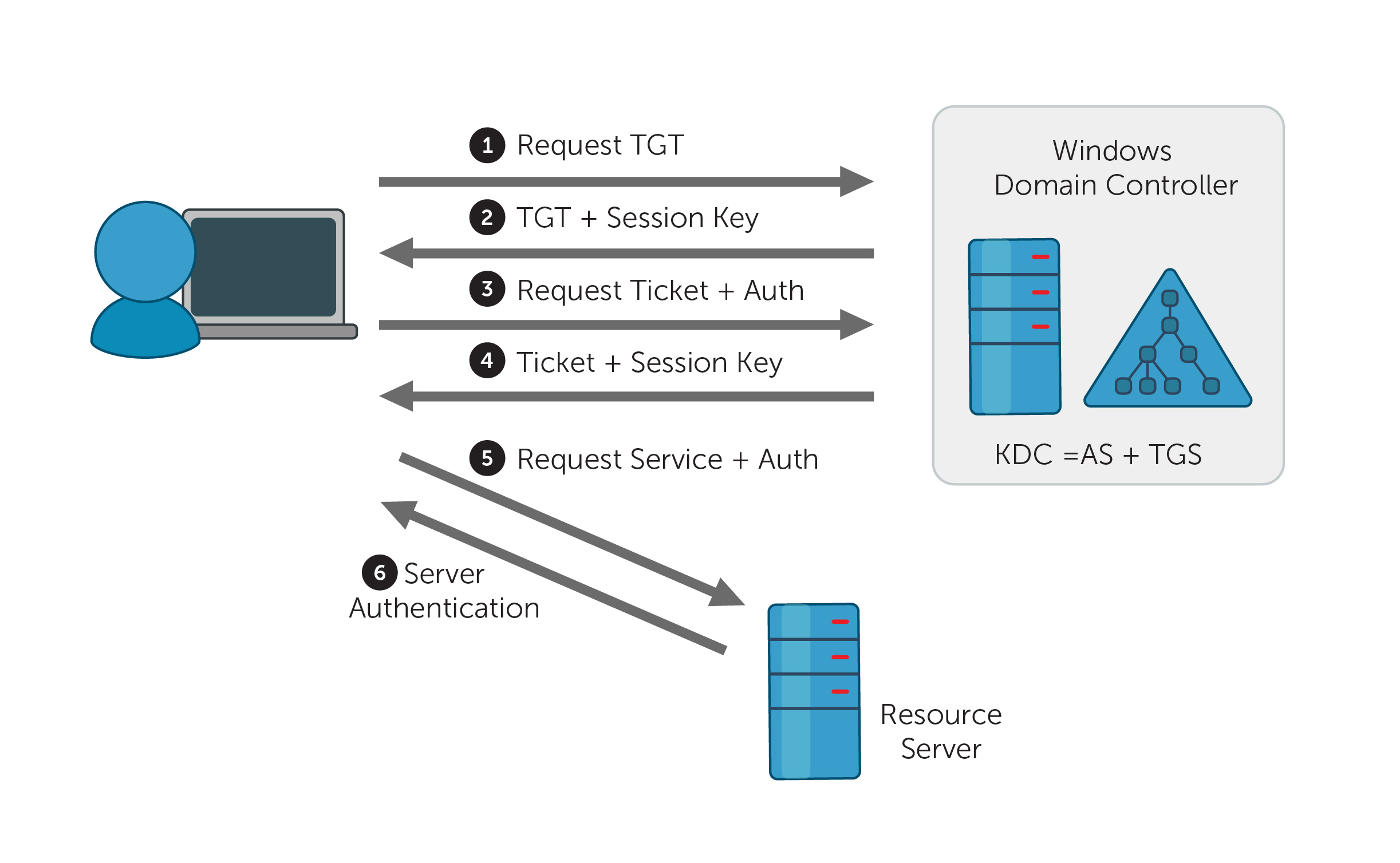
Figure 1. Kerberos authentication protocol
Event ID 4768 (S) — Authentication Success
In cases where credentials are successfully validated, the domain controller (DC) logs this event ID with the Result Codeequal to “0x0” and issues a Kerberos Ticket Granting Ticket (TGT) (Figure 1, Step 2).
Event ID 4768 (F) — Authentication Failure
If the provided credentials cannot be validated by the DC, event ID 4768 is logged instead with the Result Codenot equal to “0x0”. (View all result codes.)
Access will not actually occur until a service ticket is granted, which is audited by event ID 4769.
Note: Event ID 4768 is logged for authentication attempts using the Kerberos authentication protocol. Refer to event ID 4776 for authentication attempts using NTLM authentication.
Figure 1. Event ID 4768 — General tab under Event Properties.

Figure 2. Event ID 4768 — Details tab under Event Properties.


Description of the event fields.
Account information.
Account Name: The name of the account for which a TGT was requested.
Note: Computer account name ends with a $.
User account example: mark
Computer account example: WIN12R2$
Supplied Realm Name: The name of the Kerberos Realm that the Account Name belongs to.
User ID: The SID of the account that requested a TGT. Event Viewer automatically tries to resolve SIDs and show the account name. If the SID cannot be resolved, you will see the source data in the event. For example, ADAPWS\mark or ADAPWS\WIN12R2$.
Service Information.
Service Name: The name of the service in the Kerberos Realm to which the TGT request was sent.
Service ID: The SID of the service account in the Kerberos Realm to which the TGT request was sent.
Network Information.
Client Address: The IP address of the computer from which the TGT request was received.
Client Port: The source port number of the client network connection. The Client Port is "0" for local (localhost) requests.
Additional Information.
Ticket Options: A set of different ticket flags in hexadecimal format.
The most common values:
0x40810010 — Forwardable, Renewable, Canonicalize, Renewable-ok
0x40810000 — Forwardable, Renewable, Canonicalize
0x60810010 — Forwardable, Forwarded, Renewable, Canonicalize, Renewable-ok
Result Code: This is a set of different failure codes displayed in hexadecimal format. The result codes are listed in the following table:
| Code | Code name | Description | Possible causes |
|---|---|---|---|
| 0x0 | KDC_ERR_NONE | No error | No errors were found. |
| 0x1 | KDC_ERR_NAME_EXP | Client's entry in KDC database has expired | No information. |
| 0x2 | KDC_ERR_SERVICE_EXP | Server's entry in KDC database has expired | No information. |
| 0x3 | KDC_ERR_BAD_PVNO | Requested Kerberos version number not supported | No information. |
| 0x4 | KDC_ERR_C_OLD_MAST_KVNO | Client's key encrypted in old master key | No information. |
| 0x5 | KDC_ERR_S_OLD_MAST_KVNO | Server's key encrypted in old master key | No information. |
| 0x6 | KDC_ERR_C_PRINCIPAL_UNKNOWN | Client not found in Kerberos database | The username doesn’t exist. |
| 0x7 | KDC_ERR_S_PRINCIPAL_UNKNOWN | Server not found in Kerberos database | The DC can't find the server’s name in Active Directory. |
| 0x8 | KDC_ERR_PRINCIPAL_NOT_UNIQUE | Multiple principal entries in KDC database | Duplicate principal names exist. Unique principal names are crucial for ensuring mutual authentication; duplicate principal names are strictly forbidden, even across multiple realms. Without unique principal names, the client has no way of ensuring that the server it's communicating with is the correct one. |
| 0x9 | KDC_ERR_NULL_KEY | The client or server has a null key (master key) | No master key was found for the client or server. This usually means that the administrator should reset the password on the account. |
| 0xA | KDC_ERR_CANNOT_POSTDATE | Ticket (TGT) not eligible for postdating | A client has requested postdating of a Kerberos ticket (setting the ticket’s start time to a future date/time), or there is a time difference between the client and the KDC. |
| 0xB | KDC_ERR_NEVER_VALID | Requested start time is later than the end time | There is a time difference between the KDC and the client. |
| 0xC | KDC_ERR_POLICY | Requested start time is later than the end time | There are logon restrictions on the user’s account, like a workstation restriction, smart card authentication requirement, or logon time restriction. |
| 0xD | KDC_ERR_BADOPTION | KDC cannot accommodate requested option |
|
| 0xE | KDC_ERR_ETYPE_NOTSUPP | KDC has no support for encryption type | The KDC or client received a packet that it can't decrypt. |
| 0xF | KDC_ERR_SUMTYPE_NOSUPP | KDC has no support for checksum type | The KDC, server, or client received a packet that it doesn’t have an appropriate encryption key for, so it can't decrypt the ticket. |
| 0x10 | KDC_ERR_PADATA_TYPE_NOSUPP | KDC has no support for PADATA type (pre-authentication data) |
This error code can't occur in event 4768, but it can occur in 4771. |
| 0x11 | KDC_ERR_TRTYPE_NO_SUPP | KDC has no support for transited type | No information. |
| 0x12 | KDC_ERR_CLIENT_REVOKED | Client’s credentials have been revoked | There may be explicit restrictions on the account; the account could also be disabled, expired, or locked out. |
| 0x13 | KDC_ERR_SERVICE_REVOKED | Credentials for server have been revoked | No information. |
| 0x14 | KDC_ERR_TGT_REVOKED | TGT has been revoked | Since the remote KDC may change its PKCROSS key while there are PKCROSS tickets still active, it should cache the old PKCROSS keys until the last issued PKCROSS ticket expires. Otherwise, the remote KDC will respond to a client with this error code. See RFC1510 for more details. |
| 0x15 | KDC_ERR_CLIENT_NOTYET | Client not yet valid—try again later | No information. |
| 0x16 | KDC_ERR_SERVICE_NOTYET | Server not yet valid—try again later | No information. |
| 0x17 | KDC_ERR_KEY_EXPIRED | Password has expired—change password to reset | The user’s password has expired. This error code can't occur in event 4768, but it does occur in event 4771. |
| 0x18 | KDC_ERR_PREAUTH_FAILED | Pre-authentication information was invalid | The wrong password was provided. This error code can't occur in event 4768, but it does occur in event 4771. |
| 0x19 | KDC_ERR_PREAUTH_REQUIRED | Additional pre-authentication required | Often occurs in UNIX interoperability scenarios. MIT-Kerberos clients do not request pre-authentication when they send a KRB_AS_REQ message. If pre-authentication is required (the default setting), Windows systems will send this error. Most MIT-Kerberos clients will respond to this error by giving pre-authentication, in which case the error can be ignored. |
| 0x1A | KDC_ERR_SERVER_NOMATCH | KDC does not know about the requested server | No information. |
| 0x1B | KDC_ERR_SVC_UNAVAILABLE | KDC is unavailable | No information. |
| 0x1F | KRB_AP_ERR_BAD_INTEGRITY | Integrity check on decrypted field failed | The authenticator was encrypted with something other than the session key, so the client can't decrypt the resulting message. The modification of the message could be the result of an attack or network noise. |
| 0x20 | KRB_AP_ERR_TKT_EXPIRED | The ticket has expired | The smaller the value for the Kerberos policy setting Maximum lifetime for user ticket, the more likely it is that this error will occur. Because ticket renewal is automatic, you shouldn't have to do anything if you get this message. |
| 0x21 | KRB_AP_ERR_TKT_NYV | The ticket is not yet valid | The clocks on the KDC and the client aren't synchronized. If cross-realm Kerberos authentication is being attempted, then you should verify time synchronization between the KDC in the target realm and the KDC in the client realm. |
| 0x22 | KRB_AP_ERR_REPEAT | The request is a replay | A specific authenticator showed up twice; in other words, the KDC detected that this session ticket duplicates one that it has already received. |
| 0x23 | KRB_AP_ERR_NOT_US | The ticket is not for us | The server has received a ticket that was meant for a different realm. |
| 0x24 | KRB_AP_ERR_BADMATCH | The ticket and authenticator do not match | The KRB_TGS_REQ is being sent to the wrong KDC. |
| 0x25 | KRB_AP_ERR_SKEW | The clock skew is too great | A client computer sent a timestamp that exceeded the difference in value allowed by the Maximum tolerance for computer clock synchronization setting in Kerberos policy. |
| 0x26 | KRB_AP_ERR_BADADDR | Network address in network layer header doesn't match address inside ticket |
|
| 0x27 | KRB_AP_ERR_BADVERSION | Protocol version numbers don't match (PVNO) | An application checks the KRB_SAFE message to verify that the protocol version and type fields match the current version and KRB_SAFE, respectively. A mismatch generates this error code. |
| 0x28 | KRB_AP_ERR_MSG_TYPE | Message type is unsupported |
|
| 0x29 | KRB_AP_ERR_MODIFIED | Message stream modified and checksum didn't match |
|
| 0x2A | KRB_AP_ERR_BADORDER | Message out of order (possible tampering) | This event is generated by KRB_SAFE and KRB_PRIV messages if an incorrect sequence number is included, or if a sequence number is expected but not present. See RFC4120 for more details. |
| 0x2C | KRB_AP_ERR_BADKEYVER | Specified version of key is not available | This error might be generated on the server side when receiving an invalid KRB_AP_REQ message. The server can't use the key version indicated by the ticket in the KRB_AP_REQ (e.g. it indicates an old key that the server doesn't have copy of). |
| 0x2D | KRB_AP_ERR_NOKEY | Service key not available | This error might be generated on the server side during receipt of an invalid KRB_AP_REQ message. The server doesn't have the right key to decipher the ticket. Because it's possible for the server to be registered in multiple realms with different keys in each realm, the realm field in the unencrypted portion of the ticket in the KRB_AP_REQ is used to specify which secret key the server should use to decrypt that ticket. |
| 0x2E | KRB_AP_ERR_MUT_FAIL | Mutual authentication failed | No information. |
| 0x2F | KRB_AP_ERR_BADDIRECTION | Incorrect message direction | No information. |
| 0x30 | KRB_AP_ERR_METHOD | Alternative authentication method required | According to RFC4120, this error message is obsolete. |
| 0x31 | KRB_AP_ERR_BADSEQ | Incorrect sequence number in message | No information. |
| 0x32 | KRB_AP_ERR_INAPP_CKSUM | Inappropriate type of checksum in message (checksum may be unsupported) | When the KDC receives a KRB_TGS_REQ message, it decrypts it. Afterwards, the user-supplied checksum in the Authenticator must be verified against the contents of the request, and the message must be rejected if the checksums don't match (with an error code of KRB_AP_ERR_MODIFIED) or if the checksum isn't collision-proof (with an error code of KRB_AP_ERR_INAPP_CKSUM). |
| 0x33 | KRB_AP_PATH_NOT_ACCEPTED | Desired path is unreachable | No information. |
| 0x34 | KRB_ERR_RESPONSE_TOO_BIG | Too much data | The size of a ticket is too large to be transmitted reliably via UDP. In a Windows environment, this message is purely informational. A Windows computer will automatically try TCP if UDP fails. |
| 0x3C | KRB_ERR_GENERIC | Generic error |
|
| 0x3D | KRB_ERR_FIELD_TOOLONG | Field is too long for this implementation | If a KDC that doesn’t understand how to interpret a set high bit of the length encoding receives a request with the high order bit of the length set, it must return a KRB-ERROR message with the error KRB_ERR_FIELD_TOOLONG, and it must close the TCP stream. Each request (KRB_KDC_REQ) and response (KRB_KDC_REP or KRB_ERROR) sent over the TCP stream is preceded by the length of the request as 4 octets in network byte order. The high bit of the length is reserved for future expansion and must currently be set to zero. |
| 0x3E | KDC_ERR_CLIENT_NOT_TRUSTED | The client trust failed or is not implemented | A user’s smart card certificate has been revoked, or the root CA that issued the smart card certificate (in a chain) is not trusted by the DC. |
| 0x3F | KDC_ERR_KDC_NOT_TRUSTED | The KDC server trust failed or could not be verified | The trustedCertifiers field contains a list of CAs trusted by the client, just in case the client doesn't possess the KDC's public key certificate. If the KDC has no certificate signed by any of the trustedCertifiers, then it returns this error code. See RFC1510 for more details. |
| 0x40 | KDC_ERR_INVALID_SIG | The signature is invalid | This error is related to PKINIT. If a PKI trust relationship exists, then the KDC verifies the client's signature on AuthPack (TGT request signature). If that fails, the KDC returns this error code. |
| 0x41 | KDC_ERR_KEY_TOO_WEAK | A higher encryption level is needed | f the clientPublicValue field is filled in, indicating that the client wishes to use Diffie-Hellman key agreement, then the KDC checks to see that the parameters satisfy its policy. If they do not (e.g. the prime size is insufficient for the expected encryption type), then the KDC returns this error code. |
| 0x42 | KRB_AP_ERR_USER_TO_USER_REQUIRED | User-to-user authorization is required | The client doesn't know that a service requires user-to-user authentication, so it requests, receives, and forwards a conventional KRB_AP_REP to the server; the server generates this error code in response. |
| 0x43 | KRB_AP_ERR_NO_TGT | No TGT was presented or available | A service doesn't have a TGT for user-to-user authentication. |
| 0x44 | KDC_ERR_WRONG_REALM | Incorrect domain or principal | The client presents a cross-realm TGT to a realm other than the one specified in the TGT. This error rarely occurs, but it’s typically caused by an incorrectly configured DNS. |
Ticket Encryption Type: The cryptographic suite that was used while issuing the TGT.
| Type | Type Name | Description |
|---|---|---|
| 0x1 | DES-CBC-CRC | Disabled by default starting from Windows 7 and Windows Server 2008 R2. |
| 0x3 | DES-CBC-MD5 | Disabled by default starting from Windows 7 and Windows Server 2008 R2. |
| 0x11 | AES128-CTS-HMAC-SHA1-96 | Supported starting from Windows Server 2008 and Windows Vista. |
| 0x12 | AES256-CTS-HMAC-SHA1-96 | Supported starting from Windows Server 2008 and Windows Vista. |
| 0x17 | RC4-HMAC | Default suite for operating systems before Windows Server 2008 and Windows Vista. |
| 0x18 | RC4-HMAC-EXP | Default suite for operating systems before Windows Server 2008 and Windows Vista. |
| 0xFFFFFFFF or 0xffffffff | - | This type shows in Audit Failure events. |
Pre-Authentication Type: The code number of the pre-authentication type which was used for the TGT request.
| Error code | Description | Description |
|---|---|---|
| 0 | - | Logon without pre-authentication. |
| 2 | PA-ENC-TIMESTAMPS | Standard password authentication. |
| 11 | PA-ETYPE-INFO | Additional pre-authentication required (accompanied by KRB-ERROR from the KDC). Usually used to notify a client of which key to use for encryption while sending a PA-ENC-TIMESTAMP pre-authentication value. Never seen in Microsoft Active Directory environments. |
| 15 | PA-PK-AS-REP_OLD | Used for smart card logon authentication. |
| 17 | PA-PK-AS-REP | Used for smart card authentication. Never seen in certain Active Directory environments. |
| 19 | PA-ETYPE-INFO2 | Additional pre-authentication required (accompanied by KRB-ERROR from the KDC). Usually used to notify a client of which key to use for encryption while sending a PA-ENC-TIMESTAMP pre-authentication value. Never seen in Microsoft Active Directory environments. |
| 20 | PA-SVR-REFERRAL-INFO | Used in KDC Referrals tickets. |
| 138 | PA-ENCRYPTED-CHALLENGE | Logon using Kerberos Armoring (FAST). Supported in DCs running Windows Server 2012 and up, and clients running Windows 8 and up. |
| - | - | Shown in Audit Failure events. |
Certificate Information.
Holds information regarding smart card certificates used during logon (if applicable).
Certificate Issuer Name: The name of the CA that issued the smart card certificate.
Certificate Serial Number: The smart card certificate’s serial number.
Certificate Thumbprint: The smart card certificate’s thumbprint.
Reasons to monitor event ID 4768
- •Monitor the Client Address field in event ID 4768 to track logon attempts that are outside your internal IP range.
- •Monitor for when the Result Code equals “0x6” (the username doesn't exist). If you see multiple events in a short span of time, this could be an indicator of account enumeration, reverse brute-force, or password spraying attacks, especially for highly-critical accounts.
- •Monitor event ID 4768 for accounts that have a Security ID that corresponds to high-value accounts, including administrators, built-in local administrators, domain administrators, and service accounts.
- •If a username is only to be used on an allowed list of IP addresses, you can monitor the Client Address field and trigger an alert whenever a logon attempt is made with a username that's not part of the white list.
- •If you have a list of accounts that are allowed to log on directly to DCs (rather than via network logon or Remote Desktop Connection), then monitor for when Client Address equals “::1” to identify violations and possible malicious intent.
- •Monitor Subject\Account Name for names that don’t comply with your company's naming conventions.
- •Monitor for accounts with a Security ID that corresponds to accounts that should never be used, including non-active, disabled, and guest accounts.
- •Monitor the 0x3F, 0x40, and 0x41 errors to more quickly identify smart card related problems with Kerberos authentication.
- •Monitor this event for account use outside of work hours to detect anomalies and potential malicious activity.
The need for an auditing solution:
Auditing solutions like ADAudit Plus offer real-time monitoring, user and entity behavior analytics, and reports; together these features help secure your AD environment.
Around the clock, real-time monitoring.
Although you can attach a task to the security log and ask Windows to send you an email, you are limited to simply getting an email whenever event ID 4768 is generated. Windows also lacks the ability to apply more granular filters that are required to meet security recommendations.
With a tool like ADAudit Plus, not only can you apply granular filters to focus on real threats, you can get notified in real time via SMS, too.
User and entity behavior analytics (UEBA).
Leverage advanced statistical analysis and machine learning techniques to detect anomalous behavior within your network.
Compliance-ready reports.
Meet various compliance standards, such as SOX, HIPAA, PCI, FISMA, GLBA, and the GDPR with out-of-the-box compliance reports.
True turnkey: it doesn't get simpler than this.
Go from downloading ADAudit Plus to receiving real-time alerts in less than 30 minutes. With over 200 preconfigured reports and alerts, ADAudit Plus ensures that your Active Directory stays secure and compliant.
