Policy that determines the security events to be reported to the network administrator.
To allow ADAP to report on Security events - the Audit Policy must be defined accordingly in your Auditing Policy settings of the ADUC (揂ctive Directory Users and Computers?console) on your Domain Controller machine.
To perform this procedure, you must be a member of the Domain Admins group or the Enterprise Admins group in Active Directory, or you must have been delegated the appropriate authority. As a security best practice, consider using Run as to perform this procedure.
Open "Active Directory Users and Computers".
(Click ?span style="font-weight: bold;">Start? --> Click ?span style="font-weight: bold;">Control Panel?--> double-click ?span style="font-weight: bold;">Administrative Tools? and then -->> double-click ?span style="font-weight: bold;">Active Directory Users and Computers ?
In the console tree, right-click the "domain"
Click 揚roperties? and then click the ?span style="font-weight: bold;">Security?tab.
Click ?span style="font-weight: bold;">Advanced? to open the Window to enter 揂dvanced Security Settings for the Domain?/p>
Click ?span style="font-weight: bold;">Add? to add the security principal you want to apply the security policy (In our case it is ?span style="font-weight: bold;">Everyone? and click on OK
This opens the window to select 揂uditing Entries for the Domain?/p>
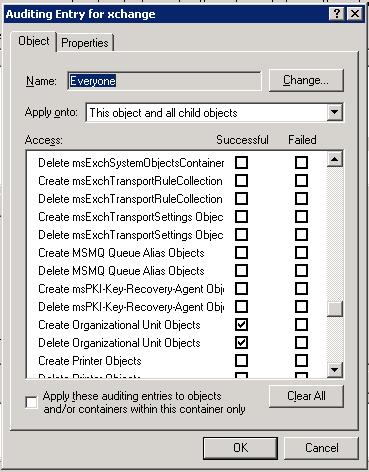
To get the audit trail from Active Directory on the creation (or) deletion of Organizational Unit objects, you must check the below auditing entries:
Select Apply onto : This object and all child objects
Select the Success check box for the below Audit Entries
Create Organizational Unit Objects
Delete Organizational Unit Objects
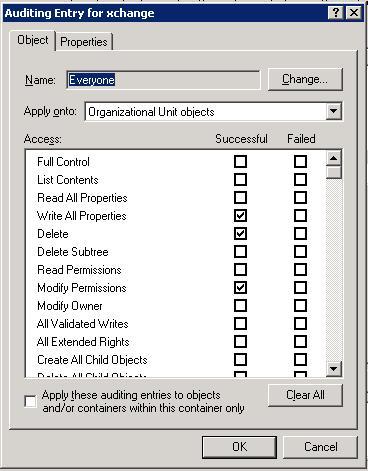
To get the audit trail from Active Directory on Write All Properties, Delete, and Modify Permissions for Organizational Unit objects, you must check the below auditing entries:
Select Apply onto : Organizational Unit objects
Select the Success check box for the below Audit Entries
Write All Properties
Delete
Modify Permissions
To get the audit trail from Active Directory on (Users, Groups, Computers) Creation in OU, you must check the below auditing entries:
Select Apply onto : This object and all child objects
Select the Success check box for the below Audit Entries
Create User objects
Create Group Objects
Create Computer Objects
Table provides details on SACLs for OU Auditing:
|
|
Object to set SACL on |
Principal |
Type |
Accesses |
Scope |
|
SACLs to Create, Delete OU object |
Domain |
Everyone |
Success |
Create organizationalUnit Object, Delete organizationalUnit Object |
This object and all child objects |
|
SACLs to Write All Properties, Delete, and Modify Permissions for Organizational Unit objects |
Domain |
Everyone |
Success |
Write All Properties, Delete, Modify Permissions |
Organizational Unit objects |
|
SACLs to enable auditing Child Objects(Users, Groups, Computers) Creation in OU |
Domain |
Everyone |
Success |
Create user Object, Create group Object, Create computer Object |
This container and all sub-containers and objects |