Bulk Installation of Agents in AWS Instances
This is only applicable for Patch Manager Plus build version 10.0.545 and above.
The following are the steps to install agents in bulk in AWS Instances
- Create S3 Bucket in the region you want to deploy the Agents.
- Upload all files from the downloaded Agent zip folder to the created bucket and set the permission as public.
Create IAM role for SSM.
- In the IAM console navigate to Roles --> Create Roles.
- In the Select type of trusted entity, choose AWS service.
- Choose the service EC2.
- If the specified service has only one use case, it is selected automatically after which choose NEXT: Permissions.
Note: Use cases are defined by the service to include the trust policy that the service requires.
- In the Create role window as given in the figure below, search for AmazonEC2RoleForSSM and select it.
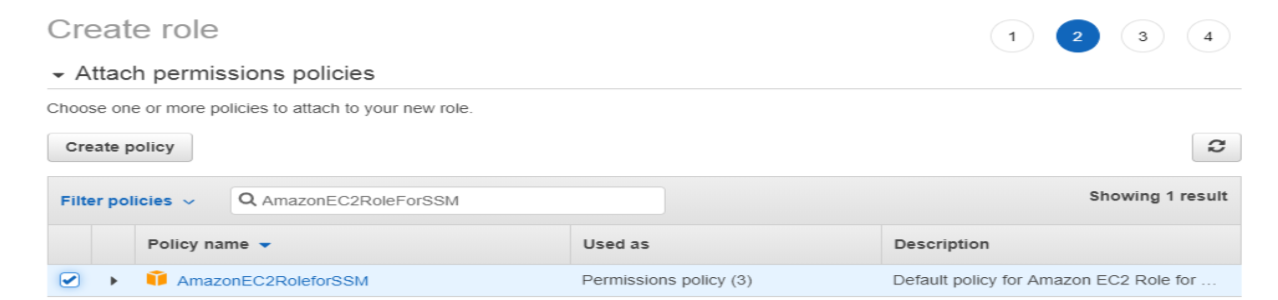
Note: You can also add AmazonEC2RoleForSSM in the already existing IAM role.
- Choose NEXT: Review.
- Change EC2 settings.
- Select the existing instance.
- Choose Action at the top of the screen.
- Choose Instance settings and assign the created role.
Run the command to install the agents in AWS Instances.
- In the AWS System Manager console, choose Run Command
- Run the following command (Powershell):
Note: BUCKETPATH is object URL.
New-Item -ItemType directory -Path C:\\LocalOffice\\localsetup
$WebClient = New-Object System.Net.WebClient
$WebClient.DownloadFile("BUCKETPATH/UEMSAgent.msi","C:\\LocalOffice\\localsetup/UEMSAgent.msi")
$WebClient.DownloadFile("BUCKETPATH/UEMSAgent.mst","C:\\LocalOffice\\localsetup/UEMSAgent.mst")
$WebClient.DownloadFile("BUCKETPATH/setup.bat","C:\\LocalOffice\\localsetup/setup.bat")
cmd /c msiexec /i C:\\LocalOffice\\localsetup\\UEMSAgent.msi REBOOT="REALLYSUPPRESS" MSIRESTARTMANAGERCONTROL="Disable" TRANSFORMS=C:\\LocalOffice\\localsetup\\UEMSAgent.mst ENABLESILENT=yes /qn
You have now successfully installed Patch Manager Plus Agents in AWS instances.