将远程 PostgreSQL 从 OpManager 12.6 迁移到 12.7 的 PPM 升级
注意:以下步骤仅适用于将 OpManager 从 12.6 升级到 12.7,以及从 12.7 升级到更高版本(PgSQL 14.20 到 14.x)。
远程 PostgreSQL 迁移(版本 10.x 到 14.x)
在 OpManager 完成升级后,必须将远程 PgSQL 迁移到最新版本。请按以下步骤将远程 PostgreSQL 从 10.x 版本迁移到 14.x 版本。
- 在新的 PgSQL 服务器中创建一个新的数据库。
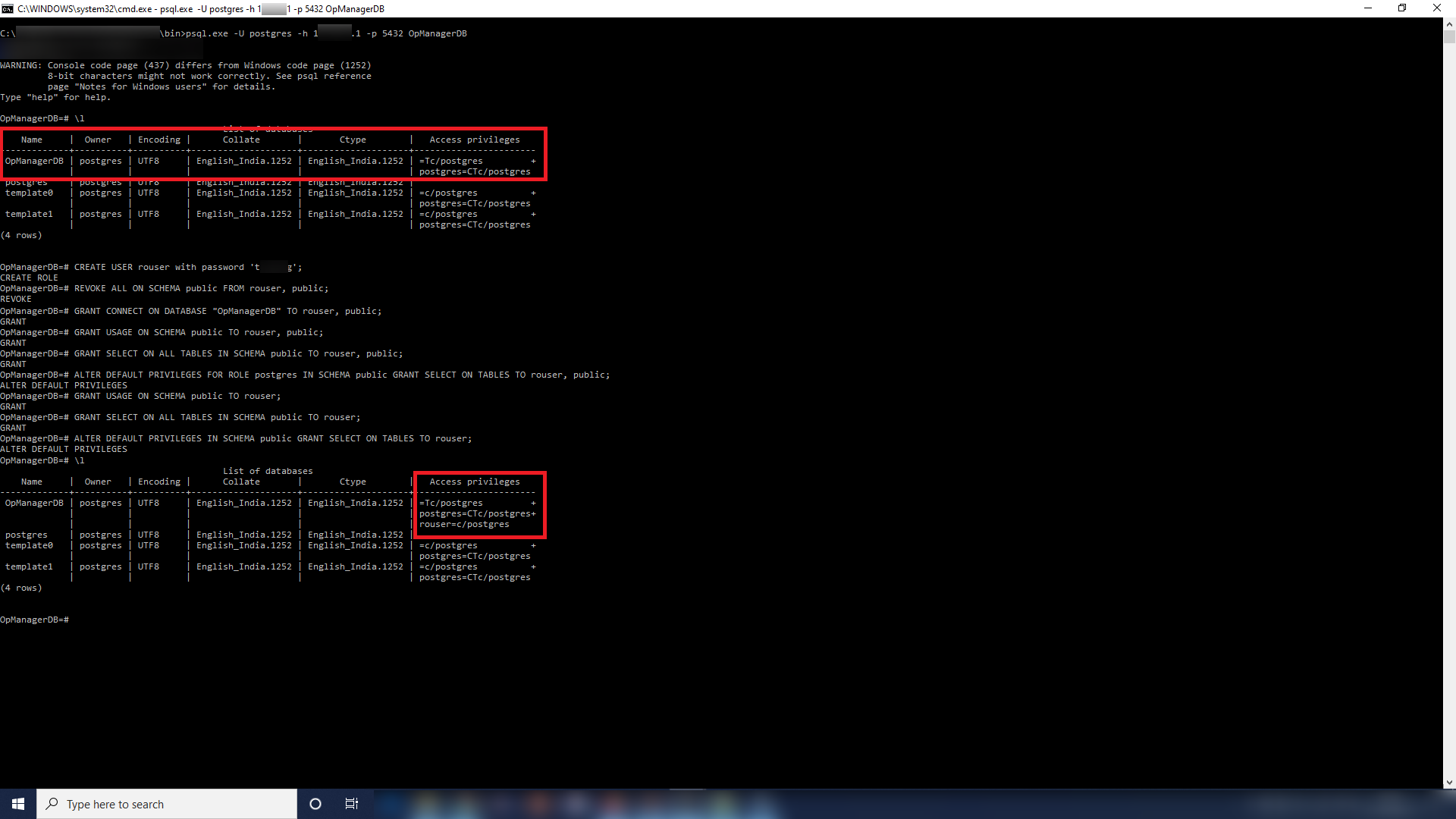
- 创建一个名为 'rouser' 的新用户,并为其赋予只读权限。
- 执行以下查询:
- REVOKE ALL ON SCHEMA public FROM rouser, public;
- GRANT CONNECT ON DATABASE "<databasename>" TO rouser, public;
- GRANT USAGE ON SCHEMA public TO rouser, public;
- GRANT SELECT ON ALL TABLES IN SCHEMA public TO rouser, public;
- ALTER DEFAULT PRIVILEGES FOR ROLE postgres IN SCHEMA public GRANT SELECT ON TABLES TO rouser, public;
- GRANT USAGE ON SCHEMA public TO rouser;
- GRANT SELECT ON ALL TABLES IN SCHEMA public TO rouser;
- ALTER DEFAULT PRIVILEGES IN SCHEMA public GRANT SELECT ON TABLES TO rouser;
Create database "<databasename>";
CREATE USER rouser with password '<ROPASSWORD>';
将旧 PgSQL 数据库中的数据导出到新的数据库
迁移完成后,通过执行以下命令,将旧 PgSQL 数据库中的数据导出至新的数据库:
"<OldPgSQLHome>\bin\pg_dump.exe" -U postgres -p <OldPgSQLPort> -h <OldPgSQLHost> -x -W OpManagerDB | "<NewPgSQLHome>\bin\psql.exe" -U postgres -p <NewPgSQLPort> -h <NewPgSQLHost> -W OpManagerDB
示例: "C:\Program Files\PostgreSQL\10\bin\pg_dump.exe" -U postgres -p 5431 -h <ip_address_1> -x -W OpManagerDB | "C:\Program Files\PostgreSQL\14\bin\psql.exe" -U postgres -p 5432 -h <ip_address_1> -W OpManagerDB
在 OpManager 目录中需要进行的更改
- 打开位于 <OpManagerHome>\conf
. 下的 database_params.conf 文件。 将其中现有的 URL 修改为包含新 PgSQL 信息的以下格式。
url jdbc:postgresql://<NewPgSQLHost>:<NewPgSQLPort>/<NewlyMigratedDBName>?dontTrackOpenResources=true&useUnicode=true&characterEncoding=utf8
示例: url jdbc:postgresql://remote-pgsql-host:5432/OpManagerDB?dontTrackOpenResources=true&useUnicode=true&characterEncoding=utf8
启动服务后,为进行基本验证,可在“提交查询”页面中执行一条查询,并尝试添加设备或在产品中执行其他基础功能操作。[示例查询 - Select * from BuildDetails;]
感谢您的反馈!