在 OpManager 中配置远程 PostgreSQL(适用于 12.5 以下版本)
下载并安装相应版本的企业版 PostgreSQL,并按照以下步骤操作。
注意:以下步骤仅适用于 12.5 以下版本的 OpManager(PgSQL 9.2.4 到 9.4*)。
1. 在 pg_hba.conf 文件中需要进行的修改
- 从<InstalledRemotePgSQLHome>\data 目录中打开 pg_hba.conf 文件。
将现有的地址值替换为你希望允许的 IP 段(例如:192.168.93.0/24)。如果希望监听所有接口,将地址指定为 all 并保存更改。 #IPv4 本地连接:
#TYPE DATABASE USER ADDRESS METHOD #IPv4 local connections: host all all <允许连接的 IP> md5
2. 在 postgresql.conf 中需要进行的修改
- 从安装目录 <InstalledRemotePgSQLHome>\data 中打开 postgresql.conf 文件。
- 将 listen_address 的值更改为允许连接的 IP(例如:192.168.0.192, localhost),或者如果希望监听所有网络接口,则设置为 '*'。
listen_address = <192.168.0.192>
- 保存所做的更改。
3. 在远程 PgSQL Server 中创建新数据库
- 重启 PostgreSQL 服务。
- 在远程 PostgreSQL Server 中创建一个新的数据库。
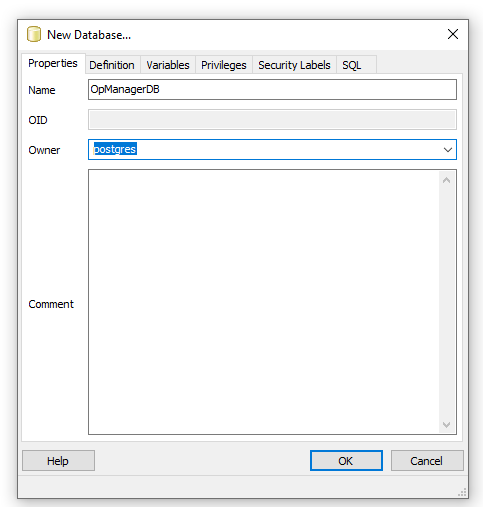
4. 在 OpManager 目录中需要进行的修改
- 停止 OpManager 服务并关闭所有相关操作。
- 从 <OpManagerHome>\conf 中打开 database_params 文件。
- 将现有 URL 修改为以下格式。
url jdbc:postgresql://<remotePgSQLInstalledIPAddress>:<PortNumber>/<DBName>
输入用户名和加密后的密码。
# 数据库登录用户名(如果有)
username postgres
# 数据库登录密码(如果有)
#password <EncryptedPassword>从 <OpManagerHome>\bin 运行 encrypt.bat 文件 以生成加密密码。(在 Linux 机器上,运行 encrypt.sh 脚本)
执行 <OpManagerHome>\bin\encryt.bat Password
- 从 <OpManagerHome>\conf 中打开 customer-config.xml 文件。
- 将 StartDBServer 的Configuration value 修改为 'false'。
<configuration name="StartDBServer" value="false"/>
- 保存上述两个文件并重启 OpManager。
感谢您的反馈!