How to integrate NCM with service now?
If you have ServiceNow installed in your network, you can automatically log trouble tickets from Network Configuration Manager for specific network faults. So, besides the provision to email, sms, or notify fault in other forms, you can also track the faults by logging trouble tickets to ServiceNow. This helps in issue tracking.
For logging the trouble ticket to ServiceNow correctly, you need to ensure the following:
- ServiceNow Settings must be configured in Network Configuration Manager.
- A notification profile to log a trouble ticket to ServiceNow must be configured and associated.
Configure Server Settings
Following are the steps to configure the ServiceNow and Network Configuration Manager Server settings:
- Go to Settings → Integrations → ServiceNow and configure the following values:
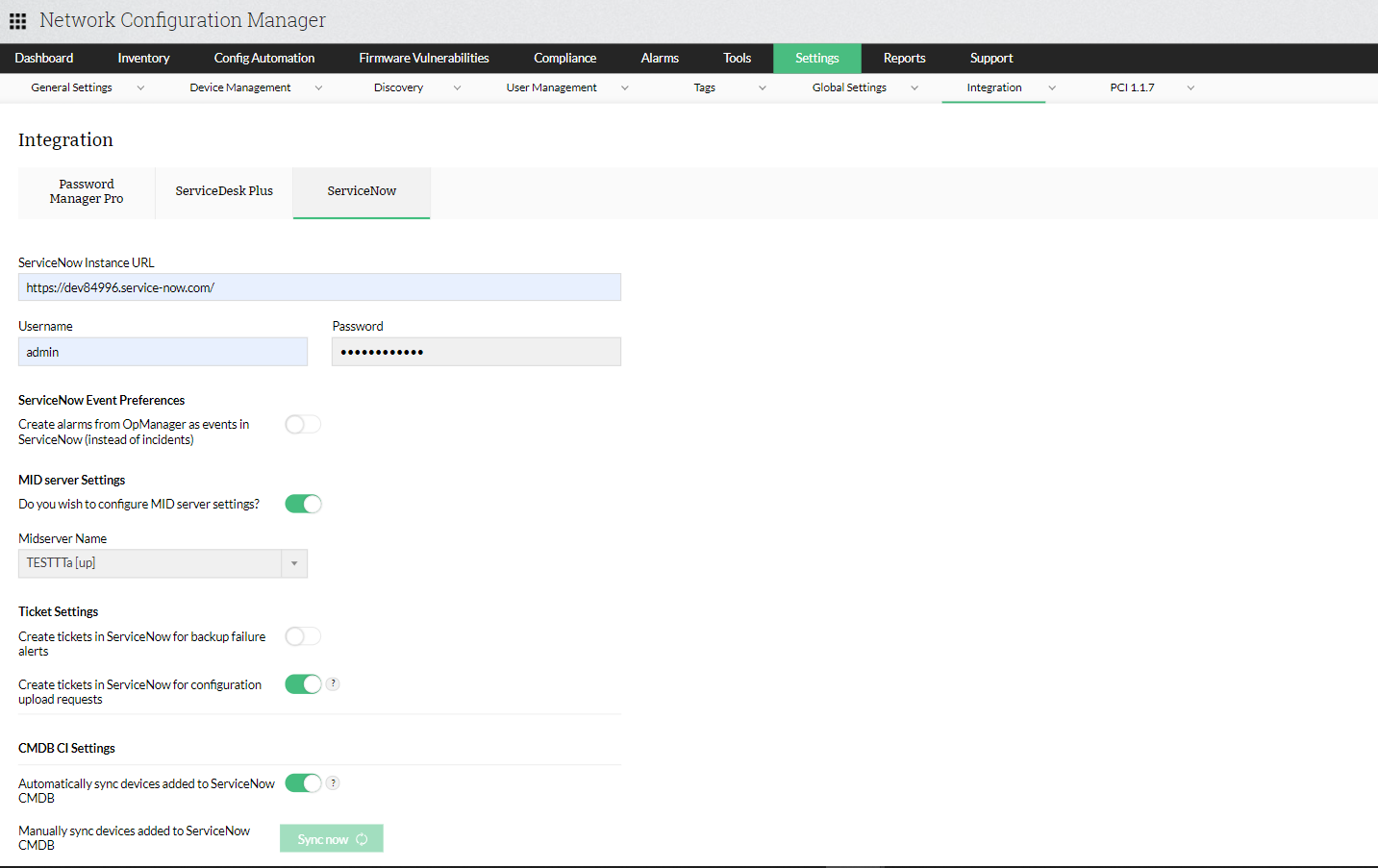
- ServiceNow URL: The URL for your ServiceNow Connection
- ServiceNow UserName & Password
- Ticket Settings:
- Midserver: Choose the Midserver name from the dropdown. It establishes the connection between Network Configuration Manager and ServiceNow.
- Raise ticket in ServiceNow for Backup Failure Alerts: Configure ServiceNow to create a ticket whenever configuration backups fail.
- If alert re-occurs: Instruct Network Configuration Manager to perform an operation if an alert re-occurs. Create new ticket will raise the alert as a new ticket in ServiceNow while Re-open closed ticket will re-open the ticket raised for the corresponding alert in ServiceNow.
- Clear alarm in Network Configuration Manager when an Incident is closed/resolved in ServiceNow: Automatically clears the alarm when the corresponding incident is closed / resolved in ServiceNow. (or)
- Raise ticket in ServiceNow for Configuration upload requests: Configure ServiceNow to create a ticket, whenever a user raises a configuration upload request in Network Configuration Manager.
- CMDB CI Settings:
- Automatically sync devices from ServiceNow: When new devices are added in Network Configuration Manager, automatically add them to ServiceNow.
- Sync ServiceNow devices manually: Add devices that have already been added to ServiceNow into Network Configuration Manager by clicking on "Sync now".
Click on Save to save your configurations and complete the integration process successfully.
