How to send log files to the Mobile Device Manager Plus MSP support team?
Description
While working with Mobile Device Manager Plus, you might encounter issues which can be resolved quicker and better by the MDM MSP Support team, if provided with the logs.
The logs can be sent to the MDM MSP Support team as explained below:
Steps
- Mobile Device Manager Plus Server logs
MDM MSP server logs is located in <Install_Dir>\MDMMSPServer\logs.
Sending the server logs to the support
- Navigate to the Support tab in Mobile Device Manager server.
- Select Create support file.
- Enter the following details:
- E-mail address
- Message
- Select the logs you want to upload:
- Server logs
- Agent logs
- Click Send to send the support file.
The log file(s) are successfully sent to MDM MSP support team.
- ME MDM Android app logs
- Uploading logs automatically from managed Android devices to Mobile Device Manager Plus support
- Uploading logs manually from managed Android devices to Mobile Device Manager Plus support
- Uploading Android device logs from MDM MSP Server (Applicable for MDM on-premises)
Uploading logs automatically from managed Android devices to Mobile Device Manager Plus support
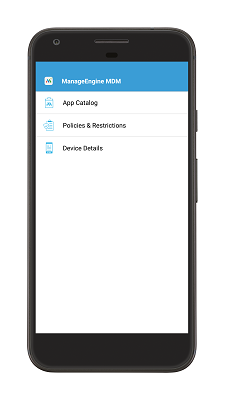
The other option is to send the logs directly from the MDM app. Open the MDM app, click on the horizontal blue bar at the top 5 times.
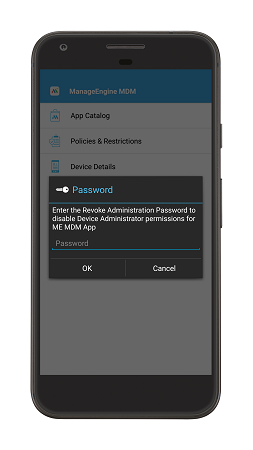
Provide logs@memdm as password and then specify the issue details. Click OK to send the logs.
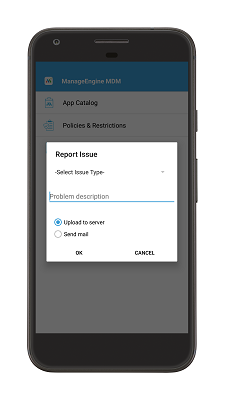
Uploading logs manually from managed Android devices to Mobile Device Manager Plus support
You can also upload the logs of Android devices managed by MDM. You can find the steps to archive the logs and the steps involved in sending it to the Mobile Device Manager Plus support.
- Open the MDM app on the device.
- Navigate to Device Details section.
- Navigate to Agent Log Directory.
- Note down the agent log directory: /mnt/sdcard/memdm/agent.
- Open the file browser in the device.
- Navigate to the location where the logs are stored.
- The file mdmagentLog*.txt contains the agent logs. This file is to be sent to the MDM MSP Support team
Uploading Android device logs from MDM MSP Server (Applicable for MDM on-premises)
- Navigate to the Support tab in the MDM MSP server. Click on Create Support file.
- Specify your E-mail address and the description of the problem, which needs to be sent with the logs
- Select the logs you want to upload:
- Server logs
- Agent logs
- Select the Agent logs and specify the devices whose logs are to be sent.
- Click Send to send the support file.
The log files are successfully sent to Mobile Device Manager Plus support.
- ME MDM iOS app logs
- Uploading logs automatically from managed iOS devices to Mobile Device Manager Plus support
- Extracting the logs
- Sending the logs
Uploading logs automatically from managed iOS devices to Mobile Device Manager Plus support
- The users can directly send the logs from the managed iOS devices. Open the MDM app, click on the Support button.
- Select the email logs option and optionally enter the ticket ID and problem description and click Send.
Extracting the logs
Follow the steps to extract the ME MDM App logs.
- Open the ME MDM App in the managed device.
- Navigate to Support tab.
- Select Collect logs. A notification is shown when the logs are successfully compiled.
Sending the logs to Mobile Device Manager Plus support
Follow the steps to send your logs to MDM MSP support.
- Navigate to the Support tab in the MDM MSP server.
- Select Create support file.
- Enter the following details:
- Message
- Select the logs you want to upload:
- Server logs
- Agent logs
- Click Send to send the support file.
The log file are successfully sent to Mobile Device Manager Plus MSP support.